





pepper
Members
-
Joined
-
Last visited
-
I have been trying to setup nextcloud fulltextsearch using elasticsearch on unraid but I can not get the search to return any results. Where should I look or what could I be missing in the configuration? root@f59188334fbf:/config/www/nextcloud# sudo -u abc ./occ files:scan userid --all Starting scan for user 1 out of 7 (admin) Starting scan for user 2 out of 7 (admin2) Starting scan for user 3 out of 7 (Ben) Starting scan for user 4 out of 7 (Bryce) Starting scan for user 5 out of 7 (Fritz) Starting scan for user 6 out of 7 (Sam) Starting scan for user 7 out of 7 (Steph) +---------+-------+--------------+ | Folders | Files | Elapsed time | +---------+-------+--------------+ | 30 | 127 | 00:00:02 | +---------+-------+--------------+
-
Check to see if you are running low on cache.
-
Thanks. I built the 4.3-414~g994de3d and the streams work well.
-
Jaroslav Kysela put a fix in for some streams and I was wondering if there is an easy way to test v4.3-362-g2a5aab6b9? I will try to download, build and package it in my ubuntu vm and insert it into the docker container.
-
Can someone give me a quick step by step how to configure? I must be missing something simple but the tvhproxy won't start, I get socket.error: [Errno 97] Address family not supported by protocol
-
U.S. -- I was trying to actually strip the commercials out to make a smaller file, Plex didn't seem to honor the vdr file.
-
I modified a comcut.sh script found on the net and use it as the postprocessor to remove the commercials using comskip edl. Still a work in progress but very interesting to play with. Let me know if you make enhancements. p.s. made a few changes to the comskip.ini as I was losing the end of some programs. comcut.sh comskip.ini
-
To use the stronger encryption copy the 4096 files and the ovpn that you want. Open the file to verify port and protocol I think it is 1397 -- not at my computer to verify. Worked for me last night. Only issue is updated to a dev version which the site I connect to doesn't allow.
-
got it working thru a free one --- FreeVPN.me --- it is slow, but I was just wanting to get a test thru.
-
thank you for the direction. This was pretty easy to setup and I appreciate your help.
-
root@Tower:/mnt/user/appdata/delugevpn# docker exec binhex-delugevpn ping -c 4 yahoo.com PING yahoo.com (98.138.253.109) 56(84) bytes of data. 64 bytes from ir1.fp.vip.ne1.yahoo.com (98.138.253.109): icmp_seq=1 ttl=49 time=314 ms 64 bytes from ir1.fp.vip.ne1.yahoo.com (98.138.253.109): icmp_seq=2 ttl=49 time=313 ms 64 bytes from ir1.fp.vip.ne1.yahoo.com (98.138.253.109): icmp_seq=3 ttl=49 time=313 ms 64 bytes from ir1.fp.vip.ne1.yahoo.com (98.138.253.109): icmp_seq=4 ttl=49 time=313 ms --- yahoo.com ping statistics --- 4 packets transmitted, 4 received, 0% packet loss, time 2999ms rtt min/avg/max/mdev = 313.057/313.626/314.608/0.820 ms root@Tower:/mnt/user/appdata/delugevpn# docker exec binhex-delugevpn iptables -L -v Chain INPUT (policy DROP 96 packets, 36729 bytes) pkts bytes target prot opt in out source destination 35 2620 ACCEPT all -- tun0 any anywhere anywhere 649 34093 ACCEPT all -- any any 172.17.0.0/16 172.17.0.0/16 970 98630 ACCEPT udp -- eth0 any anywhere anywhere udp spt:domain 40354 50M ACCEPT tcp -- eth0 any anywhere anywhere tcp dpt:8112 0 0 ACCEPT tcp -- eth0 any anywhere anywhere tcp spt:8112 0 0 ACCEPT tcp -- eth0 any anywhere anywhere tcp dpt:privoxy 0 0 ACCEPT tcp -- eth0 any anywhere anywhere tcp spt:privoxy 0 0 ACCEPT tcp -- eth0 any 192.168.0.0/24 anywhere tcp dpt:58846 0 0 ACCEPT udp -- any any anywhere anywhere udp spt:domain 0 0 ACCEPT icmp -- any any anywhere anywhere icmp echo-reply 7382 1740K ACCEPT all -- lo any anywhere anywhere Chain FORWARD (policy ACCEPT 0 packets, 0 bytes) pkts bytes target prot opt in out source destination Chain OUTPUT (policy DROP 15 packets, 1460 bytes) pkts bytes target prot opt in out source destination 329 33995 ACCEPT all -- any tun0 anywhere anywhere 29 1275 ACCEPT all -- any any 172.17.0.0/16 172.17.0.0/16 1211 143K ACCEPT udp -- any eth0 anywhere anywhere udp dpt:domain 0 0 ACCEPT tcp -- any eth0 anywhere anywhere tcp dpt:8112 16473 3735K ACCEPT tcp -- any eth0 anywhere anywhere tcp spt:8112 0 0 ACCEPT tcp -- any eth0 anywhere anywhere tcp dpt:privoxy 0 0 ACCEPT tcp -- any eth0 anywhere anywhere tcp spt:privoxy 0 0 ACCEPT tcp -- any eth0 anywhere 192.168.0.0/24 tcp spt:58846 0 0 ACCEPT udp -- any any anywhere anywhere udp dpt:domain 0 0 ACCEPT icmp -- any any anywhere anywhere icmp echo-request 7502 1758K ACCEPT all -- any lo anywhere anywhere
-
root@Tower:/mnt/user/appdata/delugevpn# docker exec binhex-delugevpn ifconfig eth0: flags=4163<UP,BROADCAST,RUNNING,MULTICAST> mtu 1500 inet 172.17.0.25 netmask 255.255.0.0 broadcast 0.0.0.0 ether 02:42:ac:11:00:19 txqueuelen 0 (Ethernet) RX packets 59957 bytes 68392503 (65.2 MiB) RX errors 0 dropped 0 overruns 0 frame 0 TX packets 23744 bytes 6303156 (6.0 MiB) TX errors 0 dropped 0 overruns 0 carrier 0 collisions 0 lo: flags=73<UP,LOOPBACK,RUNNING> mtu 65536 inet 127.0.0.1 netmask 255.0.0.0 loop txqueuelen 0 (Local Loopback) RX packets 8871 bytes 2438002 (2.3 MiB) RX errors 0 dropped 0 overruns 0 frame 0 TX packets 8871 bytes 2438002 (2.3 MiB) TX errors 0 dropped 0 overruns 0 carrier 0 collisions 0 tun0: flags=4305<UP,POINTOPOINT,RUNNING,NOARP,MULTICAST> mtu 1500 inet 10.8.1.94 netmask 255.255.255.255 destination 10.8.1.93 unspec 00-00-00-00-00-00-00-00-00-00-00-00-00-00-00-00 txqueuelen 100 (UNSPEC) RX packets 362 bytes 23953 (23.3 KiB) RX errors 0 dropped 0 overruns 0 frame 0 TX packets 1590 bytes 205040 (200.2 KiB) TX errors 0 dropped 0 overruns 0 carrier 0 collisions 0
-
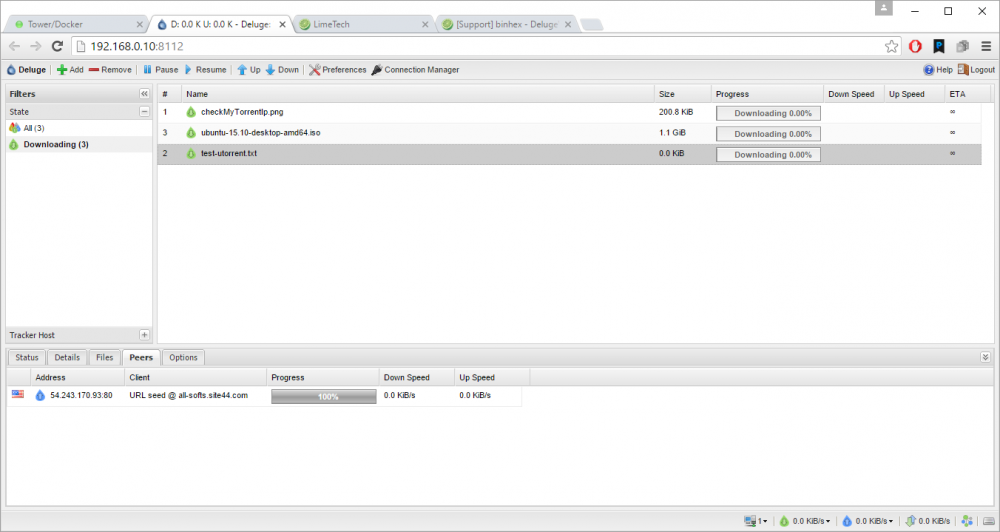
Thanks for the quick reply. I hope the attached picture is worth a thousand words (shows a peer), but just in case... from ubuntu-15.10-desktop-amd64.iso Downloaded: 0.0 KiB (0.0 KiB) Uploaded: 0.0 KiB (0.0 KiB) Share Ratio: ? Next Announce: 2m 45s Tracker Status: ubuntu.com: Error: I had been trying the checkMyTorrentIp.png as suggested in the FAQ and also test-utorrent.txt.
-
Need some ideas on debugging my connection -- gui comes up but can't download anything. Can you give a quick peek and let me know where / how to start looking? Has anyone used vpnbook as a provider? supervisord.log.txt deluged.log.txt

