





nas_nerd
Members
-
Joined
-
Last visited
-
Apologies I didn't pay attention to that, I think I would have noticed if it was Tvshows at least, so it wasn't that.
-
Thanks Jorge. I could not find 2 versions of TVShows, however, I deleted the file as you suggested, then setup the share again and ran mover. That did the trick! Thanks a million!
-
I have just noticed my cache is filling up and can see I have a bunch of TV Shows that are not moving off my Cache pool to the array. Looking at the dates of the TV shows, this has been happening for around 2 years (I mis-configured something 2 years ago?). My Movies are fine though. I think I have everything set correctly? Attached: TVShow share settings Sonarr path settings Diagonostics Any help would be greatly appreciated. unraid-diagnostics-20250714-2036.zip
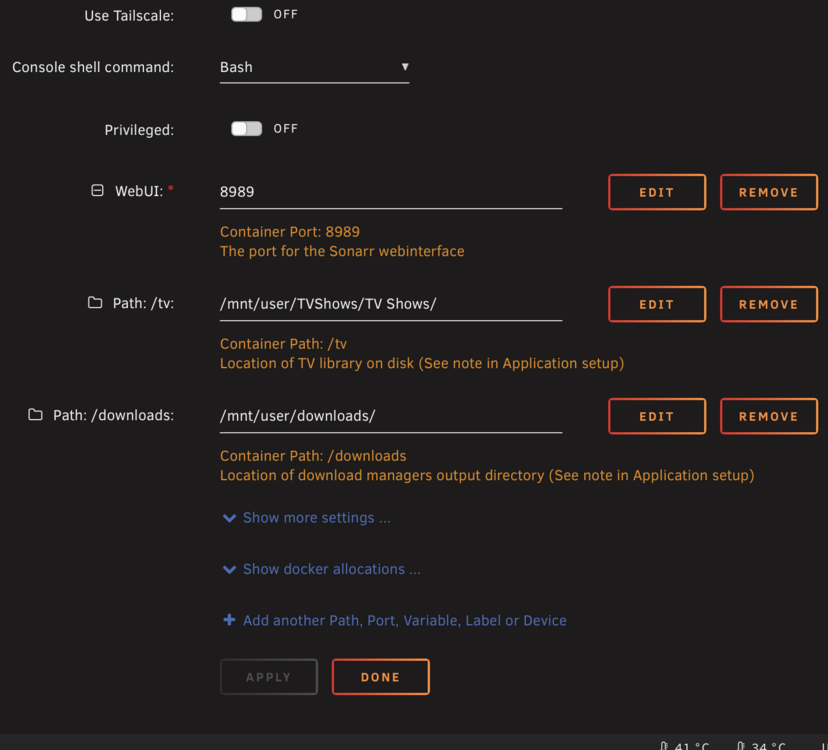
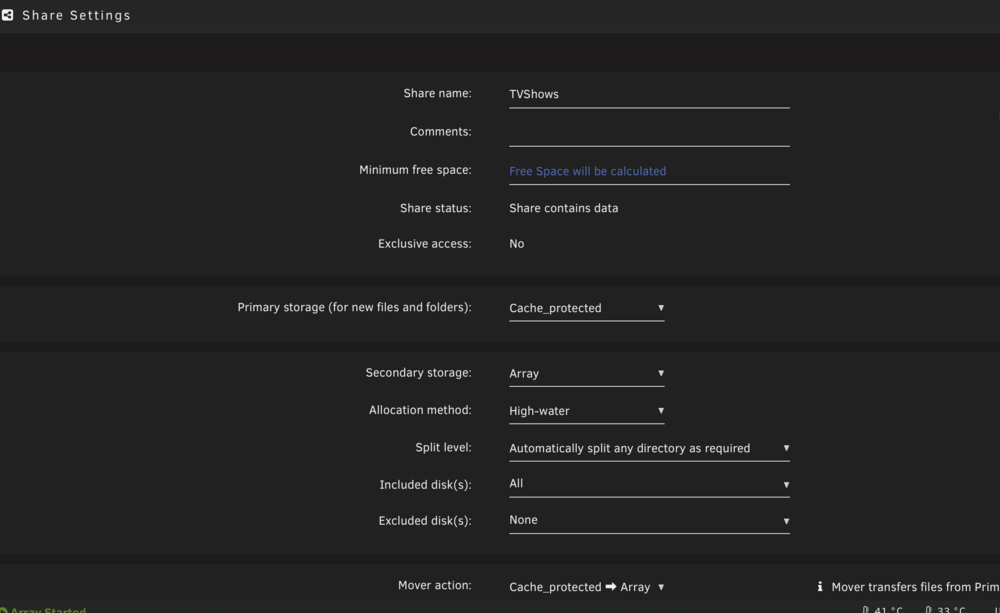
-
I changed the data cable and that fixed it.
-
Ok thanks, I will check the bios tomorrow. It would be a strange coincidence though if something happened at the same time I updated.
-
Hi all, I just upgrade from 6.12.10 to 6.12.11 and now one of my array disks is missing on reboot. Shows up as no device on the slot and it isn't visible of the drop down list. I downgraded back to v 6.12.10 and I still have the same issue. Diagnostics attached. unraid-diagnostics-20240805-1352.zip
-
Hi I have been getting this Plex error. [05.02.2024 03:15:07][❌][plex] tar creation failed! Tar said: tar: /mnt/user/appdata/plex/Library/Application Support/Plex Media Server/Metadata/TV Shows/0/f9b0450807cb79fd02ccc1c93207c3d006c5ad6.bundle/Contents/com.plexapp.agents.thetvdb/posters/: Cannot savedir: Structure needs cleaning; tar: Exiting with failure status due to previous errors I am wondering if this is a Plex issue? Debug log ID 029ade43-0fb1-4185-b399-574cfc0cd42e
-
Hi, yes thanks to My Servers I had a backup from the 16th and have since restored to a new flash drive. The old drive was probably 6+ years old so I guess it’s time had come.
-
Just logged in to see this message. Diagnostics attached unraid-diagnostics-20230121-1104.zip
-
Hi all, I am looking in to this as I am not fully happy with Duplicati. My question - is it possible to have only some sources sent to a particular repo? The scenario I am looking at doing would be: Backup Photos and other important smaller files to a local server AND cloud (e.g. Borgbase perhaps). Backup larger files e.g. Movies/Music etc to local server only. Is this possible all from the one confi.yaml file or would I need to have multiple instances of Borgmatic running? Cheers
-
Any update on this? Same problem here .....
-
Hi all, Firstly thanks for all the great work with this plugin. I am setting up spare SSD for my Plex appdata as an unassigned disk rather than through the cache drive appdata. What is the lightning bolt symbol next to the drive name? I don't think I have seen this until recently....? Just want to ensure it is setup correctly before transferring all the Plex data.

-
Ah ok then. Maybe that is a standard thing for Intel 1151 sockets. The image I attached is actually the mini-itx version of what you have.
-
Perfect! Thanks very much.
-
Hi Hoopster, I am referring to a metal backplate on the underside of the mobo. Some motherboards come with them to support the CPU bracket thing on the top side. I was worried it would interfere with the noctua mounting system.
.jpg.3936248aa305d70f83fe7ed0ee6d8ce3.jpg)



.jpg.3936248aa305d70f83fe7ed0ee6d8ce3.jpg)