





biopixen
Members
-
Joined
-
Last visited
Everything posted by biopixen
-
Hi Guys! Trying to add a network card to my pfsense vm. 3Com Corporation 3c940 37:09.0 0200: 10b7:1700 Realtek RTL8111/8168/8411 03:00.0 0200: 10ec:8168 Added pci-stub.ids=10ec:8168,10b7:1700 to my syslinux.cfg rebooted Added the following line to my .xml-file (Im only testing ONE card at the moment for a proof of concept) <hostdev mode='subsystem' type='pci' managed='yes'> <driver name='vfio'/> <source> <address domain='0x0000' bus='0x37' slot='0x09' function='0x0'/> </source> </hostdev> That was changed to: (2 last lines automatically added) <hostdev mode='subsystem' type='pci' managed='yes'> <driver name='vfio'/> <source> <address domain='0x0000' bus='0x37' slot='0x09' function='0x0'/> </source> <address type='pci' domain='0x0000' bus='0x02' slot='0x06' function='0x0'/> </hostdev> However i receive the following error when trying to start the vm: virsh start pfSense160325 error: Failed to start domain pfSense160325 error: internal error: early end of file from monitor: possible problem: 2016-03-25T20:01:38.358902Z qemu-system-x86_64: -device vfio-pci,host=37:09.0,id=hostdev0,bus=pci.2,addr=0x6: vfio: failed to set iommu for container: Operation not permitted 2016-03-25T20:01:38.358943Z qemu-system-x86_64: -device vfio-pci,host=37:09.0,id=hostdev0,bus=pci.2,addr=0x6: vfio: failed to setup container for group 13 2016-03-25T20:01:38.358957Z qemu-system-x86_64: -device vfio-pci,host=37:09.0,id=hostdev0,bus=pci.2,addr=0x6: vfio: failed to get group 13 2016-03-25T20:01:38.358969Z qemu-system-x86_64: -device vfio-pci,host=37:09.0,id=hostdev0,bus=pci.2,addr=0x6: Device initialization failed 2016-03-25T20:01:38.358982Z qemu-system-x86_64: -device vfio-pci,host=37:09.0,id=hostdev0,bus=pci.2,addr=0x6: Device 'vfio-pci' could not be initialized Any clues?!
-
Hi Guys! Trying to add a network card to my pfsense vm. 3Com Corporation 3c940 37:09.0 0200: 10b7:1700 Realtek RTL8111/8168/8411 03:00.0 0200: 10ec:8168 Added pci-stub.ids=10ec:8168,10b7:1700 to my syslinux.cfg rebooted Added the following line to my .xml-file (Im only testing ONE card at the moment for a proof of concept) <hostdev mode='subsystem' type='pci' managed='yes'> <driver name='vfio'/> <source> <address domain='0x0000' bus='0x37' slot='0x09' function='0x0'/> </source> </hostdev> That was changed to: (2 last lines automatically added) <hostdev mode='subsystem' type='pci' managed='yes'> <driver name='vfio'/> <source> <address domain='0x0000' bus='0x37' slot='0x09' function='0x0'/> </source> <address type='pci' domain='0x0000' bus='0x02' slot='0x06' function='0x0'/> </hostdev> However i receive the following error when trying to start the vm: virsh start pfSense160325 error: Failed to start domain pfSense160325 error: internal error: early end of file from monitor: possible problem: 2016-03-25T20:01:38.358902Z qemu-system-x86_64: -device vfio-pci,host=37:09.0,id=hostdev0,bus=pci.2,addr=0x6: vfio: failed to set iommu for container: Operation not permitted 2016-03-25T20:01:38.358943Z qemu-system-x86_64: -device vfio-pci,host=37:09.0,id=hostdev0,bus=pci.2,addr=0x6: vfio: failed to setup container for group 13 2016-03-25T20:01:38.358957Z qemu-system-x86_64: -device vfio-pci,host=37:09.0,id=hostdev0,bus=pci.2,addr=0x6: vfio: failed to get group 13 2016-03-25T20:01:38.358969Z qemu-system-x86_64: -device vfio-pci,host=37:09.0,id=hostdev0,bus=pci.2,addr=0x6: Device initialization failed 2016-03-25T20:01:38.358982Z qemu-system-x86_64: -device vfio-pci,host=37:09.0,id=hostdev0,bus=pci.2,addr=0x6: Device 'vfio-pci' could not be initialized Any clues?!
-
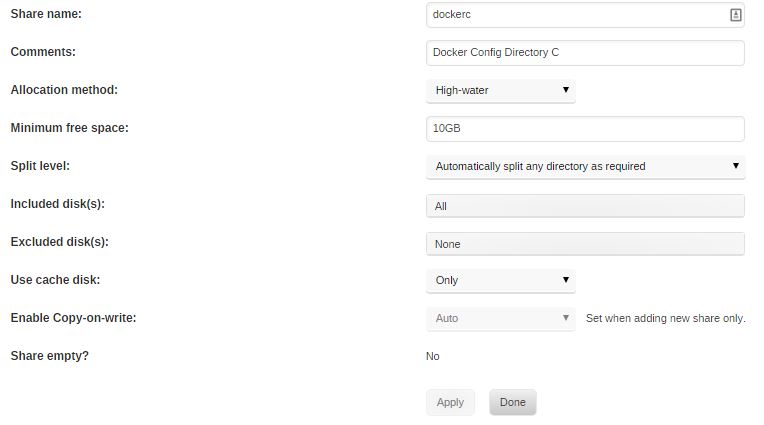
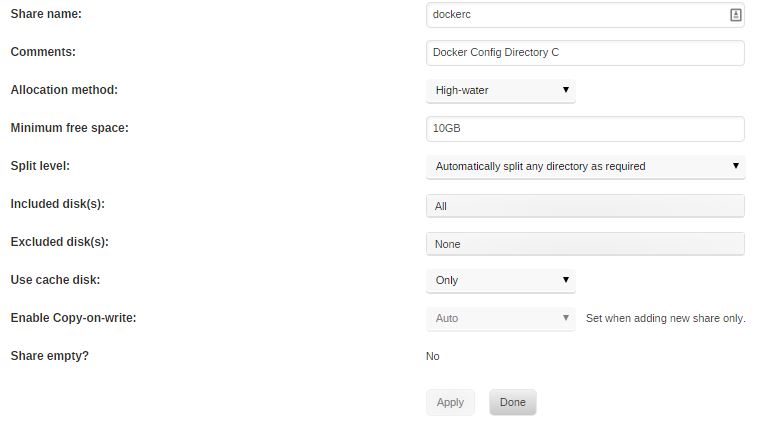
No, but the mover will do exactly what you are seeing if the dockerc share isn't set to cache only. Hi! Thanks for the feedback! I checked, and it seems that the share is cache only: (attached picture)
-
Hi! Great job with the docker! Whenever i reboot the unraid server the couchpotato and nzbget-docker reverts back to "defaults" my /config points at: /mnt/cache/dockerc/couchpotato on my unraid system and is read/write-able... Is there something in the startup script that erases the config.ini and replaces it with a default one?
