




Skip to content
View in the app

A better way to browse. Learn more.

Unraid

A full-screen app on your home screen with push notifications, badges and more.

To install this app on iOS and iPadOS
  1. Tap the Share icon in Safari
  2. Scroll the menu and tap Add to Home Screen.
  3. Tap Add in the top-right corner.
To install this app on Android
  1. Tap the 3-dot menu (⋮) in the top-right corner of the browser.
  2. Tap Add to Home screen or Install app.
  3. Confirm by tapping Install.

jiddle

Members
  • Joined

  • Last visited

Everything posted by jiddle

  1. I restarted the server, installed the delugevpn update and tried again last night without any luck. After reading your comment this morning, i decided to give it another go and stopped both services and it worked! Wow I feel like an idiot, this has been bugging me for 2 days and it was something so simple. Thanks!
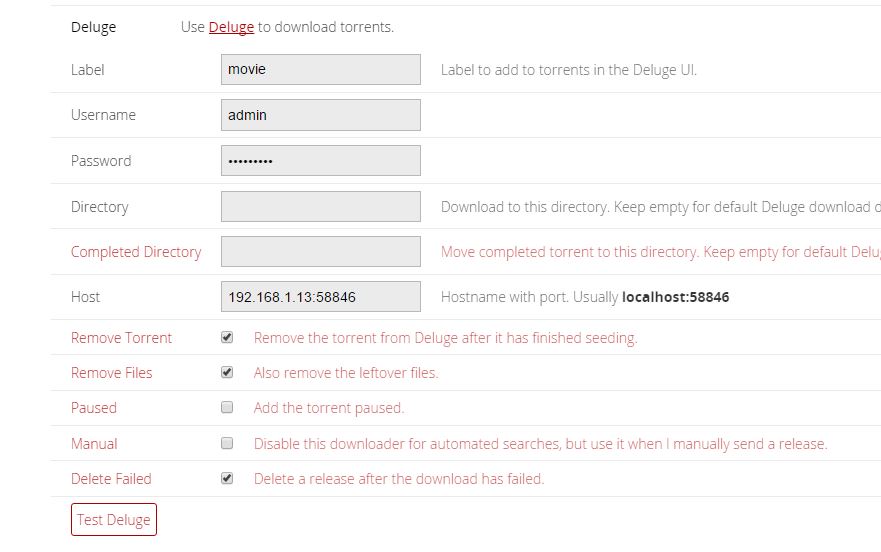
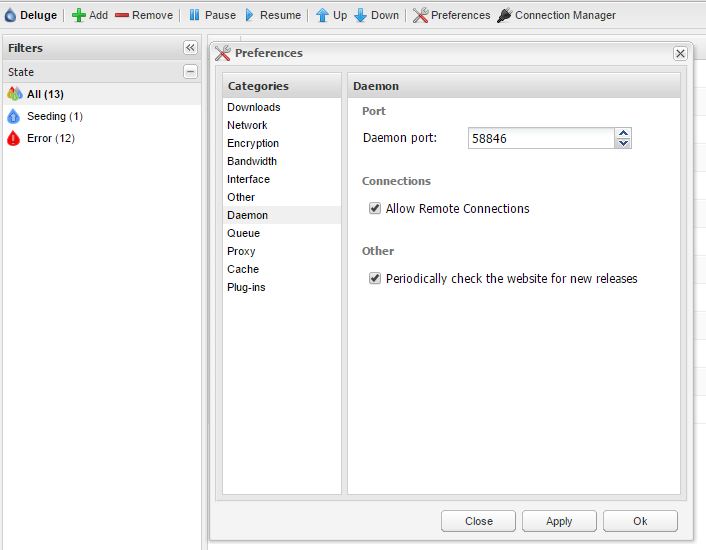
  2. Love your dockers binhex. I have your delugevpn up and running great with sonarr, but I am having a hard time connecting couchpotato to delugevpn. I keep getting the cannot connect error when I test the connection under settings, and I can't find the problem in the log. I have tried to add a user to the auth file in delugevpn and adding the user to CP settings, but that doesn't work either. Any idea what I am doing wrong?
Account

Navigation

Search

Search

Configure browser push notifications

Chrome (Android)
  1. Tap the lock icon next to the address bar.
  2. Tap Permissions → Notifications.
  3. Adjust your preference.
Chrome (Desktop)
  1. Click the padlock icon in the address bar.
  2. Select Site settings.
  3. Find Notifications and adjust your preference.