





thestraycat
Members
-
Joined
-
Last visited
Everything posted by thestraycat
-
Good to hear - Yeah i feel the userscripts plugin might need some love....
-
I had similar issues, had to delete the script manually from the userscript folder via terminal. Not sure when or why it broke.
-
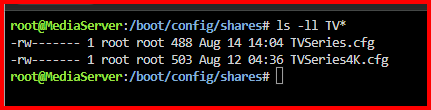
Yup thats fixed the mover issue. (TVseries.cfg > TVSeries.cfg) I'm now testing to see if the user shares dissapearing issue is resolved but wont know for a week or so. Thanks @JorgeB and @itimpi for the timely assistance.
-
Thanks for confirming - I'll try it now. I wonder why it hasn't updated the .cfg file when the share name was tweaked? Old share in use at the time no doubt via an openfile or container?
-
You might be onto something there. The configuration file references "TVseries" (with NO capital S for series.) My share shows as "TVSeries" (WITH a capital S for series.) Obviously this path is referenced as "TVSeries" throughout a lot of services. Can i just stop the array and rename this .cfg file to "TVSeries" (wit the capital S) and restart the array?

-
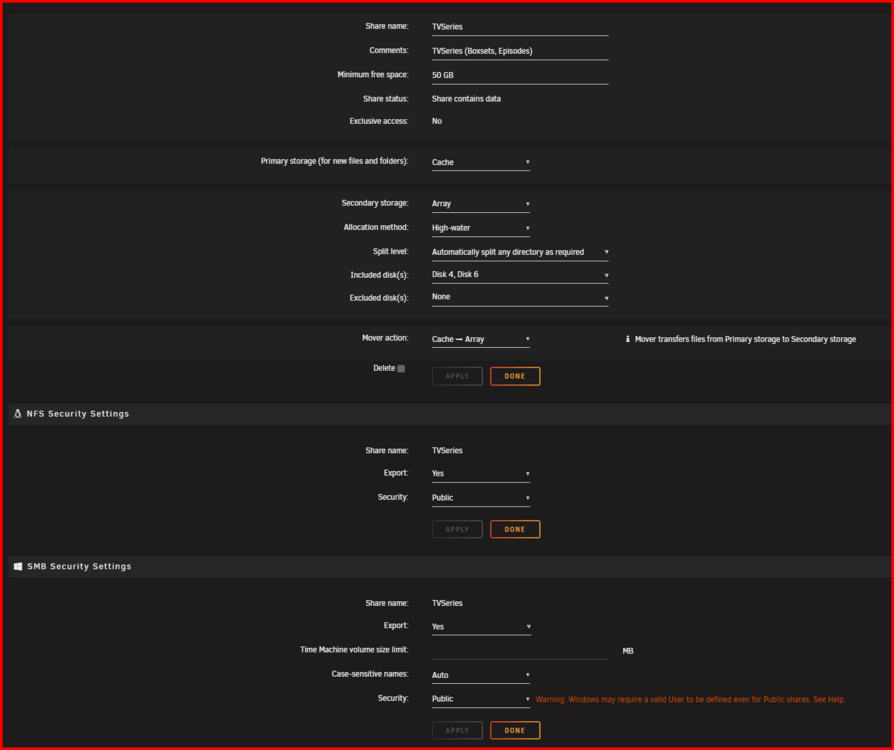
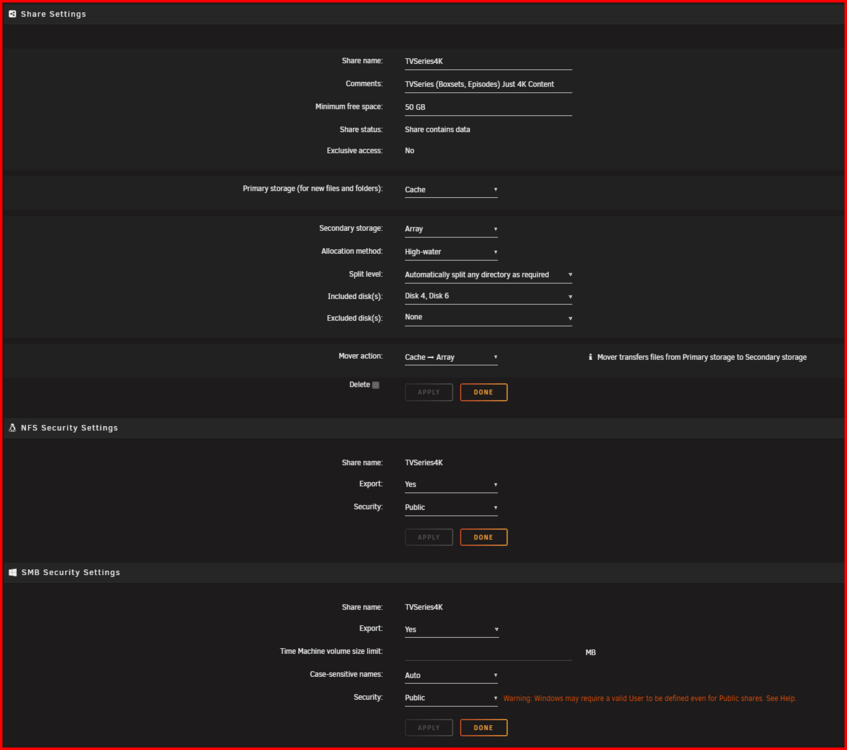
@JorgeB Here you go. So mover seems to be ignoring the "TVSeries" user share when runner mover automatically and manually. Even though I have a test file downloaded to the cache ready to move. All other folders that are set to cache > array work as expected. for eg. "TVseries4K", "Documentarys" etc. All move fine. Permissions look the same between a known good folder (TVSeries4K) and the problematic folder (TVSeries) that refuses to move. Both shares look identical in Unraid UI > Shares. "TVSeries" User Share. "TVSeries4K" User Share. Diagnostics captured after running the mover manually with fresh files in the cache folder "TVSeries" that are ready be moved to the user share "TVSeries" Interestingly, i've noticed that the files that mover should be moving to the array on the cache are already showing up on the array. So there showing both places at once. (cache + array) When i delete the test file from the array, the copy on the cache dissapears When i delete the test file from the cache, the copy on the array dissapears. Its like there symlinked instead of the file being "moved" from cache to Array which would be the expected behaviour. Is there any state file i can delete for the mover at all? All i see in the syslog is "Mover started - Moved finished" mediaserver-diagnostics (after running mover)-20250814-0042.zip

-
@SkilledAlpaca Thanks for the update. Was there a reason you swapped it out? Was it showing as failing? Bad SMART status etc? Just wondering how i can tell whether i'm suffering from the same related issue. Mine has been in use for around 8 years now lol.
-
@SkilledAlpaca - I'd love to know whether you feel like your rid of the issue now since the USB flash replacement?
-
Will do. I'll post them this evening. Thanks for the help - It's appreciated.
-
Thanks JorgeB . This is not good. I don't use Tdarr, But i do use NFS - For more responsive file transfers to both my MAC's and for ALL my media shares to my mediacenters. Why would this have ramped up after my move to 7.1.4 from 7.0.1? Server i now unusable, happening with a few hours of reboots. I've also noticed that mover is not moving files off the cache to the array, related?
-
I've had this issue once or twice in the last 2 months, but just upgraded to Unraid 7.1.4 and it's happened again after around 7-8 hours or so of the upgrade. No idea whats causing it. Everything works fine, then for no reason i goto access a share on windows which fails, check unraid's dashboard and notice there are no shares being exported. Reboot brings it all back. Anonymized diagnostics attached - Can anyone shed some light on it? mediaserver-diagnostics-20250812-0037.zip
-
Not sure if this is a potential bug but i created a new script and called the script: "Link Overlay2 folders to Container Names! (troubleshooting)" After creating the new script name in the userscipt plugin, the settings cog for the new script dosn't load when clicked on so i'm stuck with this entry and cant delete it, edit it or do anything with it. It's just become stale! Assuming that the way the name has been parsed to the plugin has caused some sort of weird glitch. Likely either the "!" or the "(" or ")" symbols. Can anyone do a quick test to see if they experience the same issue? Add new script > give it the name above in bold. Save. Then try and delete it. Where would be best to post this to get it looked at potentially?
-
Thanks - yeah i was tihnking i might do that tbh just to be sure. I've got around 8 spares, but dont want to confine good disks to the bin. Yes they've just turned 5 years old... but the 2tb disks they replaced were 9 years old and kept hotter. Just seems a bit coincidental after the update.
-
Thank for looking - i understand the SMART test is internal but could it have been prompted by the update in anyway? Is there a way of verifying the SMART data that is currently being presented?
-
mediaserver-diagnostics-20250307-2053.zip
-
I'll generate and attach in a mo, seemed very coincidental that the smart failure have only shown since the update no?
-
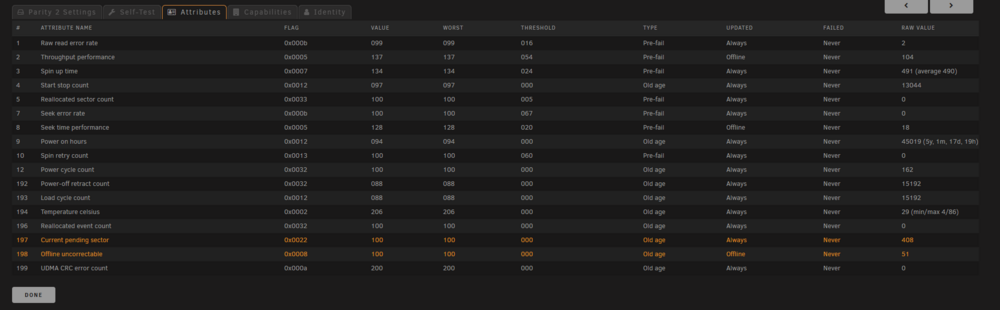
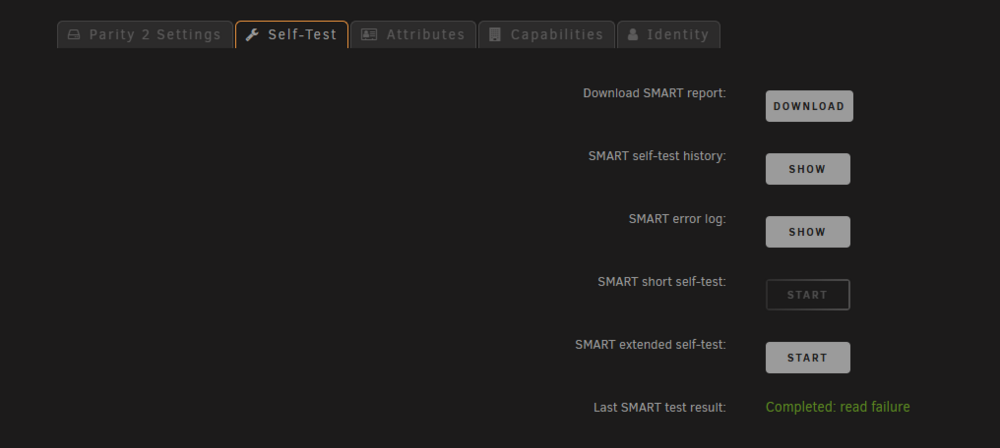
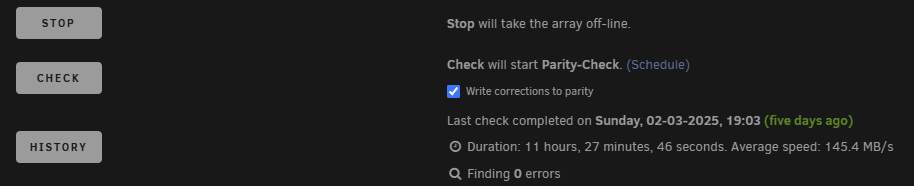
I've just done an update to Unraid 7 after putting it off for a while. I always check SMART data prior to an update as part of my pre-update checks, not necessary, but i just like a picture of what the system looked like prior to updating. Since updating my 2nd parity disk is showing the following: And when running the extended SMART test it goes to 10% and then displays: However when i check the smart log from the UI, i see no errors! For a little more detail in case it matters, my last parity check was 5 days ago, and the one before that 90 days ago. This all seems a little fishy. Can anyone shed any light?

-
@Splatman2 Any idea on how much power the expander is consuming at all? Did you check it before and after, i'd be really interested to see if theres much of a power saving using an expander over 3 x HBA's... Wondered whether you had any before and after power meter readings?
-
@ZappyZap Hey! Do you plan on upgrading this image to the latest iventoy version v1.0.20 from v1.0.19? There'a few windows driver improvement in the newer version i believe.
-
Yeah ive tried those. The container dosnt seem to honour the variable: KEY: THEME_DARK_PRIMARY VALUE: #E58325
-
@CatDuck Tried the variable for 'dark mode' on the new latest ... but still not working.
-
Yeah i remember those... hence why i moved over to IPVLAN! Cheers for the reply. I thought it might be the case.
-
Hi, - I currently run Unraid 6.12.4 - IPVLAN mode - I have 2 NIC's and use 1 NIC for all docker traffic, VM's and and host UI. I have a single container that lives on my network bridge (BR0) with the IP Address 192.168.1.40. Everything works as expected, But i cant create a DHCP reservation for this container in my router as the MAC Address shows as the same MAC address as my Unraid Server Host. And i'd l need to be unique to save the DHCP reservation. Do i need to move my networking mode over to MACVLAN to get a unique MAC Address for my Fixed IP Address container on BR0? As it stands i've limited the DHCP scope to give me 50 or so fixed addresses for issues like this so it's not crucial, but i find it more convenient to keep track of DHCP reservations on the router than find and update servers with fixed addresses.. Any advice? Cheers.
-
hmmm.. Running the development build of this plugin, and whenever i try and save a pre-script or post-script it never finishes processing and never saves and just hangs for ever until i refresh to screen (and dosnt save the scripts) Anyone else have that issue? Can anyone test there's by just typing something superficial like the below and hitting save? tl;dr - Just want to know if you can save the info below into the vm_backup > 'upload scripts' > pre-script tab. #!/bin/bash echo "Hello World"
-
I believe it's coming, but for now he's very respondant on the github issues page.... https://github.com/EideardVMR/unraid-easybackup





