





Karyudo
Members
-
Joined
-
Last visited
Everything posted by Karyudo
-
Ah, yes. But of course.... It's 'sde' that's the drive I'm asking about here. shinagawa-diagnostics-20210815-0625.zip
-
I'm having trouble mounting a certain NTFS drive with UD under 6.9.2 that previously mounted. Before rebooting to install 6.9.2 I also had a problem with Transmission giving me an I/O error, so I suspect this drive isn't in great shape, although running a SMART test seems OK? Now when I reboot unRAID, I get a 'current pending sector' error popping up that seems to resolve itself. I'd like to mount this drive, copy everything off it, and then decommission it. But I can't seem to mount it under UD: When I click on the orange 'mount' button, it goes grey and the spinner spins for a bit, and then it goes back to orange 'mount' like nothing happened. How can I solve this problem?
-
I've also got a 'kde' directory that I don't believe I have deliberately installed for anything. Does Krusader (any Docker version) use that? Would that be a confounding factor?
-
Default template labeled 'krusader'-with-a-lowercase-'k' is binhex's. Which seems to work as well as it did when I uninstalled it earlier today.
-
Tried again with user template Krusader, and no change: still not connecting. Will try again with krusader default template....
-
Default template? Or user? Also: I've got defaults for krusader and Krusader, and neither looks quite exactly like the previous install. (User template for Krusader looks like what I just deleted...)
-
14/08/2020 17:25:42 X FBPM extension not supported. Xlib: extension "DPMS" missing on display ":0". 14/08/2020 17:25:42 X display is not capable of DPMS. 14/08/2020 17:25:42 -------------------------------------------------------- 14/08/2020 17:25:42 14/08/2020 17:25:42 Default visual ID: 0x21 14/08/2020 17:25:42 Read initial data from X display into framebuffer. 14/08/2020 17:25:42 initialize_screen: fb_depth/fb_bpp/fb_Bpl 24/32/5120 14/08/2020 17:25:42 14/08/2020 17:25:42 X display :0 is 32bpp depth=24 true color 14/08/2020 17:25:42 14/08/2020 17:25:42 Listening for VNC connections on TCP port 5900 14/08/2020 17:25:42 14/08/2020 17:25:42 Xinerama is present and active (e.g. multi-head). 14/08/2020 17:25:42 Xinerama: number of sub-screens: 1 14/08/2020 17:25:42 Xinerama: no blackouts needed (only one sub-screen) 14/08/2020 17:25:42 14/08/2020 17:25:42 fb read rate: 1136 MB/sec 14/08/2020 17:25:42 fast read: reset -wait ms to: 10 14/08/2020 17:25:42 fast read: reset -defer ms to: 10 14/08/2020 17:25:42 The X server says there are 10 mouse buttons. 14/08/2020 17:25:42 screen setup finished. 14/08/2020 17:25:42 The VNC desktop is: 5e34f8d2d25b:0 0 ****************************************************************************** Have you tried the x11vnc '-ncache' VNC client-side pixel caching feature yet? The scheme stores pixel data offscreen on the VNC viewer side for faster retrieval. It should work with any VNC viewer. Try it by running: x11vnc -ncache 10 ... One can also add -ncache_cr for smooth 'copyrect' window motion. More info: http://www.karlrunge.com/x11vnc/faq.html#faq-client-caching 14/08/2020 17:58:48 Got connection from client 127.0.0.1 14/08/2020 17:58:48 other clients: 14/08/2020 17:58:48 Got 'ws' WebSockets handshake 14/08/2020 17:58:48 - webSocketsHandshake: using base64 encoding 14/08/2020 17:58:48 - WebSockets client version hybi-13 caught signal: 11 14/08/2020 17:58:48 deleted 40 tile_row polling images. [x11vnc] starting... 14/08/2020 17:58:48 passing arg to libvncserver: -rfbport 14/08/2020 17:58:48 passing arg to libvncserver: 5900 14/08/2020 17:58:48 passing arg to libvncserver: -rfbportv6 14/08/2020 17:58:48 passing arg to libvncserver: -1 14/08/2020 17:58:48 passing arg to libvncserver: -httpportv6 14/08/2020 17:58:48 passing arg to libvncserver: -1 14/08/2020 17:58:48 passing arg to libvncserver: -desktop 14/08/2020 17:58:48 passing arg to libvncserver: Krusader 14/08/2020 17:58:48 x11vnc version: 0.9.14 lastmod: 2015-11-14 pid: 989 14/08/2020 17:58:48 Using X display :0 14/08/2020 17:58:48 rootwin: 0x298 reswin: 0x400001 dpy: 0xa4b1db00 14/08/2020 17:58:48 14/08/2020 17:58:48 ------------------ USEFUL INFORMATION ------------------ 14/08/2020 17:58:48 X DAMAGE available on display, using it for polling hints. 14/08/2020 17:58:48 To disable this behavior use: '-noxdamage' 14/08/2020 17:58:48 14/08/2020 17:58:48 Most compositing window managers like 'compiz' or 'beryl' 14/08/2020 17:58:48 cause X DAMAGE to fail, and so you may not see any screen 14/08/2020 17:58:48 updates via VNC. Either disable 'compiz' (recommended) or 14/08/2020 17:58:48 supply the x11vnc '-noxdamage' command line option. 14/08/2020 17:58:48 X COMPOSITE available on display, using it for window polling. 14/08/2020 17:58:48 To disable this behavior use: '-noxcomposite' 14/08/2020 17:58:48 14/08/2020 17:58:48 Wireframing: -wireframe mode is in effect for window moves. 14/08/2020 17:58:48 If this yields undesired behavior (poor response, painting 14/08/2020 17:58:48 errors, etc) it may be disabled: 14/08/2020 17:58:48 - use '-nowf' to disable wireframing completely. 14/08/2020 17:58:48 - use '-nowcr' to disable the Copy Rectangle after the 14/08/2020 17:58:48 moved window is released in the new position. 14/08/2020 17:58:48 Also see the -help entry for tuning parameters. 14/08/2020 17:58:48 You can press 3 Alt_L's (Left "Alt" key) in a row to 14/08/2020 17:58:48 repaint the screen, also see the -fixscreen option for 14/08/2020 17:58:48 periodic repaints. 14/08/2020 17:58:48 GrabServer control via XTEST. 14/08/2020 17:58:48 14/08/2020 17:58:48 Scroll Detection: -scrollcopyrect mode is in effect to 14/08/2020 17:58:48 use RECORD extension to try to detect scrolling windows 14/08/2020 17:58:48 (induced by either user keystroke or mouse input). 14/08/2020 17:58:48 If this yields undesired behavior (poor response, painting 14/08/2020 17:58:48 errors, etc) it may be disabled via: '-noscr' 14/08/2020 17:58:48 Also see the -help entry for tuning parameters. 14/08/2020 17:58:48 You can press 3 Alt_L's (Left "Alt" key) in a row to 14/08/2020 17:58:48 repaint the screen, also see the -fixscreen option for 14/08/2020 17:58:48 periodic repaints. 14/08/2020 17:58:48 14/08/2020 17:58:48 XKEYBOARD: number of keysyms per keycode 7 is greater 14/08/2020 17:58:48 than 4 and 51 keysyms are mapped above 4. 14/08/2020 17:58:48 Automatically switching to -xkb mode. 14/08/2020 17:58:48 If this makes the key mapping worse you can 14/08/2020 17:58:48 disable it with the "-noxkb" option. 14/08/2020 17:58:48 Also, remember "-remap DEAD" for accenting characters. 14/08/2020 17:58:48 14/08/2020 17:58:48 X FBPM extension not supported. Xlib: extension "DPMS" missing on display ":0". 14/08/2020 17:58:48 X display is not capable of DPMS. 14/08/2020 17:58:48 -------------------------------------------------------- 14/08/2020 17:58:48 14/08/2020 17:58:48 Default visual ID: 0x21 14/08/2020 17:58:48 Read initial data from X display into framebuffer. 14/08/2020 17:58:48 initialize_screen: fb_depth/fb_bpp/fb_Bpl 24/32/5120 14/08/2020 17:58:48 14/08/2020 17:58:48 X display :0 is 32bpp depth=24 true color 14/08/2020 17:58:48 14/08/2020 17:58:48 Listening for VNC connections on TCP port 5900 14/08/2020 17:58:48 14/08/2020 17:58:48 Xinerama is present and active (e.g. multi-head). 14/08/2020 17:58:48 Xinerama: number of sub-screens: 1 14/08/2020 17:58:48 Xinerama: no blackouts needed (only one sub-screen) 14/08/2020 17:58:48 14/08/2020 17:58:48 fb read rate: 1187 MB/sec 14/08/2020 17:58:48 fast read: reset -wait ms to: 10 14/08/2020 17:58:48 fast read: reset -defer ms to: 10 14/08/2020 17:58:48 The X server says there are 10 mouse buttons. 14/08/2020 17:58:48 screen setup finished. 14/08/2020 17:58:48 The VNC desktop is: 5e34f8d2d25b:0 0 ****************************************************************************** Have you tried the x11vnc '-ncache' VNC client-side pixel caching feature yet? The scheme stores pixel data offscreen on the VNC viewer side for faster retrieval. It should work with any VNC viewer. Try it by running: x11vnc -ncache 10 ... One can also add -ncache_cr for smooth 'copyrect' window motion. More info: http://www.karlrunge.com/x11vnc/faq.html#faq-client-caching 14/08/2020 19:03:10 Got connection from client 127.0.0.1 14/08/2020 19:03:10 other clients: 14/08/2020 19:03:10 Got 'ws' WebSockets handshake 14/08/2020 19:03:10 - webSocketsHandshake: using base64 encoding 14/08/2020 19:03:10 - WebSockets client version hybi-13 caught signal: 11 14/08/2020 19:03:10 deleted 40 tile_row polling images. [x11vnc] starting... 14/08/2020 19:03:10 passing arg to libvncserver: -rfbport 14/08/2020 19:03:10 passing arg to libvncserver: 5900 14/08/2020 19:03:10 passing arg to libvncserver: -rfbportv6 14/08/2020 19:03:10 passing arg to libvncserver: -1 14/08/2020 19:03:10 passing arg to libvncserver: -httpportv6 14/08/2020 19:03:10 passing arg to libvncserver: -1 14/08/2020 19:03:10 passing arg to libvncserver: -desktop 14/08/2020 19:03:10 passing arg to libvncserver: Krusader 14/08/2020 19:03:10 x11vnc version: 0.9.14 lastmod: 2015-11-14 pid: 996 14/08/2020 19:03:10 Using X display :0 14/08/2020 19:03:10 rootwin: 0x298 reswin: 0x400001 dpy: 0x18884b00 14/08/2020 19:03:10 14/08/2020 19:03:10 ------------------ USEFUL INFORMATION ------------------ 14/08/2020 19:03:10 X DAMAGE available on display, using it for polling hints. 14/08/2020 19:03:10 To disable this behavior use: '-noxdamage' 14/08/2020 19:03:10 14/08/2020 19:03:10 Most compositing window managers like 'compiz' or 'beryl' 14/08/2020 19:03:10 cause X DAMAGE to fail, and so you may not see any screen 14/08/2020 19:03:10 updates via VNC. Either disable 'compiz' (recommended) or 14/08/2020 19:03:10 supply the x11vnc '-noxdamage' command line option. 14/08/2020 19:03:10 X COMPOSITE available on display, using it for window polling. 14/08/2020 19:03:10 To disable this behavior use: '-noxcomposite' 14/08/2020 19:03:10 14/08/2020 19:03:10 Wireframing: -wireframe mode is in effect for window moves. 14/08/2020 19:03:10 If this yields undesired behavior (poor response, painting 14/08/2020 19:03:10 errors, etc) it may be disabled: 14/08/2020 19:03:10 - use '-nowf' to disable wireframing completely. 14/08/2020 19:03:10 - use '-nowcr' to disable the Copy Rectangle after the 14/08/2020 19:03:10 moved window is released in the new position. 14/08/2020 19:03:10 Also see the -help entry for tuning parameters. 14/08/2020 19:03:10 You can press 3 Alt_L's (Left "Alt" key) in a row to 14/08/2020 19:03:10 repaint the screen, also see the -fixscreen option for 14/08/2020 19:03:10 periodic repaints. 14/08/2020 19:03:10 GrabServer control via XTEST. 14/08/2020 19:03:10 14/08/2020 19:03:10 Scroll Detection: -scrollcopyrect mode is in effect to 14/08/2020 19:03:10 use RECORD extension to try to detect scrolling windows 14/08/2020 19:03:10 (induced by either user keystroke or mouse input). 14/08/2020 19:03:10 If this yields undesired behavior (poor response, painting 14/08/2020 19:03:10 errors, etc) it may be disabled via: '-noscr' 14/08/2020 19:03:10 Also see the -help entry for tuning parameters. 14/08/2020 19:03:10 You can press 3 Alt_L's (Left "Alt" key) in a row to 14/08/2020 19:03:10 repaint the screen, also see the -fixscreen option for 14/08/2020 19:03:10 periodic repaints. 14/08/2020 19:03:10 14/08/2020 19:03:10 XKEYBOARD: number of keysyms per keycode 7 is greater 14/08/2020 19:03:10 than 4 and 51 keysyms are mapped above 4. 14/08/2020 19:03:10 Automatically switching to -xkb mode. 14/08/2020 19:03:10 If this makes the key mapping worse you can 14/08/2020 19:03:10 disable it with the "-noxkb" option. 14/08/2020 19:03:10 Also, remember "-remap DEAD" for accenting characters. 14/08/2020 19:03:10 14/08/2020 19:03:10 X FBPM extension not supported. Xlib: extension "DPMS" missing on display ":0". 14/08/2020 19:03:10 X display is not capable of DPMS. 14/08/2020 19:03:10 -------------------------------------------------------- 14/08/2020 19:03:10 14/08/2020 19:03:10 Default visual ID: 0x21 14/08/2020 19:03:10 Read initial data from X display into framebuffer. 14/08/2020 19:03:10 initialize_screen: fb_depth/fb_bpp/fb_Bpl 24/32/5120 14/08/2020 19:03:10 14/08/2020 19:03:10 X display :0 is 32bpp depth=24 true color 14/08/2020 19:03:10 14/08/2020 19:03:10 Listening for VNC connections on TCP port 5900 14/08/2020 19:03:10 14/08/2020 19:03:10 Xinerama is present and active (e.g. multi-head). 14/08/2020 19:03:10 Xinerama: number of sub-screens: 1 14/08/2020 19:03:10 Xinerama: no blackouts needed (only one sub-screen) 14/08/2020 19:03:10 14/08/2020 19:03:10 fb read rate: 1239 MB/sec 14/08/2020 19:03:10 fast read: reset -wait ms to: 10 14/08/2020 19:03:10 fast read: reset -defer ms to: 10 14/08/2020 19:03:10 The X server says there are 10 mouse buttons. 14/08/2020 19:03:10 screen setup finished. 14/08/2020 19:03:10 The VNC desktop is: 5e34f8d2d25b:0 0 ****************************************************************************** Have you tried the x11vnc '-ncache' VNC client-side pixel caching feature yet? The scheme stores pixel data offscreen on the VNC viewer side for faster retrieval. It should work with any VNC viewer. Try it by running: x11vnc -ncache 10 ... One can also add -ncache_cr for smooth 'copyrect' window motion. More info: http://www.karlrunge.com/x11vnc/faq.html#faq-client-caching 14/08/2020 19:03:15 Got connection from client 192.168.1.206 14/08/2020 19:03:15 other clients: 14/08/2020 19:03:15 Got 'ws' WebSockets handshake 14/08/2020 19:03:15 webSocketsHandshake: incomplete client handshake 14/08/2020 19:03:15 Client 192.168.1.206 gone 14/08/2020 19:03:15 Statistics events Transmit/ RawEquiv ( saved) 14/08/2020 19:03:15 TOTALS : 0 | 0/ 0 ( 0.0%) 14/08/2020 19:03:15 Statistics events Received/ RawEquiv ( saved) 14/08/2020 19:03:15 TOTALS : 0 | 0/ 0 ( 0.0%) 14/08/2020 19:03:15 Got connection from client 192.168.1.206 14/08/2020 19:03:15 other clients: 14/08/2020 19:03:15 Got 'ws' WebSockets handshake 14/08/2020 19:03:15 webSocketsHandshake: incomplete client handshake 14/08/2020 19:03:15 Client 192.168.1.206 gone 14/08/2020 19:03:15 Statistics events Transmit/ RawEquiv ( saved) 14/08/2020 19:03:15 TOTALS : 0 | 0/ 0 ( 0.0%) 14/08/2020 19:03:15 Statistics events Received/ RawEquiv ( saved) 14/08/2020 19:03:15 TOTALS : 0 | 0/ 0 ( 0.0%) 14/08/2020 19:03:19 Got connection from client 127.0.0.1 14/08/2020 19:03:19 other clients: 14/08/2020 19:03:19 Got 'ws' WebSockets handshake 14/08/2020 19:03:19 - webSocketsHandshake: using base64 encoding 14/08/2020 19:03:19 - WebSockets client version hybi-13 caught signal: 11 14/08/2020 19:03:19 deleted 40 tile_row polling images. [x11vnc] starting... 14/08/2020 19:03:19 passing arg to libvncserver: -rfbport 14/08/2020 19:03:19 passing arg to libvncserver: 5900 14/08/2020 19:03:19 passing arg to libvncserver: -rfbportv6 14/08/2020 19:03:19 passing arg to libvncserver: -1 14/08/2020 19:03:19 passing arg to libvncserver: -httpportv6 14/08/2020 19:03:19 passing arg to libvncserver: -1 14/08/2020 19:03:19 passing arg to libvncserver: -desktop 14/08/2020 19:03:19 passing arg to libvncserver: Krusader 14/08/2020 19:03:19 x11vnc version: 0.9.14 lastmod: 2015-11-14 pid: 1003 14/08/2020 19:03:19 Using X display :0 14/08/2020 19:03:19 rootwin: 0x298 reswin: 0x400001 dpy: 0x6de47b00 14/08/2020 19:03:19 14/08/2020 19:03:19 ------------------ USEFUL INFORMATION ------------------ 14/08/2020 19:03:19 X DAMAGE available on display, using it for polling hints. 14/08/2020 19:03:19 To disable this behavior use: '-noxdamage' 14/08/2020 19:03:19 14/08/2020 19:03:19 Most compositing window managers like 'compiz' or 'beryl' 14/08/2020 19:03:19 cause X DAMAGE to fail, and so you may not see any screen 14/08/2020 19:03:19 updates via VNC. Either disable 'compiz' (recommended) or 14/08/2020 19:03:19 supply the x11vnc '-noxdamage' command line option. 14/08/2020 19:03:19 X COMPOSITE available on display, using it for window polling. 14/08/2020 19:03:19 To disable this behavior use: '-noxcomposite' 14/08/2020 19:03:19 14/08/2020 19:03:19 Wireframing: -wireframe mode is in effect for window moves. 14/08/2020 19:03:19 If this yields undesired behavior (poor response, painting 14/08/2020 19:03:19 errors, etc) it may be disabled: 14/08/2020 19:03:19 - use '-nowf' to disable wireframing completely. 14/08/2020 19:03:19 - use '-nowcr' to disable the Copy Rectangle after the 14/08/2020 19:03:19 moved window is released in the new position. 14/08/2020 19:03:19 Also see the -help entry for tuning parameters. 14/08/2020 19:03:19 You can press 3 Alt_L's (Left "Alt" key) in a row to 14/08/2020 19:03:19 repaint the screen, also see the -fixscreen option for 14/08/2020 19:03:19 periodic repaints. 14/08/2020 19:03:19 GrabServer control via XTEST. 14/08/2020 19:03:19 14/08/2020 19:03:19 Scroll Detection: -scrollcopyrect mode is in effect to 14/08/2020 19:03:19 use RECORD extension to try to detect scrolling windows 14/08/2020 19:03:19 (induced by either user keystroke or mouse input). 14/08/2020 19:03:19 If this yields undesired behavior (poor response, painting 14/08/2020 19:03:19 errors, etc) it may be disabled via: '-noscr' 14/08/2020 19:03:19 Also see the -help entry for tuning parameters. 14/08/2020 19:03:19 You can press 3 Alt_L's (Left "Alt" key) in a row to 14/08/2020 19:03:19 repaint the screen, also see the -fixscreen option for 14/08/2020 19:03:19 periodic repaints. 14/08/2020 19:03:19 14/08/2020 19:03:19 XKEYBOARD: number of keysyms per keycode 7 is greater 14/08/2020 19:03:19 than 4 and 51 keysyms are mapped above 4. 14/08/2020 19:03:19 Automatically switching to -xkb mode. 14/08/2020 19:03:19 If this makes the key mapping worse you can 14/08/2020 19:03:19 disable it with the "-noxkb" option. 14/08/2020 19:03:19 Also, remember "-remap DEAD" for accenting characters. 14/08/2020 19:03:19 14/08/2020 19:03:19 X FBPM extension not supported. Xlib: extension "DPMS" missing on display ":0". 14/08/2020 19:03:19 X display is not capable of DPMS. 14/08/2020 19:03:19 -------------------------------------------------------- 14/08/2020 19:03:19 14/08/2020 19:03:19 Default visual ID: 0x21 14/08/2020 19:03:19 Read initial data from X display into framebuffer. 14/08/2020 19:03:19 initialize_screen: fb_depth/fb_bpp/fb_Bpl 24/32/5120 14/08/2020 19:03:19 14/08/2020 19:03:19 X display :0 is 32bpp depth=24 true color 14/08/2020 19:03:19 14/08/2020 19:03:19 Listening for VNC connections on TCP port 5900 14/08/2020 19:03:19 14/08/2020 19:03:19 Xinerama is present and active (e.g. multi-head). 14/08/2020 19:03:19 Xinerama: number of sub-screens: 1 14/08/2020 19:03:19 Xinerama: no blackouts needed (only one sub-screen) 14/08/2020 19:03:19 14/08/2020 19:03:19 fb read rate: 1531 MB/sec 14/08/2020 19:03:19 fast read: reset -wait ms to: 10 14/08/2020 19:03:19 fast read: reset -defer ms to: 10 14/08/2020 19:03:19 The X server says there are 10 mouse buttons. 14/08/2020 19:03:19 screen setup finished. 14/08/2020 19:03:19 The VNC desktop is: 5e34f8d2d25b:0 0 ****************************************************************************** Have you tried the x11vnc '-ncache' VNC client-side pixel caching feature yet? The scheme stores pixel data offscreen on the VNC viewer side for faster retrieval. It should work with any VNC viewer. Try it by running: x11vnc -ncache 10 ... One can also add -ncache_cr for smooth 'copyrect' window motion. More info: http://www.karlrunge.com/x11vnc/faq.html#faq-client-caching Yeah, I'm at <local IP>:6080. I haven't changed any of the defaults. Well, not deliberately, anyway....
-
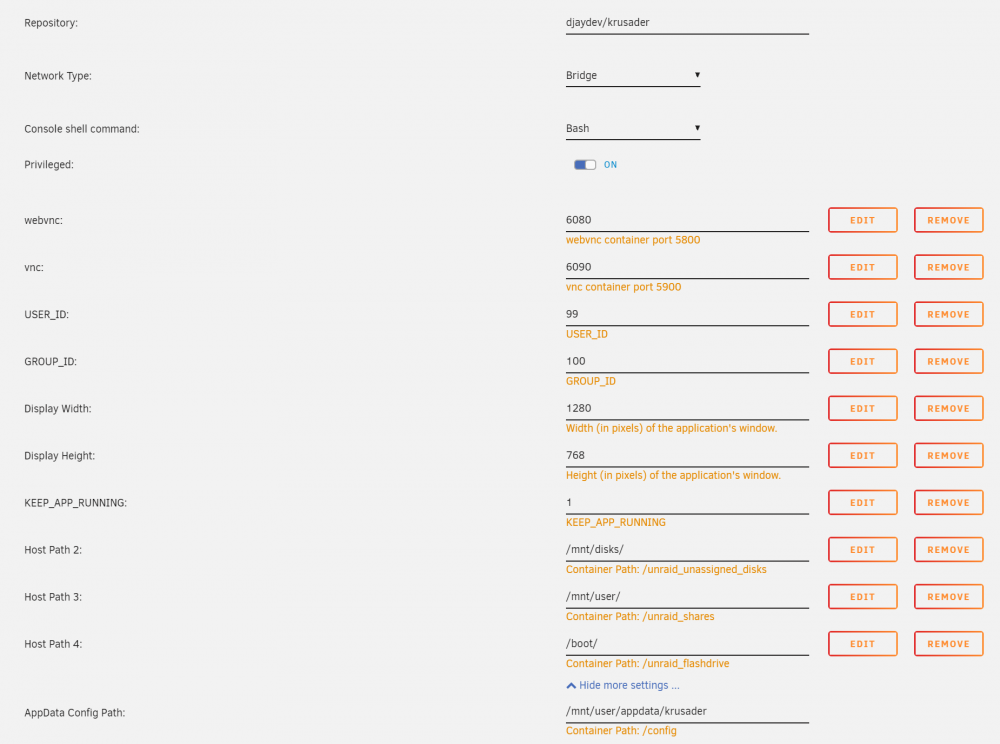
Like this...?
-
RE: Krusader Docker The djaydev Krusader Docker has been recommended to me, but I can't get it working right. Accepting the default info and starting the Docker, I get a red 'X' and "Server disconnected (code: 1006)". I've previously had the binhex-krusader Docker working with no problems (although it's been completely removed at the moment). What do I have to do to get this working correctly?
-
Thanks @TexasUnraid for your detailed and easy-to-follow response! Lots there for me to understand and try. I do appreciate that unRAID is less fiddly and command line-y than most other Linux varieties—it's part of the reason I'm all-in with a Pro license—but it's also nice (?) to hear I'm not the only one who struggles all the same. I usually get there in the end, though, and it's usually because I get assistance from some understanding and more knowledgeable person like yourself. Cheers!
-
I've been working with computers since the '80s. Linux is by far the most inside baseball, "it's a feature, not a bug" OS I've ever used. It was easier to find out how to set up your autoexec.bat and config.sys file in DOS than it is to find out how to do almost anything quickly and easily in Linux. Although, 40 years later, the tools look identical: light text on a dark background and a flashing cursor. So throwback! Such commandline! For argument's sake, let's say my deleting issue is a permissions problem. Never had any problems deleting anything created or handled by any other Docker (e.g. Sonarr, Radarr, sabNZBd, etc.) before, so it's far from clear why it would be a problem now, and even though your premise doesn't make logical sense on the face of it, it is Linux we're dealing with, so you're probably right. Somehow, it's always a permissions issue. It's very nice you've solved that for yourself by "ending up just making Krusader a root user so you can do whatever the heck you want." Next question: How can *I* end up just making Krusader a root user so I can do whatever the heck I want? I assume this should be pretty easy; probably even the default. Obviously there will be a quick explanation that will cover the basics and a few pros and cons, and I'll just check the Docker edit page for this rundown and some options and oh wait no nothing is explained there because of course it never is. Default UMASK (not explained anywhere) is 000 (not explained anywhere); default PUID (not explained anywhere) is 99 (not explained anywhere); and default PGID (not explained anywhere) is 100 (not explained anywhere). I seem to recall from troubleshooting some previous infuriating Linux/unRAID problem that those defaults should allow Dockers permission enough to read/write files created by other users/Dockers, but I'm open to learning otherwise! It would certainly fit within my increasingly cynical worldview to find out everything I know is wrong.
-
OK, why won't Krusader delete the Plex directory in appdata? I *know* it's not empty; I'm telling you to just delete it anyway! But it won't. What secret do I not know about this command? Windows is looking better and better all the time. At least there's documentation for its stupidities.
-
That's interesting! I didn't know such things exist. In my case, I don't think I actually need a dummy port plug—I was able to reboot a second time by hitting F1 without seeing a screen, and that worked fine. One small victory!
-
So, nice and idiot-proof. Good thing it warned me about that! /s In the case of Krusader, I didn't have too many extra things specified in my setup, so it's not a big deal. Just a few directories like 'MEDIA' and 'UNASSIGNED' to make it easier to navigate.
-
I'm now three problems deep: my Plex won't start, due to a corrupted database. So I need to get the backup from CA Backup. But Krusader won't open the .tar. So I try rebooting unRAID. But unRAID won't boot, because of a SMART error on the cache SSD. Is there anyone who can just log on to my server (via TeamViewer, say) and sort me out? Maybe I'm just cursed, and your better mojo is all that's needed.... EDIT: OK, I've got the server running again. Had to plug in a monitor and keyboard just to see a message that I need to press F1 to continue to boot. So much for "headless."
-
I wish that piece of information were a little more obvious! I'm clearly still pissed off that my installation doesn't seem to be working as it should, but almost everything Linux/unRAID/Docker has half a dozen ways for a relatively-unsophisticated user to get in trouble, with seemingly little to no documentation/explanation/controls to prevent it and guide the user to the secret preferred way of doing things. [deep breath] Thanks for the information about Previous Apps. I didn't know that detail, clearly, and I'll try to keep that in mind for the next time I have to troubleshoot an errant Docker. I may also try it again today, to see if using Previous Apps after bungling things with a straightforward fresh template install will still let me recover my previous configuration.
-
Just tried Krusader from djaydev: doesn't even connect to my server. FAIL. Tried original binhex Krusader on a different backup: failed the same way it did originally. Reinstalled binhex Krusader: template information gone (WHY????) and fails the same way it did on the original file. You can see why I get pissy about Linux/Dockers/unRAID. Once I calm down, I'll see about trying the console window. Which I'll also have to figure out how to start.
-
How can I use the Krusader GUI to open a 'CA Backup / Restore Appdata' .tar file, so I can extract just the backup data for a single Docker app? If I just right-click on the file in question and choose 'Open', I ultimately get "Error could not open the file, probably due to an unsupported file format". Really? The one compressed file format essentially native to Linux, and Krusader doesn't open it?? That can't possibly be right. 7-Zip will open the file no problem in Windows, but extracting 50GB from the monolithic 236GB file isn't working well because of a lack of space on my Windows machine, and because of 136,000+ "Can not create symbolic link: A required privilege is not held by the client" errors. It's sort of insane I have to ask, but can someone please step me through this?
-
One truly great outcome of this otherwise-annoying problem is that so far I've discovered more than 130GB of cruft in my Krusader and Emby appdata folders! Cleaning that up should make CA Appdata Backup much faster and easier to work with, going forward.
-
What, you've never noticed that before? That's not to say there aren't many amazingly experienced and generous folks, too—of course there are; and maybe even in greater numbers than most other communities—but there isn't a more insufferable jerk in the computing world than a Linux jerk. It's pathological. In any case, that's off-topic. I'll get back to trying Energen's multiple troubleshooting suggestions. Hope one of the options works before having to kill it all and start from scratch.
-
Oh, I'm always proven to be the one at fault. That's a given. But when that happens with multiple users of unRAID and Dockers, then I think they might need to re-evaluate how little information they're providing on setup, such that users continue to get things wrong. It's shocking how little documentation is provided with any given Docker, and how brittle some things are (like the cache filling up). Trying to get the binhex qBittorrentVPN running was an all-day project, and still the WebUI call points to port 8080 every damn time.... It's no surprise to me that Linux has never taken over the world: its most ardent supporters are *the worst* for inadequate and out-of-date documentation, terseness bordering on obfuscation, condescension, and victim-blaming.
-
Thanks for your calm response—unlike mine. This is not my first problem with Plex, or unRAID, or Docker, or BTRFS, so after a while I feel pretty down on the whole thing, which is otherwise a pretty incredibly good ecosystem. I'll feel better once I get Plex sorted. I'm also pretty sure I know now what caused my Plex problem: Sonarr. Obliquely, anyway. There was a huge flood of... Linux isos... yesterday, and Sonarr cued them up and started downloading them. Ultimately, there were so many that the cache drive filled up, and SABnzbd stopped. But I imagine at the same time Plex is trying to add those new items to the database, on the same cache drive. I ran the mover to keep the downloading coming, but I guess Plex was already done for. After I sort out the immediate database corruption, I think I'm going to have to look at putting Plex data on a separate SSD, and perhaps also getting a bigger cache SSD. I'll read and re-read your post a couple of times, dig in, and see where I end up after a few hours.
-
Thanks, Energen. I did go through most of the things you suggested (with no luck), and also posted to the linuxserver.io Discord last night, where I got confirmation it's database corruption. The first and only recovery suggestion so far was to point Plex at /mnt/cache/appdata instead of /mnt/user/appdata, and that didn't work. I also learned that CA Appdata Backup is a useless turd. Restoring appdata from a backup is an all-or-nothing proposition (i.e. it restores *all* applications, not just the one with the problem), takes forever, and also didn't fix the problem. In theory, I have three separate backups from when Plex worked fine. In practice, I've got several hundred GB of useless trash, it seems. Don't know why I wasted my time. In general, unRAID has been a huge letdown in terms of how robust and redundant everything supposedly is. It's still my favourite, but it's way more fragile than the lucky folks who have never had a problem think.
-
Last night, Plex worked fine. Tonight, after a Plex Docker update a couple of hours ago, I can't even get the web UI going. Something has been broken by the update. How do I go about fixing this? The last bunch of lines in the log file (like over 50? and more coming) are "Starting Plex Media Server." I haven't changed anything in months, but definitely not in the past 24 hours, when Plex was working last.
-
Now I'm getting this error: [16.07.2020 23:55:56] JS error: [http://192.168.1.201:9080/js/webui.js : 765] Uncaught TypeError: Cannot read property 'rTorrent' of undefined


