






mbicca
Members
-
Joined
-
Last visited
-
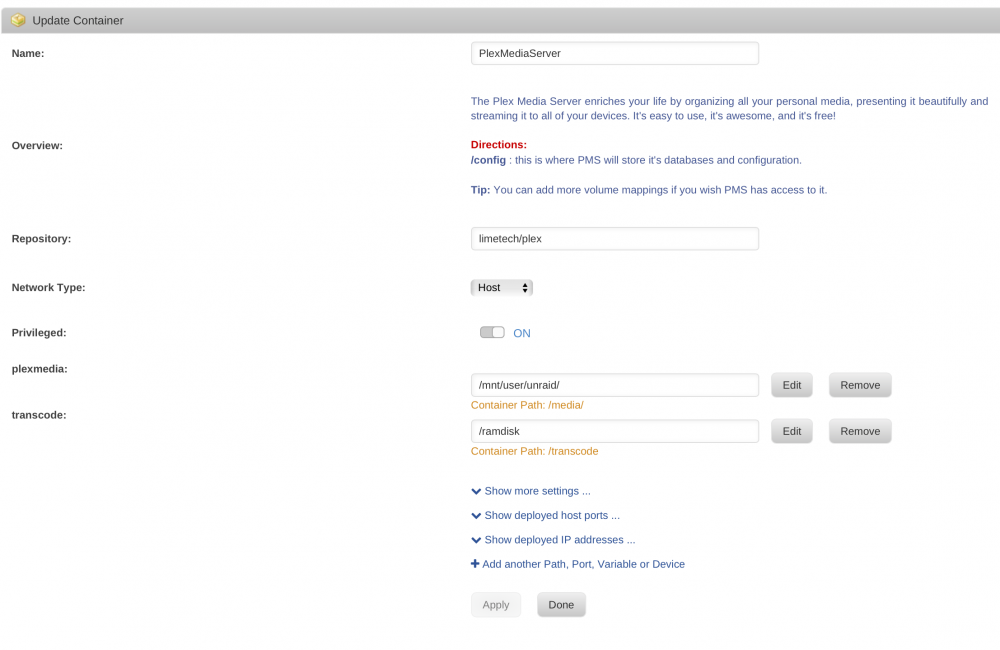
Did you change your plex settings to use that path? It does look like your tmpfs mounted correctly under /ramdisk. Remember you need to change your Plex Settings to actually use it. Attached you can find how I setup up mine and then inside the Plex setup you set it to use the /transcode path.
-
This is really odd, I have been using this for a long time, did you try running the commands manually? Any errors? Like: mkdir /ramdisk mount -t tmpfs -o size=2048m tmpfs /ramdisk This is my go file and the output of df -h which shows the /ramdisk of 2GB: # cat /boot/config/go #!/bin/bash # Start the Management Utility #ethtool -K eth0 tx off sg off tso off /usr/local/sbin/emhttp & mkdir /ramdisk mount -t tmpfs -o size=2048m tmpfs /ramdisk # df -h Filesystem Size Used Avail Use% Mounted on rootfs 12G 396M 12G 4% / tmpfs 12G 248K 12G 1% /run devtmpfs 12G 16K 12G 1% /dev cgroup_root 12G 0 12G 0% /sys/fs/cgroup tmpfs 128M 2.4M 126M 2% /var/log /dev/sdd1 7.6G 587M 7.1G 8% /boot tmpfs 2.0G 0 2.0G 0% /ramdisk /dev/md1 2.8T 1.4T 1.4T 51% /mnt/disk1 /dev/md2 2.8T 279G 2.5T 10% /mnt/disk2 /dev/md3 2.8T 17M 2.8T 1% /mnt/disk3 /dev/md4 2.8T 748G 2.0T 27% /mnt/disk4 /dev/md5 2.8T 218G 2.6T 8% /mnt/disk5 /dev/sdc1 233G 121G 111G 53% /mnt/cache shfs 14T 2.6T 12T 19% /mnt/user /dev/loop0 30G 1018M 28G 4% /var/lib/docker shm 64M 0 64M 0% /var/lib/docker/containers/dfc268df8c41735b6868324017ee4856f1dd9f1d6d78521101b81b126411eb03/shm shm 64M 8.0K 64M 1% /var/lib/docker/containers/508dfe59ead3611622afde93e85ad50f77f796511ff80c2bc4e07a814c6ea626/shm /dev/loop1 5.0G 18M 4.9G 1% /etc/libvirt
-
mbicca changed their profile photo
-
Hi Guys, Yes, trurl, sorry for the typo that is correct, I have also tested adding lines to the /boot/go script and it works great. Here are the reviewed steps , including the go script change: 1) Login using SSH to your Unraid server > ssh root@unraid(IP) 2) mkdir /ramdisk 3) mount -t tmpfs -o size=1024m tmpfs /ramdisk 4) This will create a 1G /ramdisk 5) Set Plex set to container (/transcode) host (/ramdisk) 6) Change Plex settings to /transcode 7) Be happy .. you can actually go inside the folder too: cd /ramdisk, start a movie and do a couple of ls or df -h and you will see that being used. 8) To make it persistent, you can add the lines to the go script under /boot/config 9) Here are the lines in mine that are working: #!/bin/bash # Start the Management Utility /usr/local/sbin/emhttp & ethtool -K eth0 tx off sg off tso off mkdir /ramdisk mount -t tmpfs -o size=1024m tmpfs /ramdisk NOTE: This is my whole go script, the only lines you really need are the last two ones to be added to whatever you have setup.
-
Hi Guys, I think the easiest way to do this and to make sure it works is: 1) Login using SSH to your Unraid server > ssh root@unraid(IP) 2) mkdir /ramdisk 3) mount -t tmpfs -o size=1024m tmpfs /mnt/ramdisk 4) This will create a 1G /ramdisk 5) Set Plex set to container (/transcode) host (/ramdisk) 6) Change Plex settings to /transcode 7) Be happy .. you can actually go inside the folder too: cd /ramdisk, start a movie and do a couple of ls or df -h and you will see that being used. Enjoy! -Marco


