GoldStig23
Members
-
Joined
-
Last visited
-
Wow. Ok, that was it. Should have looked at it closer. I renamed the share with lowercase and now the mover is working again. Thank you!
-
The mover button is not working on 7.0 when clicked, the gui refreshes but nothing happens. The gui also says that my cache pool has 57.3GB free available as well. I've never had the mover tuning plugin installed. I've also checked my flash drive .cfg files and they appear to be correctly capitalized. I found this comment to check the share settings and I had the same issue with the share settings being wrong, and set them back to Cache>Array. Not sure what my next steps are here. Attached are the diagnostics. The diagnostics from 0534 are from BEFORE I changed the cache>array setting. The 0551 is AFTER that. Even with that change, the mover is still not running. tower-diagnostics-20250205-0534.zip tower-diagnostics-20250205-0551.zip
-
I think I got everything working again. SSD drives are in a new pool, with the original data moved over. Got docker going again and all of the data from plex, etc is back to normal. Thank you for your help Jorge!
-
I deleted the pools and started over. Changed the filesystem to zfs and added both drives to the new pool. They both now show up as " Unmountable: Unsupported or no file system" When I select the format button on the main page, it tries to format, but it doesn't appear to work. It still remains unmountable. Here's the output of the logs: Dec 5 11:56:08 tower kernel: mdcmd (36): nocheck pause Dec 5 11:56:10 tower emhttpd: creating volume: cache (zfs) Dec 5 11:56:10 tower emhttpd: shcmd (8047): /sbin/wipefs -af /dev/sdj Dec 5 11:56:10 tower root: /dev/sdj: 2 bytes were erased at offset 0x000001fe (dos): 55 aa Dec 5 11:56:10 tower emhttpd: shcmd (8048): /sbin/blkdiscard /dev/sdj Dec 5 11:56:10 tower root: blkdiscard: cannot open /dev/sdj: Device or resource busy Dec 5 11:56:10 tower emhttpd: shcmd (8048): exit status: 1 Dec 5 11:56:10 tower emhttpd: continuing... Dec 5 11:56:10 tower emhttpd: writing MBR on disk (sdj) with partition 1 offset 2048, erased: 0 Dec 5 11:56:10 tower emhttpd: re-reading (sdj) partition table Dec 5 11:56:11 tower emhttpd: error: mkmbr, 2192: Device or resource busy (16): ioctl BLKRRPART: /dev/sdj Dec 5 11:56:11 tower emhttpd: shcmd (8049): udevadm settle Dec 5 11:56:12 tower emhttpd: shcmd (8050): /sbin/wipefs -af /dev/sdj1 Dec 5 11:56:12 tower emhttpd: shcmd (8051): /sbin/wipefs -af /dev/sdk Dec 5 11:56:12 tower root: /dev/sdk: 2 bytes were erased at offset 0x000001fe (dos): 55 aa Dec 5 11:56:12 tower kernel: ata8.00: Enabling discard_zeroes_data Dec 5 11:56:12 tower emhttpd: shcmd (8052): /sbin/blkdiscard /dev/sdk Dec 5 11:56:13 tower kernel: ata8.00: Enabling discard_zeroes_data Dec 5 11:56:13 tower emhttpd: writing MBR on disk (sdk) with partition 1 offset 2048, erased: 0 Dec 5 11:56:13 tower emhttpd: re-reading (sdk) partition table Dec 5 11:56:14 tower kernel: ata8.00: Enabling discard_zeroes_data Dec 5 11:56:14 tower emhttpd: shcmd (8053): udevadm settle Dec 5 11:56:14 tower kernel: sdk: sdk1 Dec 5 11:56:15 tower emhttpd: shcmd (8054): /sbin/wipefs -af /dev/sdk1 Dec 5 11:56:15 tower emhttpd: shcmd (8055): /usr/sbin/zpool create -f -o ashift=12 -o autotrim=on -O compression=off -O dnodesize=auto -O acltype=posixacl -O xattr=sa -O normalization=formD -m /mnt/cache cache mirror /dev/sdj1 /dev/sdk1 Dec 5 11:56:15 tower root: cannot open '/dev/sdj1': Device or resource busy Dec 5 11:56:15 tower root: cannot create 'cache': one or more devices is currently unavailable Dec 5 11:56:15 tower emhttpd: shcmd (8055): exit status: 1 Dec 5 11:56:15 tower emhttpd: mounting /mnt/cache Dec 5 11:56:15 tower emhttpd: shcmd (8056): mkdir -p /mnt/cache Dec 5 11:56:15 tower emhttpd: /usr/sbin/zpool import -d /dev/sdj1 2>&1 Dec 5 11:56:15 tower emhttpd: no pools available to import Dec 5 11:56:15 tower emhttpd: cache: no uuid Dec 5 11:56:15 tower emhttpd: /mnt/cache mount error: Unsupported or no file system Dec 5 11:56:15 tower emhttpd: shcmd (8057): rmdir /mnt/cache Dec 5 11:56:15 tower emhttpd: Starting services... Dec 5 11:56:16 tower emhttpd: shcmd (8060): /etc/rc.d/rc.samba restart Dec 5 11:56:16 tower wsdd2[12390]: 'Terminated' signal received. Dec 5 11:56:16 tower wsdd2[12390]: terminating. Dec 5 11:56:18 tower root: Starting Samba: /usr/sbin/smbd -D Dec 5 11:56:18 tower root: /usr/sbin/nmbd -D Dec 5 11:56:18 tower root: /usr/sbin/wsdd2 -d -4 Dec 5 11:56:18 tower root: /usr/sbin/winbindd -D Dec 5 11:56:18 tower wsdd2[13473]: starting. Dec 5 11:56:18 tower emhttpd: shcmd (8064): /etc/rc.d/rc.avahidaemon restart Dec 5 11:56:18 tower root: Stopping Avahi mDNS/DNS-SD Daemon: stopped Dec 5 11:56:18 tower avahi-daemon[12438]: Got SIGTERM, quitting. Dec 5 11:56:18 tower avahi-dnsconfd[12447]: read(): EOF
-
Ok, that seemed to have worked. I was able to mount it to the X directory, copy everything over with MC to the array. I think I grabbed everything What's the recommended next step? Should I start a new cache pool with both SSD drives, format them both and go to zfs?
-
No dice, here's the output: root@tower:~# mkdir /x root@tower:~# mount -t btrfs -o skip_balance /dev/sdj1 /x mount: /x: wrong fs type, bad option, bad superblock on /dev/sdj1, missing codepage or helper program, or other error. dmesg(1) may have more information after failed mount system call. root@tower:~# Here's the syslog output after running that command. BTRFS error (device sdj1: state EMA): Remounting read-write after error is not allowed
-
I added a new drive to the pool thinking I could just replace it after it replicated the data to it. Should I try adding it back to the old pool?
-
sdj1 was the drive in the old pool.
-
Here's the output of btrfs fi show root@tower:~# btrfs fi show Label: none uuid: e90043d3-1088-44d0-909f-6758d9989b79 Total devices 2 FS bytes used 458.17GiB devid 1 size 465.76GiB used 465.76GiB path /dev/sdj1 devid 2 size 0 used 0 path MISSING Label: none uuid: 715addb3-54e3-48d1-9c22-42f1ba1444ca Total devices 1 FS bytes used 144.00KiB devid 1 size 465.76GiB used 2.02GiB path /dev/sdk1 root@tower:~#
-
Two weeks ago, I had a hard lock up on 6.12.5 and rebooted the server. After that happened I turned on remote syslogging to see if I could catch the error again if it happened. I noticed another issue where the cache drive BTRFS was throwing errors BTRFS: error (device loop2: state EA) in cleanup_transaction:1964: errno=-5 IO failure BTRFS warning (device loop2: state E): Skipping commit of aborted transaction. BTRFS info (device loop2: state E): forced readonly BTRFS: error (device loop2) in btrfs_commit_transaction:2466: errno=-5 IO failure (Error while writing out transaction) BTRFS error (device loop2): bdev /dev/loop2 errs: wr 10, rd 0, flush 0, corrupt 0, gen 0 I/O error, dev loop2, sector 16606560 op 0x1:(WRITE) flags 0x1800 phys_seg 16 prio class 2 BTRFS error (device loop2): bdev /dev/loop2 errs: wr 9, rd 0, flush 0, corrupt 0, gen 0 I purchased a new ssd to replace the failing drive. I naively thought that replacement worked the same as replacing the parity drive, so I added the drive to the cache pool, and that seemed to have caused the issues to expound. I tried to backup the files on the cache drive by setting the shares to Cache>Array and invoking the mover. I was able to move most of the data, but it seems that the drive went read only. I captured diagnostics from Dec 3rd after that happened. I ran the following commands and it appeared to fail, so I stopped the array and started the array again. root@tower:~# root@tower:~# mount -o rescue=all,ro /dev/sdj1 /temp mount: /temp: /dev/sdj1 already mounted on /temp. dmesg(1) may have more information after failed mount system call. root@tower:~# btrfs restore -v /dev/sdj1 /mnt/cache-ssd/restore ERROR: /dev/sdj1 is currently mounted, cannot continue root@tower:~# After starting and stopping the array, my drive is now unmountable. I've run the same commands above, and the result is the same. See diagnostics from today after the drive went unmountable. What's my next step? Not all of the data made if off the cache drive, and while it's just plex and some *arr services, it would be nice to have to start from scratch. I do have a second ssd drive installed in the server, so I plan on getting this drive replaced and hopefully RMA'd since it's still under warranty. tower-diagnostics-20231204-2141.zip tower-diagnostics-20231203-2102.zip
-
Sounds like it's correct. If you go to Settings>Scrapers and click the reload scrapers button, does that work? If not, you could always restart the docker and see if that works.
-
I'm trying to scrape one of the sites, but I'm getting a "x509: certificate signed by unknown authority" error. I found in the discord that suggested to download the .pem file from the site, and install it to the ca. Is there a way to install this cert in the docker file? I've tried using scp, and putting it in etc/ssl/certs/ and then using the terminal "update-ca-certicates" but that didn't work. Is there a different location for certs within the dockers? Update: In the dev version, there's an option to ignore unsecure certificates fixing this issue.
-
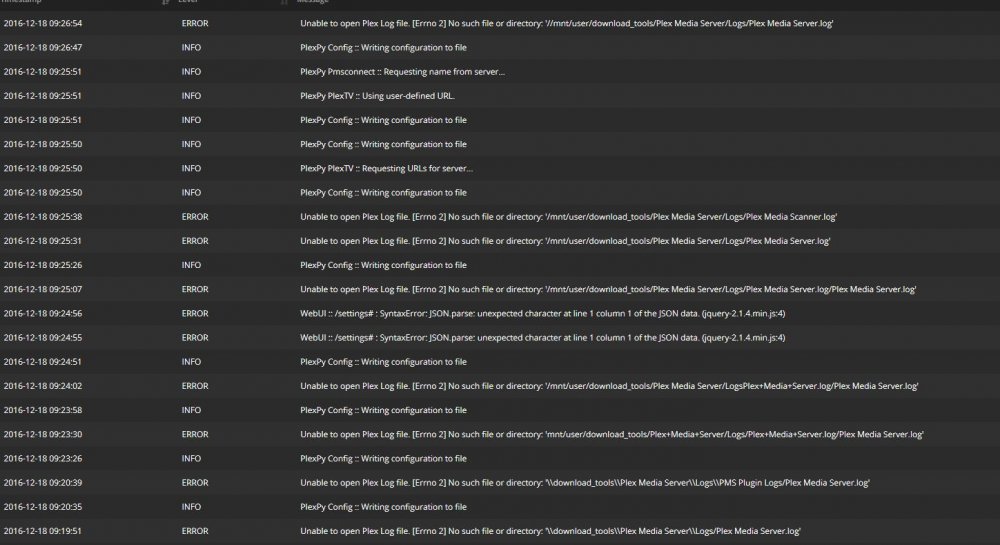
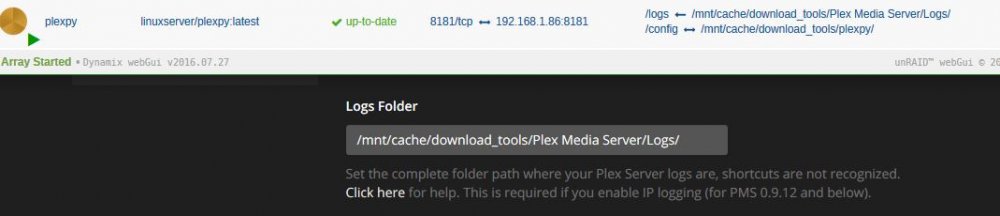
Ah, I should have RTFM. Thank you. In the plexpy webui, I'm still getting the directory not found in the logs, even after a restart. I am using the binhex plex docker, could that make a difference?
-
I'm having a really difficult time importing my Plex logs into plexpy. I've tried multiple different formats and can confirm that the plex logs are all in the logs folder. I have a feeling I'm missing something really obvious here, can someone point me in the right direction?