





lutiana
Members
-
Joined
-
Last visited
Everything posted by lutiana
-
I am hitting the exact same wall. Anyone got an answer to this? EDIT: Fixed the issue. Stop the docker, then go into the app data folder and delete the navidrome.db file. Then restart the docker and it'll present you the ability to create an admin account.
-
@iXNyNe Great script, I just added this just before the RM statement: echo "Deleting now, you have 2 seconds to break here to stop. Use Ctrl-C to break" sleep 2 Slows this down, but it at least gives you time to kill it before it deletes in case you see something you don't like.
-
I had a power failure here, and ever since I cannot get your airsonic advanced docker to work, when I try to load it I get (with the html tags and everything): <html><head><title>Airsonic Error</title></head><body><h2>Airsonic Error</h2><p>The directory <b>/var/airsonic</b> is not writable. Please change file permissions, then restart the servlet container.</p><p>(You can override the directory location by specifying -Dairsonic.home=... when starting the servlet container.)</p></body></html> I tried doing a forced update to no avail. The `/var/airsonic` folder in the docker is mapped to `/mnt/user/appdata/airsonic-advanced-a75g` and I can look at the permissions, but I have no idea what they should be, nor why they would have changed due to a power failure (all my other dockers come up and work fine). Interestingly the log file in that folder is being written to when the thing starts up, and I see no error messages being logged. Any suggestions on how to diagnose this and get it fixed? EDIT: Here is the directory listing from the unRAID side: /mnt/user/appdata/airsonic-advanced-a75g# ls -al total 516 drwxr-xr-x 1 root root 558 Sep 11 03:00 ./ drwxrwxrwx 1 nobody users 164 Jun 29 20:02 ../ -rw-r--r-- 1 nobody users 388397 Sep 11 15:08 airsonic.log -rw-r--r-- 1 nobody users 14243 Sep 5 00:27 airsonic.log.2022-09-04.0.gz -rw-r--r-- 1 nobody users 12275 Sep 6 03:00 airsonic.log.2022-09-05.0.gz -rw-r--r-- 1 nobody users 13878 Sep 7 01:29 airsonic.log.2022-09-06.0.gz -rw-r--r-- 1 nobody users 16497 Sep 8 03:00 airsonic.log.2022-09-07.0.gz -rw-r--r-- 1 nobody users 21245 Sep 9 03:00 airsonic.log.2022-09-08.0.gz -rw-r--r-- 1 nobody users 23743 Sep 10 03:00 airsonic.log.2022-09-09.0.gz -rw-r--r-- 1 nobody users 14351 Sep 11 03:00 airsonic.log.2022-09-10.0.gz -rw-r--r-- 1 nobody users 1272 Sep 11 15:08 airsonic.properties drwxr-xr-x 1 nobody users 10 Sep 11 15:08 cache/ drwxr-xr-x 1 nobody users 166 Sep 11 15:08 db/ drwxr-xr-x 1 nobody users 68 Apr 9 20:35 index19/ drwxr-xr-x 1 nobody users 16060 Sep 9 19:47 lastfmcache/ -rw-r--r-- 1 nobody users 896 Sep 11 15:08 rollback.sql drwxr-xr-x 1 nobody users 34 Apr 9 20:51 thumbs/ drwxr-xr-x 1 nobody users 20 Apr 9 20:35 transcode/ and from in the docker itself: ls -alh total 516K drwxr-xr-x 1 root root 558 Sep 11 03:00 . drwxr-xr-x 1 root root 164 Sep 11 15:07 .. -rw-r--r-- 1 au users 380K Sep 11 15:13 airsonic.log -rw-r--r-- 1 au users 14K Sep 5 00:27 airsonic.log.2022-09-04.0.gz -rw-r--r-- 1 au users 12K Sep 6 03:00 airsonic.log.2022-09-05.0.gz -rw-r--r-- 1 au users 14K Sep 7 01:29 airsonic.log.2022-09-06.0.gz -rw-r--r-- 1 au users 17K Sep 8 03:00 airsonic.log.2022-09-07.0.gz -rw-r--r-- 1 au users 21K Sep 9 03:00 airsonic.log.2022-09-08.0.gz -rw-r--r-- 1 au users 24K Sep 10 03:00 airsonic.log.2022-09-09.0.gz -rw-r--r-- 1 au users 15K Sep 11 03:00 airsonic.log.2022-09-10.0.gz -rw-r--r-- 1 au users 1.3K Sep 11 15:08 airsonic.properties drwxr-xr-x 1 au users 10 Sep 11 15:08 cache drwxr-xr-x 1 au users 166 Sep 11 15:08 db drwxr-xr-x 1 au users 68 Apr 9 20:35 index19 drwxr-xr-x 1 au users 16K Sep 9 19:47 lastfmcache -rw-r--r-- 1 au users 896 Sep 11 15:08 rollback.sql drwxr-xr-x 1 au users 34 Apr 9 20:51 thumbs drwxr-xr-x 1 au users 20 Apr 9 20:35 transcode
-
Does the diagnostic report I posted indicate what the issue is with my system? FWIW - I acknolwledge that calling NVMe unreliable in unRAID is probably a step too far, but from what I gather in this thread, this is a known issue, and therefore should be at least warrant a foot note in the documentation, letting people factor this into their decisions, especially as this can cause data corruption even when the hardware is working just fine.
-
Thank you for this completely frustrating and useless statement. I did have backups, I followed the prescribed process of using the extension to do backups, but no where in my extensive research and questions I had about this did anyone tell me that this would not be adequate due to *known* issues with NVMe storage and unRAID. Hell I never wanted to move the Appdata folder to the cache drive in the first place, as I was more interested in resiliency than performance, but for some reason this is just not an option in UnRAID. Also, can you point me to the official unRAID documentation that warns that NVMe based storage is not reliable due to the fact that it can "drop offline" and that this is not uncommon? Had I known that, I would not have wasted my time and money adding a cache drive at all.
-
Fair enough, attached are the diagnostics, but run today, after I pulled the drive from the system, and the original issue occurred around March 22, so not sure they will tell us anteing about what happened. Interestingly the drive does not even show up in the Historical device section of the Main section in the UI. Mostly I am looking for an idea of what best practice is here, and how that compares to what I did and/or if there is any obvious hardware compatibility issues here. Like, is this a common occurrence with PCIe to NVMe adapters? Should I have prepped the drive differently? Was there some sort of extra backup process I should have looked into doing? etc. Basically how can I add the cache drive back in, but also put something in place to guarentee that this won't happen again, or if it does, a guaranteed way to recover from it. deepthought-diagnostics-20220410-1541.zip
-
Back in October I picked up a WD Red SN750 and one of these (PCIe NVMe adatper). Installed that into my server (Intel S1200BTL board with a Xeon E3 1240 cpu and 16Gb of DDR3 ECC RAM). Threw it into the system, configured the cache drive, installed the app data backup plugin, set it up, formatted the cache drive to btrfs and everything was great, until about two weeks ago. I left on vacation, the day after I left this new cache drive suddenly read only, and all my dockers never came back online after a backup. The data on the drive was corrupted (not all of it, just most of it as near as I can tell). The backup kept running, but at that point it was just backing up bad data. I could not do much about it from across the globe, so I just let it be till this weekend. The drive was visible by the system, I could browse to it and look at the data on it. Apart from the corrupted files and read only state everything looked fine. I decided that the first thing to try was to simply reboot the system, so I did. It started up, and the cache pool and drive were just missing. `lsblk` showed nothing, but `lspci` showed the drive was there. My next thought was the I just got unlucky and the drive was bad. So I yanked it (and the adapter) from the server, and set about just rebuilding all my dockers. Thankfully this was reasonably straight forward and re-doing them was not really much of a loss except for Jellyfin, that one hurts a little to have to start all over again, but it's happily scanning my media folder now. Ok, next step was to check the SN750, get a report going and see if I can RMA the drive through WD. Well, to my surprise the drive tests out just fine, nothing wrong with it. Threw it back into the carrier board and tested it out on another linux machine I have lying around, still works perfectly. So know I am wondering what the heck happened? Should I have done something different when setting up the cache drive? Is the issue the cheap PCIe to NVMe adapter I bought and if so, is there a better one I can buy? Obviously I am now very gun shy about putting it back in the server, especially as the backup plugin gives me near zero guarantee that this won't happen again (is there a better way to backup the app data folder?). Any advice would be welcome here. Thanks in advance
-
I am trying to recover my Jellyfin setup after an issue with my Cache drive. I copied back over the config and data folder, from a backup, but I am getting: 2022-04-09 21:21:40,441 DEBG 'jellyfin' stdout output: [21:21:40] [FTL] [1] Main: Error while starting server. Microsoft.Data.Sqlite.SqliteException (0x80004005): SQLite Error 11: 'database disk image is malformed'. Is there any way to recover from this? Or am I hosed? EDIT: Never mind, I'm hosed. Using a Hex editor I looked at a collection of files I have, and they filled with random blocks of null characters and "00" blocks.
-
Then you'll need to reach to Cloud flare to work out what's missing and/or where to get the correct client connection certificate.
-
See step 3 in the link I added that take you to the digital ocean instructions. You need to add the authenticated origin stuff in your config: ssl_certificate /config/magi-plex.com.pem; ssl_certificate_key /config/magi-plex.com.key; ssl_client_certificate /config/cloudflare.crt; ssl_verify_client on; Where cloudflare.crt is: -----BEGIN CERTIFICATE----- MIIGCjCCA/KgAwIBAgIIV5G6lVbCLmEwDQYJKoZIhvcNAQENBQAwgZAxCzAJBgNV BAYTAlVTMRkwFwYDVQQKExBDbG91ZEZsYXJlLCBJbmMuMRQwEgYDVQQLEwtPcmln aW4gUHVsbDEWMBQGA1UEBxMNU2FuIEZyYW5jaXNjbzETMBEGA1UECBMKQ2FsaWZv cm5pYTEjMCEGA1UEAxMab3JpZ2luLXB1bGwuY2xvdWRmbGFyZS5uZXQwHhcNMTkx MDEwMTg0NTAwWhcNMjkxMTAxMTcwMDAwWjCBkDELMAkGA1UEBhMCVVMxGTAXBgNV BAoTEENsb3VkRmxhcmUsIEluYy4xFDASBgNVBAsTC09yaWdpbiBQdWxsMRYwFAYD VQQHEw1TYW4gRnJhbmNpc2NvMRMwEQYDVQQIEwpDYWxpZm9ybmlhMSMwIQYDVQQD ExpvcmlnaW4tcHVsbC5jbG91ZGZsYXJlLm5ldDCCAiIwDQYJKoZIhvcNAQEBBQAD ggIPADCCAgoCggIBAN2y2zojYfl0bKfhp0AJBFeV+jQqbCw3sHmvEPwLmqDLqynI 42tZXR5y914ZB9ZrwbL/K5O46exd/LujJnV2b3dzcx5rtiQzso0xzljqbnbQT20e ihx/WrF4OkZKydZzsdaJsWAPuplDH5P7J82q3re88jQdgE5hqjqFZ3clCG7lxoBw hLaazm3NJJlUfzdk97ouRvnFGAuXd5cQVx8jYOOeU60sWqmMe4QHdOvpqB91bJoY QSKVFjUgHeTpN8tNpKJfb9LIn3pun3bC9NKNHtRKMNX3Kl/sAPq7q/AlndvA2Kw3 Dkum2mHQUGdzVHqcOgea9BGjLK2h7SuX93zTWL02u799dr6Xkrad/WShHchfjjRn aL35niJUDr02YJtPgxWObsrfOU63B8juLUphW/4BOjjJyAG5l9j1//aUGEi/sEe5 lqVv0P78QrxoxR+MMXiJwQab5FB8TG/ac6mRHgF9CmkX90uaRh+OC07XjTdfSKGR PpM9hB2ZhLol/nf8qmoLdoD5HvODZuKu2+muKeVHXgw2/A6wM7OwrinxZiyBk5Hh CvaADH7PZpU6z/zv5NU5HSvXiKtCzFuDu4/Zfi34RfHXeCUfHAb4KfNRXJwMsxUa +4ZpSAX2G6RnGU5meuXpU5/V+DQJp/e69XyyY6RXDoMywaEFlIlXBqjRRA2pAgMB AAGjZjBkMA4GA1UdDwEB/wQEAwIBBjASBgNVHRMBAf8ECDAGAQH/AgECMB0GA1Ud DgQWBBRDWUsraYuA4REzalfNVzjann3F6zAfBgNVHSMEGDAWgBRDWUsraYuA4REz alfNVzjann3F6zANBgkqhkiG9w0BAQ0FAAOCAgEAkQ+T9nqcSlAuW/90DeYmQOW1 QhqOor5psBEGvxbNGV2hdLJY8h6QUq48BCevcMChg/L1CkznBNI40i3/6heDn3IS zVEwXKf34pPFCACWVMZxbQjkNRTiH8iRur9EsaNQ5oXCPJkhwg2+IFyoPAAYURoX VcI9SCDUa45clmYHJ/XYwV1icGVI8/9b2JUqklnOTa5tugwIUi5sTfipNcJXHhgz 6BKYDl0/UP0lLKbsUETXeTGDiDpxZYIgbcFrRDDkHC6BSvdWVEiH5b9mH2BON60z 0O0j8EEKTwi9jnafVtZQXP/D8yoVowdFDjXcKkOPF/1gIh9qrFR6GdoPVgB3SkLc 5ulBqZaCHm563jsvWb/kXJnlFxW+1bsO9BDD6DweBcGdNurgmH625wBXksSdD7y/ fakk8DagjbjKShYlPEFOAqEcliwjF45eabL0t27MJV61O/jHzHL3dknXeE4BDa2j bA+JbyJeUMtU7KMsxvx82RmhqBEJJDBCJ3scVptvhDMRrtqDBW5JShxoAOcpFQGm iYWicn46nPDjgTU0bX1ZPpTpryXbvciVL5RkVBuyX2ntcOLDPlZWgxZCBp96x07F AnOzKgZk4RzZPNAxCXERVxajn/FLcOhglVAKo5H0ac+AitlQ0ip55D2/mf8o72tM fVQ6VpyjEXdiIXWUq/o= -----END CERTIFICATE----- Also, you definitely want to obfuscate your config files here, blank out the URL and the name/location of the certs (I recommend you rename them now).
-
Sounds like your issue has to do with NGINX and not Audiobookshelf. Cloudflare is issuing you a certificate to use. Does that include a private key? If not, then I am not sure how you would use this. Any certificate has to two parts, the certificate it'self and the private key, which was used to generate the certificate. In the NGINX config you need to specify both parts like this: ssl_certificate /path/to/certificate; ssl_certificate_key /path/to/key; Both of these are basically just plain text files, one with the cert in it, the other with the key. Your actual code should look something like this: ssl_certificate /etc/nginx/ssl/domain.name.crt; ssl_certificate_key /etc/nginx/ssl/domain.name.key; Where domain.name.crt is the certificate file from Cloud flare, and domain.name.key is the private key used to generate the certificate. If Cloud flair is issuing you a certificate used for authentication, without a key, then whatever service you are using from them probably won't work with this as a proxy. This might help: https://www.digitalocean.com/community/tutorials/how-to-host-a-website-using-cloudflare-and-nginx-on-ubuntu-20-04
-
I worked it out. Turns out it was an IP conflict with another container. No clue why this was not simply logged somewhere, but it took me manually creating and trying to run this container to get: docker: Error response from daemon: Address already in use. From there I could work it was the IP conflict. Hopefully this helps someone else. It's weird that this was not simply logged somewhere in unRAID, it looks me an hour or so of playing around to get that error. Would have been nice if when I tried to run it the popup said "Address already in use" rather than a generic 403 error with no real indication as to what happened.
-
The idrac6 container appears to be broken. I installed it, and when it goes to start I get an 403 error and the docker log shows this: time="2021-12-28T15:38:58.764125699-08:00" level=error msg="bbd98ab026faa7370d9ce5a1ca28cec6123a1b9bb3e5946a8fb97d8b06bf871a cleanup: failed to delete container from containerd: no such container" Anyone else run into this? Any ideas on how to get this container to run?
-
If I start messing with the folder/file layout (renaming, moving around etc). Will a rescan of the library be sufficient to get those changes to reflect in the UI? i.e Will it delete entries for files/folders that are no longer present? EDIT: For others who may wonder this same thing, audiobookshelf handles folder name changes very well. Just rename it and the ui is updated nearly instantly. Makes clean up very easy.
-
I have been, there are two posts from me there already (the nginx reverse proxy, and I was about to make a thread with my suggestion about ordering, but I missed the one you linked), so cancelled it before submitting it. Glad to be on the same page as you though
-
Got it, I will adjust my expectations on this one. No, it is very useful IMO, it may just need more explanation somewhere on what it does exactly. That is helpful. I may wait till the next release, then start working on optimizing my naming convention on my files. The library is well organized, but not perfect.
-
Actually, a rather elegant way to get around this would be to update the meta data track number with the update, but not re-order the tracks, but make the column heading clickable so that the list is sorted by that column and then you can save the order from there. This would not obliterate any custom ordering, but would allow for the user to easily determine which data is best for track ordering and can pick it with a simple click. Makes ordering the tracks by the number parsed from filename, the number grabbed from the id3 tag or even the actual file name very easy to do.
-
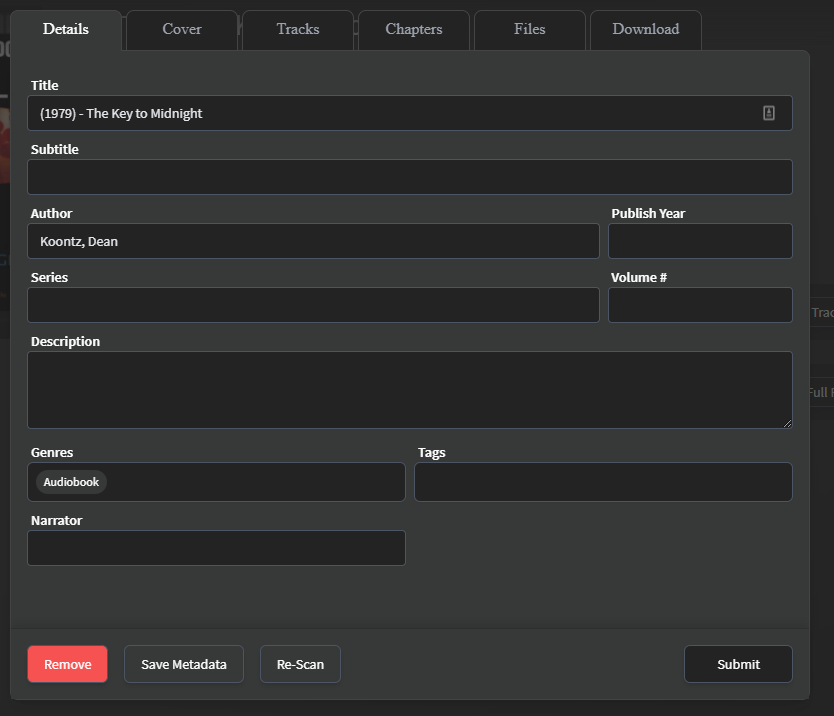
Yes, that does make sense. I think you may want to consider adding a second button that says "Update Track numbers from Metadata" or something like that. Maybe a popup that give you two options, with track number update and re-order and without. The main issue I am running into here is with books that are ripped by CD track. So I have Disk 1 track 1, that has the same track number as disk 2 track 2. So I went through and updated the numbering so it just flowed through the disks. Manually re-ordering the tracks is an option, but it will take forever to do, much easier if I could just update the file order by the track numbering in the id3 meta data. The other issue that I am seeing is something to do with the author parsing. The <last>,<first> folder names seem to work, but it seems to be getting in the way of meta data retrieval and how the book is listed. Notice how the "By" field is listed. I was not expecting that, I was expecting it to be <First> <Last> If I go into the meta data editor I get: Nothing is populated, and again the author field is not what I'd expect. I *think* this is why I am not getting any meta data from the internet. Although if I manually set it to the correct way, and re-scan it still does not grab any internet meta data either, nor does a whole library scan work either. Am I misunderstanding how that button is supposed to work? I also notice that on more than a few titles the parser includes the year (see the screen shot for an example). But again, manually correcting that also does not yield any internet meta data being added.

-
I do not. Attached is what you need I think. tree.txt is the entire tree, without the files. tree_small.txt is just a snippet of the structure, but with files in the list. tree.txt tree_small.txt
-
Ok, here is what I found. {"album":"Mockingjay","artist":"Suzanne Collins","album_artist":"Suzanne Collins","iTunPGAP":"0","iTunNORM":" 000003A4 000003A4 00002A61 00002A61 0000914E 0000914E 00007C1A 00007C19 00023E63 00023E63","iTunSMPB":" 00000000 00000210 00000B10 0000000000B941E0 00000000 0042C7D2 00000000 00000000 00000000 00000000 00000000 00000000","iTunes_CDDB_1":"F9117710+335490+16+150+20251+44632+62836+85156+110966+130278+152446+175159+198276+212435+224801+245449+269802+292771+314853","iTunes_CDDB_TrackNumber":"12","disc":"2/10","encoded_by":"iTunes 10.4","title":"Disk 2 Track 12","track":"023/152","date":"2010"} The interface indicates that the metadata shows this to be 023/152, or track 23 (in the "From metadata column). The file list on the other hand says it is track 12 from the metadata, which is what it was before I edited the track number in the id3 tag. A full library scan did not fix this, nor did a re-scan if the individual book fix it either.
-
The books flagged in the warnings do not appear to have issues with covers, though there are a ton of books that do not have covers after the scan. I *think* this has to do with the parsing from the file/folder names as quite a few of them list the author as <last>,<first> and the book name has bits from the folder path that should not be there (such as the number in the series or other such things). I think this is mostly on me to go through and fix the folder names to match the convention needed.
-
Also, there is something odd going on with the meta data retrieval. It looks like most of the book covers were grabbed fine, but none of the books have any data beyond that. No synopsis/author etc. When I click edit to check on the metadata, the "Details" tab is mostly blank, and what it has seems to only be what was parsed from the local file name/path. The author is listed as <last,first> as well. If I click "rescan" it tells me that it was updated, but the meta data remains blank and it is also not re-scanning the ID3 data from the tracks either. EDIT: For Clarity - I am going through the books, any flagged as having errors I am manually fixing. Most so far are just the track number meta data in the MP3 being wrong. So I am using mp3tag to just re-number them in order. But when I go to rescan the book, nothing changes. So I am wondering how I can get the changes made in the file to happen in the Audiobookshelf interface.
-
Yes, it's version 1.4.15.
-
I am finally getting around to implementing this. So far so good, but I am getting warnings like this in the log: [Audiobook] Full cover path still not set "/s/book/kv4956i4/cover.jpg" and this: [Book] "The Valley of Horses" updating book cover to "/s/book/kv499okx/cover.png" but no full path was passed What does that mean exactly? Is it something to be concerned about?
-
Wow, this is sweet! And exactly what I have been looking for! Quick question, your docs say you have to have the Author as the top folder, but as <First> <Last>, all of mine are <Last>, <First>. I am guessing I have to rename all of them for this to work then? If so, have you considered tweaking it so that both could work?


