





Lebowski
Members
-
Joined
-
Last visited
Everything posted by Lebowski
-
Just noticed that I can't make the time change on the schedule stick. Make a change to the time and it will revert back to the old setting. I have completely removed the plugin and reinstalled, same issue, Have tested other schedules and they work fine.
-
Emby shows an update, it downloads nothing and still shows an update avail. Anyone else have this? only came up yesterday.
-
Thank you, I will give it a go.
-
I know this is not a CA issue directly but I have my backups for CA run nightly. It's a good tool to reset Sabnzbd before my offpeak downloads start as I have found it flaky start stop on a schedule. Last night after the backup / start/stop Sabnzbd dumped it's queue and orphaned all the jobs. Granted I was able to get them back with one push. Not sure if anyone else has had this happen? Didn't see it till next morning an missed a offpeak download session.
-
Tried searching for this. I have 3 USB external HDD's attached to my server for crash plan backups. Before crash plan these drives use to sleep automatically as external HDD's normally do. My backups only run weekly. However the drives no longer sleep. I am currently testing with crashplan turned off and waiting the result. I am also using the open files plugin to see if I have any open files (none open to "disks") Not sure if anyone else has issues with USB drives not sleeping?
-
Just posting here if not already known, speedtest plugin plays up with the Dynamix time of day scheduled option. https://lime-technology.com/forum/index.php?topic=36543.1140
-
Can confirm, Removing speedtest plugin restores the time function on the trim plugin
-
not sure if anyone else has this issue? i want to change the time of day but i cant.
-
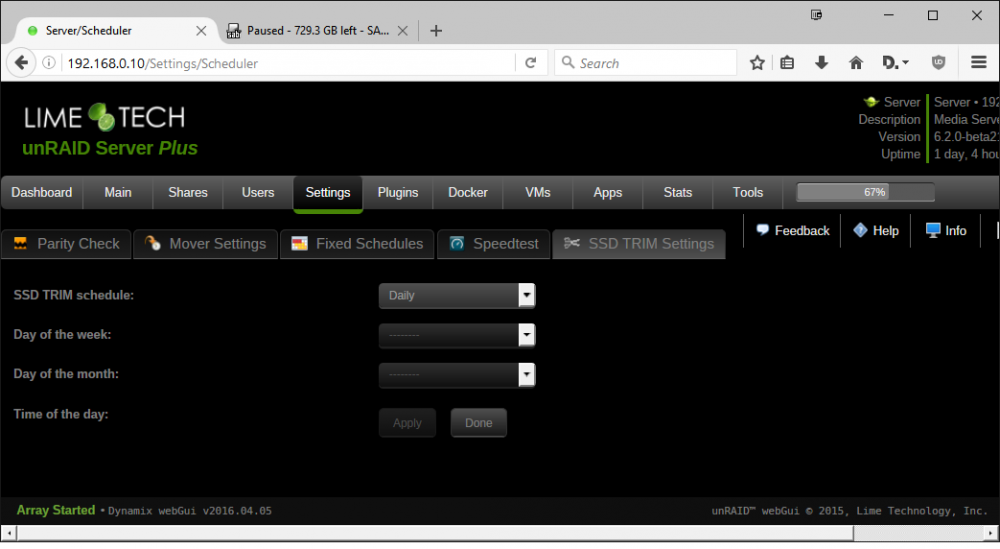
For Trim Plugin, it looks like the time of day option has gone or some sort of UI error? I have uninstalled and reinstalled, still same issue.
-
Good to know, thanks.
-
Thanks Squid, hdparm -N /dev/nvme0n1 & / hdparm -N /dev/nvme1n1 returned the following /dev/nvme0n1: SG_IO: questionable sense data, results may be incorrect max sectors = 0/1, HPA is enabled /dev/nvme1n1: SG_IO: questionable sense data, results may be incorrect max sectors = 0/1, HPA is enabled
-
Thank you I don't really understand what HPA is but I figure it's part of the BTRFS cache pool?
-
This would be great and VM's (I know VM's is not really a part of this but Flash backup would be great)
-
Just wanted to check on this Other Comments section, do I need to do anything? NVME pool.
-
Container update just came up. Have updated and removed the extra variable, all working fine version 1.0.2
-
Thank you, it's up and going now.
-
I had the same issue this morning after re-booting unRaid. Sab would not auto start. I removed the container and re-installed it. That fixed my issue I restarted UnRaid to test and it auto started again. I did that before seeing this post. At work now so not sure what version is running. Ignore this, I did a remote login to check it. It's not working... Sab was stopped. When I looked at it this morning it must of been trying to start and stopped shortly after I checked it.
-
I have full access to the shares with my user login via windows. The share is secure and guests are read only so no one moves files instead of copy when grabbing files from me. My user has full access. I'm getting the file access info from file zilla in case you are wondering how i am getting the info. I had same issues with Sab, sonarr and cp. they have folder / file permission settings to change to 666/777 as needed. its not really an issue. Any modifications I do to the images I run in Emby and its working fine. It's only if I want to move the movie folder to another share that I run into problems.
-
-
Thanks, Images / nfo created in the main movie folder have file permission 644 seems I can change those The extrafanart folder has permission 755, I can rename the folder, but cant cut/move it. Cant do anything to the images inside it (they are 644 but seem to be locked down for rename / delete / cut)
-
Change the container variable? e.g. APP_UID (Default) to PUID (Like my other dockers?) I don't understand how it changes things, new to linux / dockers / unraid.
-
What issues are you reffering to? SMB client can't move or delete the files until permissions are changed to 0666. Hi Just wanted to ask about this, I have the same issue, meta data / images downloaded can't be moved or deleted. This is something being looked into? It's not a major deal as I don't really delete stuff or move it. (I guess if I do I use MC or FileZilla) In SAB and CP / SONARR you have the option to change file permissions. Thanks,

