andreidelait
Members
-
Joined
-
Last visited
Everything posted by andreidelait
-
I have two Unraid instances. One is at home and I use a few docker containers over br0 with IP Addresses from my local network (pi-hole, unifi-controller etc). And also one that I manage remotely for a friend. Both have the same settings as far as I can tell and both are on v6.9.2, but on his I cannot use any container on br0 what so ever. The interesting part is that I have Host access to custom networks: Disabled and it still works. On the other one I've tried Enabled or Disabled with no success.
-
Yes exactly.
-
Mine is stuck on June 27th right now. I just restarted the container and you're right. All daily alerts are shown now.
-
You have to format them as NTFS. Windows does not work with XFS or BTRFS.
-
If you're willing to run a VM 24/7 that's totally fine. When you finish plotting you can also reduce the amount of RAM allocated to that VM and just farm with it.
-
Yes that is true but I have some unassigned HDDs. Also is very common for people to use external HDDs for farming.
-
I was referring to /plots not plotting. I found a solution by adding a new directory in the config file /mnt/user/appdata/chia/mainnet/config/config.yaml I added another directory named plots2 and mapped it to another HDD where I store more plots plot_directories: - /plots - /plots2 So I guess you can add as many directories as you need if you're using multiple HDDs.
-
Is there a way to add multiple plots locations with this container?
-
Thank you for making it clear. I've edited the post above and I can confirm if works after moving that section from swag to nextcloud default config.
-
So I updated to 21.0.1 today and I had a few errors after. I will address them here and I hope they will help others to fix them quick. I had errors referring to my nginx config /.well-known/carddav, caldav, webfinger etc. Here is my nextcloud nginx config section about that location ^~ /.well-known { location = /.well-known/carddav { return 301 /remote.php/dav/; } location = /.well-known/caldav { return 301 /remote.php/dav/; } location = /.well-known/webfinger { return 301 /index.php$uri; } location ^~ /.well-known { return 301 /index.php$uri; } try_files $uri $uri/ =404; } I had them different before and apparently they do not work in this version. Also I had an error reffering to some db indices. Fo these you go into nextcloud container console and run sudo -u abc php /config/www/nextcloud/occ db:add-missing-indices And another one was reffering to default phone region. You have to add your phone region in config.php 'default_phone_region' => 'GB', You have to replace GB with your country specific code. You can find it here I hope this is useful info.
-
On Demand is the Default option. I remember changing it to Power Save a few months ago without noticing a performance impact but hoping for a better power consumption. So changing it back I expect a more aggressive frequency stepping with a small increase in power consumption. I hope I'm not wrong.
-
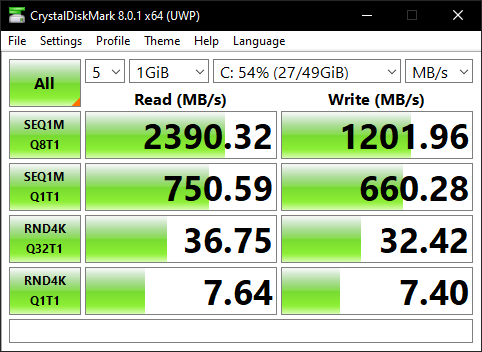
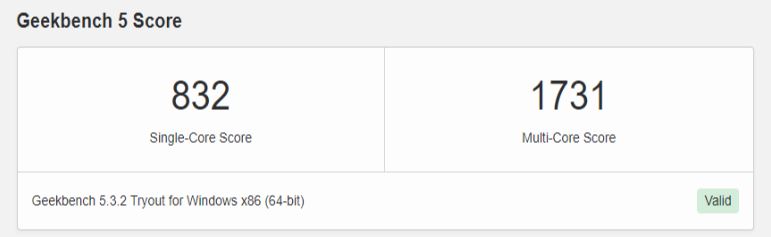
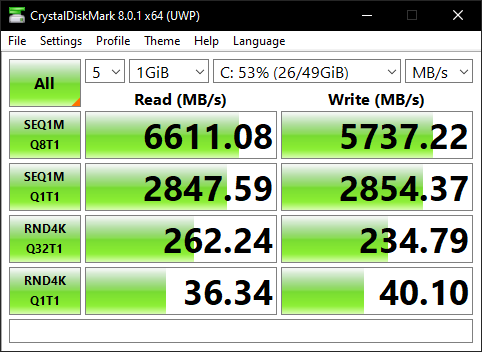
Wow you're a life saver. Thank you so much for the solution. It works as expected now. BEFORE AFTER

-
Did this happen since Unraid 6.9.0 update? My VMs are slow and luggy since then and they worked just fine before. Maybe this solution will work for you. Mine is fixed
-
I can confirm the same. I've noticed it since I updated from 6.8.3 to 6.9.0 RC2 and it's the same in the release version. I'm going crazy about it. I've tried everything I've found on the internet about it. I see System Interrupts in task manager a lot and I'm sure that's not good. I nuked my old W10 VM that I worked from home on the entire last year and it was just fine back then. Installin a new one takes a much longer time than it should. I think also the linux VMs are much slower now. I'll calm down that I'm not alone in this and I'm looking forward for a fix. I'll let you know if I find something for sure.
-
What I find unusual is that wp-login is a file specific to wordpress and NOT nextcloud. I guess some bot knocks at my door.
-
I have some log entries in nginx error log that look like this 2020/12/29 20:38:38 [error] 375#375: *405 FastCGI sent in stderr: "Primary script unknown" while reading response header from upstream, client: 172.17.0.1, server: _, request: "GET /wp-login.php HTTP/1.1", upstream: "fastcgi://127.0.0.1:9000", host: "MYDOMAIN", referrer: "http://mta-sts.MYDOMAIN/wp-login.php" is this normal?
-
My Nextcloud interface is very slow since 20.0.3 I guess. I updated de 20.0.4 and it's the same. Is it just me or somone else has this problem too?
-
If you're not using reverse proxy you need to modify the nginx config that nextcloud container is using. In my case is /mnt/user/appdata/nextcloud/nginx/site-confs/default
-
I have the same issue and it looks like it's related to an internal port 8088 Edit: I had another docker using that port. After changing that, it works now. 2020-09-22T19:48:12.501537Z info Go runtime {"log_id": "0PPqaULG000", "version": "go1.13.8", "maxprocs": 8} run: open server: listen: listen tcp 127.0.0.1:8088: bind: address already in use
-
I still have them the same. I did not dig enough into this unfortunately. As I understood at the time, you should consider your hardware configuration and your traffic. It depdens on how many users you have and how often your nextcloud is accessed to find a happy medium of these parameters. Sorry but I'm not able to explain how should they be configured properly. For me they work as they are now.
-
You can install ncdu inside the container and run it from there to see the folder sizes in real time. I could not identify which one is tho. I had this problem only using shared links. If a user uploads or downloads something, everything is fine in my case. If I share a link to someone who's not a user in my nextcloud then the docker image fills up. Can you test this please?
-
Please see this post of mine
-
WHen cache prefer is used, mover does not move the files to array unless the Cache drive is full. So that's why you want the config to stay on the SSD. for the 'data' folder I wold use Cache Yes if you want to write the data fast to the SSD and later mover gets the files to the array, or Cache No to write the files directly to the array. If you have enough free space on cache drive, you may want to use Cache Yes.
-
Did you find a solution for this? I have two servers that are doing the same thing.
-
Finally I have Onlyoffice working (separate docker version) BUT I don't have the close and share buttons in top right corner. when it should be I can't find any relevant information about this. Did any of you have this problem?