andreidelait
Members
-
Joined
-
Last visited
Everything posted by andreidelait
-
Be sure to run latest stable version of Nextcloud to get an A+. For now it's 16.0.5.
-
Hi, I have a very specific scenario happening with my Nextcloud instance. If I upload a large file using a shared link, my docker image fills up. Only using a shared link. If I upload the same file as a logged in user this does not happen. I tought I might be able to find what directory keeps the temporary data and export it outside of the container but I'm not able to find it. I ran watch du -sh against every directory inside the container with no success. It looks like it doesn't happen there. Any help is apreciated.
-
Sorry I didn't provide enough details. A kind of buffering happens. Is not related to volume binding. If the file is smaller then my docker image free space, after the upload ends, the file goes on the array at the correct destination. BUT if the file size exceeds my docker image free space, the dicker image gets 100% full, the upload fails and the docker image gets back to normal. So I need to find out where this cache exists to bind it outside of docker image. Here are my mappings. /localdata is created by me for external storage in Nextcloud. It works fine. /data -> /mnt/user/DATA/Cloud/ /localdata -> /mnt/user/ /config -> /mnt/user/appdata/nextcloud Actually this happens only if I upload by shared link and not if I'm logged in as a user. I'll start a new topic on Nextcloud thread I think.
-
This is the config server { listen 80; server_name ..... return 301 https://$server_name$request_uri; } server { listen 443 ssl; server_name ..... root /config/www; index index.html index.htm index.php; ###SSL Certificates ssl_certificate /config/keys/letsencrypt/fullchain.pem; ssl_certificate_key /config/keys/letsencrypt/privkey.pem; ###Diffie–Hellman key exchange ### ssl_dhparam /config/nginx/dhparams.pem; ###SSL Ciphers ssl_ciphers ..... ###Extra Settings### ssl_prefer_server_ciphers on; #ssl_session_cache shared:SSL:10m; ### Add HTTP Strict Transport Security ### add_header Strict-Transport-Security "max-age=63072000; includeSubdomains"; add_header Front-End-Https on; client_max_body_size 0; location / { proxy_pass ..... proxy_buffering off; } location = /.well-known/carddav { return 301 $scheme://$host/remote.php/dav; } location = /.well-known/caldav { return 301 $scheme://$host/remote.php/dav; } add_header Referrer-Policy no-referrer always; } I have proxy buffering off so I could avoid this problem.
-
Hi, My situation is a bit different but it fits in this topic I guess. I have a Nextcloud setup with a Letsencrypt reverse proxy. When I upload a large file to Nextcloud my docker image fills up. As far as I can tell the Letsencrypt container has the most data transfered but I'm unable to find out where exactly that temporary data is stored. All I could find is the /dev/loop2 gets full and obviously I get an error in Nextcloud. Any hint is apreciated.
-
I don't get a lgo file because the encode does not start. Here is the contaier log 08/05/2019 19:58:07 errors, etc) it may be disabled: 08/05/2019 19:58:07 - use '-nowf' to disable wireframing completely. 08/05/2019 19:58:07 - use '-nowcr' to disable the Copy Rectangle after the 08/05/2019 19:58:07 moved window is released in the new position. 08/05/2019 19:58:07 Also see the -help entry for tuning parameters. 08/05/2019 19:58:07 You can press 3 Alt_L's (Left "Alt" key) in a row to 08/05/2019 19:58:07 repaint the screen, also see the -fixscreen option for 08/05/2019 19:58:07 periodic repaints. 08/05/2019 19:58:07 GrabServer control via XTEST. 08/05/2019 19:58:07 08/05/2019 19:58:07 Scroll Detection: -scrollcopyrect mode is in effect to 08/05/2019 19:58:07 use RECORD extension to try to detect scrolling windows 08/05/2019 19:58:07 (induced by either user keystroke or mouse input). 08/05/2019 19:58:07 If this yields undesired behavior (poor response, painting 08/05/2019 19:58:07 errors, etc) it may be disabled via: '-noscr' 08/05/2019 19:58:07 Also see the -help entry for tuning parameters. 08/05/2019 19:58:07 You can press 3 Alt_L's (Left "Alt" key) in a row to 08/05/2019 19:58:07 repaint the screen, also see the -fixscreen option for 08/05/2019 19:58:07 periodic repaints. 08/05/2019 19:58:07 08/05/2019 19:58:07 XKEYBOARD: number of keysyms per keycode 7 is greater 08/05/2019 19:58:07 than 4 and 51 keysyms are mapped above 4. 08/05/2019 19:58:07 Automatically switching to -xkb mode. 08/05/2019 19:58:07 If this makes the key mapping worse you can 08/05/2019 19:58:07 disable it with the "-noxkb" option. 08/05/2019 19:58:07 Also, remember "-remap DEAD" for accenting characters. 08/05/2019 19:58:07 08/05/2019 19:58:07 X FBPM extension not supported. Xlib: extension "DPMS" missing on display ":0". 08/05/2019 19:58:07 X display is not capable of DPMS. 08/05/2019 19:58:07 -------------------------------------------------------- 08/05/2019 19:58:07 08/05/2019 19:58:07 Default visual ID: 0x21 08/05/2019 19:58:07 Read initial data from X display into framebuffer. 08/05/2019 19:58:07 initialize_screen: fb_depth/fb_bpp/fb_Bpl 24/32/5120 08/05/2019 19:58:07 08/05/2019 19:58:07 X display :0 is 32bpp depth=24 true color 08/05/2019 19:58:07 08/05/2019 19:58:07 Listening for VNC connections on TCP port 5900 08/05/2019 19:58:07 08/05/2019 19:58:07 Xinerama is present and active (e.g. multi-head). 08/05/2019 19:58:07 Xinerama: number of sub-screens: 1 08/05/2019 19:58:07 Xinerama: no blackouts needed (only one sub-screen) 08/05/2019 19:58:07 08/05/2019 19:58:07 fb read rate: 2259 MB/sec 08/05/2019 19:58:07 fast read: reset -wait ms to: 10 08/05/2019 19:58:07 fast read: reset -defer ms to: 10 08/05/2019 19:58:07 The X server says there are 10 mouse buttons. 08/05/2019 19:58:07 screen setup finished. 08/05/2019 19:58:07 The VNC desktop is: 11b36fc03c7e:0 0 ****************************************************************************** Have you tried the x11vnc '-ncache' VNC client-side pixel caching feature yet? The scheme stores pixel data offscreen on the VNC viewer side for faster retrieval. It should work with any VNC viewer. Try it by running: x11vnc -ncache 10 ... One can also add -ncache_cr for smooth 'copyrect' window motion. More info: http://www.karlrunge.com/x11vnc/faq.html#faq-client-caching [services.d] starting app... [app] starting HandBrake... [services.d] done. (ghb:1010): GLib-GIO-CRITICAL **: 19:58:09.729: g_dbus_proxy_new_sync: assertion 'G_IS_DBUS_CONNECTION (connection)' failed GLib-GIO-Message: 19:58:09.849: Using the 'memory' GSettings backend. Your settings will not be saved or shared with other applications. 08/05/2019 19:58:11 Got connection from client 127.0.0.1 08/05/2019 19:58:11 other clients: 08/05/2019 19:58:11 Got 'ws' WebSockets handshake 08/05/2019 19:58:11 Got protocol: binary 08/05/2019 19:58:11 - webSocketsHandshake: using binary/raw encoding 08/05/2019 19:58:11 - WebSockets client version hybi-13 08/05/2019 19:58:11 Disabled X server key autorepeat. 08/05/2019 19:58:11 to force back on run: 'xset r on' (3 times) 08/05/2019 19:58:11 incr accepted_client=1 for 127.0.0.1:43012 sock=10 08/05/2019 19:58:11 Client Protocol Version 3.8 08/05/2019 19:58:11 Protocol version sent 3.8, using 3.8 08/05/2019 19:58:11 rfbProcessClientSecurityType: executing handler for type 1 08/05/2019 19:58:11 rfbProcessClientSecurityType: returning securityResult for client rfb version >= 3.8 08/05/2019 19:58:11 Pixel format for client 127.0.0.1: 08/05/2019 19:58:11 32 bpp, depth 24, little endian 08/05/2019 19:58:11 true colour: max r 255 g 255 b 255, shift r 16 g 8 b 0 08/05/2019 19:58:11 no translation needed 08/05/2019 19:58:11 Enabling NewFBSize protocol extension for client 127.0.0.1 08/05/2019 19:58:11 Enabling full-color cursor updates for client 127.0.0.1 08/05/2019 19:58:11 Using image quality level 6 for client 127.0.0.1 08/05/2019 19:58:11 Using JPEG subsampling 0, Q79 for client 127.0.0.1 08/05/2019 19:58:11 Using compression level 9 for client 127.0.0.1 08/05/2019 19:58:11 Enabling LastRect protocol extension for client 127.0.0.1 08/05/2019 19:58:11 rfbProcessClientNormalMessage: ignoring unsupported encoding type Enc(0xFFFFFECC) 08/05/2019 19:58:11 Using tight encoding for client 127.0.0.1 08/05/2019 19:58:11 client 1 network rate 1289.5 KB/sec (99180.3 eff KB/sec) 08/05/2019 19:58:11 client 1 latency: 0.7 ms 08/05/2019 19:58:11 dt1: 0.0054, dt2: 0.0346 dt3: 0.0007 bytes: 51150 08/05/2019 19:58:11 link_rate: LR_LAN - 1 ms, 1289 KB/s 08/05/2019 19:58:12 client_set_net: 127.0.0.1 0.0000 08/05/2019 19:58:12 created xdamage object: 0x20002c 08/05/2019 19:58:18 copy_tiles: allocating first_line at size 41 08/05/2019 19:58:21 created selwin: 0x20002d 08/05/2019 19:58:21 called initialize_xfixes() 08/05/2019 19:59:36 got closure, reason 1001 08/05/2019 19:59:36 rfbProcessClientNormalMessage: read: Connection reset by peer 08/05/2019 19:59:36 client_count: 0 08/05/2019 19:59:36 Restored X server key autorepeat to: 1 08/05/2019 19:59:36 Client 127.0.0.1 gone 08/05/2019 19:59:36 Statistics events Transmit/ RawEquiv ( saved) 08/05/2019 19:59:36 ServerCutText : 1 | 8/ 8 ( 0.0%) 08/05/2019 19:59:36 FramebufferUpdate : 436 | 0/ 0 ( 0.0%) 08/05/2019 19:59:36 LastRect : 356 | 4272/ 4272 ( 0.0%) 08/05/2019 19:59:36 tight : 1632 | 1713811/ 42417408 ( 96.0%) 08/05/2019 19:59:36 RichCursor : 1 | 1374/ 1374 ( 0.0%) 08/05/2019 19:59:36 TOTALS : 2426 | 1719465/ 42423062 ( 95.9%) 08/05/2019 19:59:36 Statistics events Received/ RawEquiv ( saved) 08/05/2019 19:59:36 KeyEvent : 13 | 104/ 104 ( 0.0%) 08/05/2019 19:59:36 PointerEvent : 1443 | 8658/ 8658 ( 0.0%) 08/05/2019 19:59:36 FramebufferUpdate : 437 | 4370/ 4370 ( 0.0%) 08/05/2019 19:59:36 SetEncodings : 1 | 56/ 56 ( 0.0%) 08/05/2019 19:59:36 SetPixelFormat : 1 | 20/ 20 ( 0.0%) 08/05/2019 19:59:36 TOTALS : 1895 | 13208/ 13208 ( 0.0%) 08/05/2019 19:59:36 destroyed xdamage object: 0x20002c 08/05/2019 21:24:16 Got connection from client 127.0.0.1 08/05/2019 21:24:16 other clients: 08/05/2019 21:24:16 Got 'ws' WebSockets handshake 08/05/2019 21:24:16 Got protocol: binary 08/05/2019 21:24:16 - webSocketsHandshake: using binary/raw encoding 08/05/2019 21:24:16 - WebSockets client version hybi-13 08/05/2019 21:24:16 Disabled X server key autorepeat. 08/05/2019 21:24:16 to force back on run: 'xset r on' (3 times) 08/05/2019 21:24:16 incr accepted_client=2 for 127.0.0.1:60678 sock=10 08/05/2019 21:24:16 Client Protocol Version 3.8 08/05/2019 21:24:16 Protocol version sent 3.8, using 3.8 08/05/2019 21:24:16 rfbProcessClientSecurityType: executing handler for type 1 08/05/2019 21:24:16 rfbProcessClientSecurityType: returning securityResult for client rfb version >= 3.8 08/05/2019 21:24:16 Pixel format for client 127.0.0.1: 08/05/2019 21:24:16 32 bpp, depth 24, little endian 08/05/2019 21:24:16 true colour: max r 255 g 255 b 255, shift r 16 g 8 b 0 08/05/2019 21:24:16 no translation needed 08/05/2019 21:24:16 Enabling NewFBSize protocol extension for client 127.0.0.1 08/05/2019 21:24:16 Enabling full-color cursor updates for client 127.0.0.1 08/05/2019 21:24:16 Using image quality level 6 for client 127.0.0.1 08/05/2019 21:24:16 Using JPEG subsampling 0, Q79 for client 127.0.0.1 08/05/2019 21:24:16 Using compression level 9 for client 127.0.0.1 08/05/2019 21:24:16 Enabling LastRect protocol extension for client 127.0.0.1 08/05/2019 21:24:16 rfbProcessClientNormalMessage: ignoring unsupported encoding type Enc(0xFFFFFECC) 08/05/2019 21:24:16 Using tight encoding for client 127.0.0.1 08/05/2019 21:24:18 client_set_net: 127.0.0.1 0.0000 08/05/2019 21:24:18 created xdamage object: 0x20002e 08/05/2019 21:24:19 got closure, reason 1001 08/05/2019 21:24:19 rfbProcessClientNormalMessage: read: Connection reset by peer 08/05/2019 21:24:19 client_count: 0 08/05/2019 21:24:19 Restored X server key autorepeat to: 1 08/05/2019 21:24:19 Client 127.0.0.1 gone 08/05/2019 21:24:19 Statistics events Transmit/ RawEquiv ( saved) 08/05/2019 21:24:19 FramebufferUpdate : 8 | 0/ 0 ( 0.0%) 08/05/2019 21:24:19 LastRect : 8 | 96/ 96 ( 0.0%) 08/05/2019 21:24:19 tight : 67 | 72131/ 4101156 ( 98.2%) 08/05/2019 21:24:19 RichCursor : 1 | 1374/ 1374 ( 0.0%) 08/05/2019 21:24:19 TOTALS : 84 | 73601/ 4102626 ( 98.2%) 08/05/2019 21:24:19 Statistics events Received/ RawEquiv ( saved) 08/05/2019 21:24:19 KeyEvent : 1 | 8/ 8 ( 0.0%) 08/05/2019 21:24:19 PointerEvent : 73 | 438/ 438 ( 0.0%) 08/05/2019 21:24:19 FramebufferUpdate : 9 | 90/ 90 ( 0.0%) 08/05/2019 21:24:19 SetEncodings : 1 | 56/ 56 ( 0.0%) 08/05/2019 21:24:19 SetPixelFormat : 1 | 20/ 20 ( 0.0%) 08/05/2019 21:24:19 TOTALS : 85 | 612/ 612 ( 0.0%) 08/05/2019 21:24:19 destroyed xdamage object: 0x20002e [services.d] stopping services [services.d] stopping app... [services.d] stopping openbox... [services.d] stopping statusmonitor... [services.d] stopping logmonitor... [services.d] stopping x11vnc... caught signal: 15 08/05/2019 21:25:00 deleted 40 tile_row polling images. [services.d] stopping xvfb... [services.d] stopping autovideoconverter... [services.d] stopping nginx... [services.d] stopping certsmonitor... [services.d] stopping s6-fdholderd... [cont-finish.d] executing container finish scripts... [cont-finish.d] done. [s6-finish] syncing disks. [s6-finish] sending all processes the TERM signal. [s6-finish] sending all processes the KILL signal and exiting. [s6-init] making user provided files available at /var/run/s6/etc...exited 0. [s6-init] ensuring user provided files have correct perms...exited 0. [fix-attrs.d] applying ownership & permissions fixes... [fix-attrs.d] done. [cont-init.d] executing container initialization scripts... [cont-init.d] 00-app-niceness.sh: executing... [cont-init.d] 00-app-niceness.sh: exited 0. [cont-init.d] 00-app-script.sh: executing... [cont-init.d] 00-app-script.sh: exited 0. [cont-init.d] 00-app-user-map.sh: executing... [cont-init.d] 00-app-user-map.sh: exited 0. [cont-init.d] 00-clean-logmonitor-states.sh: executing... [cont-init.d] 00-clean-logmonitor-states.sh: exited 0. [cont-init.d] 00-clean-tmp-dir.sh: executing... [cont-init.d] 00-clean-tmp-dir.sh: exited 0. [cont-init.d] 00-set-app-deps.sh: executing... [cont-init.d] 00-set-app-deps.sh: exited 0. [cont-init.d] 00-set-home.sh: executing... [cont-init.d] 00-set-home.sh: exited 0. [cont-init.d] 00-take-config-ownership.sh: executing... [cont-init.d] 00-take-config-ownership.sh: exited 0. [cont-init.d] 00-xdg-runtime-dir.sh: executing... [cont-init.d] 00-xdg-runtime-dir.sh: exited 0. [cont-init.d] 10-certs.sh: executing... [cont-init.d] 10-certs.sh: exited 0. [cont-init.d] 10-cjk-font.sh: executing... [cont-init.d] 10-cjk-font.sh: exited 0. [cont-init.d] 10-nginx.sh: executing... [cont-init.d] 10-nginx.sh: exited 0. [cont-init.d] 10-vnc-password.sh: executing... [cont-init.d] 10-vnc-password.sh: exited 0. [cont-init.d] 10-web-index.sh: executing... [cont-init.d] 10-web-index.sh: exited 0. [cont-init.d] 95-check-optical-drive.sh: executing... [cont-init.d] 95-check-optical-drive.sh: looking for usable optical drives... [cont-init.d] 95-check-optical-drive.sh: no usable optical drive found. [cont-init.d] 95-check-optical-drive.sh: exited 0. [cont-init.d] 95-check-qsv.sh: executing... [cont-init.d] 95-check-qsv.sh: Processor: Intel(R) Core(TM) i7-4790 CPU @ 3.60GHz [cont-init.d] 95-check-qsv.sh: exited 0. [cont-init.d] handbrake.sh: executing... [cont-init.d] handbrake.sh: core dump file location: core [cont-init.d] handbrake.sh: core dump file size: 0 (blocks) [cont-init.d] handbrake.sh: exited 0. [cont-init.d] done. [services.d] starting services [services.d] starting s6-fdholderd... [services.d] starting nginx... [services.d] starting autovideoconverter... [nginx] starting... [services.d] starting xvfb... [xvfb] starting... [autovideoconverter] starting... [autovideoconverter] Processing watch folder '/watch'... [autovideoconverter] Watch folder '/watch' processing terminated. [services.d] starting certsmonitor... [services.d] starting logmonitor... [certsmonitor] disabling service: secure connection not enabled. [logmonitor] no file to monitor: disabling service... [services.d] starting statusmonitor... [services.d] starting x11vnc... [statusmonitor] no file to monitor: disabling service... [services.d] starting openbox... [x11vnc] starting... [openbox] starting... 09/05/2019 12:04:57 passing arg to libvncserver: -rfbport 09/05/2019 12:04:57 passing arg to libvncserver: 5900 09/05/2019 12:04:57 passing arg to libvncserver: -rfbportv6 09/05/2019 12:04:57 passing arg to libvncserver: -1 09/05/2019 12:04:57 passing arg to libvncserver: -httpportv6 09/05/2019 12:04:57 passing arg to libvncserver: -1 09/05/2019 12:04:57 passing arg to libvncserver: -desktop 09/05/2019 12:04:57 passing arg to libvncserver: HandBrake 09/05/2019 12:04:57 x11vnc version: 0.9.14 lastmod: 2015-11-14 pid: 986 09/05/2019 12:04:57 Using X display :0 09/05/2019 12:04:57 rootwin: 0x43 reswin: 0x200001 dpy: 0x6c4999e0 09/05/2019 12:04:57 09/05/2019 12:04:57 ------------------ USEFUL INFORMATION ------------------ 09/05/2019 12:04:57 X DAMAGE available on display, using it for polling hints. 09/05/2019 12:04:57 To disable this behavior use: '-noxdamage' 09/05/2019 12:04:57 09/05/2019 12:04:57 Most compositing window managers like 'compiz' or 'beryl' 09/05/2019 12:04:57 cause X DAMAGE to fail, and so you may not see any screen 09/05/2019 12:04:57 updates via VNC. Either disable 'compiz' (recommended) or 09/05/2019 12:04:57 supply the x11vnc '-noxdamage' command line option. 09/05/2019 12:04:57 X COMPOSITE available on display, using it for window polling. 09/05/2019 12:04:57 To disable this behavior use: '-noxcomposite' 09/05/2019 12:04:57 09/05/2019 12:04:57 Wireframing: -wireframe mode is in effect for window moves. 09/05/2019 12:04:57 If this yields undesired behavior (poor response, painting 09/05/2019 12:04:57 errors, etc) it may be disabled: 09/05/2019 12:04:57 - use '-nowf' to disable wireframing completely. 09/05/2019 12:04:57 - use '-nowcr' to disable the Copy Rectangle after the 09/05/2019 12:04:57 moved window is released in the new position. 09/05/2019 12:04:57 Also see the -help entry for tuning parameters. 09/05/2019 12:04:57 You can press 3 Alt_L's (Left "Alt" key) in a row to 09/05/2019 12:04:57 repaint the screen, also see the -fixscreen option for 09/05/2019 12:04:57 periodic repaints. 09/05/2019 12:04:57 GrabServer control via XTEST. 09/05/2019 12:04:57 09/05/2019 12:04:57 Scroll Detection: -scrollcopyrect mode is in effect to 09/05/2019 12:04:57 use RECORD extension to try to detect scrolling windows 09/05/2019 12:04:57 (induced by either user keystroke or mouse input). 09/05/2019 12:04:57 If this yields undesired behavior (poor response, painting 09/05/2019 12:04:57 errors, etc) it may be disabled via: '-noscr' 09/05/2019 12:04:57 Also see the -help entry for tuning parameters. 09/05/2019 12:04:57 You can press 3 Alt_L's (Left "Alt" key) in a row to 09/05/2019 12:04:57 repaint the screen, also see the -fixscreen option for 09/05/2019 12:04:57 periodic repaints. 09/05/2019 12:04:57 09/05/2019 12:04:57 XKEYBOARD: number of keysyms per keycode 7 is greater 09/05/2019 12:04:57 than 4 and 51 keysyms are mapped above 4. 09/05/2019 12:04:57 Automatically switching to -xkb mode. 09/05/2019 12:04:57 If this makes the key mapping worse you can 09/05/2019 12:04:57 disable it with the "-noxkb" option. 09/05/2019 12:04:57 Also, remember "-remap DEAD" for accenting characters. 09/05/2019 12:04:57 09/05/2019 12:04:57 X FBPM extension not supported. Xlib: extension "DPMS" missing on display ":0". 09/05/2019 12:04:57 X display is not capable of DPMS. 09/05/2019 12:04:57 -------------------------------------------------------- 09/05/2019 12:04:57 09/05/2019 12:04:57 Default visual ID: 0x21 09/05/2019 12:04:57 Read initial data from X display into framebuffer. 09/05/2019 12:04:57 initialize_screen: fb_depth/fb_bpp/fb_Bpl 24/32/5120 09/05/2019 12:04:57 09/05/2019 12:04:57 X display :0 is 32bpp depth=24 true color 09/05/2019 12:04:57 09/05/2019 12:04:57 Listening for VNC connections on TCP port 5900 09/05/2019 12:04:57 09/05/2019 12:04:57 Xinerama is present and active (e.g. multi-head). 09/05/2019 12:04:57 Xinerama: number of sub-screens: 1 09/05/2019 12:04:57 Xinerama: no blackouts needed (only one sub-screen) 09/05/2019 12:04:57 09/05/2019 12:04:57 fb read rate: 2272 MB/sec 09/05/2019 12:04:57 fast read: reset -wait ms to: 10 09/05/2019 12:04:57 fast read: reset -defer ms to: 10 09/05/2019 12:04:57 The X server says there are 10 mouse buttons. 09/05/2019 12:04:57 screen setup finished. 09/05/2019 12:04:57 The VNC desktop is: 11b36fc03c7e:0 0 ****************************************************************************** Have you tried the x11vnc '-ncache' VNC client-side pixel caching feature yet? The scheme stores pixel data offscreen on the VNC viewer side for faster retrieval. It should work with any VNC viewer. Try it by running: x11vnc -ncache 10 ... One can also add -ncache_cr for smooth 'copyrect' window motion. More info: http://www.karlrunge.com/x11vnc/faq.html#faq-client-caching [services.d] starting app... [app] starting HandBrake... [services.d] done. (ghb:1017): GLib-GIO-CRITICAL **: 12:04:59.524: g_dbus_proxy_new_sync: assertion 'G_IS_DBUS_CONNECTION (connection)' failed GLib-GIO-Message: 12:04:59.654: Using the 'memory' GSettings backend. Your settings will not be saved or shared with other applications. This looks a bit strange (ghb:1017): GLib-GIO-CRITICAL **: 12:04:59.524: g_dbus_proxy_new_sync: assertion 'G_IS_DBUS_CONNECTION (connection)' failed GLib-GIO-Message: 12:04:59.654: Using the 'memory' GSettings backend. Your settings will not be saved or shared with other applications. Sorry for the lack of details but I have no clue what else to check at this point. I also got some errors in activity maybe this is more rellevant [13:13:08] gtkgui: HandBrake 1.2.2 (2019050500) - Linux x86_64 - https://handbrake.fr [13:13:08] hb_display_init: attempting VA driver 'iHD' libva info: VA-API version 1.4.0 libva info: va_getDriverName() returns 0 libva info: User requested driver 'iHD' libva info: Trying to open /opt/intel/mediasdk/lib64/iHD_drv_video.so libva info: Found init function __vaDriverInit_1_4 libva error: /opt/intel/mediasdk/lib64/iHD_drv_video.so init failed libva info: va_openDriver() returns 1 [13:13:08] hb_display_init: attempting VA driver 'i965' libva info: VA-API version 1.4.0 libva info: va_getDriverName() returns 0 libva info: User requested driver 'i965' libva info: Trying to open /opt/intel/mediasdk/lib64/i965_drv_video.so libva info: Found init function __vaDriverInit_1_4 libva info: va_openDriver() returns 0 Cannot load libnvidia-encode.so.1 Cannot load libnvidia-encode.so.1 Cannot load libnvidia-encode.so.1 Cannot load libnvidia-encode.so.1 [13:13:08] hb_init: starting libhb thread [13:13:08] hb_init: starting libhb thread [13:13:08] hb_init: starting libhb thread [13:13:15] gtkgui: Modified Preset: /General/Fast 1080p30 [13:13:15] 1 job(s) to process [13:13:15] CPU: Intel(R) Core(TM) i7-4790 CPU @ 3.60GHz [13:13:15] - Intel microarchitecture Haswell [13:13:15] - logical processor count: 8 [13:13:15] Intel Quick Sync Video support: yes [13:13:15] - Intel Media SDK hardware: API 1.28 (minimum: 1.3) [13:13:15] - H.264 encoder: yes [13:13:15] - preferred implementation: hardware (any) via D3D11 [13:13:15] - capabilities (hardware): breftype la+i+downs vsinfo opt1 opt2+mbbrc+extbrc+trellis+ib_adapt+nmpslice [13:13:15] - H.265 encoder: no [13:13:16] * video track [13:13:16] + decoder: h264 [13:13:16] + bitrate 11985 kbps [13:13:16] + filters [13:13:16] + Comb Detect (mode=3:spatial-metric=2:motion-thresh=1:spatial-thresh=1:filter-mode=2:block-thresh=40:block-width=16:block-height=16) [13:13:16] + Decomb (mode=39) [13:13:16] + Framerate Shaper (mode=2:rate=27000000/900000) [13:13:16] + frame rate: 24.000 fps -> peak rate limited to 30.000 fps [13:13:16] + Crop and Scale (width=1920:height=1080:crop-top=0:crop-bottom=0:crop-left=0:crop-right=0) [13:13:16] + source: 1920 * 1080, crop (0/0/0/0): 1920 * 1080, scale: 1920 * 1080 [13:13:16] + Output geometry [13:13:16] + storage dimensions: 1920 x 1080 [13:13:16] + pixel aspect ratio: 1 : 1 [13:13:16] + display dimensions: 1920 x 1080 [13:13:16] + encoder: H.264 (Intel Media SDK) [13:13:16] + preset: balanced [13:13:16] + profile: auto [13:13:16] + level: auto [13:13:16] + quality: 15.00 (QP) [13:13:16] + color profile: 1-1-1 [13:13:16] * audio track 1 [13:13:16] + decoder: Unknown (AC3) (2.0 ch) (track 1, id 0x1) [13:13:16] + bitrate: 192 kbps, samplerate: 48000 Hz [13:13:16] + mixdown: Stereo [13:13:16] + dither: triangular [13:13:16] + encoder: AAC (libfdk_aac) [13:13:16] + bitrate: 160 kbps, samplerate: 48000 Hz [13:13:16] yadif thread started for segment 6 [13:13:16] yadif thread started for segment 7 [13:13:16] sync: expecting 7213 video frames [13:13:16] hb_display_init: using VA driver 'i965' libva info: VA-API version 1.4.0 libva info: va_getDriverName() returns 0 libva info: User requested driver 'i965' libva info: Trying to open /opt/intel/mediasdk/lib64/i965_drv_video.so libva info: Found init function __vaDriverInit_1_4 libva info: va_openDriver() returns 0 [13:13:16] encqsvInit: using encode-only path [13:13:16] encqsvInit: H.264/AVC High profile @ level 4.0 [13:13:16] encqsvInit: TargetUsage 4 AsyncDepth 4 [13:13:16] encqsvInit: GopRefDist 4 GopPicSize 32 NumRefFrame 3 [13:13:16] encqsvInit: BFramesMax 3 BRefType pyramid [13:13:16] encqsvInit: RateControlMethod CQP with QPI 15 QPP 17 QPB 19 [13:13:16] sync: first pts video is 0 [13:13:16] sync: Chapter 1 at frame 1 time 0 [13:13:16] sync: first pts audio 0x1 is 0 [13:13:16] qsv_enc_init: using 'hardware (1) via VAAPI' implementation, API: 1.28 libva info: VAEncMiscParameterBufferQualityLevel.quality_level (4) out of range (max 2). Error code -12, hb_qsv_wait_on_sync 602 [13:13:16] encqsv: MFXVideoENCODE_EncodeFrameAsync failed (-17) [13:13:16] work: average encoding speed for job is 0.000000 fps [13:13:17] comb detect: heavy 0 | light 0 | uncombed 49 | total 49 [13:13:17] decomb: deinterlaced 0 | blended 0 | unfiltered 45 | total 45 [13:13:17] vfr: 41 frames output, 0 dropped and 0 duped for CFR/PFR [13:13:17] vfr: lost time: 0 (0 frames) [13:13:17] vfr: gained time: 0 (0 frames) (0 not accounted for) [13:13:17] ac3-decoder done: 118 frames, 0 decoder errors [13:13:17] h264-decoder done: 88 frames, 0 decoder errors [13:13:17] sync: got 50 frames, 7213 expected [13:13:17] sync: framerate min 24.000 fps, max 24.000 fps, avg 24.000 fps [13:13:17] mux: track 0, 0 frames, 0 bytes, 0.00 kbps, fifo 8 [13:13:17] mux: track 1, 96 frames, 41323 bytes, 161.92 kbps, fifo 128 [13:13:17] libhb: work result = 4
-
HI, I'm having some trouble with QSV. I've added /dev/dri as a device. Do I need to do anything else? When I choose H.264 QSV, encode fails. I've tried different files, different settings but I get the same error.
-
I still have the same problem. Rstarting the container solves the problem temporarily. After a ahile it starts hitting the CPU again.
-
I have it too. I don't remember when it started happen but after restart my pihole does not start by itself.
-
Updated mine today and now doesn't work anymore. No connection to rTorrent. Check if it is really running. Check $scgi_port and $scgi_host settings in config.php and scgi_port in rTorrent configuration file. I've tried last backup of appdata config but with no success.
-
I realized today that my last installation of ombi doesn't have any user. I tried to run user importer but with no success. Did some of you experienced this?
-
I get that error too. The application seems to run OK, but as long as it spits errors in log I think something might be wrong.
-
Hi, I'm having an issue with the newsletter. The cron looks to be fine, and if I manually send it it works. Unfortunately it doesn't send it automatically. My cron expression is 0 17 * * 5, so if I press test it shows the correct dates when the email should be sent, but so far it didn't send any. Thank you.
-
As I promised in another thread I've tested Call Trace issue with some dockers (plex is the most present as far as I can see). The same behavior was present in 6.5.1 rc1 unfortunately. What is strange about it, is that I used plex remotely (so using transcoding) and successful streamed 3 concerts. As I got home I've tried another concert on my Samsung TV (this time with direct play), and unfortunately after one hour it stopped working. However I can reproduce this issue with plex, but other users as we discussed in the other threads get this error for other dockers. If you need me to test something I'm happy to help. tower-diagnostics-20180321-1919.zip
-
OMG I was so dumb Thank you
-
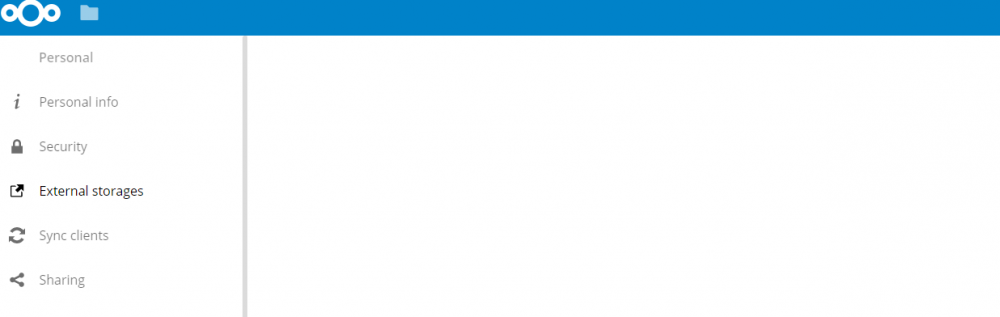
Hi, I've got a strange problem with external storage. After I enable the plugin, I'm unable to access the settings page ...../index.php/settings/user/externalstorages For less than a second it shows up and after that it disappears. Any help is appreciated.