





noja
Members
-
Joined
-
Last visited
-
I already pared it down to just a few services that haven't had any new updates and turned off the one vm. I haven't run it as a basic nas quite yet. I'm 99% sure its hardware, I'm just a bit clueless how to track down what it is when there isn't anything in the logs.
-
Hey everyone - I've been having daily crashing for a little over a week straight now that I can't pin down. The system is generally stable with almost no hardware changes preceding the issues. I recently changed out a few drives, but there were no errors and subsequent parity rebuilds went fine. The logs have been almost empty as well, which makes me wonder if there is a hardware issue more than anything else. One other change that I made was to switch to ipvlan in docker which made no difference on the crashing (fwiw I've never had an issue on macvlan so I never changed). I've run memtest and got through 3 passes with no errors. Despite that I've been pulling ram sticks between crashes to see if I just missed something. The only other hardware I could trade out at this point is the HBA which I've been meaning to do, but again, it's been good for a couple years now so I didn't want to introduce that as a potential. I've attached the most recent logs and the diagnostics, but I'm not seeing much. In the logs you'll see that there's nothing right before it crashed at around 8:40AM. One last thing that I'm wondering about as I type this, I've recent put in two shucked drives for the first time - one of them became a parity drive. I put the first one in and the system picked it up right away - no need for the 3.3 volt tape thing. However, the second drive (same model same purchase time etc) did need the adjustment to be recognized by the system. Could that new parity drive actually need the power adjustment and when parity writes happen the whole system locks up? At this point I'll just make the change the next time it crashes, but I'm at a loss. Thanks for any help you all can give! manky-dreadful-diagnostics-20240429-0852.zip syslog-172.16.120.5.log
-
I just had something similar start happening for me as well. I'd get as far as entering the credentials from the user I created on Unraid but then it would ask me to select a certificate to use for the share. Since I didn't have any certs set up, I used the address that the MyServer plugin defaults to since it has a LetsEncrypt cert running. Connecting to that ij5lk2j4j52j34k2k3l4jl23.unraid.net address now lets me log in with no issues under the un/pw I expected.
-
Hey! I'm having a hell of a time trying to figure out how to import my LastFM csv. The instructions from Github tell me to However, I have no idea how to start the container in "Shell mode" on Unraid. I've tried to taking my CSV from https://benjaminbenben.com/lastfm-to-csv/ and importing it while Maloja is running, but it errored out on every single line I'm definitely feeling a little stuck on how to get all my history imported. (If it helps, I do have Multi-Scrobbler up and running well and connecting to my Maloja instance - but I don't see a way from that app to import from LastFM history either) Thanks!
-
Appreciate it!
-
Of course life is back to normal now - thank you! That being said, starting the array seemed like a bit of a chore and Firefox asked me if I wanted to "reconfirm my form submission" meaning something timed out while the array was starting. I think I'll go through and just remove any older plugins that I haven't use in awhile and see what's up. During boot though, I am getting this log Any chance that nvidia driver is causing problems? Thanks again!

-
Ok! Safe mode has fixed the issue where the array wouldn't appear to start. Thank you! What's the best method to track down which plugin might have been acting up? manky-dreadful-diagnostics-20220802-0744.zip
-
Found my server this morning with the array offline after I went through parity last night (FWIW this is the first parity check since I upgraded to 6.10.3). I didn't see anything missing or otherwise concerning other than a log about disk 8 having some errors that it's had for like forever. So when I tried to start up the array again the really weird thing is that docker started up and seems to work fine, but now the array still wont start and there are no disks reported missing. It's still giving me Stale Configuration though. Should I just set a new configuration? Thanks for any help! manky-dreadful-diagnostics-20220801-1426.zip
-
Thanks for the insights @trurl. I had restarted docker prior to downloading the diagnostics to see if things responded better after shutting down docker. I have no idea why the docker.img file was on the array as the system share is set to Prefer:Cache. In any case, I shut down docker again and moved it back to the ssd and things quickly moved back to normal. So thank you for that heads up! One thing that keeps spamming through my logs though are: May 24 12:20:09 AVASARALA kernel: docker0: port 25(veth203c48e) entered blocking state May 24 12:20:09 AVASARALA kernel: docker0: port 25(veth203c48e) entered forwarding state May 24 12:20:09 AVASARALA kernel: docker0: port 25(veth203c48e) entered disabled state It's more than just port 25 too. Should I try and track down why that's happening?
-
Docker is essentially refusing to work right now. All of a sudden today they just started crashing one by one and the whole GUI started getting bogged down. I turned off the docker service and life got a lot better. Before I swap it out, is someone able to help me understand if my ssd is failing and might be the culprit? Thanks for any help! avasarala-diagnostics-20220523-2010.zip
-
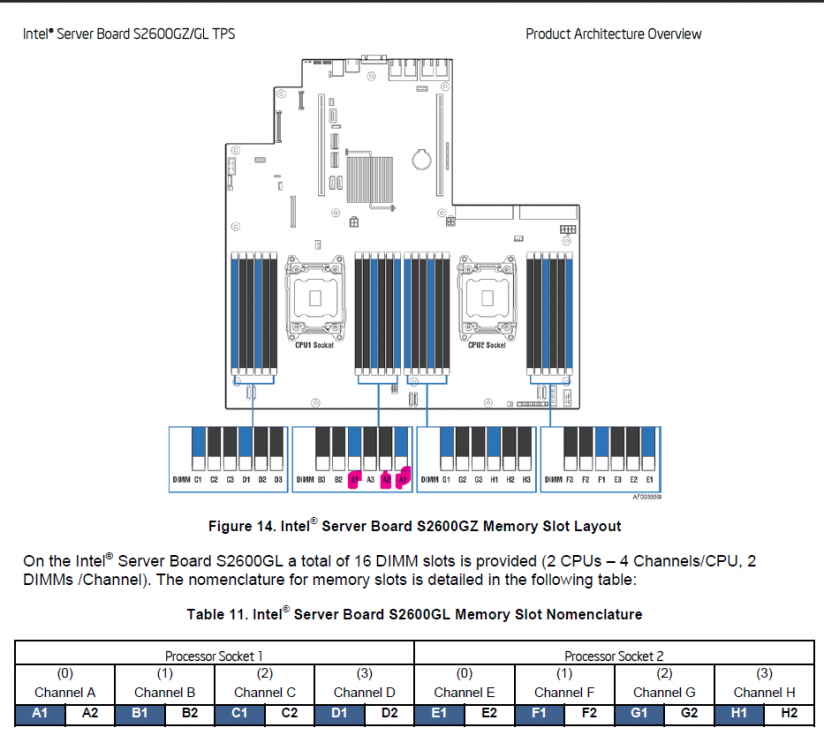
Fix Common Problems identified that I have an MCE error. I took a look at my logs and found this: 1 CE memory scrubbing error on CPU_SrcID#1_Ha#0_Chan#1_DIMM#0 or CPU_SrcID#1_Ha#0_Chan#1_DIMM#1 or CPU_SrcID#1_Ha#0_Chan#1_DIMM#2 (channel:1 page:0xd7237f offset:0x0 grain:32 syndrome:0x0 - area:DRAM err_code:0008:00c1 socket:1 ha:0 channel_mask:2 rank:255) First - is that going to be the source of the error? I didn't have the MCE log installed in NerdPack so I'm not sure how to check that. Second - assuming that would be the source of the error - would the highlighted slots be what I'm looking to pull in order to find the culprit?
-
Just ran into this problem as well. I believe my culprit was Ferdi which I added Unraid to a little while ago. Never thought that having it open in Ferdi for a week straight would cause me some issues. However, "quick" reboot and I'm back to normal. I have since removed the Unraid service from Ferdi. The log file is back to a manageable level.
-
To anyone looking for this in the future, I never did sort out why the networking wouldn't work. My solution was to create a new VLAN for my servers like I had been planning for a long time. Setting the static IPs over to the new VLAN flushed whatever issues arose and everything works fine. I had to connect directly to the servers and reboot in GUI mode and I set the IPs that way. I have to assume that if I switched the IPs back to the original VLAN, life would work again, but I'm not going to test that now that I've set things up the way they should have been done in the first place.
-
Thanks for the help! So I've set the VLAN to 1, but how do I change the "main" interface to something else? My "main" interface isn't a VLAN.
-
I got a new pfsense firewall installed today and had to change the previous lan into a VLAN with a tag. The new LAN is exactly the same so that all my static IPs could stick around, but now it has a VLAN tag whereas before it didn't. Both of my Unraid servers are fully accessible via SSH and the NFS/SMB connections are working fine, but docker containers and GUI are inaccessible. Is there config that I missed that I can edit through SSH? So logs say something like: "Dec 30 13:56:09 SERVER-NAME nginx: 2021/12/30 13:56:09 [error] 32152#32152: *19991992 auth request unexpected status: 502 while sending to client, client: 172.16.XXX.XX, server: , request: "GET /Dashboard HTTP/2.0", host: "LOTSOFLETTERS&NUMBERS.unraid.net"

