





elpuntonegro
Members
-
Joined
-
Last visited
Everything posted by elpuntonegro
-
Thanks! It's working now.
-
I have the same problem. Pihole is working but no data on the graphs.
-
Thanks for the advice! Time to change the VPN provider. Regards,
-
I recently updated this docker and now Im stuck on waiting for valid IP address from tunnel. It was working fine on version 4.4.5(1). Q11. There is an issue with the latest version of an application, how do i roll back to a specific version? A11. In order to pull down a specific version of an application you need to modify the tag parameter with the version you want. This can be achieved by going to the unRAID web interface, left clicking the specific Docker container and selecting "edit", then click on the advanced view option (top right) and edit the repository string from:- binhex/arch-<appname>:latest to binhex/arch-<appname>:<verisonyouwant> I tried this but I don't see binhex/arch-rtorrentvpn:latest on the repository field and if i put binhex/arch-rtorrentvpn:4.4.5.1 it doesn't work. Any help to rollback or fix my problem with the latest version will be appreciated. This are the logs for the latest version: [info] OpenVPN started [debug] Waiting for valid IP address from tunnel... Thu May 18 23:55:20 2017 WARNING: No server certificate verification method has been enabled. See http://openvpn.net/howto.html#mitm for more info. Thu May 18 23:55:20 2017 NOTE: the current --script-security setting may allow this configuration to call user-defined scripts Thu May 18 23:55:20 2017 TCP/UDP: Preserving recently used remote address: [AF_INET]172.111.YYY.Y:53 Thu May 18 23:55:20 2017 UDP link local (bound): [AF_INET][undef]:1194 Thu May 18 23:55:20 2017 UDP link remote: [AF_INET]172.111.YYY.Y:53 Thu May 18 23:55:20 2017 VERIFY ERROR: depth=0, error=CA signature digest algorithm too weak: C=HK, ST=HK, L=HongKong, O=PureVPN, OU=IT, CN=PureVPN, name=PureVPN, [email protected] Thu May 18 23:55:20 2017 OpenSSL: error:1416F086:SSL routines:tls_process_server_certificate:certificate verify failed Thu May 18 23:55:20 2017 TLS_ERROR: BIO read tls_read_plaintext error Thu May 18 23:55:20 2017 TLS Error: TLS object -> incoming plaintext read error Thu May 18 23:55:20 2017 TLS Error: TLS handshake failed Thu May 18 23:55:20 2017 SIGUSR1[soft,tls-error] received, process restarting Thu May 18 23:55:25 2017 WARNING: No server certificate verification method has been enabled. See http://openvpn.net/howto.html#mitm for more info. Thu May 18 23:55:25 2017 NOTE: the current --script-security setting may allow this configuration to call user-defined scripts Thu May 18 23:55:25 2017 TCP/UDP: Preserving recently used remote address: [AF_INET]104.243.XXX.X:53 Thu May 18 23:55:25 2017 UDP link local (bound): [AF_INET][undef]:1194 Thu May 18 23:55:25 2017 UDP link remote: [AF_INET]104.243.XXX.X:53 Thu May 18 23:55:25 2017 TLS Error: Unroutable control packet received from [AF_INET]104.243.XXX.X:53 (si=3 op=P_ACK_V1) Thu May 18 23:55:27 2017 TLS Error: Unroutable control packet received from [AF_INET]104.243.XXX.X:53 (si=3 op=P_CONTROL_V1) Thu May 18 23:55:28 2017 TLS Error: Unroutable control packet received from [AF_INET]104.243.XXX.X:53 (si=3 op=P_ACK_V1) Thu May 18 23:55:28 2017 TLS Error: Unroutable control packet received from [AF_INET]172.111.YYY.Y:53 (si=3 op=P_CONTROL_V1) Thu May 18 23:55:28 2017 TLS Error: Unroutable control packet received from [AF_INET]172.111.YYY.Y:53 (si=3 op=P_CONTROL_V1) Thu May 18 23:55:29 2017 TLS Error: Unroutable control packet received from [AF_INET]104.243.XXX.X:53 (si=3 op=P_CONTROL_V1) Thu May 18 23:55:30 2017 TLS Error: Unroutable control packet received from [AF_INET]172.111.YYY.Y:53 (si=3 op=P_CONTROL_V1) Thu May 18 23:55:32 2017 TLS Error: Unroutable control packet received from [AF_INET]104.243.XXX.X:53 (si=3 op=P_ACK_V1) Thu May 18 23:55:34 2017 TLS Error: Unroutable control packet received from [AF_INET]172.111.YYY.Y:53 (si=3 op=P_CONTROL_V1) Thu May 18 23:55:36 2017 TLS Error: Unroutable control packet received from [AF_INET]104.243.XXX.X:53 (si=3 op=P_CONTROL_V1) Thu May 18 23:55:37 2017 TLS Error: Unroutable control packet received from [AF_INET]172.111.YYY.Y:53 (si=3 op=P_CONTROL_V1) Thu May 18 23:55:37 2017 TLS Error: Unroutable control packet received from [AF_INET]104.243.XXX.X:53 (si=3 op=P_CONTROL_V1) Thu May 18 23:55:38 2017 TLS Error: Unroutable control packet received from [AF_INET]172.111.YYY.Y:53 (si=3 op=P_CONTROL_V1) Thu May 18 23:55:41 2017 TLS Error: Unroutable control packet received from [AF_INET]104.243.XXX.X:53 (si=3 op=P_ACK_V1) Thu May 18 23:55:53 2017 TLS Error: Unroutable control packet received from [AF_INET]172.111.YYY.Y:53 (si=3 op=P_CONTROL_V1) Thu May 18 23:55:54 2017 TLS Error: Unroutable control packet received from [AF_INET]172.111.YYY.Y:53 (si=3 op=P_CONTROL_V1) Thu May 18 23:55:57 2017 VERIFY ERROR: depth=0, error=CA signature digest algorithm too weak: C=HK, ST=HK, L=HongKong, O=PureVPN, OU=IT, CN=PureVPN, name=PureVPN, [email protected] Thu May 18 23:55:57 2017 OpenSSL: error:1416F086:SSL routines:tls_process_server_certificate:certificate verify failed Thu May 18 23:55:57 2017 TLS_ERROR: BIO read tls_read_plaintext error Thu May 18 23:55:57 2017 TLS Error: TLS object -> incoming plaintext read error Thu May 18 23:55:57 2017 NOTE: --mute triggered... Thu May 18 23:55:57 2017 1 variation(s) on previous 20 message(s) suppressed by --mute Thu May 18 23:55:57 2017 SIGUSR1[soft,tls-error] received, process restarting Thu May 18 23:56:02 2017 WARNING: No server certificate verification method has been enabled. See http://openvpn.net/howto.html#mitm for more info. Thu May 18 23:56:02 2017 NOTE: the current --script-security setting may allow this configuration to call user-defined scripts Thu May 18 23:56:03 2017 TCP/UDP: Preserving recently used remote address: [AF_INET]104.243.XXX.X:53 Thu May 18 23:56:03 2017 UDP link local (bound): [AF_INET][undef]:1194 Thu May 18 23:56:03 2017 UDP link remote: [AF_INET]104.243.XXX.X:53 Thu May 18 23:56:03 2017 VERIFY ERROR: depth=0, error=CA signature digest algorithm too weak: C=HK, ST=HK, L=HongKong, O=PureVPN, OU=IT, CN=PureVPN, name=PureVPN, [email protected] Thu May 18 23:56:03 2017 OpenSSL: error:1416F086:SSL routines:tls_process_server_certificate:certificate verify failed Thu May 18 23:56:03 2017 TLS_ERROR: BIO read tls_read_plaintext error Thu May 18 23:56:03 2017 TLS Error: TLS object -> incoming plaintext read error Thu May 18 23:56:03 2017 TLS Error: TLS handshake failed Thu May 18 23:56:03 2017 SIGUSR1[soft,tls-error] received, process restarting Thu May 18 23:56:08 2017 WARNING: No server certificate verification method has been enabled. See http://openvpn.net/howto.html#mitm for more info. Thu May 18 23:56:08 2017 NOTE: the current --script-security setting may allow this configuration to call user-defined scripts Thu May 18 23:56:08 2017 TCP/UDP: Preserving recently used remote address: [AF_INET]172.111.YYY.Y:53 Thu May 18 23:56:08 2017 UDP link local (bound): [AF_INET][undef]:1194 Thu May 18 23:56:08 2017 UDP link remote: [AF_INET]172.111.YYY.Y:53 Thu May 18 23:56:08 2017 VERIFY ERROR: depth=0, error=CA signature digest algorithm too weak: C=HK, ST=HK, L=HongKong, O=PureVPN, OU=IT, CN=PureVPN, name=PureVPN, [email protected] Thu May 18 23:56:08 2017 OpenSSL: error:1416F086:SSL routines:tls_process_server_certificate:certificate verify failed Thu May 18 23:56:08 2017 TLS_ERROR: BIO read tls_read_plaintext error Thu May 18 23:56:08 2017 TLS Error: TLS object -> incoming plaintext read error Thu May 18 23:56:08 2017 TLS Error: TLS handshake failed Thu May 18 23:56:08 2017 SIGUSR1[soft,tls-error] received, process restarting Thu May 18 23:56:13 2017 WARNING: No server certificate verification method has been enabled. See http://openvpn.net/howto.html#mitm for more info. Thu May 18 23:56:13 2017 NOTE: the current --script-security setting may allow this configuration to call user-defined scripts Thu May 18 23:56:13 2017 TCP/UDP: Preserving recently used remote address: [AF_INET]104.243.XXX.X:53 Thu May 18 23:56:13 2017 UDP link local (bound): [AF_INET][undef]:1194 Thu May 18 23:56:13 2017 UDP link remote: [AF_INET]104.243.XXX.X:53 Thu May 18 23:56:13 2017 TLS Error: Unroutable control packet received from [AF_INET]104.243.XXX.X:53 (si=3 op=P_ACK_V1) Thu May 18 23:56:15 2017 TLS Error: Unroutable control packet received from [AF_INET]172.111.YYY.Y:53 (si=3 op=P_CONTROL_V1) Thu May 18 23:56:15 2017 TLS Error: Unroutable control packet received from [AF_INET]104.243.XXX.X:53 (si=3 op=P_ACK_V1) Thu May 18 23:56:17 2017 TLS Error: Unroutable control packet received from [AF_INET]172.111.YYY.Y:53 (si=3 op=P_CONTROL_V1) Thu May 18 23:56:19 2017 TLS Error: Unroutable control packet received from [AF_INET]104.243.XXX.X:53 (si=3 op=P_CONTROL_V1) Thu May 18 23:56:20 2017 TLS Error: Unroutable control packet received from [AF_INET]104.243.XXX.X:53 (si=3 op=P_CONTROL_V1) Thu May 18 23:56:24 2017 TLS Error: Unroutable control packet received from [AF_INET]172.111.YYY.Y:53 (si=3 op=P_CONTROL_V1) Thu May 18 23:56:25 2017 TLS Error: Unroutable control packet received from [AF_INET]172.111.YYY.Y:53 (si=3 op=P_CONTROL_V1) Thu May 18 23:56:28 2017 TLS Error: Unroutable control packet received from [AF_INET]104.243.XXX.X:53 (si=3 op=P_CONTROL_V1) Thu May 18 23:56:28 2017 TLS Error: Unroutable control packet received from [AF_INET]104.243.XXX.X:53 (si=3 op=P_ACK_V1) Thu May 18 23:56:35 2017 TLS Error: Unroutable control packet received from [AF_INET]104.243.XXX.X:53 (si=3 op=P_CONTROL_V1) Thu May 18 23:56:36 2017 TLS Error: Unroutable control packet received from [AF_INET]104.243.XXX.X:53 (si=3 op=P_CONTROL_V1)
-
Any ideas why the -script fn:configure on the filebot:watcher only allows to introduce the username for opensubtitles?
-
I tried this: docker run -it -v $PWD:/mnt/user/Media -v data:/data -p 5452:5452 rednoah/filebot:node fn:sysinfo But when i run the script it doesn't find the path to media.
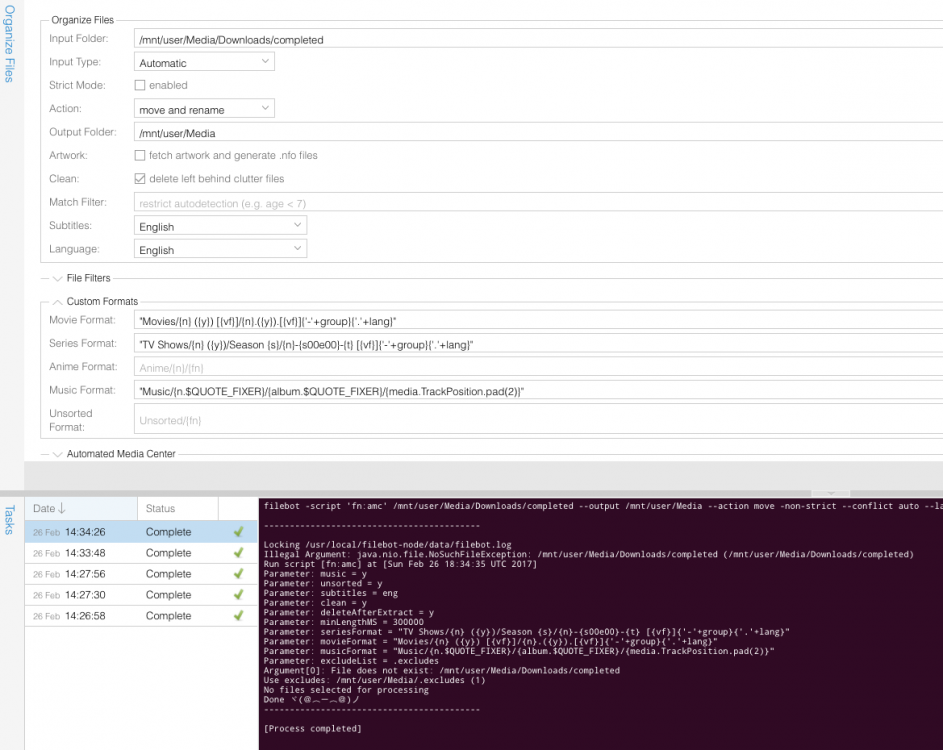
-
@rednoah good to see you in this forum! How can i install your docker on Unraid if its not on the community repository? I have the coppit version but i have an issue that after a period of time it doesn't pickup the new files and i have to restart the docker to fix it.
-
It looks that the problem was the server that i was using.
-
Did you manage to fix your issue? Im having the same problem.
-
Changing the input folder fixed for me. Change from /mnt/user/Media/Downloads/completed/ to /mnt/cache/Media/Downloads/completed/
-
Im having the same issue. Did you manage to fix it?
