Waltm
Members
-
Joined
-
Last visited
Everything posted by Waltm
-
I've tried both. If I try UEFI from the boot menu it just brings me to the bios setup
-
My boot usb drive was failing a few months ago. I was able to repair it in Windows. I took a backup and it was running fine. It failed again and I was not able to see it in windows so tried to create a new one using he unRaid usb creator tool. I have tried two different USB sticks, one was the same make/model as the original. I have tried creating from the backup using the tool, tried to copy the files and use the make bootable .bat file, and tried creating a new one from scratch without the backup config files. I have tried plugging into all usb slots on the motherboard. If I enter the boot menu (F8) the drive shows up and I can select it as well as setting it in the bios. Nothing I have tried will boot from either stick. I only see a flashing cursor on a monitor I've attached. The ip address does not show on my router and I can not connect through telnet. Any ideas what I should look at next?
-
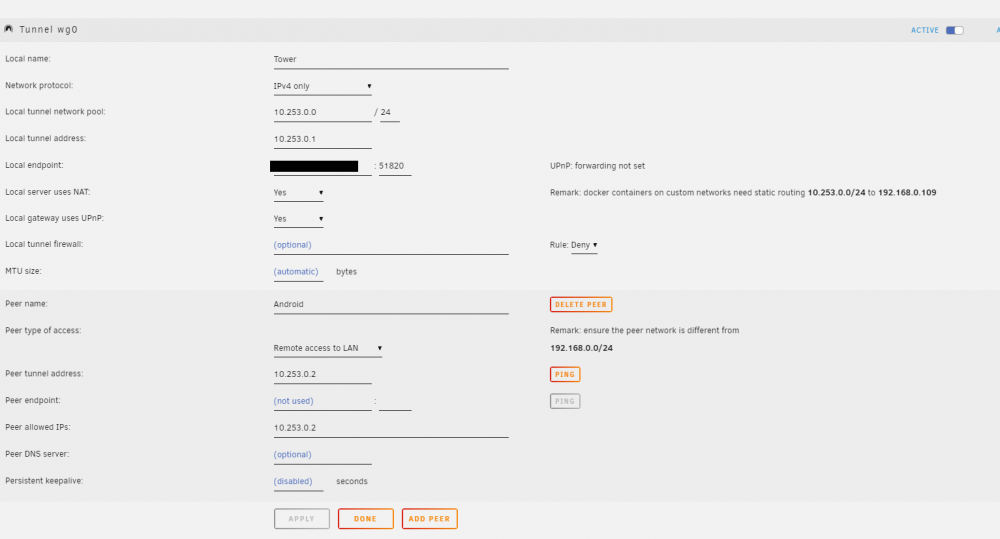
Yeah, I try to reach the unRaid server in the phones web browser using it's ip address, and splashtop to access other machines on the network. They are the only things I really use it for and both stopped working. Oddly enough, after 3 days of trying everything I can think of, it just started working on it's own this morning. I'm happy that it's working but it really bugs me when problems 'resolve' themselves without me knowing what caused them or why they suddenly work again. I'll try switching it back to ddns when I get home tonight but don't think I'll have an issue with that now either. Thanks for chiming in with advice, I really appreciate the help. It still shows upnp forwarding not set, but can I ignore that if it seems to be working again, or is it something I should be concerned with?
-
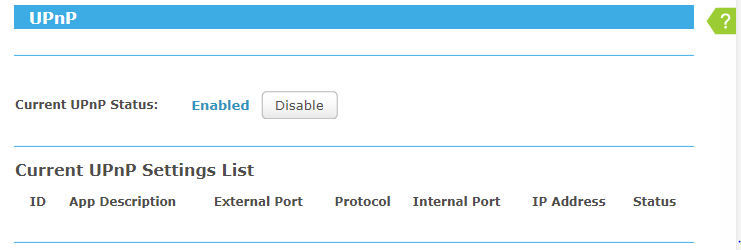
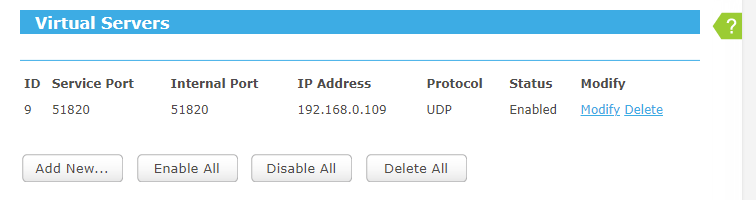
So, I had this working fine and for some reason it recently stopped. I can't get it to show a connection or handshake. I've tried to reconfigure and even deleted the tunnel and started from scratch. I have upnp enabled on my router but the server is showing it's not set. I also have the port forwarded to the server. I've switched to my wan ip instead of ddns that was working. I've read through the troubleshooting tips at the start of this thread but am not sure where to look next. Any recommendations on what info I can provide to help get this resolved? Client is on an Android phone, wifi is off in order to use cell network.
-
Please ignore, my issue resolved itself when I updated other containers.
-
After trying everything I could think of I gave up with making this work with it's own IP address and switched it over to bridge mode, changed the ports to unused ones (8443 was taken) and forwarded the new ones in my router. Everything works now with ZM using the unRaid address and zmNinja can connect and receive notices of events. Thanks again for all the help you've been giving to all of us and your work on this docker!
-
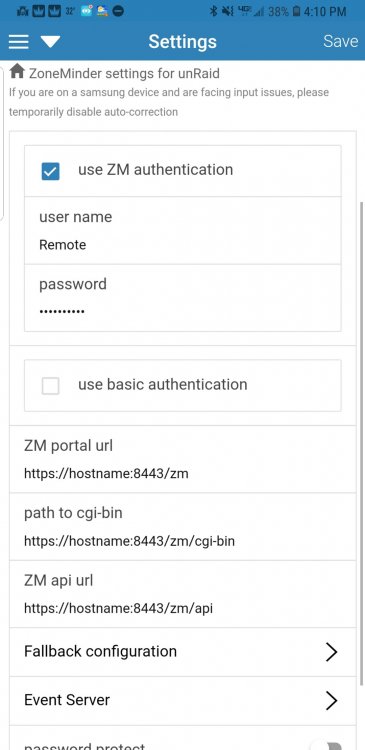
As soon as I close 80 and 8080, zmNinja can not connect and gives a "Zoneminder Authentication error". It also can not be reached in a browser at https://hostname:8443 This may have something to do with SSL cert since I have not set anything up for that. The first post says the cert is automatically generated but I do not know how to test it. hostname in settings is a resolvable dns hostname that works with port 80 open if I user http://hostname/zm , just changed it for posting. Is this not the correct way to set this up for ssl?
-
Thanks for all the support you've been providing to all of us. ZM isn't the easiest thing to get running and you've done a great job with the Docker. I have it running and am now trying to get zmNinja and notifications working with it. I just want to make sure I'm allowing access the correct way and not opening up too many security holes. I have a static IP assigned to the docker as recommended previously. It turns out that dockers can not access other docker IPs so I am unable to get OpenVPN to allow me to access ZM through VPN. It appears I have to open ports in my router and forward them to the ZM IP. I have 80, 8080, 8443 and 9000 going to the ZM IP. Is this safe and is this the preferred way to allow zmNinja to access the server from outside my lan? I can use most of zmNinja but have not gotten notifications to work yet. I want to make sure I have the connections correct before trying to troubleshoot further. I'd love a howto on getting this type of detection going once everything is worked out. I read a little about this on https://medium.com/zmninja/inside-the-hood-machine-learning-enhanced-real-time-alarms-with-zoneminder-e26c34fe354c but it wasn't really a how-to. I hope it gets integrated into ZM eventually. I'm still working on getting the basics but this looks like a great feature.
-
Oh. Thanks for the info. Is there any workaround for this? Anything I can do on my router? It's sort of the reason I am trying to run OpenVPN in the first place.
-
Once you connect a remote client to the VPN, you only need to open a web browser on the connected device and enter the IP address of the unraid system in the address bar and you should get the web UI of the server. You should have access to anything on your network the same way as if you were at home on a connected device.
-
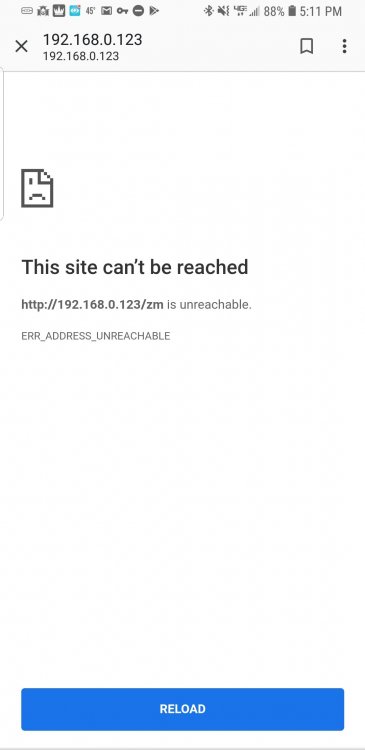
Hi folks. I have this docker installed and mostly working. It seems I can not access all of the IPs on my lan. From outside my lan I can access my router and the unraid server but not other docker IPs. I'm trying to get access to a Zoneminder docker with it's own IP but just get an error. I can access the .123 address from within my lan and also if I forward my external IP port 80 to the .123 address but I would rather not have the port open. This seems like a similar issue that jfrancais is having above. I'm not sure what pages of the OpenVPN docker to post for info or if this is even the right place to ask for help with this.
-
That did it! I had removed and installed earlier but didn't delete the folder. Thanks again for the help.
-
Thanks, didn't know I could change IPs on dockers. Set network to br0 and gave it an IP address. Now the UI page just displays "View '' does not exist" The log file shows the php errors below each time I try to access or refresh the UI page. Apr 2 19:04:06 9389d4a44ad6 zmeventnotification[657]: INF [Broadcasting new events to all 0 websocket clients] Apr 2 19:04:11 9389d4a44ad6 zmeventnotification[657]: INF [Broadcasting new events to all 0 websocket clients] Apr 2 19:04:13 9389d4a44ad6 web_php[607]: ERR [Invalid skin css 'classic' setting to ] Apr 2 19:04:13 9389d4a44ad6 web_php[607]: FAT [View '' does not exist] Apr 2 19:04:16 9389d4a44ad6 zmeventnotification[657]: INF [Broadcasting new events to all 0 websocket clients] Apr 2 19:04:21 9389d4a44ad6 zmeventnotification[657]: INF [Broadcasting new events to all 0 websocket clients]
-
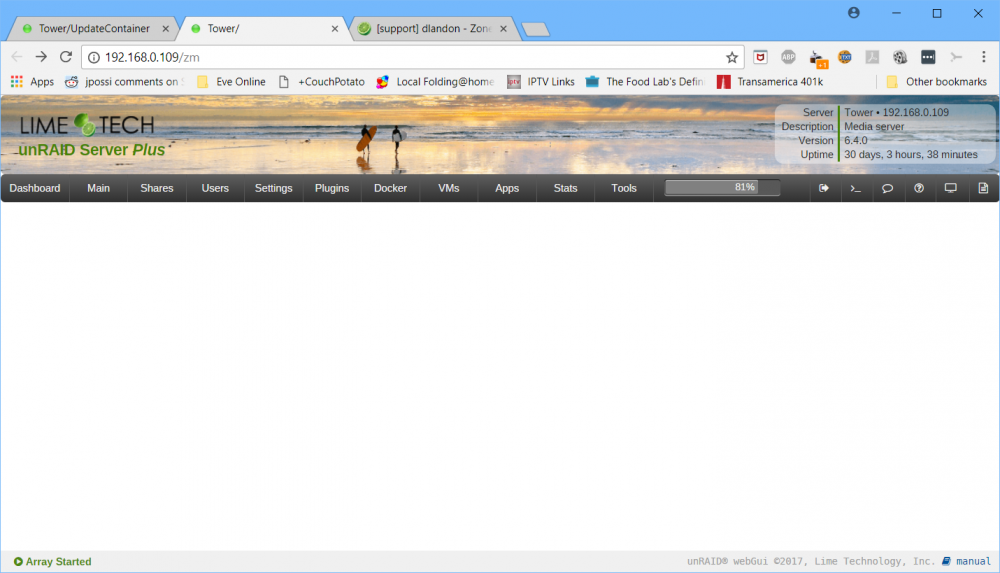
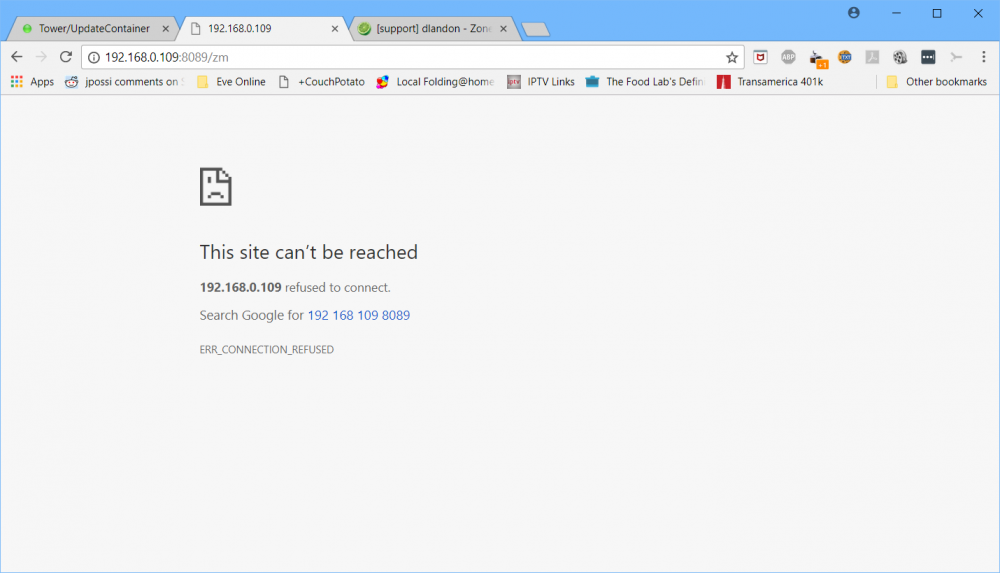
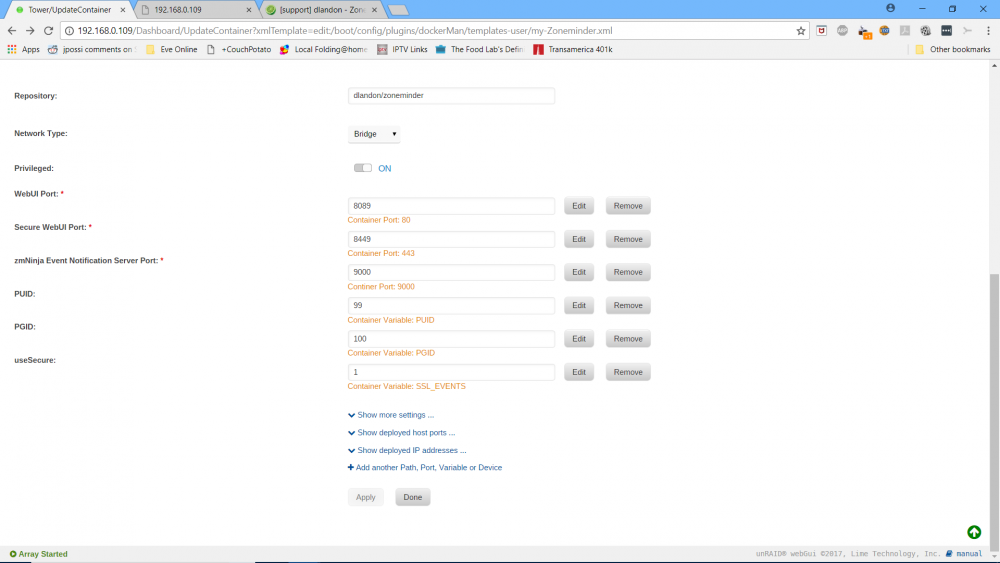
Hi folks. I'm having a little trouble getting started with this. The docker starts but when I go to the web UI I only see the Unraid main menu bar. Manually entering the IP and port just returns a connection refused error. Any help would be greatly appreciated. *** Running /etc/my_init.d/00_regen_ssh_host_keys.sh... *** Running /etc/my_init.d/05_set_the_time.sh... Setting the timezone to : America/New_York Current default time zone: 'America/New_York' Local time is now: Mon Apr 2 17:20:55 EDT 2018. Universal Time is now: Mon Apr 2 21:20:55 UTC 2018. Date: Mon Apr 2 17:20:55 EDT 2018 *** Running /etc/my_init.d/06_set_php_time.sh... *** Running /etc/my_init.d/10_syslog-ng.init... Apr 2 17:20:55 998a6f6b5c57 syslog-ng[33]: syslog-ng starting up; version='3.5.6' Apr 2 17:20:56 998a6f6b5c57 syslog-ng[33]: EOF on control channel, closing connection; *** Running /etc/my_init.d/20_apt_update.sh... Get:1 http://security.ubuntu.com/ubuntu xenial-security InRelease [102 kB] Hit:2 http://archive.ubuntu.com/ubuntu xenial InRelease Get:3 http://archive.ubuntu.com/ubuntu xenial-updates InRelease [102 kB] Get:4 http://archive.ubuntu.com/ubuntu xenial-backports InRelease [102 kB] Get:5 http://security.ubuntu.com/ubuntu xenial-security/main Sources [147 kB] Get:6 http://archive.ubuntu.com/ubuntu xenial-updates/main Sources [381 kB] Get:7 http://security.ubuntu.com/ubuntu xenial-security/universe Sources [77.2 kB] Get:8 http://security.ubuntu.com/ubuntu xenial-security/main amd64 Packages [593 kB] Get:9 http://archive.ubuntu.com/ubuntu xenial-updates/universe Sources [250 kB] Get:10 http://security.ubuntu.com/ubuntu xenial-security/universe amd64 Packages [428 kB] Get:11 http://archive.ubuntu.com/ubuntu xenial-updates/main amd64 Packages [962 kB] Get:12 http://archive.ubuntu.com/ubuntu xenial-updates/universe amd64 Packages [793 kB] Fetched 3937 kB in 1s (2853 kB/s) Reading package lists... Reading package lists... Building dependency tree... Reading state information... Calculating upgrade... 0 upgraded, 0 newly installed, 0 to remove and 0 not upgraded. Reading package lists... Building dependency tree... Reading state information... Calculating upgrade... 0 upgraded, 0 newly installed, 0 to remove and 0 not upgraded. Reading package lists... Building dependency tree... Reading state information... 0 upgraded, 0 newly installed, 0 to remove and 0 not upgraded. *** Running /etc/my_init.d/30_gen_ssl_keys.sh... using existing keys in "/config/keys" *** Running /etc/my_init.d/40_firstrun.sh... File zm.conf already exists Using existing ssmtp configuration Using existing mysql database Using existing skins directory Creating symbolink links Using existing data directory for events Using existing data directory for images Using existing data directory for temp no crontab for root Setting shared memory to : 50% of 32920064 bytes Starting services * Starting MariaDB database server mysqld ...done. Apr 2 17:21:04 998a6f6b5c57 /etc/mysql/debian-start[513]: Upgrading MySQL tables if necessary. Apr 2 17:21:04 998a6f6b5c57 /etc/mysql/debian-start[517]: /usr/bin/mysql_upgrade: the '--basedir' option is always ignored Apr 2 17:21:04 998a6f6b5c57 /etc/mysql/debian-start[517]: Looking for 'mysql' as: /usr/bin/mysql Apr 2 17:21:04 998a6f6b5c57 /etc/mysql/debian-start[517]: Looking for 'mysqlcheck' as: /usr/bin/mysqlcheck Apr 2 17:21:04 998a6f6b5c57 /etc/mysql/debian-start[517]: This installation of MySQL is already upgraded to 10.0.34-MariaDB, use --force if you still need to run mysql_upgrade Apr 2 17:21:04 998a6f6b5c57 /etc/mysql/debian-start[524]: Checking for insecure root accounts. Apr 2 17:21:04 998a6f6b5c57 /etc/mysql/debian-start[528]: Triggering myisam-recover for all MyISAM tables and aria-recover for all Aria tables Database already at version 1.30.4, update aborted. Freshening configuration in database Loading config from DB Saving config to DB * Starting Apache httpd web server apache2 * Starting ZoneMinder: Apr 2 17:21:20 998a6f6b5c57 zmpkg[610]: INF [Sanity checking States table...] Apr 2 17:21:20 998a6f6b5c57 zmpkg[610]: INF [Command: start] Apr 2 17:21:21 998a6f6b5c57 zmdc[623]: INF [Server starting at 18/04/02 17:21:21] Apr 2 17:21:24 998a6f6b5c57 zmpkg[610]: INF [Single server configuration detected. Starting up services.] Apr 2 17:21:24 998a6f6b5c57 zmdc[623]: INF ['zmfilter.pl' starting at 18/04/02 17:21:24, pid = 652] Apr 2 17:21:24 998a6f6b5c57 zmdc[652]: INF ['zmfilter.pl' started at 18/04/02 17:21:24] Apr 2 17:21:24 998a6f6b5c57 zmdc[623]: INF ['zmeventnotification.pl' starting at 18/04/02 17:21:24, pid = 656] Apr 2 17:21:24 998a6f6b5c57 zmdc[656]: INF ['zmeventnotification.pl' started at 18/04/02 17:21:24] Apr 2 17:21:24 998a6f6b5c57 zmfilter[652]: INF [Scanning for events] Apr 2 17:21:24 998a6f6b5c57 zmdc[623]: INF ['zmaudit.pl -c' starting at 18/04/02 17:21:24, pid = 662] Apr 2 17:21:24 998a6f6b5c57 zmdc[662]: INF ['zmaudit.pl -c' started at 18/04/02 17:21:24] Apr 2 17:21:24 998a6f6b5c57 zmeventnotification[656]: INF [Push enabled via FCM] Apr 2 17:21:24 998a6f6b5c57 zmeventnotification[656]: INF [Event Notification daemon v 0.98.3 starting] Apr 2 17:21:24 998a6f6b5c57 zmeventnotification[656]: INF [Creating /etc/private/tokens.txt] Apr 2 17:21:24 998a6f6b5c57 zmeventnotification[656]: INF [Total event client connections: 0] Apr 2 17:21:24 998a6f6b5c57 zmeventnotification[656]: INF [Reloading Monitors...] Apr 2 17:21:24 998a6f6b5c57 zmeventnotification[656]: INF [Loading monitors] Apr 2 17:21:24 998a6f6b5c57 zmeventnotification[656]: INF [About to start listening to socket] Apr 2 17:21:24 998a6f6b5c57 zmdc[623]: INF ['zmwatch.pl' starting at 18/04/02 17:21:24, pid = 669] Apr 2 17:21:24 998a6f6b5c57 zmdc[669]: INF ['zmwatch.pl' started at 18/04/02 17:21:24] Apr 2 17:21:24 998a6f6b5c57 zmeventnotification[656]: INF [Secure WS(WSS) is enabled...] Apr 2 17:21:24 998a6f6b5c57 zmeventnotification[656]: INF [Web Socket Event Server listening on port 9000] Apr 2 17:21:24 998a6f6b5c57 zmdc[623]: INF ['zmupdate.pl -c' starting at 18/04/02 17:21:24, pid = 677] Apr 2 17:21:24 998a6f6b5c57 zmdc[677]: INF ['zmupdate.pl -c' started at 18/04/02 17:21:24] Apr 2 17:21:25 998a6f6b5c57 zmwatch[669]: INF [Watchdog starting] Apr 2 17:21:25 998a6f6b5c57 zmwatch[669]: INF [Watchdog pausing for 30 seconds] Apr 2 17:21:25 998a6f6b5c57 zmdc[623]: INF ['zmtelemetry.pl' starting at 18/04/02 17:21:25, pid = 683] Apr 2 17:21:25 998a6f6b5c57 zmdc[683]: INF ['zmtelemetry.pl' started at 18/04/02 17:21:25] success *** Running /etc/rc.local... *** Booting runit daemon... *** Runit started as PID 686 Apr 2 17:21:25 998a6f6b5c57 cron[689]: (CRON) INFO (pidfile fd = 3) Apr 2 17:21:25 998a6f6b5c57 cron[689]: (CRON) INFO (Running @reboot jobs) Apr 2 17:21:29 998a6f6b5c57 zmeventnotification[656]: INF [Broadcasting new events to all 0 websocket clients] Apr 2 17:21:34 998a6f6b5c57 zmeventnotification[656]: INF [Broadcasting new events to all 0 websocket clients] Apr 2 17:21:39 998a6f6b5c57 zmeventnotification[656]: INF [Broadcasting new events to all 0 websocket clients] Apr 2 17:21:44 998a6f6b5c57 zmeventnotification[656]: INF [Broadcasting new events to all 0 websocket clients] Apr 2 17:21:49 998a6f6b5c57 zmeventnotification[656]: INF [Broadcasting new events to all 0 websocket clients] Apr 2 17:21:54 998a6f6b5c57 zmeventnotification[656]: INF [Broadcasting new events to all 0 websocket clients] Apr 2 17:21:59 998a6f6b5c57 zmeventnotification[656]: INF [Broadcasting new events to all 0 websocket clients] Apr 2 17:22:04 998a6f6b5c57 zmeventnotification[656]: INF [Broadcasting new events to all 0 websocket clients] Apr 2 17:22:09 998a6f6b5c57 zmeventnotification[656]: INF [Broadcasting new events to all 0 websocket clients] Apr 2 17:22:14 998a6f6b5c57 zmeventnotification[656]: INF [Broadcasting new events to all 0 websocket clients] Apr 2 17:22:19 998a6f6b5c57 zmeventnotification[656]: INF [Broadcasting new events to all 0 websocket clients] Apr 2 17:22:24 998a6f6b5c57 zmeventnotification[656]: INF [Broadcasting new events to all 0 websocket clients] Apr 2 17:22:29 998a6f6b5c57 zmeventnotification[656]: INF [Broadcasting new events to all 0 websocket clients]
-
Still getting the failed recordings due to 'time missed' error. New log from today is attached (zipped for size). The upcoming recordings does not show any duplicates. Minor victory, the guide data seems to be saved now and only new or changes are added. That's if I'm reading the logs correctly. Thanks again for helping out with this even though the issues are caused by operator... Log_11-17-16.zip

-
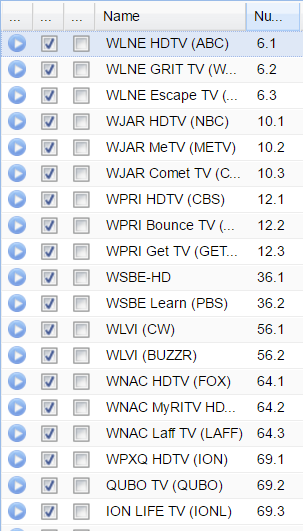
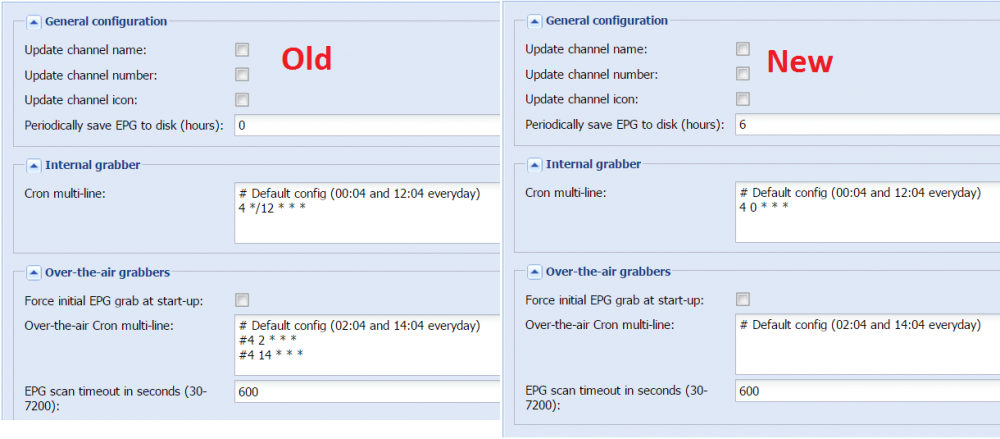
So, it looks like I don't have duplicate channels enabled in the 'Channels' tab. I did find duplicate entries in the 'EPG Grabber Channels tab. I'll delete the ones that don't show any previous update time. Added save guide to disk at 6 hours and changed cron jobs to only run once at 00:04 (I think). Old and new settings attached. From the latest log it appears the guide was updated at 14:02 and 15:02. 2016-11-16 14:02:02.000 xmltv: /usr/bin/tv_grab_wg: grab /usr/bin/tv_grab_wg 2016-11-16 14:02:02.000 spawn: Executing "/usr/bin/tv_grab_wg" 2016-11-16 14:02:02.311 xmltv: /usr/bin/tv_grab_wg: grab took 0 seconds 2016-11-16 15:02:02.000 xmltv: /usr/bin/tv_grab_wg: grab /usr/bin/tv_grab_wg 2016-11-16 15:02:02.000 spawn: Executing "/usr/bin/tv_grab_wg" 2016-11-16 15:02:02.300 xmltv: /usr/bin/tv_grab_wg: grab took 0 seconds Resetting auto records and restarting container.

-
I'll have to verity all this when I get home but I thought I had it set to update once a day. Apparently not. I don't think I have multiples under the 'channels' tab but will verify this as well. I don't suppose there is a config file I could export that would show everything in one place?
-
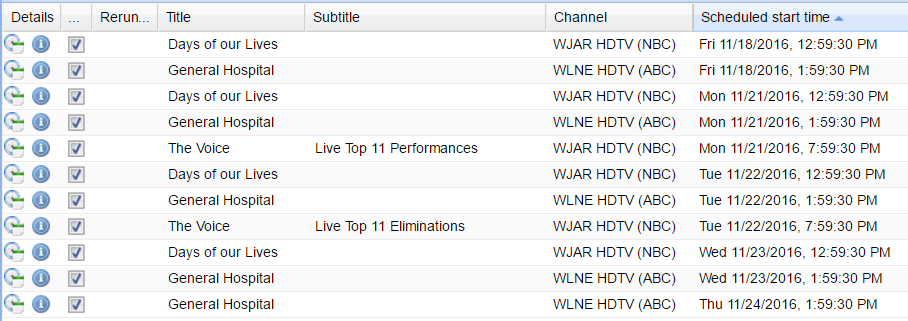
So, I think something is happening when the guide is updating. There were only single recordings scheduled when I went to bed but now shows doubles again for today. Here is the overnight log. Is there some other log that shows more details? 2016-11-15 21:02:02.000 xmltv: /usr/bin/tv_grab_wg: grab /usr/bin/tv_grab_wg 2016-11-15 21:02:02.000 spawn: Executing "/usr/bin/tv_grab_wg" 2016-11-15 21:02:02.298 xmltv: /usr/bin/tv_grab_wg: grab took 0 seconds 2016-11-15 21:02:02.302 dvr: "General Hospital" on "WLNE HDTV (ABC)": Updated Timer (osB) 2016-11-15 21:02:02.307 dvr: "General Hospital" on "WLNE HDTV (ABC)": Updated Timer (osB) 2016-11-15 21:02:02.311 dvr: entry 6919d6eb11109028968f6447d7949899 "General Hospital" on "WLNE HDTV (ABC)" starting at 2016-11-18 13:59:30, scheduled for recording by "htpcserver" 2016-11-15 21:02:02.323 dvr: "General Hospital" on "WLNE HDTV (ABC)": Updated Timer (osB) 2016-11-15 21:02:02.327 dvr: "General Hospital" on "WLNE HDTV (ABC)": Updated Timer (osB) 2016-11-15 21:02:02.382 dvr: "Days of our Lives" on "WJAR HDTV (NBC)": Updated Timer (osB) 2016-11-15 21:02:02.386 dvr: "Days of our Lives" on "WJAR HDTV (NBC)": Updated Timer (osB) 2016-11-15 21:02:02.387 dvr: "NFL Football (?)" on "WJAR HDTV (NBC)": Updated (B) 2016-11-15 21:02:02.390 dvr: entry 02118fe1c615705da82ec0a1b64909f7 "Days of our Lives" on "WJAR HDTV (NBC)" starting at 2016-11-18 12:59:30, scheduled for recording by "htpcserver" 2016-11-15 21:02:02.401 dvr: "Days of our Lives" on "WJAR HDTV (NBC)": Updated Timer (osB) 2016-11-15 21:02:02.403 dvr: "The Voice" on "WJAR HDTV (NBC)": Updated (B) 2016-11-15 21:02:02.406 dvr: "Days of our Lives" on "WJAR HDTV (NBC)": Updated Timer (osB) 2016-11-15 21:02:02.407 dvr: "The Voice" on "WJAR HDTV (NBC)": Updated (B) 2016-11-15 21:02:03.178 xmltv: /usr/bin/tv_grab_wg: parse took 0 seconds 2016-11-15 21:02:03.178 xmltv: /usr/bin/tv_grab_wg: channels tot= 71 new= 0 mod= 0 2016-11-15 21:02:03.178 xmltv: /usr/bin/tv_grab_wg: brands tot= 0 new= 0 mod= 0 2016-11-15 21:02:03.178 xmltv: /usr/bin/tv_grab_wg: seasons tot= 0 new= 0 mod= 0 2016-11-15 21:02:03.178 xmltv: /usr/bin/tv_grab_wg: episodes tot= 5050 new= 5050 mod= 5050 2016-11-15 21:02:03.178 xmltv: /usr/bin/tv_grab_wg: broadcasts tot= 5050 new= 5050 mod= 5050 2016-11-16 00:04:00.000 xmltv: /usr/bin/tv_grab_wg: grab /usr/bin/tv_grab_wg 2016-11-16 00:04:00.003 spawn: Executing "/usr/bin/tv_grab_wg" 2016-11-16 00:04:00.253 xmltv: /usr/bin/tv_grab_wg: grab took 0 seconds 2016-11-16 00:04:00.875 xmltv: /usr/bin/tv_grab_wg: parse took 0 seconds 2016-11-16 00:04:00.875 xmltv: /usr/bin/tv_grab_wg: channels tot= 71 new= 0 mod= 0 2016-11-16 00:04:00.875 xmltv: /usr/bin/tv_grab_wg: brands tot= 0 new= 0 mod= 0 2016-11-16 00:04:00.875 xmltv: /usr/bin/tv_grab_wg: seasons tot= 0 new= 0 mod= 0 2016-11-16 00:04:00.875 xmltv: /usr/bin/tv_grab_wg: episodes tot= 4962 new= 0 mod= 0 2016-11-16 00:04:00.875 xmltv: /usr/bin/tv_grab_wg: broadcasts tot= 4962 new= 0 mod= 0
-
I'll have to take the blame for now. Still moving everything to unRAID server and she's been patiently waiting for me to get everything working again before she starts using it. Seems like it was easier to get it all working the first time under Ubuntu. Or I'm just getting better at suppressing the bad memories.
-
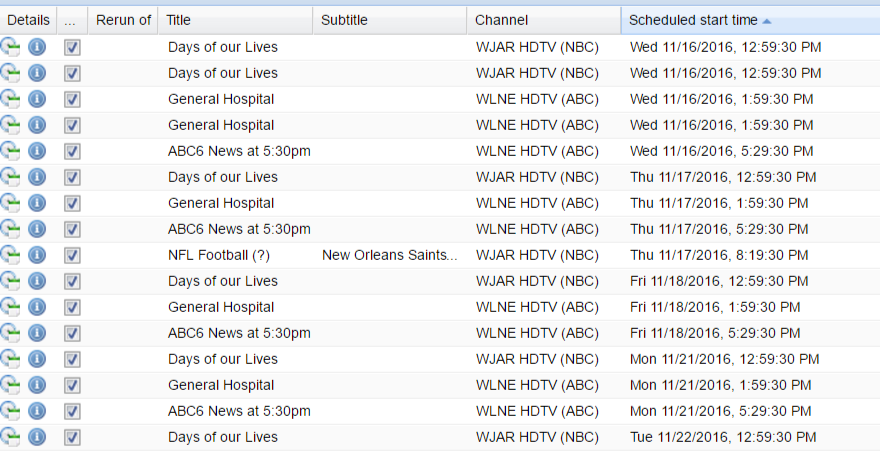
So, it looks like things can work correctly as I had added an auto record and it seems to have completed correctly with a minor issue of not being able to change permissions. I suggested to my wife that she just watch the news instead of soaps since this recording is working but that didn't go over too well... Loglevel debug: enabled 2016-11-15 17:03:22.766 dvr: entry 2ad58a5679263d3cf2d476f41635a9dd "ABC6 News at 5:30pm" on "WLNE HDTV (ABC)" starting at 2016-11-15 17:29:30, scheduled for recording by "htpcserver" 2016-11-15 17:03:22.766 dvr: entry bbc8514c0321675e794fdb5e22aa0afb "ABC6 News at 5:30pm" on "WLNE HDTV (ABC)" starting at 2016-11-16 17:29:30, scheduled for recording by "htpcserver" 2016-11-15 17:03:22.766 dvr: entry 129f18c6d26a487063f579423d69d631 "ABC6 News at 5:30pm" on "WLNE HDTV (ABC)" starting at 2016-11-17 17:29:30, scheduled for recording by "htpcserver" 2016-11-15 17:03:22.766 dvr: entry 3a58fdcb629ee271272e00cf7bd2e939 "ABC6 News at 5:30pm" on "WLNE HDTV (ABC)" starting at 2016-11-18 17:29:30, scheduled for recording by "htpcserver" 2016-11-15 17:03:22.767 dvr: entry 325c53bf5d00630a37122b0e75f1b07e "ABC6 News at 5:30pm" on "WLNE HDTV (ABC)" starting at 2016-11-21 17:29:30, scheduled for recording by "htpcserver" 2016-11-15 17:03:22.767 dvr: entry 6512b1467c59802cd9c3ce1cbdcb9874 "ABC6 News at 5:30pm" on "WLNE HDTV (ABC)" starting at 2016-11-22 17:29:30, scheduled for recording by "htpcserver" 2016-11-15 17:29:30.000 dvr: "ABC6 News at 5:30pm" on "WLNE HDTV (ABC)" recorder starting 2016-11-15 17:29:30.000 mpegts: 683.028MHz in ATSC-T Network - tuning on HDHomeRun ATSC-T Tuner #0 (192.168.0.103) 2016-11-15 17:29:30.000 tvhdhomerun: tuning to auto:683028615 2016-11-15 17:29:30.105 subscription: 0002: "DVR: ABC6 News at 5:30pm" subscribing on channel "WLNE HDTV (ABC)", weight: 300, adapter: "HDHomeRun ATSC-T Tuner #0 (192.168.0.103)", network: "ATSC-T Network", mux: "683.028MHz", service: "WLNE-TV", profile="matroska" 2016-11-15 17:30:00.007 dvr: Unable to change directory permissions to "775" for "/recordings/ABC6 News at 5_30pm" (keeping "755") 2016-11-15 17:30:00.008 dvr: /recordings/ABC6 News at 5_30pm/ABC6 News at 5_30pm - -.mkv from adapter: "HDHomeRun ATSC-T Tuner #0 (192.168.0.103)", network: "ATSC-T Network", mux: "683.028MHz", provider: "", service: "WLNE-TV" 2016-11-15 17:30:00.008 dvr: # type lang resolution aspect ratio sample rate channels 2016-11-15 17:30:00.008 dvr: 1 MPEG2VIDEO 1280x720 16:9 2016-11-15 17:30:00.008 dvr: 2 AC3 eng 48000 5.1 2016-11-15 17:30:00.008 dvr: 3 AC3 spa 48000 2 2016-11-15 18:00:00.010 subscription: 0002: "DVR: ABC6 News at 5:30pm" unsubscribing from "WLNE HDTV (ABC)" 2016-11-15 18:00:00.012 dvr: "ABC6 News at 5:30pm" on "WLNE HDTV (ABC)": End of program: Completed OK As for the dual recordings, I have no clue why that happened. They should all be created from the auto-record settings. It only shows double recordings for some days and not others. I'll try deleting all auto recordings and scheduled recordings and re-create them and see what happens going forward. Thanks for taking a look at this.

-
This is from a failed recording earlier today. Is it also odd that every time it scrapes for new guide data it is adding over 5000 'new' items. I thought it was just doing an incremental update of new or changed programs every day. log.txt
-
I'll try and schedule something to run when I get home and grab the log then, thanks.
-
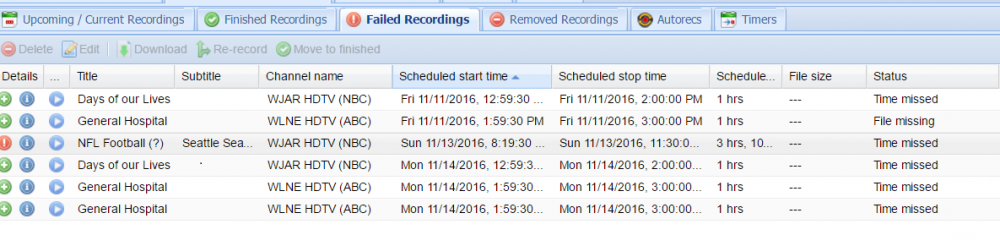
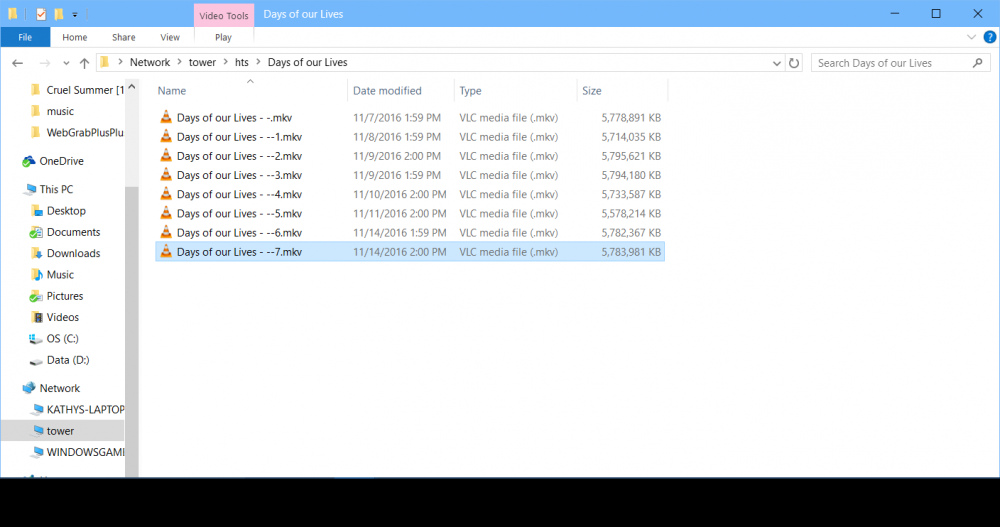
Hi guys, I'm having an issue with recordings and though I'd ask here if anyone knows what I'm doing wrong. I have several auto-records scheduled but they always seem to end up as failed recordings with a status of 'time missed'. The odd thing is that the .mkv files are saved to disk and play fine if I use VLC. For some reason they are not showing as completed recordings in TVHeadend or any of it's clients (Kodi). One other thing I noticed is that some times the error while trying to record is 'no input source available', but if I start a recording of the same show manually at the same time, the manual recording will complete as it should. The tuner is a HDHomerun on the network. Also, what's the best way to attach a log from unRAID dockers? I've just zipped the HTML file but is there a preferred method? Thanks. Log_for__tvheadend.zip
-
Yup, and of course I only changed the view level on the individual pages... Thanks!
-
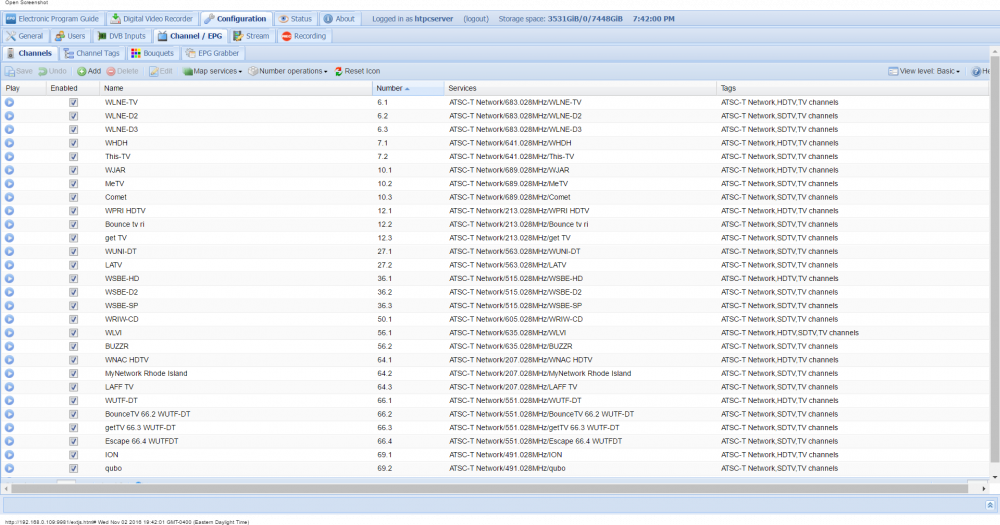
I was using tvheadend on Ubuntu and I'm trying to get it set up on unRAID along with all the other stuff I had running. I have the basic functionality working but I'm running into an issue getting the guide data into tvheadend. I'm using webgrab++ and think that is working properly. I seem to be missing the EPG modules tab from tvheadend. I tried all view levels and I'm logged into admin account. Any idea what is going on with this or what I could have done to lose the tab?