





Waltm
Members
-
Joined
-
Last visited
Everything posted by Waltm
-
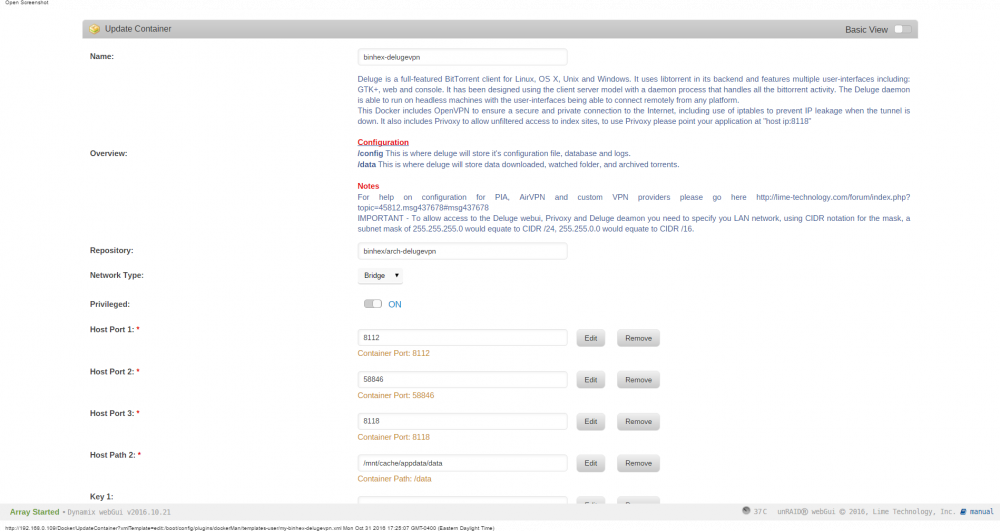
The docker installed with 3 ports. This was done earlier today so I believe it is the latest version. I removed the 8118 port and it installed, stared, and seems to run without issue. Thanks for the help!
-
I did not try changing anything yet. Both dockers installed with that port mapped (container=8118, host=8118). If this port is not needed would I just remove the setting ("Remove" button)?
-
Hi guys. I'm trying to get this running and I think I have a conflict with binhex-sabnzbdvpn. When I try to install delugevpn I get an error docker: Error response from daemon: failed to create endpoint binhex-delugevpn on network bridge: Bind for 0.0.0.0:8118 failed: port is already allocated. It appears sab is also using this port as shown in 'deployed ports" binhex-sabnzbdvpn 8080 8090 8118 binhex-delugevpn 8112 58846 8118 I don't know enough about how virtualization works to know what this port is used for and if I can change or remove it. I do have ENABLE_PRIVOXY=no in deluge as mentioned earlier in this thread.
