





tjb_altf4
Members
-
Joined
-
Last visited
-
Looking at the screenshot it seems nothing has been lost from Unraid. It's simply a case of SMB shares not being exported, or not detected by Windows. Note also that If the array is stopped, so will be the SMB service.
-
FYI https://github.com/jellyfin/jellyfin/issues/17831
-
Thanks for all your hard work @ich777
-
With Unraid 8 in development, will we still see multi array in 7 series, or will it be pushed back again?
-
Too hard basket for LT, accept its never coming and make plans appropriately.
-
Switch to bridge network and right port settings will reappear. You can't port map on custom networks like the docker br0, so either you can have pihole on its own IP with no mapping (ports are 1:1), or you can use the port mapping like the pihole devs suggest. The error is likely the dhcp pool from docker network clashing with your dhcp set by your router. Its also possible you need to restart the server as Unraid may not have cleaned up its network artifacts correctly.
-
the way your describing used to work, but was broken a few releases ago to lockdown the UI for tailscale users. typical way to solve is to host icons on a github repo, or one way I solved this in the past was to spinup an nginx container with a configuration that supports directory browsing (you then grab that url).
-
I think those weird variables come from Unraid itself doing some jiggery to save port settings when you change to a network type that doesn't support port mapping... its not part of the binhex template. The variables aren't really a problem, but it is a symptom that you might not be using the correct network type.
-
Its official because it uses the docker container image from the author of the application i.e. pihole/pihole Unraid templates are a wrapper which hold the docker configuration, equivalent of docker run command. There templates are nearly all community author supported, and typically have a support thread... this one doesn't seem to, so post in their general thread: https://forums.unraid.net/topic/44108-support-binhex-general/page/8/
-
I'm going to be real here, if you can't even help yourself by searching for unknown terms on google etc, are you really ready to do advanced tasks like working with your encrypted array data from the CLI ?
-
This looks like you are only changing the properties for Unraid WebUI link, not the container's port settings.
-
Prowlarr doesn't have a vpn component, that read me is for containers with the vpn suffix e.g. delugevpn, qbittorrentvpn, sabnzbdvpn etc Typical use case is downloaders (e.g. delugevpn) have the vpn setup, and you use container networking to use that containers vpn connection.
-
you'll need to update your container templates manually, but here's a cli one-liner to give you a table of info you need (container name, ip and mac address): docker ps -q | xargs docker inspect \ --format '{{.Name}} {{range .NetworkSettings.Networks}}{{.IPAddress}} {{.MacAddress}}{{end}}' \ | column -t
-
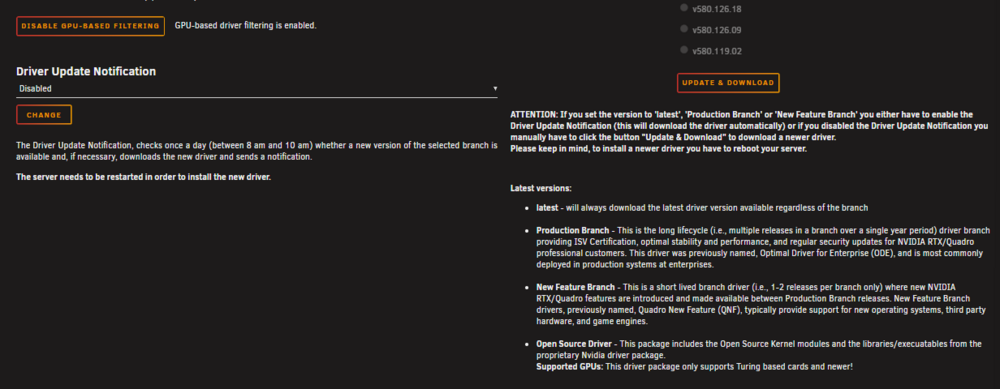
setting is still there for me 🤷♂️
-
--gpus=all is the modern, supported method for gpu passthrough as per Dockers documentation (linked). It does work on Unraid, I use it currently in 7.2, but there are regressions in 7.3.x, which look likely to be issues with nvidia-container-toolkit. https://docs.docker.com/engine/containers/gpu/




