





davisnub
Members
-
Joined
-
Last visited
Everything posted by davisnub
-
Errr, newbie question. To accomplish that, I'd need to use some kind of file browser like Krusader correct? I'd compare the files due to modified date and delete the oldest one? I'm poking around Krusader for the first time, how do I mount the cache and the largepool so I can compare the files? Also, if most of the duplicate files are metadata that I don't mind just deleting and I've backed up my appdata, would it theoretically be easier for me to just erase the old cache drive?
-
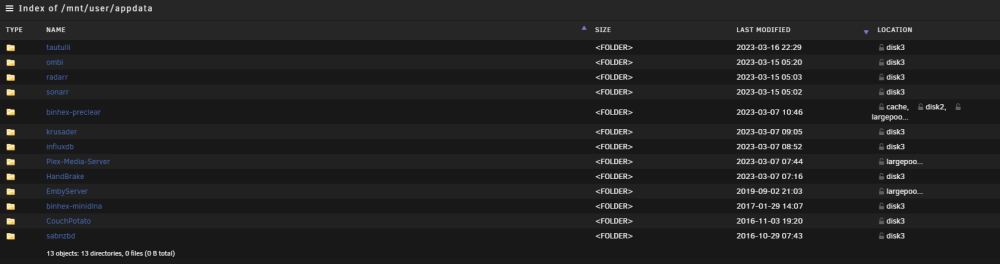
Any way to move the remaining files that are in the cache that are part of appdata? I see that binhex-preclear has some files that still remain in the cache for some reason. I'm assuming that after those are moved over, is there a straightforward method to remove the duplicate files on the old cache drive?
-
Does that mean there are duplicate files that exist on the old cache drive?
-
Hello all, Recently resurrected my unraid server after having two children, so getting back into the swing of things. I recently added a a new ssd drive as a cache drive as a separate pool (yay for dropping ssd prices). I'm currently working on getting appdata to move from the old cache drive to the array and then to the new cache drive (separate pool devices). For the life of me, I cannot get the mover to move everything off the cache. I've also noticed that after the mover is complete, there's still about 23GB being used on the old cache drive. I've attached a syslog while the mover is working. cache = old ssd drive largepool = new ssd drive tower-syslog-20230317-1015.zip
-
You tried searching in this thread? thanks for the help! i tried looking for the option to search within a thread but could only find the option to search within a forum
-
is multicore enabled by default? noticed it was grayed out in my config and was reading on how to enable it. thank you!
-
Sounds like your system doesn't support the sleep command. What happens when you go into CLI and execute the command directly? echo -n mem >/sys/power/state I can ssh into the server and execute this correct? (sorry, I'm new to this OS) Thank you
-
I'm having issues with getting the sleep plug in to work. I just manually set up: ethtool -s eth0 wol g however, I'm still getting the following message from unraid: /user/local/emhttp/plugins/dynamix.s3.sleep/scripts/s3_sleep: line 334: echo: write error: invalid argument I'm currently using unraid 6.3.0rc3
-
interesting app. just purchased through the store. I couldn't connect to my unraid server (it's running 6.3 rc3) via manual or auto
-
noob question, how do you execute the ssd trim plugin? or does it run automatically?
