





WannabeMKII
Members
-
Joined
Everything posted by WannabeMKII
-
Ignore this message, I've carried out a connection test to CrashPlan servers and it maxes out my connection and it's cheaper Time for a change I think.
-
I've been using CrashPlan PROe here in the UK and backing up to a data centre in Amsterdam using a local CrashPlan reseller. I moved to a local reseller, as the speed was much faster. Is it possible to use this Docker to backup retain that backup, as I've got just over 350GB backed up and don't want to start again if I can avoid it?
-
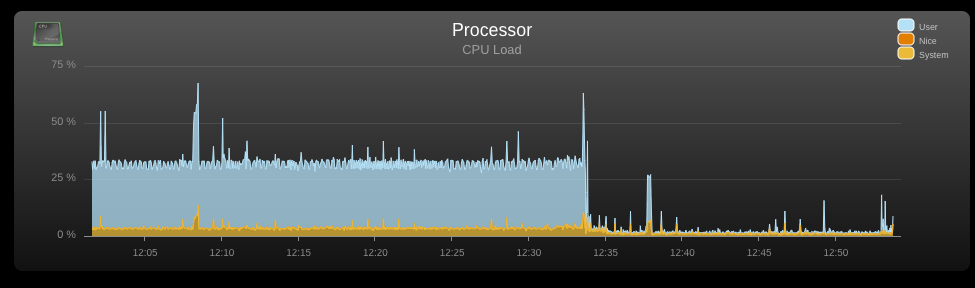
As an additional screenshot, I restarted the Plex docker at 12:34 and this is the outcome.
-
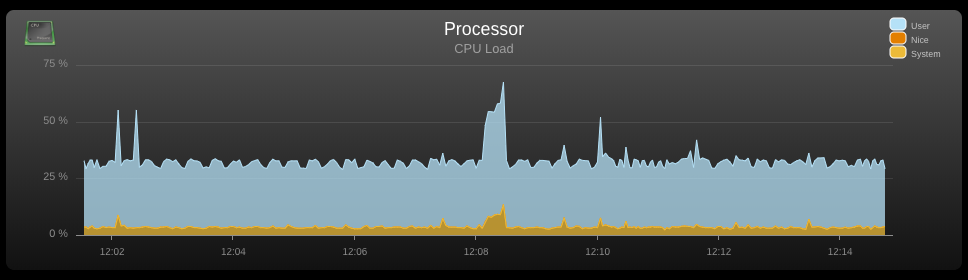
Over the weekend, I changed from a Xeon Windows machine running Plex and an N54L running unraid with the data, to moving everything to unraid on the Xeon. All generally went smoothly, but Plex seems to be using quite a bit of CPU. I've taken screenshots of what I can find and hoping someone can offer a bit of guidance on what is causing this? I see the scanner run periodically to increase CPU usage, but then drops when done. Also, when Plex isn't using that much CPU, the CPU generally sits about 2%. Any ideas?


-
I think you're getting the login request because of this -
-
Great, thanks again. I'll continue to watch this thread as things progress and will keep an eye out for docker updates and scripts.
-
I just wanted to report back 24 hours later that all is going well here with no hanging or slowdowns, which is GREAT news! Thanks! A few quick questions; 1. If I make any changes, when I hit apply, when I open PiHole, I seem to have lost all my historical logs? Any ideas why? A docker restart doesn't do the same thing? 2. Off the back of that, the settings we've added in above, will they be lost with a container update? 3. I use a reverse proxy. I've had a play, but unable to get through to PiHole. Any ideas on how to configure with LetsEncrypt? Thanks again and keep up the good work @spants
-
I've just run this on my install with the following output; docker exec -it pihole apt-get update docker exec -it pihole apt-get --reinstall install iptables docker exec -it pihole apt-get install iptables-persistent docker exec -it pihole iptables -A INPUT -p tcp --destination-port 443 -j REJECT --reject-with tcp-reset docker exec -it pihole iptables -A INPUT -p udp --destination-port 80 -j REJECT --reject-with icmp-port-unreachable docker exec -it pihole iptables -A INPUT -p udp --destination-port 443 -j REJECT --reject-with icmp-port-unreachable docker exec -it pihole ip6tables -A INPUT -p tcp --destination-port 443 -j REJECT --reject-with tcp-reset docker exec -it pihole ip6tables -A INPUT -p udp --destination-port 80 -j REJECT --reject-with icmp6-port-unreachable docker exec -it pihole ip6tables -A INPUT -p udp --destination-port 443 -j REJECT --reject-with icmp6-port-unreachable docker exec -it pihole iptables-save > /etc/iptables/rules.v4 Get:1 http://security.debian.org jessie/updates InRelease [63.1 kB] Get:2 http://security.debian.org jessie/updates/main amd64 Packages [608 kB] Ign http://deb.debian.org jessie InRelease Get:3 http://deb.debian.org jessie-updates InRelease [145 kB] Get:4 http://deb.debian.org jessie Release.gpg [2434 B] Get:5 http://deb.debian.org jessie Release [148 kB] Get:6 http://deb.debian.org jessie-updates/main amd64 Packages [23.1 kB] Get:7 http://deb.debian.org jessie/main amd64 Packages [9064 kB] Fetched 10.1 MB in 3s (2824 kB/s) Reading package lists... Done Not sure if there's anywhere in particular I can look to check? But I'll keep an eye on things to see how things run... Thanks @spants
-
Awesome, thanks spants and hope you had a great time travelling!!!
-
To be honest, I wouldn't even know where to begin in terms of adding the info manually, especially if there's a risk of it being wiped after an update. @spants, is it possible to have the required settings baked into the container for a future release? I'd love to use this, as the www is getting more and more littered with ads!
-
Ah ha, 'DNS resolution not currently available' resolved thanks to your link, appreciated! As for the second section, that's gone straight over my head Is this something I can do manually, or is this something that can be added to the docker?
-
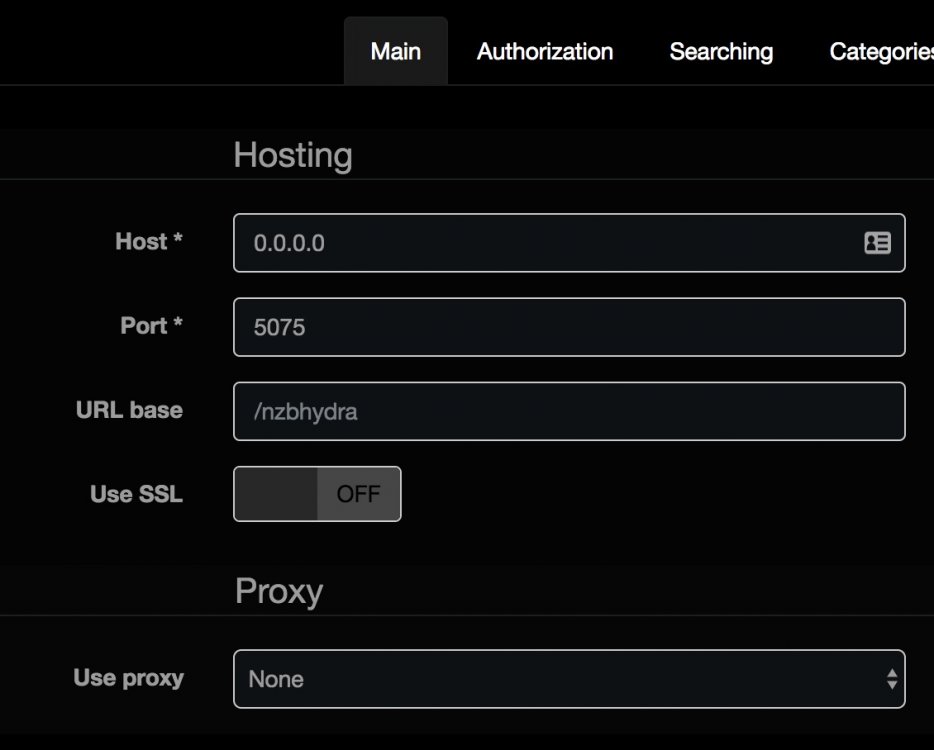
Found the issue and it was really subtle. Within nzbhydra, the URL base is actually greyed as an example and not actually completed. I typed in "/nzbhydra" and it's now working perfectly! So everything is now back to 100% working order, thanks again for the pointers everyone!
-
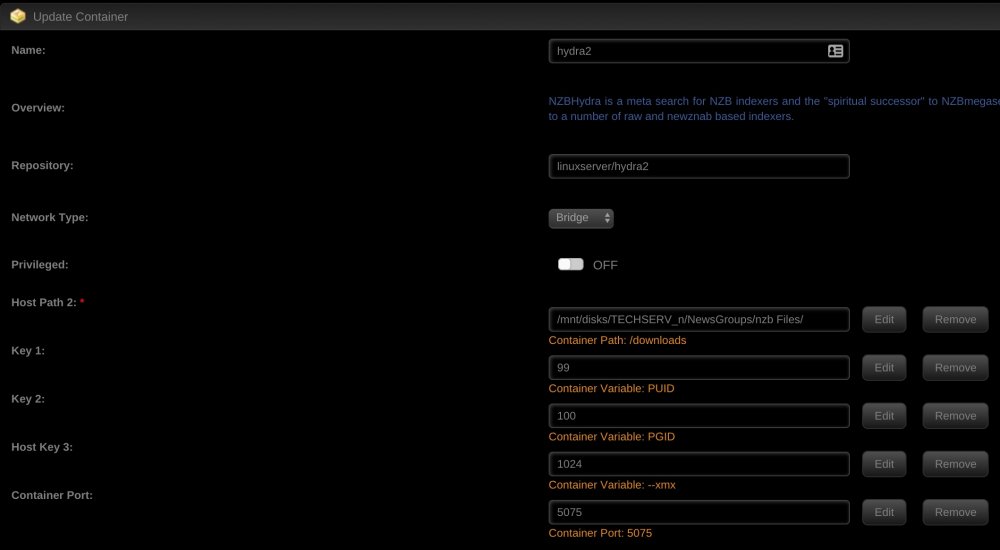
Sorry, got excited that things are almost 100%. Attached are images and the LE setup; location /nzbhydra { include /config/nginx/proxy.conf; proxy_pass http://10.0.0.124:5075/nzbhydra; }
-
I've tried using Pi-Hole three times. Once on 6.3.5, once on 6.4 and again on 6.4, but with it's own IP. The problem I'm having is that 75% of time, everything is fine, but every now and again, pages just don't load. They hang and hang and refreshing the page 2 or 3 times then causes it to load? Any ideas? The only other thing I've noticed is that I get the following on startup and when updating the lists; [✗] DNS resolution is currently unavailable I'm not sure why?
-
This is working great, but now I've LetsEncrypt back up and running, when accessing, it prompts for my username and password, but not actually loads? It appears to access my login credentials, but the page doesn't render anything? Any ideas?
-
Ah ha, adding "tls-sni" = "true" has got me back up and running! Port 80 is still appearing as closed though? Now just to get nzbhydra2 actually loading properly. Superb news though and really appreciate the constant help from everyone, absolutely legendary!
-
OK. I'll wait for the new version to be available, then nuke everything and start again. Just out of interest, what's the ETA on the new version? Are we talking hours, days...?
-
Should I just nuke my LE container, appdata etc and start again?
-
OK. I had to delete that section and re-add it and now done; root@localhost:# /usr/local/emhttp/plugins/dynamix.docker.manager/scripts/docker run -d --name="letsencrypt" --net="bridge" --privileged="true" -e TZ="Europe/London" -e HOST_OS="unRAID" -e "EMAIL"="*****@*****.***" -e "URL"="*****.***" -e "SUBDOMAINS"="*****" -e "ONLY_SUBDOMAINS"="true" -e "DHLEVEL"="2048" -e "HTTPVAL"="true" -e "PUID"="99" -e "PGID"="100" -p 444:443/tcp -p 81:80/tcp -v "/mnt/user/appdata/letsencrypt":"/config":rw linuxserver/letsencrypt 2e883074e4fa57872dcfe4dbe866e245bdb871a60f8010e34cdf2bf7ca3d997c The command finished successfully! I've also attached the port forwarding. LE logs; [cont-init.d] 10-adduser: exited 0. [cont-init.d] 20-config: executing... [cont-init.d] 20-config: exited 0. [cont-init.d] 30-keygen: executing... using keys found in /config/keys [cont-init.d] 30-keygen: exited 0. [cont-init.d] 50-config: executing... Backwards compatibility check. . . Still using tls-sni. Please set the VALIDATION parameter in the future 2048 bit DH parameters present SUBDOMAINS entered, processing Only subdomains, no URL in cert Sub-domains processed are: -d *****.*****.*** E-mail address entered: *****.*****.*** Generating new certificate Saving debug log to /var/log/letsencrypt/letsencrypt.log Plugins selected: Authenticator standalone, Installer None Obtaining a new certificate Performing the following challenges: Client with the currently selected authenticator does not support any combination of challenges that will satisfy the CA. Client with the currently selected authenticator does not support any combination of challenges that will satisfy the CA. ERROR: Cert does not exist! Please see the validation error above. The issue may be due to incorrect dns or port forwarding settings. Please fix your settings and recreate the container Hopefully this show's everything...?
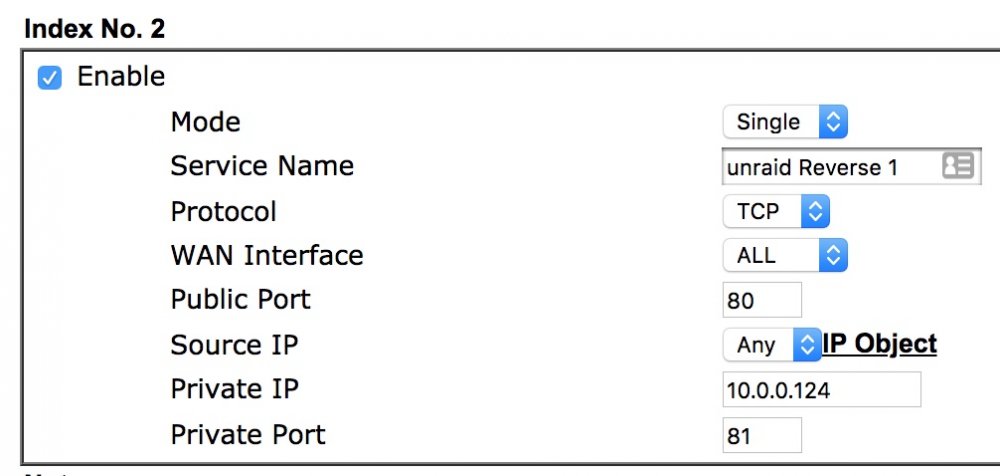
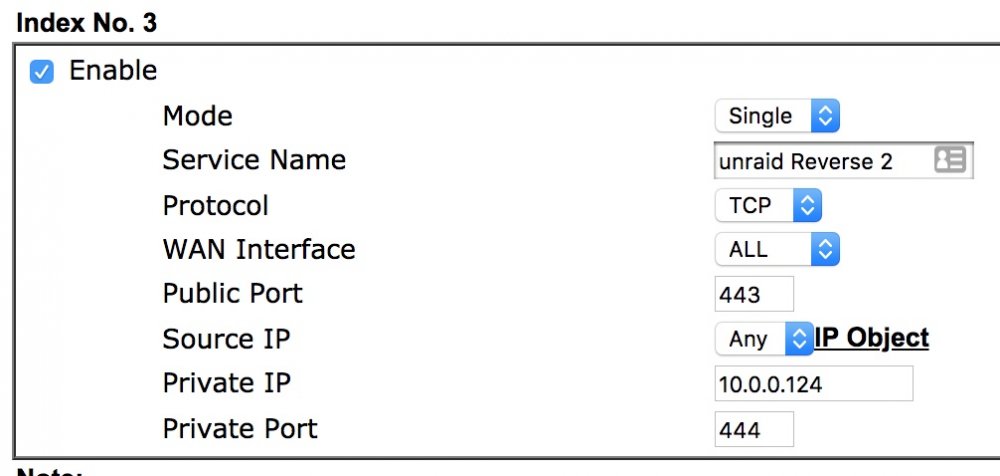
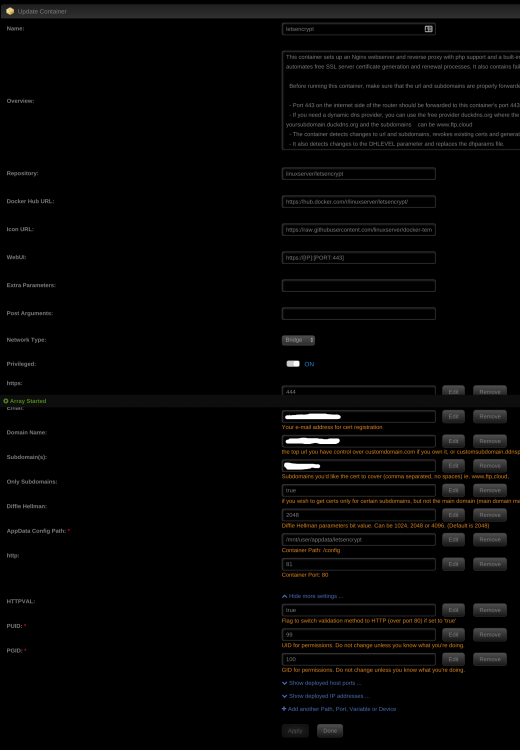
-
Ah got you, sorry. After changing the port, I get the following; root@localhost:# /usr/local/emhttp/plugins/dynamix.docker.manager/scripts/docker run -d --name="letsencrypt" --net="bridge" --privileged="true" -e TZ="Europe/London" -e HOST_OS="unRAID" -e "EMAIL"="*****@*****.***" -e "URL"="*****.***" -e "SUBDOMAINS"="*****" -e "ONLY_SUBDOMAINS"="true" -e "DHLEVEL"="2048" -e "HTTPVAL"="true" -e "PUID"="99" -e "PGID"="100" -p 80:81/tcp -p 444:443/tcp -v "/mnt/user/appdata/letsencrypt":"/config":rw linuxserver/letsencrypt 1d79d9f9dc01fd82456b2131a0311e4d33eb32a8ed50b55b026349ea5bde2033 /usr/bin/docker: Error response from daemon: driver failed programming external connectivity on endpoint letsencrypt (176839ccbca9b1aa09ea179adc960f4d4b1887c58ead94c06b6ef5bb2006a44e): Error starting userland proxy: listen tcp 0.0.0.0:80: bind: address already in use. The command failed. I guessing this is because of it being the same port and IP of unraid?
-
We've tried all variations to get it to work and we're back to sharing the IP with unraid.
-
No space anywhere on 'true'. Here's the run command; root@localhost:# /usr/local/emhttp/plugins/dynamix.docker.manager/scripts/docker run -d --name="letsencrypt" --net="bridge" --privileged="true" -e TZ="Europe/London" -e HOST_OS="unRAID" -e "EMAIL"="*****@*****.***" -e "URL"="*****.***" -e "SUBDOMAINS"="*****" -e "ONLY_SUBDOMAINS"="true" -e "DHLEVEL"="2048" -e "HTTPVAL"="true" -e "PUID"="99" -e "PGID"="100" -p 81:81/tcp -p 444:443/tcp -v "/mnt/user/appdata/letsencrypt":"/config":rw linuxserver/letsencrypt 0d992b727e55d3d67b94761e56853cd0ba7df419c3e8050ddb17d8304b908227 The command finished successfully! I mentioned about dnsmadeeasy, as was going to give it a try for you, but guess it's not worth it until this is working.
-
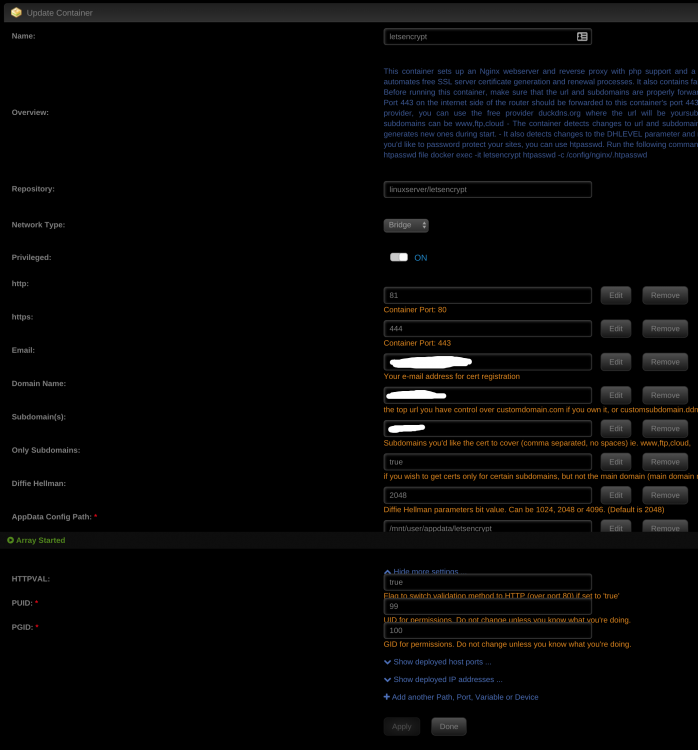
HTTPVAL appears correct and the docker image is from this morning. I've attached a screenshot. All port forwarding etc is fine too and when we tried nginx on the same ports, it worked straight away... CHBMB looked over my setup earlier too. He suggested I speak with you about dnsmadeeady, as that's my DNS provider. Did you get my message?
-
It appears to be a DNS issue after fixing all other problems. I'm hoping to test the dnsmadeeasy setup, so I've PM'd and hoping to hear back so I can get back online...
-
Perfect, worked a treat! Many thanks!


