





J.Nerdy
Members
-
Joined
-
Last visited
Everything posted by J.Nerdy
-
Cheers!
-
Did you get this sorted. I am trying to get log access. I found a 0byte file /mnt/user/disk/appdata/homebridge/log.txt but nothing obviously written to it?
-
I am getting the same log spamming, on multiple operations.
-
I tried. Something is borked on the client side for sure. XPlay plays the same content on client in HDR (though playback is choppy - something is definitely going on with how stream is rendered on this TV)
-
Unfortunately that did not help. I removed the container, reinstalled 6.8.3, reinstalled the container and configured fresh (my setting did not carry over - but I had them exported) and the problem still persists. HOWEVER I have the same model TV upstairs and it does not have this issue. Further, no other clients accessing the server have playback issues. It seems like it isolated to this particular client. I reinstalled the plex webOS app... but still no joy. Really odd.
-
I did not, but I will, Just nuked the contents?
-
Has anyone else noticed that on latest update *.2740 their HDR content is no longer playing? I have an LG C7p and have been streaming HDR without issue. No, the movies start - but do not trigger HDR. Oddly, I have the unRAID library mirrored on a Mac mini, and the PMS serves the HDR content just fine to the C7p/
-
I am perplexed Everytime I restart the container, the same 17 (out of 310) torrents are force rechecked, and, then set to complete rather than actively seeding. I assume the FastResume data is corrupted. Is there anything I can do so that these torrents just begin seeding upon container restart?
-
Mouse and keyboard can be done through the template (peripherals on the USB bus show up on the bottom with tick boxes). Regarding the gtx - I am not certain, but you need a VGA BIOS (check tech power ups library for your card|mfg) & some kext insertions in clover (Lilu, whatevergreen). I think Space has a video on his channel as well for GPU passthrough in macOS machine Edit: check this out
-
Hard reset does nothing. I tweaked xml and can get the VM started now... but no signal. I wonder if the card is blow... though I would imagine it wouldn't enumerate in system devices if that was the case. Super bizarre (and frustrating) EDIT: ~~Something is borked... now I started from scratch, and on first start... VNC just hangs.~~ EDIT2: ~~what would cause a single VCPU to peg @ 100% and log to hang changing the state of the network adapter br0 ?~~ EDIT3: VNC viewer lets me hit the clover boot loader EDIT 4: Dear Jackass (me): K.I.S.S. (Keep it simple stupid). My 8pin was not seated all the way (I added a new 2070 a month+ ago, and hadn't fired up my macOS vm since). Hence, enough power to announce, but not enough to enumerate. I suck. Sorry everyone. EDIT 5: Back to square1. All VMs using the Radeon are hanging at boot. Got it to boot once after re-seating, but that's it. I am not sure why or how, but the BIOS of my card got nerfed. After trying several revision of actual BIOS, I used some different Polaris BIOS and got one that worked. For those of you using a Polaris 20 GPU - The Sapphire Nitro 580 4gb (2017.11.17) worked for my Pulse 570x.
-
Everything has been working fine... until today. I started the VM, and in unRAID it shows as started. However no video signal and it seems the machine stays pegged at 100% on one core. I have been using it without problems (4 core, 16gb, 570x passed through with working sound)... and then just bupkus. Any thoughts would be appreciated.
-
Silly question, but can UD and "plus" be installed side by side? Or must we remove one?
-
what was the change between .20 and .20a? Thanks!
-
This popped up today: so far only occurrence. ec 20 02:24:54 nerdyRAID kernel: CIFS VFS: sends on sock 000000002eed1320 stuck for 15 seconds Dec 20 02:24:54 nerdyRAID kernel: CIFS VFS: Error -11 sending data on socket to server Dec 20 02:25:18 nerdyRAID kernel: Status code returned 0xc0000128 STATUS_FILE_CLOSED Dec 20 02:25:18 nerdyRAID kernel: CIFS VFS: Send error in read = -9
-
There seem to be some miscellaneous issues regarding catalina’s deprecation of smb1 for smb3 in documentation online. That said, it started happening prior upgrading to 10.15 Purely making an educated guess... I think it has to do with samba 4.11 and macOS. If I have some time I may downgrade to 6.7.2 since the issue was absent until upgrading to 6.8 I appreciate you digging in on it... but it is log spam (and low priority) as near as I can tell since no functionally is compromised. Happy Holiday
-
Cheers permissions are correct, right?
-
total 0 drwxrwxrwx 2 nobody users 0 Dec 16 21:13 BACKups/ drwxrwxrwx 2 nobody users 0 Nov 30 14:57 ISO_IMG/ drwxrwxrwx 2 nobody users 0 Sep 21 09:33 MEDIA/
-
Disabled netbios and made sure WSD was enabled. Errors persist.
-
Using enhanced log, I am not seeing VM start-up or other messaging - is this normal?
-
macOS 10.15.x defaults to smb3 (which was introduced with its rollout - deprecating smb1 support). I really do appreciate your diligence. What is so perplexing about the error is despite protesting security mismatch, the network device is still mounted R/W with complete access. Wacky. Thanks!
-
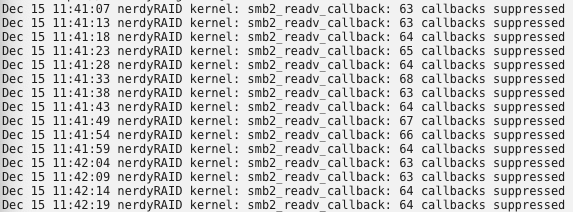
1) very cool plugin - I wish I knew about this earlier 2) indeed it mask the SMB sig errors... 3) see the pic, I will do the same for smb2_readyv_callback (they are clearly related to the samba issues and only persist when accessing the remote mount) How do I troubleshoot the issues with Samba? While I appreciate the help (and am grateful should it continue), this appears to be an "edge-case" and honestly, is not an issue with UD ... but rather how CIFS | SMB network mounts are borked on my system.
-
Here ya go. nerdyraid-diagnostics-20191215-1135.zip
-
Copied and umount & mount and still getting log spam (tried rebooting server as well). I also tried digging into folder (disk) ownership. Nothing there worked either. I was on Mojave (which only supported smb1) and upgraded to Catalina which deprecates smb1 for sm3 ... still no joy. I really appreciate your help, I wish I could be of more value. (Just updated plug-in as well).
-
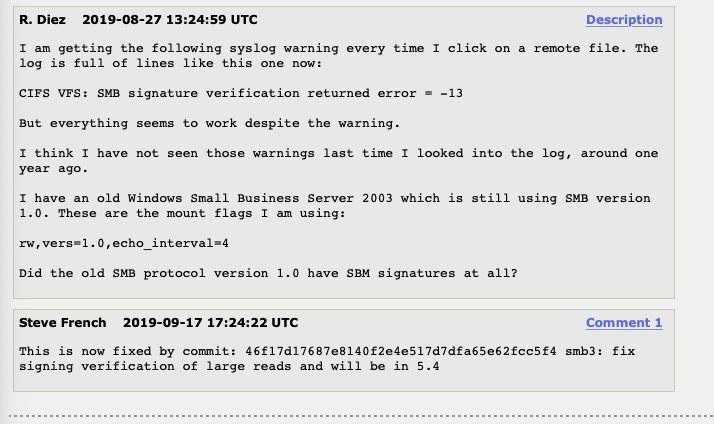
Agreed. I don't believe this to be a UD problem as other linux users are having similar issue with remote shares - (though it seems to affect windows machines as well in their instances). I think I need to kick this back to as a bug report in 6.8 stable? Though I think it could be a Samba bug...
-
@dlandon I don't know if this is as much a UD problem as a change in Samba that is causing the issue. Researching around there seems to be open issue with kernel complaining (across distros: red hat, ubunutu etc) about SMB verification error - but still being able to mount and browse the destination - starting in June. Have not found any solid information on solution either.

