menasco
Members
-
Joined
-
Last visited
-
That worked. Thanks.
-
Ok, got it now. Thank you. Billy
-
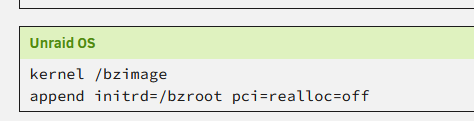
I will try this tonight. Is this where the line needs to be added? Billy default menu.c32 menu title Lime Technology, Inc. prompt 0 timeout 50 label Unraid OS menu default kernel /bzimage append initrd=/bzroot pci=realloc=off label Unraid OS GUI Mode kernel /bzimage append initrd=/bzroot,/bzroot-gui label Unraid OS Safe Mode (no plugins, no GUI) kernel /bzimage append initrd=/bzroot unraidsafemode label Unraid OS GUI Safe Mode (no plugins) kernel /bzimage append initrd=/bzroot,/bzroot-gui unraidsafemode label Memtest86+ kernel /memtest
-
I will try it when I can shutdown the system Friday evening. Thanks
-
Suggestions as to where to find a solution? Billy
-
Thanks, I will look into that when I can shutdown tonight.
-
Thank you for the reply. When I roll back to 6.12.8 everything works. Billy
-
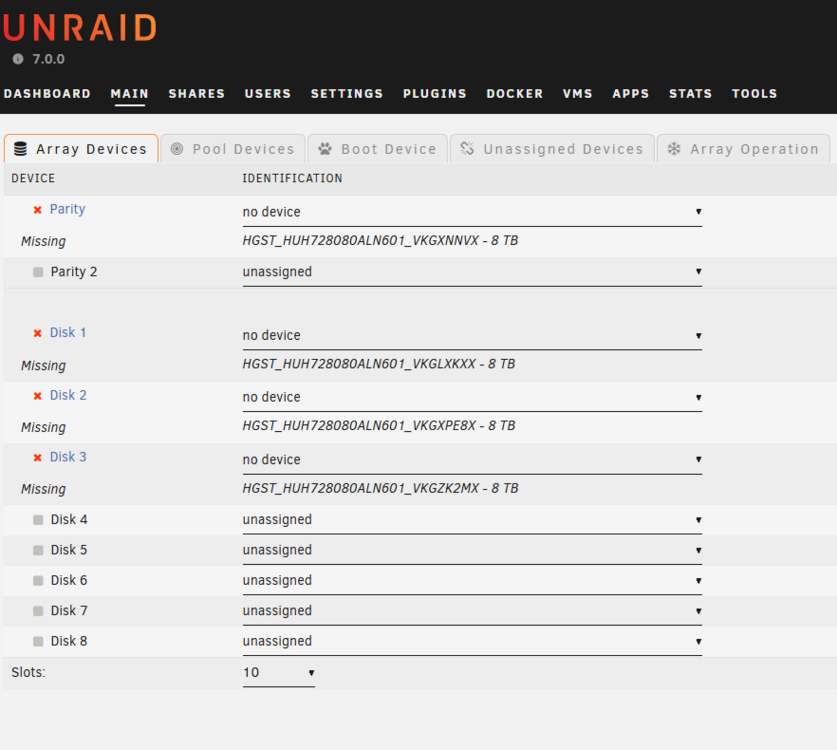
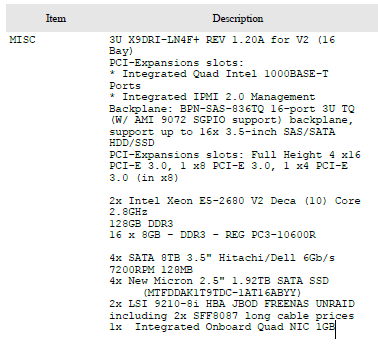
I have an unraid box I installed in 2019. Bought a surplus 3U server and it has been running flawless. I have performed updates in the past and today I tried to apply update 7.0.0. When the update completed all my array devices show "no device" for my drives. Searching I found other posts with similar issues. My setup works on 6.12.8 so I am not sure the problem is hardware related. There is a BIOS update for the motherboard but the fixes appear to not be related to my 7.0.0 update issues. Any assistance is appreciated. Billy EDIT. Looking through the syslog I found this. Feb 18 17:04:43 hotsyok-aspen kernel: mpt2sas_cm0: failure at drivers/scsi/mpt3sas/mpt3sas_scsih.c:12347/_scsih_probe()! Feb 18 17:04:43 hotsyok-aspen kernel: mpt2sas_cm0: pci_request_selected_regions: failed Below are the server specs. Supermicro X9DRI-LN4F+ REV 1.20A for V2 Integrated Quad Intel 1000BASE-T Ports Integrated IPMI 2.0 Management Backplane: BPN-SAS-836TQ 16-port 3U TQ (W/ AMI 9072 SGPIO support) backplane, support up to 16x 3.5-inch AS/SATA HDD/SSD PCI-Expansions slots: Full Height 4 x16 PCI-E 3.0, 1 x8 PCI-E 3.0, 1 x4 PCI-E 3.0 (in x8) 2x Intel Xeon E5-2680 V2 Deca (10) Core 2.8GHz 128GB DDR3 16 x 8GB - DDR3 - REG PC3-10600R 4x SATA 8TB 3.5" Hitachi/Dell 6Gb/s 7200RPM 128MB 4x New Micron 2.5" 1.92TB SATA SSD () 2x LSI 9210-8i HBA JBOD FREENAS UNRAID including 2x SFF8087 long cable prices 1x Integrated Onboard Quad NIC 1GB hotsyok-aspen-diagnostics-20250218-1707 pos 7 update.zip hotsyok-aspen-diagnostics-20250218-1519 pre 7 update.zip P-X9DR3-LN4F__X9DRI-LN4F__BIOS_3_4_release_notes.pdf