





unraid509
Members
-
Joined
-
👆 Looking for similar
-
interested to know which ones you removed. Having the same issue here.
-
unraid509 changed their profile photo
-
Thanks to maintainer and Stanley for path tip! Just wish this had ssh so I could sync with another one, haven't tried installing it but I would assume it would be wiped on updates...?
-
Is this still being maintained? Seems an update is needed
-
Seems this was replaced by https://github.com/gabe565/CastSponsorSkipWish Hoping someone makes a docker app for this
-
🥺 Thanks for the heads up! Never liked sab too much, I'll try NZBGet-ng.
-
Switched over to this container... Not sure if anyone else has gotten the certificate error but for some reason I had to use the following via console. Also anytime I make a change to docker settings: cd /nzbget rm cacert.pem && wget https://nzbget.net/info/cacert.pem cacert.pem
-
Thank you for the reply. I should have waited for it... I ended up going a long route. I realized that I think I changed the UUID. I googled but couldn't find an easy way to recover from my mistake. So I just cleared the new drive/formatted etc and made it the new pool drive. Had to reinstall dockers then copied over the appdata files over. Then formatted that drive and have it running unassigned with a VM which is now popping up a 'UDMA CRC Error count' error. I need to look into adding a second pool drive now.
-
I added an SSD I planedn on using as an unassigned disk for VMs. Somehow somewhere along the way... I must have messed up... :shrug: Now, if I make the original cache in dropdown, it doesn't like it. It likes the new SSD for some reason. Is it easier to just change to the new SSD and make the old one the VM one and let unraid fix/repair the cache? tower-diagnostics-20231009-1809.zip
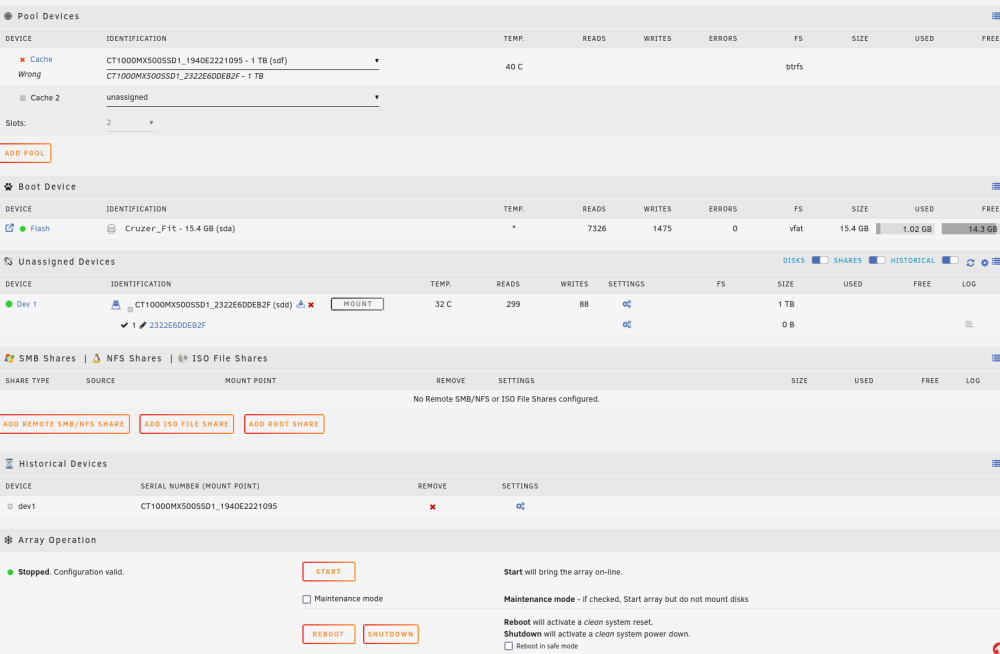
-
Thanks guys. Still having trouble with geoip2. Unknown directive error confirm/../geoip2
-
Would SWAG cause any conflicts with the remote feature as long as SWAG is not utilizing port 443 or 80? Trying to figure out why my hash url isn't working.
-
Looking forward to 2FA for root. I am now able to access gui via local IP bypassing security notice. My Servers says I'm online and with local access enabled but now the hash url isn't working. Also, it says it doesn't recommend port 444. Are their ports that are recommend?
-
I found I am now only able to access unraid via a different computer that I originally had used to set this feature up. I can access it via hash or local IP but am unable to get to it from other computers on the network. Re-enabled remote feature and trying to get access via forums won't connect either. Plugin says it's working!?!?! EDIT... Working again. Not sure why it wasn't working before.
-
Tried that route. Not working.
-
Same questions. Disabled the plugin after disabling/logging out of the feature and now getting redirected to the hash URL. Currently unable to access GUI. Any way to get it working again? Seems this needs a way to allow easier LAN access.


