





MustardTiger
Members
-
Joined
-
Last visited
-
All those commands bar one seemed to work fine, in the sense that they all out output something. The one which didn't seem to output anything was this one: root@2cd6bad055fb:/usr/local/tomcat# /sbin/hdparm -I /dev/nvme0n1 /dev/nvme0n1: I'm guessing that's just something to do with hdparm not being for NVMe devices, and if that is the case then all these commands seem to have worked. I'll attach the outputs of those commands anyway, since I already output them into a doc for myself to look through. DiskSpeed command outputs.txt
-
Update: I found another NVMe drive to test, and I seemed to be able to pass it through to the VM with no issues. Only problem is it's a 16GB Optane drive. When I was trying to boot with the NVMe drive with the problem, I was seeing something in the POST screen about 'dirty bit', and I did not see that when I tried it with the Optane drive. So, I think I'll start investigating into that to see if it can be fixed, I'll try running fsck on it.
-
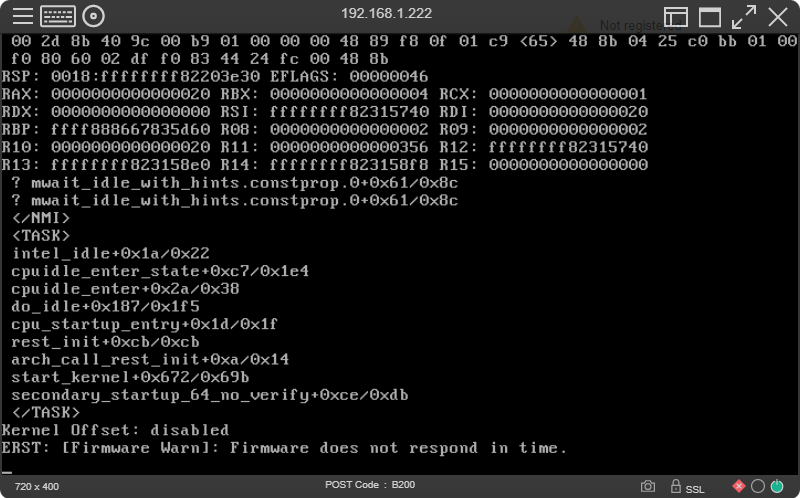
Hi everyone. I'm trying to passthrough a second NVMe drive to be able to use with VMs. I was previously able to bind the device to vfio-pci, reboot, but then I would get this error when I try to pass it through to a VM: internal error: qemu unexpectedly closed the monitor: 2022-11-28T18:10:09.668599Z qemu-system-x86_64: -device {"driver":"vfio- pci","host":"0000:81:00.0","id":"hostdev2","bus":"pci.6","addr":"0x0"}: vfio 0000:81:00.0: failed to add PCI capability 0x11[0x50]@0xb0: table & pba overlap, or they don't fit in BARs, or don't align I did some searching online and found out that I might need to update the firmware on the drive as Unraid might have issues with the controller. The NVMe drive I'm trying to passthrough is exactly the same model as my NVMe drive I use for my cache, so I updated both to the latest firmware. The one I use for my cache still works perfectly fine for Unraid. However, the one that was bound to vfio stops Unraid from booting, it just keeps bootcycling. I ended up having to edit vfio-pci.cfg on another pc to remove the problem device, which allowed me to boot into Unraid. I tried binding the device to vfio, but the same thing happened. I tried booting into legacy mode, but the same thing happens. The only difference is that I'm able to see this error just before it reboots: I also get a critical error in my Integrated Management Log in iLO (for HPE Proliant DL80 Gen9) with the description "PCI Bus Error (Slot 6, Bus 128, Device 2, Function 0)", which is the NVMe drive in question, but it shows no more information. For reference, the NVMe drive is an Intel SSDPEKKF256G8L, and both the drive in question and the one I use for my cache drive both use separate NVMe to PCI-E adapters. If anyone has any advice, it would be most appreciated, thank you. Diagnostics: tower-diagnostics-20221129-1323.zip
-
Yep, you're correct. I removed "video=simplefb:off" and all is still working fine. I've just done a test where I've kept all my settings as they are now, so my embedded graphics is enabled, Nvidia GPU bound, my Syslinux cfg is this: intel_iommu=relax_rmrr video=efifb:off isolcpus=4-19,24-39. I installed a new Windows 10 VM, and I still end up getting the error 43, and then when I install the latest Nvidia drivers it crashes again, getting the exact same issue as before. My other VM with working passthrough still works fine, however. So, I think just having the embedded GPU enabled doesn't fix the problem. So, this leads me to believe that my problem was fixed mainly by installing the Nvidia drivers in safe mode (which I didn't actually try until the time I fixed it), and whilst I'm in safe mode enabling MSI for both functions of the GPU. I'm not sure whether I succeeded in doing this by changing values in regedit or by using MSI utility v3 (which I found linked within the wiki here: https://wiki.unraid.net/Manual/VM_Guest_Support). I'm going to keep messing around till I find out exactly what fixed the problem, because I've seen many people with GPU passthrough problems with HP machines and never a real solution, so hopefully I can pass this information on.
-
Hi, thanks for your reply. I don't think I have anything too odd in my setup, although recently I added a few extra commands to my syslinux config to get GPU passthrough to work: append intel_iommu=relax_rmrr video=efifb:off video=simplefb:off isolcpus=4-19,24-39 initrd=/bzroot With regard to hardware, the only recent change is installing a GPU, so I'm not sure if that could affect anything. No change to my array or cache. I tried deleting my docker.img, then installed DiskSpeed on its own and it still crashed Unraid. I made sure I had no VMs running, also. I just noticed that each time my server crashes I get this error in my Integrated Management Log in HP iLO : PCI Bus Error (Slot 3, Bus 0, Device 1, Function 0) It happens at the exact same time as the crash. Slot 3 is my nvme to PCI-E adapter where my nvme cache drive is installed. So, that appears to link in to the previous error I got when it crashed the other day: Nov 17 13:04:42 Kernal Error: nvme0: Admin Cmd(0x7f), I/O Error (sct 0x0 / sc 0x1) However, I did not get that error in my syslog server when I recreated the crash today for the debug files. The crash I recreated happened today at 11:41. I did the debug file with controller info as well just in case: DebugFile_20221122_115802.tar.gzDebugFileControllerInfo_20221122_115952.tar.gz Here's a more up-to-date diagnostics created just after latest crash. Please let me know if you need any more info, such as a more extensive syslog from remote syslog server, thanks! tower-diagnostics-20221122-1200.zip
-
Hmm...that sounds like it's a setting you need to change in the mobo BIOS. I've had a quick look at the manual, go to IntelRCSetup --> Miscellaneous Configuration --> Active Video [Offboard Device]. See if you can change a setting there to set your primary output as the Aspeed VGA, rather than the P600. If there's no setting there, have a look through all the other BIOS settings. Also, just checking you have the correct pins set on the VGA jumper on page 2-28 in the manual?: https://dlcdnets.asus.com/pub/ASUS/mb/Socket2011-R3/Z10PE-D16/Manual/E13695_Z10PE-D16_Series_UM_V4_WEB.pdf By the way, it's probably a good idea to start your own thread to get some more help if that doesn't work!
-
Sure, here you go: tower-diagnostics-20221121-0945.zip EDIT: I decided to try and remove video=vesafb:off from boot config, and GPU passthrough still works fine. Here's updated diagnostics just in case anything changed. tower-diagnostics-20221121-1109.zip
-
Thank you, that's good to know I can ignore those. However, opening DiskSpeed is still causing my server crash. About 5-10 seconds after opening the GUI it freezes and my machine goes into an unclean shutdown, triggering a parity check when it boots back up. This time upon reboot the container is showing as an orphaned image. I was struggling to find anything in the diagnostics each time I looked at them, but I enabled a remote syslog server and this occured just as it crashed: Nov 17 13:04:42 Kernal Error: nvme0: Admin Cmd(0x7f), I/O Error (sct 0x0 / sc 0x1) I've tried removing the container and reinstalling it, but that hasn't worked. I'll attach my diagnostics, but I don't have a DiskSpeed.log because the image is orphaned. I think I'll try deleting my docker.img and see if starting fresh will fix it. Thanks! tower-diagnostics-20221117-1311.zip
-
SUCCESS! I've finally got it working 100% now. To fix the problem with legacy boot mode I had to re-enable the embedded graphics on the motherboard in the bios, then that allowed me to boot into unraid. However, I still had the same issues with the VM. I tried a bunch of different things including enabling Message Signaled-Based Interrupts (MSI) but nothing worked. I eventually found a solution from someone with a similar Gen9 HP server, except they're using Proxmox: https://forum.proxmox.com/threads/gpu-passthrough-issue.109074/post-469825 They suggest putting this in syslinux config: video=simplefb:off I put that in along with intel_iommu=relax_rmrr video=efifb:off video=vesafb:off. I then installed the latest Nvidia drivers whilst in safe mode and they seemed to install fine. For the first time the Nvidia audio drivers had installed. When I rebooted I encountered the same problem I had before, just an endless bootloop. I'd realised I forgot to re-enable MSI for the GPU, so I did that in safe mode, rebooted and it's all done! I'm going to see if I can revert back to using UEFI however, and I'll post back here if it works or not, just in case there's anyone else having the same issue. Thank you @ghost82 for helping me out and pointing me in the right direction! Update: I switched back to UEFI in BIOS and in Unraid, and it's all still working fine.
-
When you say legacy mode, do you mean change both the setting in unraid and in my BIOS? I changed both, but halfway into booting into unraid I get some critical errors in my iLO log about the GPU: Uncorrectable PCI Express Error (Slot 7, Bus 128, Device 3, Function 0, Error status 0x0000002C), Unrecoverable System Error (NMI) has occurred. System Firmware will log additional details in a separate IML entry if possible, PCI Bus Error (Slot 7, Bus 128, Device 3, Function 0). Unraid gets stuck at this point: I'm assuming it's probably to do with the extra options I've got in my syslinux config. It's strange because previously when using UEFI the video output would freeze at the very first boot screen (which I guess is a good sign because I don't want unraid using the GPU), but now it shows a lot of the output. I'll have a mess around and see what I can do.
-
Thank you very much for the detailed response! With regard to the .rom, it has had the header removed with a hexeditor. I've done it a couple of times actually just to be sure. On 5. I can enter the first line without errors, but the other two lines I get these errors: root@Tower:~# echo 0 > /sys/class/vtconsole/vtcon0/bind root@Tower:~# echo 0 > /sys/class/vtconsole/vtcon1/bind bash: /sys/class/vtconsole/vtcon1/bind: No such file or directory root@Tower:~# echo efi-framebuffer.0 > /sys/bus/platform/drivers/efi-framebuffer/unbind bash: echo: write error: No such device root@Tower:~# Here is the output of 'cat /proc/iomem' in case it's useful: I will try your suggestion of booting unraid into legacy mode later on today and I'll report back. Thanks!
-
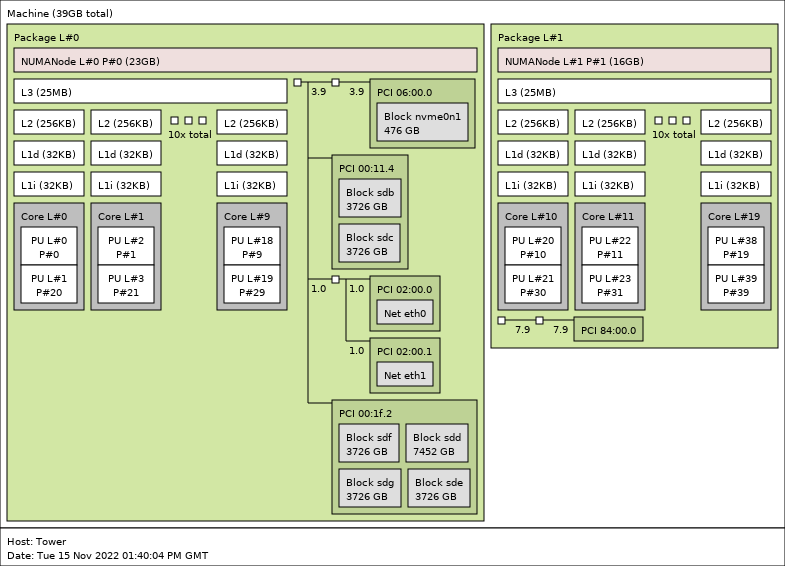
Hi everyone. I've been having an issue where my Windows 10 VM crashes during the install of Nvidia drivers for the GPU I'm passing through. At this point I can boot into a Windows 10 VM with the GPU passed through with the output working (albeit with limited functionality) via HDMI on a monitor. Initially, just after Windows 10 has been installed, the display adapter will be showing as 'Microsoft Basic Display Adapter', Soon after the driver will automatically update to an Nvidia driver, but quite an out of date one. Once this driver is installed, I now get this error in Device Manager: "Windows has stopped this device because it has reported problems (Code 43)" I'm still getting output from the GPU. However, I don't have much else functionality, such as changing the resolution, no sound, and for example GPU-Z doesn't show all of the information like it should. When I have this GPU in the same machine, same PCI slot, but booted into baremetal, the memory size and other fields are filled in correctly + it functions correctly. It's then at this point I try to install newer Nvidia drivers, and every single time it fails a few minutes into the install. The screen goes black and the VM enters a weird boot cycle that can never start up properly. I've had a look at the logs, but I can't see much that happens when the VM crashes. My machine is an HP DL80 Gen9. My cache drive where the VMs and libvirt.img are located is an m2 nvme drive attached via a PCIe adapter. I have the HP RMRR patch enabled. I've also found that I needed video=efifb:off appended to be able to passthrough the GPU. I've confirmed that vt-d is enabled in the BIOS. Here's a lit of things I've tried to fix this: Enabled/Disabled PCIe ACS override + VFIO allow unsafe interrupts Made sure my GPU (+ audio part) is bound to vfio at boot (confirmed in vfio-pci.log) Disabled the embedded video on my motherboard in my BIOS, just keeping on the Nvidia GPU. Removed the Nvidia plugin from unraid (in case there was a conflict) Disabled docker.img (again, in case of conflicts) I've tried two different GPUs, and I've also installed both those GPUs on a baremetal Windows 10 install on the same machine thats also running unraid, so I don't think there's a compatibility issue hardware-wise. I've tried the GPU in different PCIe slots: I've got a dual CPU setup, with 3 physical PCIe slots for CPU1 2 for CPU2, so I've tried different combinations of having the GPU in a PCIe slot which is connected to a specific CPU (which is then pinned to the VM) and vice-versa. I've also tried this but with a whole CPU isolated just for the VM. [I'll attach a pic of my topology below] I've tried several different vBIOSes, including ones I've dumped using the SpaceindaverOne script here (https://github.com/SpaceinvaderOne/Dump_GPU_vBIOS) and also using GPU-Z when booted into a baremetal Windows installation where the GPU is working completely. I'm sure there are other things I have tried but I've just forgotten, so when I remember I will edit this post and add more information. Each time I've installed the Windows VM, I install the virt-io drivers before I try to install the Nvidia driver. I do notice that in device manager (I think when I click 'show hidden devices') there's this: I'm not sure if that could be anything to do with this issue? Also, I've seen here: https://forums.guru3d.com/threads/windows-line-based-vs-message-signaled-based-interrupts-msi-tool.378044/ and here: https://wiki.unraid.net/Manual/VM_Guest_Support about MSI interrupts. However, when I follow the instructions and go the the registry key, it does not have any subkeys so I can't follow the instructions. I have not yet tried it with MSI utility v3, so I'll try that next. My Diagnostics and lstopo topology are attached. If it helps, I recreated the crash scenario today, I started the Nvidia install at 14.41pm today (15 November) and it crashed at around 14:43pm if that helps to locate any errors in the logs. Here my Nvidia GPU is 84:00.0. The VM and libvirt etc. is on PCI 6:00.0 nvme0n1. tower-diagnostics-20221115-1447.zip Many thanks in advance!
-
Hi, do you mind if I ask what program you used to dump the GPU BIOS when you were in the other VM? Did you use something like GPU-Z? Many thanks in advance!
-
Hi @jbartlett. I had an unclean shutdown during the initial scanning phase when I started and opened DiskSpeed. I thought I'd share my DiskSpeed.log and diagnostics just in case you need them. I hadn't run DiskSpeed for several months, but the container was up-to-date, and I'd also just updated Unraid to 6.11.3. This is the main error I can see from the DiskSpeed.log: WARNING: An illegal reflective access operation has occurred WARNING: Illegal reflective access by org.apache.felix.framework.ext.ClassPathExtenderFactory$DefaultClassLoaderExtender (file:/usr/local/tomcat/lucee/lucee.jar) to method java.net.URLClassLoader.addURL(java.net.URL) WARNING: Please consider reporting this to the maintainers of org.apache.felix.framework.ext.ClassPathExtenderFactory$DefaultClassLoaderExtender WARNING: Use --illegal-access=warn to enable warnings of further illegal reflective access operations WARNING: All illegal access operations will be denied in a future release I'm going to do some testing to see if it happens again. Thanks! tower-diagnostics-20221109-1135.zip DiskSpeed.log
-
Latest update has fixed this, thanks!


