





Spies
Members
-
Joined
-
Last visited
Everything posted by Spies
-
I want to take some dockers off my unraid machine with the intention of running them from a rpi4, my thoughts are as portainer is available for both platforms that would make it easy to move them over, I've got the portainer docker on my unraid machine but unsure how to go about exporting them reimporting them to the Rpi instance without losing any data. Any pointers would be greatful!
-
On my last two non correcting parity checks I can see 7741 sync errors, is there any way to figure out which drive is causing these errors? In the logs it simply shows the sector numbers. If I can locate the failing drive and replace it, will non corrupted versions of the data be restored from parity?
-
No I didn't, I don't have a UPS connected to it any more.
-
Is it possible to wake another unraid server on access? I have the shares mounted through unassigned devices but the data on there is infrequently accessed. I know I can just wake it up by pressing the power button but it would be nicer if it was automated. Any thoughts?
-
I want to add a Bluetooth dongle so that Home Assistant can poll Bluetooth devices, is this possible or does it have to be done through a VM?
-
Doh, thats what was missing! Thanks.
-
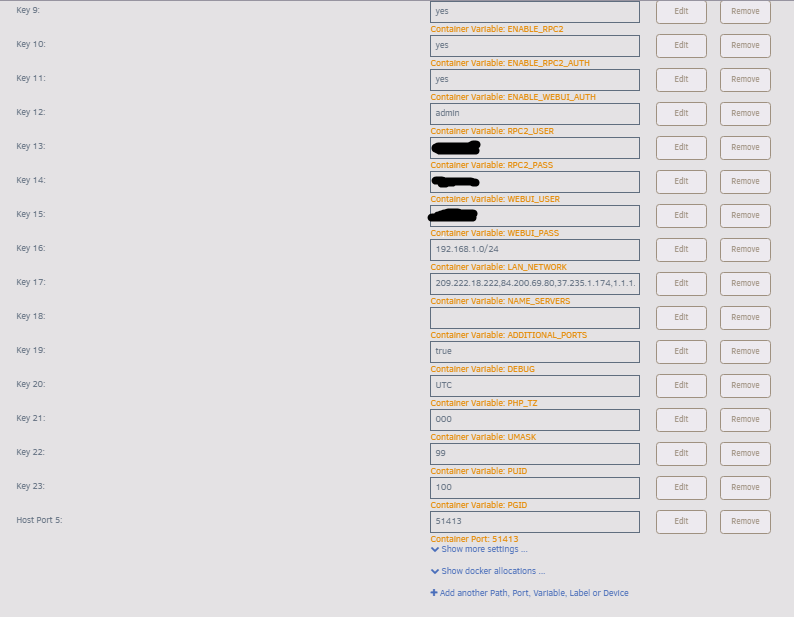
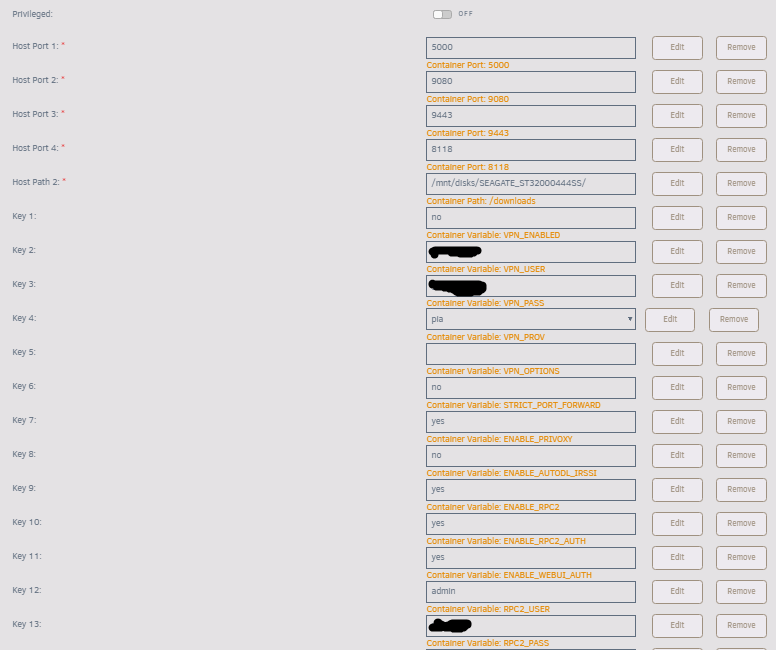
rutorrent does show that in settings yes. Here are the screenshots from my docker.
-
##################################################################### # # The Seedbox From Scratch Script # ---> https://github.com/thevisad/ # # ## See Readme.md for License ### max_downloads_global = 0 max_uploads_global = 0 min_peers = 50 max_peers = 200 min_peers_seed = 50 max_peers_seed = 200 max_uploads = 50 download_rate = 0 upload_rate = 0 trackers.use_udp.set = yes encryption = allow_incoming,try_outgoing,enable_retry network.max_open_files.set = 2500 #network.max_open_sockets.set = 1536 network.http.max_open.set = 256 network.send_buffer.size.set = 1M network.receive_buffer.size.set = 1M dht = auto protocol.pex.set = yes check_hash = no pieces.preload.type.set = 1 max_memory_usage = 3500M throttle.global_down.max_rate.set_kb = 6400 throttle.global_up.max_rate.set_kb = 1024 # Default directory to save the downloaded torrents. # execute = {/bin/bash,-c,mkdir -p /downloads/incoming} directory.default.set = /downloads/incoming/ # Default session directory. Make sure you don't run multiple instance # of rtorrent using the same session directory. Perhaps using a # relative path? # execute = {/bin/bash,-c,mkdir -p /config/rtorrent/session} session.path.set = /config/rtorrent/session/ network.port_random.set = no network.port_range.set = 51413-51413 # Disable check for SSL cert for tracker # network.http.ssl_verify_peer.set = 0 dht.mode.set = auto # UDP port to use for DHT. # dht.port.set = 6881 # Enable peer exchange (for torrents not marked private) # protocol.pex.set = yes # Set downlad list layout style. ("full", "compact") # #ui.torrent_list.layout.set = "full" # SCGI Connectivity (for alternative rtorrent interfaces, XMLRPC) # # Use a IP socket with scgi_port, or a Unix socket with scgi_local. # schedule can be used to set permissions on the unix socket. # scgi_port = 0.0.0.0:5000 #scgi_local = /home/user/rtorrent/rpc.socket #schedule = scgi_permission,0,0,"execute.nothrow=chmod,\"g+w,o=\",/home/user/rtorrent/rpc.socket" # Initialise ruTorrent plugins (required for rss and scheduler plugins) on startup # (normally triggered by a browser opening the web ui). # # The command below in practice does NOT always trigger (possible race condition?) and thus # the same command has been added to the script /home/nobody/initplugins.sh in order to # attempt to ensure all plugins are initialised. # execute = {/bin/bash,-c,/usr/bin/sleep 10s && /usr/bin/php /usr/share/webapps/rutorrent/php/initplugins.php admin &}
-
My sites also report the port as closed (unconnectable).
-
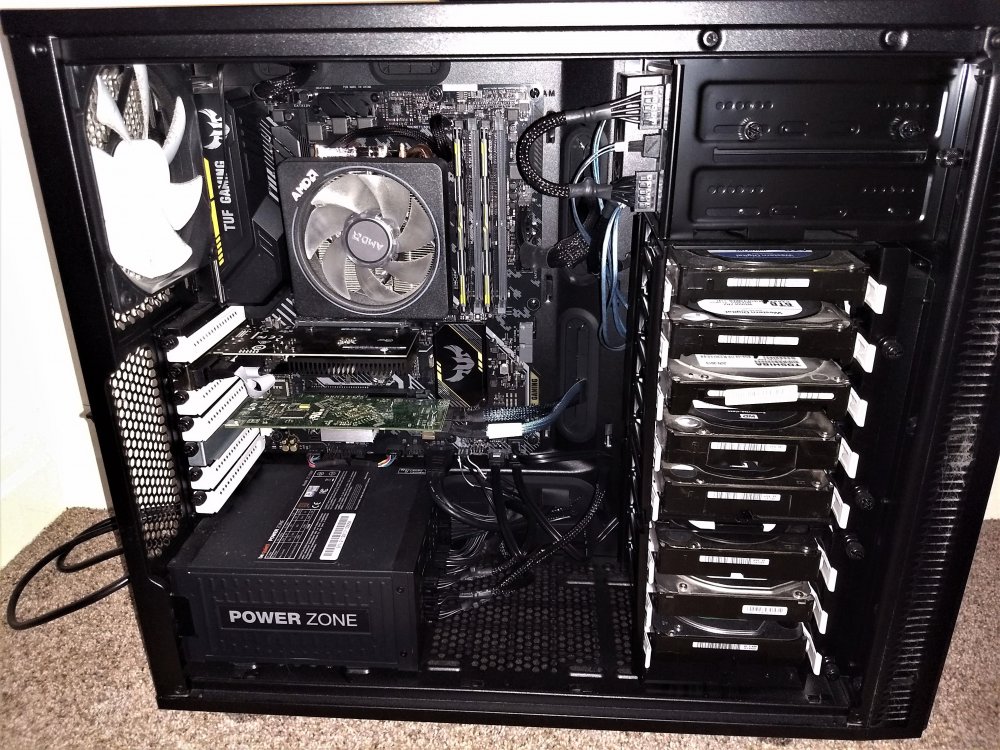
Yes but my port is reported as closed, even though i have tripple checked everything is set correctly. Docker mapping has 172.17.0.2:51413/UDP192.168.1.253:51413 I have that port forwarded on my router, both UDP and TCP, I've edited the rtorrent.rc file to include the port also.Is it possible to configure this container to work without a VPN? Or can I just install the non-VPN container and copy the appdata folders over to save everthing I'm seeding?Ah, haha, well at least its set up correctly now!Interesting, is relative temperature a new addition because as I said, this used to work fine, I'll try changing the values and see if things start working as they shouldSep 8 18:20:02 Tower parity.check.tuning.php: DEBUG: -----------MONITOR start------ Sep 8 18:20:02 Tower parity.check.tuning.php: DEBUG: Parity check appears to be paused Sep 8 18:20:02 Tower parity.check.tuning.php: TESTING: parity temp=26 (settings are: hot=0, cool=6)) Sep 8 18:20:02 Tower parity.check.tuning.php: TESTING: disk1 temp=35 (settings are: hot=0, cool=6)) Sep 8 18:20:02 Tower parity.check.tuning.php: TESTING: disk2 temp=31 (settings are: hot=0, cool=6)) Sep 8 18:20:02 Tower parity.check.tuning.php: TESTING: disk3 temp=* (settings are: hot=0, cool=6)) Sep 8 18:20:02 Tower parity.check.tuning.php: TESTING: disk4 temp=32 (settings are: hot=0, cool=6)) Sep 8 18:20:02 Tower parity.check.tuning.php: TESTING: disk5 temp=30 (settings are: hot=0, cool=6)) Sep 8 18:20:02 Tower parity.check.tuning.php: TESTING: disk6 temp=28 (settings are: hot=0, cool=6)) Sep 8 18:20:02 Tower parity.check.tuning.php: TESTING: disk7 temp=30 (settings are: hot=0, cool=6)) Sep 8 18:20:02 Tower parity.check.tuning.php: TESTING: disk8 temp=* (settings are: hot=0, cool=6)) Sep 8 18:20:02 Tower parity.check.tuning.php: TESTING: disk9 temp=27 (settings are: hot=0, cool=6)) Sep 8 18:20:02 Tower parity.check.tuning.php: DEBUG: array drives=10, hot=8, warm=0, cool=2 Sep 8 18:20:02 Tower parity.check.tuning.php: DEBUG: Array operation paused with some drives still too hot to resume Sep 8 18:20:02 Tower parity.check.tuning.php: DEBUG: -----------MONITOR end------- Drives with * are spun down due to inactivity. It worked in the past just fine. Pause at 45c Resume at 39c are my settings.They're all under 45c (which was my hot threshold). Why am I not seeing the testing portion in the log?Still happening for me, I've had to turn off overheat protection for the time being, i had upper temperatiure set to 45c Sep 8 11:25:01 Tower parity.check.tuning.php: Paused Non-Correcting Parity Check (8.2% completed) : Following drives overheated: 39 38 35 26 Sep 8 11:25:01 Tower parity.check.tuning.php: DEBUG: written PAUSE (HOT) record to /boot/config/plugins/parity.check.tuning/parity.check.tuning.progress Sep 8 11:25:01 Tower parity.check.tuning.php: DEBUG: -----------MDCMD start------ Sep 8 11:25:01 Tower parity.check.tuning.php: DEBUG: detected that mdcmd had been called from sh with command mdcmd nocheck PAUSE Sep 8 11:25:01 Tower parity.check.tuning.php: DEBUG: -----------MDCMD end------- Sep 8 11:25:01 Tower kernel: mdcmd (2687): nocheck PAUSE Sep 8 11:25:01 Tower kernel: Sep 8 11:25:01 Tower kernel: md: recovery thread: exit status: -4 Sep 8 11:25:01 Tower parity.check.tuning.php: DEBUG: Sent notification message: Non-Correcting Parity Check (8.2% completed) Pause Sep 8 11:25:01 Tower parity.check.tuning.php: DEBUG: -----------MONITOR end------- Sep 8 11:30:01 Tower parity.check.tuning.php: DEBUG: -----------MONITOR start------ Sep 8 11:30:01 Tower parity.check.tuning.php: DEBUG: Parity check appears to be paused Sep 8 11:30:01 Tower parity.check.tuning.php: DEBUG: array drives=10, hot=4, warm=0, cool=6 Sep 8 11:30:01 Tower parity.check.tuning.php: DEBUG: Array operation paused with some drives still too hot to resume Sep 8 11:30:01 Tower parity.check.tuning.php: DEBUG: -----------MONITOR end------- Sep 8 11:35:01 Tower parity.check.tuning.php: DEBUG: -----------MONITOR start------ Sep 8 11:35:01 Tower parity.check.tuning.php: DEBUG: Parity check appears to be paused Sep 8 11:35:01 Tower parity.check.tuning.php: DEBUG: array drives=10, hot=4, warm=0, cool=6 Sep 8 11:35:01 Tower parity.check.tuning.php: DEBUG: Array operation paused with some drives still too hot to resume Sep 8 11:35:01 Tower parity.check.tuning.php: DEBUG: -----------MONITOR end------- Sep 8 11:36:28 Tower ool www[11819]: /usr/local/emhttp/plugins/parity.check.tuning/parity.check.tuning.php 'updatecron' Sep 8 11:36:28 Tower parity.check.tuning.php: DEBUG: -----------UPDATECRON start------ Sep 8 11:36:28 Tower parity.check.tuning.php: DEBUG: created cron entries for running increments Sep 8 11:36:28 Tower parity.check.tuning.php: DEBUG: -----------UPDATECRON end------- Sep 8 11:36:35 Tower kernel: mdcmd (2688): check Resume Sep 8 11:36:35 Tower kernel: md: recovery thread: check P ...I've noticed recently that the docker is getting stuck on starting up at this line in the log 2020-07-19 23:05:22,411 DEBG 'start-script' stdout output: Sun Jul 19 23:05:22 2020 TCP/UDP: Preserving recently used remote address: [AF_INET]199.229.249.192:1198 Sun Jul 19 23:05:22 2020 UDP link local: (not bound) Sun Jul 19 23:05:22 2020 UDP link remote: [AF_INET]199.229.249.192:1198 Any thoughts as to why?Looks like an SSL error, not sure how to fix that one, can you get to the GUI in safe mode?Oh yeah, I forgot to say it's a Fractal Define R5 case.Ryzen 5 2600 16GB DDR4 2666mhz Crucial Ballistix AT Asus TUF B450-Plus Gaming 512GB Intel NVME for Appdata/dockers Dell H310 PERC Be Quiet 750W Power Zone Power Supply Unit Silverstone SST-FS303B 2*5.25 to 3*3.5 bay adapter Additional front intake fan Fractal Design Dynamic GP-14 Fractal Define R5 Case Array: 3*3TB (WD3001FYYG) 3*6TB (WDC_WD60EZRZ) 3*2TB (TOSHIBA_DT01ACA200_63NKVAMKS) 1*2TB (WDC_WD20EZRX) 29TB usable space. Unassigned (for downloads) 1*2TB (ST32000444SS) MSI GT710 2GB DDR3 Passthrough to Windows 10 VM This picture is after 6 months of operation, the dust filters on the front of the case really do their job!
 Tried the custom kernel for 6.8.3 and my boot process hangs when it's detecting drives, any thoughts?How well does the GT710 actually do HW transcoding?there is most likely your issue, the array isn't meant for lots of i/o which torrents cause, I use an unassigned drive for my downloading/seeding.What are you storing your torrents on? cache drive? unassigned?
.png.669268cb16e38ae6b7c0ef1509089c85.png)

