





JPDom1
Members
-
Joined
-
Last visited
-
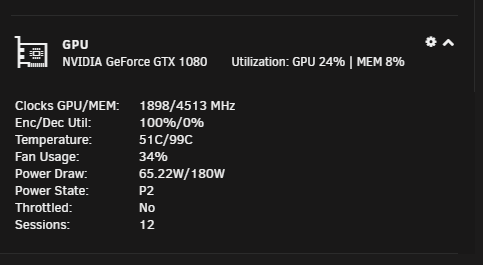
Very impressed now I can use my 1080. I have done 128 films in 18 hours and saved over 500GB. Doing 12 workers at a time running 12 streams on the GPU. 3 Questions. 1. What is the maximum file size the container can handle as I have some 4K films at over 50GB and it looks like it caps 20GB per file ? 2. I pointed the container to my films and series does it do films first then series after ? That is the way it appears now. 3. Pointing it to over 60TB of data the GUI is very slow in loading is this the same for everyone else ? (3-5 minutes to load all data)
-
@aris, No one ever replied to me on it so just sold it and got another brand. Good luck.
-
Been experiencing random Kernal panics not knowing what is causing it. Finally tailed my syslog to get a capture when it crashed and got it. I think this might be related to this container not 100% sure as i have also recently switched to a new system. Crash attached below and it is the "FFMPEG" that gets my attention. Although this crash is different to my others currently running a memtest will let it run over night. System was up for 10 minutes before it crashed and my unmatic container is configured to scan every 5 minutes so this happened just after the scan. TR4 1950X 64GB DDR4 Kingston 3000MHZ Asus X399 Aorus Pro P2000 Dell H310 x2 It mode Lots of disks Oct 3 21:34:04 Mufasa kernel: traps: ffmpeg[31800] general protection ip:152919c2051e sp:1529128aba60 err or:0 in libx265.so.169[1529196fd000+533000] Oct 3 21:34:04 Mufasa kernel: BUG: unable to handle kernel paging request at 0000000000003bc0 Oct 3 21:34:04 Mufasa kernel: PGD 0 P4D 0 Oct 3 21:34:04 Mufasa kernel: Oops: 0000 [#1] SMP NOPTI Oct 3 21:34:04 Mufasa kernel: CPU: 8 PID: 31779 Comm: ffmpeg Tainted: P O 4.18.20-unRAID # 1 Oct 3 21:34:04 Mufasa kernel: Hardware name: Gigabyte Technology Co., Ltd. X399 AORUS PRO/X399 AORUS PRO- CF, BIOS F1 10/01/2018 Oct 3 21:34:04 Mufasa kernel: RIP: 0010:__dec_node_state+0x0/0x53 Oct 3 21:34:04 Mufasa kernel: Code: 84 e0 81 65 44 88 01 c3 48 8b 3f 48 89 f8 48 c1 ef 38 83 e7 03 48 c1 e8 3a 48 69 ff 80 06 00 00 48 03 3c c5 00 65 ea 81 eb 8d <48> 8b 97 c0 3b 00 00 89 f6 b0 ff 48 8d 4c 32 01 65 0f c0 01 65 44 Oct 3 21:34:04 Mufasa kernel: RSP: 0018:ffffc900273e7b70 EFLAGS: 00010213 Oct 3 21:34:04 Mufasa kernel: RAX: 0000000000000037 RBX: ffffea001aa1f940 RCX: 000000001aa1f940 Oct 3 21:34:04 Mufasa kernel: RDX: 22ffea001aa1f908 RSI: 000000000000000c RDI: 0000000000000000 Oct 3 21:34:04 Mufasa kernel: RBP: 0000000000000000 R08: 0000000000000000 R09: ffff8806f6fb9380 Oct 3 21:34:04 Mufasa kernel: R10: ffff88107f2fc000 R11: ffff88103568afee R12: ffff8806f5492518 Oct 3 21:34:04 Mufasa kernel: R13: 80000006a87e5067 R14: ffffc900273e7c98 R15: ffffea001aa1f940 Oct 3 21:34:04 Mufasa kernel: FS: 0000152912b8bb20(0000) GS:ffff88103ca00000(0000) knlGS:000000000000000 0 Oct 3 21:34:04 Mufasa kernel: CS: 0010 DS: 0000 ES: 0000 CR0: 0000000080050033 Oct 3 21:34:04 Mufasa kernel: CR2: 0000000000003bc0 CR3: 0000000001e0a000 CR4: 00000000003406e0 Oct 3 21:34:04 Mufasa kernel: Call Trace: Oct 3 21:34:04 Mufasa kernel: page_remove_rmap+0x24d/0x29c Oct 3 21:34:04 Mufasa kernel: unmap_page_range+0x5da/0x88a Oct 3 21:34:04 Mufasa kernel: ? __switch_to_asm+0x34/0x70 Oct 3 21:34:04 Mufasa kernel: unmap_vmas+0x4b/0x7f Oct 3 21:34:04 Mufasa kernel: exit_mmap+0xc8/0x16a Oct 3 21:34:04 Mufasa kernel: mmput+0x4d/0xe5 Oct 3 21:34:04 Mufasa kernel: traps: ffmpeg[32284] general protection ip:14e28c68b73e sp:14e28575a4c0 err or:0 Oct 3 21:34:04 Mufasa kernel: traps: ffmpeg[31226] trap invalid opcode ip:147bd24c0d55 sp:147bcb790428 er ror:0 in libx265.so.169[147bd236d000+533000] Oct 3 21:34:04 Mufasa kernel: do_exit+0x3b0/0x8b0 Oct 3 21:34:04 Mufasa kernel: do_group_exit+0x9a/0x9a Oct 3 21:34:04 Mufasa kernel: get_signal+0x417/0x44c Oct 3 21:34:04 Mufasa kernel: in libx265.so.169[14e28c637000+533000] Oct 3 21:34:04 Mufasa kernel: ? __switch_to_asm+0x40/0x70 Oct 3 21:34:04 Mufasa kernel: do_signal+0x31/0x59d Oct 3 21:34:04 Mufasa kernel: ? __switch_to_asm+0x40/0x70 Oct 3 21:34:04 Mufasa kernel: ? __switch_to_asm+0x34/0x70 Oct 3 21:34:04 Mufasa kernel: ? __switch_to_asm+0x40/0x70 Oct 3 21:34:04 Mufasa kernel: ? __switch_to_asm+0x40/0x70 Oct 3 21:34:04 Mufasa kernel: exit_to_usermode_loop+0x25/0x96 Oct 3 21:34:04 Mufasa kernel: prepare_exit_to_usermode+0x66/0x6d Oct 3 21:34:04 Mufasa kernel: retint_user+0x8/0x8 Oct 3 21:34:04 Mufasa kernel: RIP: 0033:0x1529197cfa64 Oct 3 21:34:04 Mufasa kernel: Code: Bad RIP value. Oct 3 21:34:04 Mufasa kernel: RSP: 002b:0000152912b86cc8 EFLAGS: 00000246 ORIG_RAX: ffffffffffffff02 Oct 3 21:34:04 Mufasa kernel: RAX: 0000000000000008 RBX: 0000152912b86e80 RCX: 0000000000000480 Oct 3 21:34:04 Mufasa kernel: RDX: 00001528ff35ff78 RSI: 0000000000000008 RDI: 0000152912b86e80 Oct 3 21:34:04 Mufasa kernel: RBP: 0000152912b86f10 R08: 0000152907d23f78 R09: 0000000000000480 Oct 3 21:34:04 Mufasa kernel: R10: 0000000000000020 R11: 0000000000000001 R12: 0000000000000008 Oct 3 21:34:04 Mufasa kernel: R13: 000055ac0aeb6b98 R14: 0000152912b87100 R15: 000055ac0b5a0048 Oct 3 21:34:04 Mufasa kernel: Modules linked in: macvlan nvidia_uvm(O) xt_CHECKSUM iptable_mangle ipt_REJ ECT ebtable_filter ebtables ip6table_filter ip6_tables vhost_net tun vhost tap veth xt_nat ipt_MASQUERADE iptable_nat nf_conntrack_ipv4 nf_defrag_ipv4 nf_nat_ipv4 iptable_filter ip_tables nf_nat xfs md_mod it87 h wmon_vid bonding edac_mce_amd nvidia_drm(PO) nvidia_modeset(PO) nvidia(PO) drm_kms_helper kvm crct10dif_pc lmul crc32_pclmul crc32c_intel ghash_clmulni_intel drm pcbc aesni_intel mpt3sas aes_x86_64 crypto_simd cry ptd agpgart atlantic raid_class scsi_transport_sas syscopyarea nvme ahci i2c_piix4 k10temp sysfillrect glu e_helper i2c_core sysimgblt ccp fb_sys_fops libahci wmi_bmof mxm_wmi nvme_core wmi button pcc_cpufreq acpi _cpufreq Oct 3 21:34:04 Mufasa kernel: CR2: 0000000000003bc0 Oct 3 21:34:04 Mufasa kernel: ---[ end trace 186181c9c6d6be3d ]--- Oct 3 21:34:04 Mufasa kernel: RIP: 0010:__dec_node_state+0x0/0x53 Oct 3 21:34:04 Mufasa kernel: Code: 84 e0 81 65 44 88 01 c3 48 8b 3f 48 89 f8 48 c1 ef 38 83 e7 03 48 c1 e8 3a 48 69 ff 80 06 00 00 48 03 3c c5 00 65 ea 81 eb 8d <48> 8b 97 c0 3b 00 00 89 f6 b0 ff 48 8d 4c 32 01 65 0f c0 01 65 44 Oct 3 21:34:04 Mufasa kernel: RSP: 0018:ffffc900273e7b70 EFLAGS: 00010213 Oct 3 21:34:04 Mufasa kernel: RAX: 0000000000000037 RBX: ffffea001aa1f940 RCX: 000000001aa1f940 Oct 3 21:34:04 Mufasa kernel: RDX: 22ffea001aa1f908 RSI: 000000000000000c RDI: 0000000000000000 Oct 3 21:34:04 Mufasa kernel: RBP: 0000000000000000 R08: 0000000000000000 R09: ffff8806f6fb9380 Oct 3 21:34:04 Mufasa kernel: R10: ffff88107f2fc000 R11: ffff88103568afee R12: ffff8806f5492518 Oct 3 21:34:04 Mufasa kernel: R13: 80000006a87e5067 R14: ffffc900273e7c98 R15: ffffea001aa1f940 Oct 3 21:34:04 Mufasa kernel: FS: 0000152912b8bb20(0000) GS:ffff88103ca00000(0000) knlGS:000000000000000 0 Oct 3 21:34:04 Mufasa kernel: CS: 0010 DS: 0000 ES: 0000 CR0: 0000000080050033 Oct 3 21:34:04 Mufasa kernel: CR2: 00001529197cfa3a CR3: 0000000001e0a000 CR4: 00000000003406e0 Oct 3 21:34:04 Mufasa kernel: Fixing recursive fault but reboot is needed! TIA,
-
I have updated to the latest version and just 2 things to report. 1. I do my conversions folder by folder at the moment (/Mnt/usr/series/Show to convert) and then "edit" the container to the next show when it is done (/Mnt/usr/series/Show to convert). Each time the container starts up it goes back to the default settings it is not persistent. 2. When changing something in the settings and then clicking "Submit" my browser goes to http://192.168.0.4:8899/settings/?step=general with the page below. I then manually need to remove the "/?step=general" to get back to the settings GUI Apart from that my poor Threadripper has been crying for a week while my disk free disk space keeps going up 🙂
-
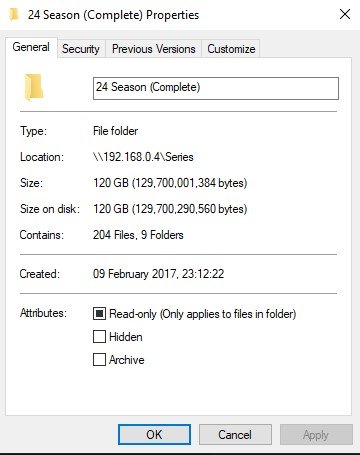
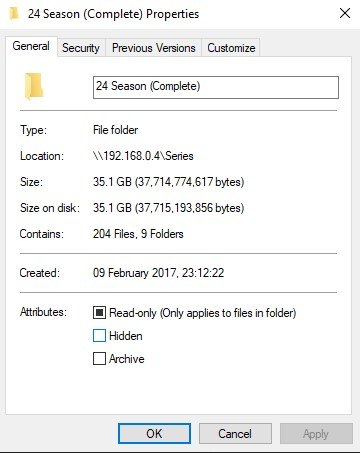
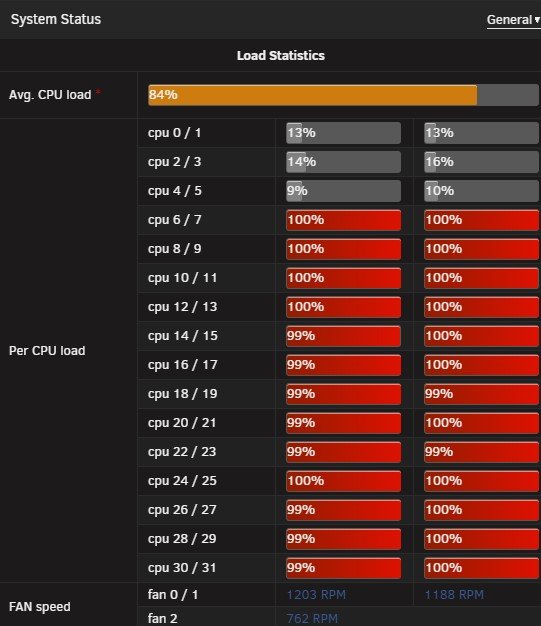
First of all I found this by looking at setting up Spaceinvaders Handbrake/Sonarr/Radarr Video but luckily I found this as with a 50+ TB library Handbraking current items will take a long time and be one hell of a tedious manual process so thank you Josh.5 for making this. Just finished my first folder as you can see from the attachments(24 series) the before and after results are amazing with video quality perfect. I do however have some comments/Recommendation about what this app has done for me not sure if anyone else has also mentioned this before so sorry if I am repeating stuff. My settings appear to not be persistent on a app restart ? After every restart of the app(changing template settings by changing series folder and allocating more cores) the settings go to default. On my unRAID dashboard the UNMATIC container does not have the image I just have a ? logo When clicking on the container can you add the function to go to "Webui" like other containers as I also do not have this ? When adding the container I did not have any variables to fill in I had to manually add this ? Might have just been the way I did it? (Copy the full URL from docker site and pasted it into the "Add container" button on unRAID). Some way to warn or tell people to allocate cores as it will just spank everything to 100% After changing folder from 24(Which is now complete) to the next series my "Completed tasks" are now blank again ? Add option for pending tasks to be moved up and down (Higher and lower priority)? Add a Fu**ing donation button I owe you a beer! Keep up the good work.
-
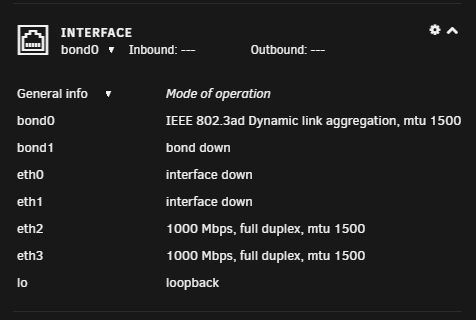
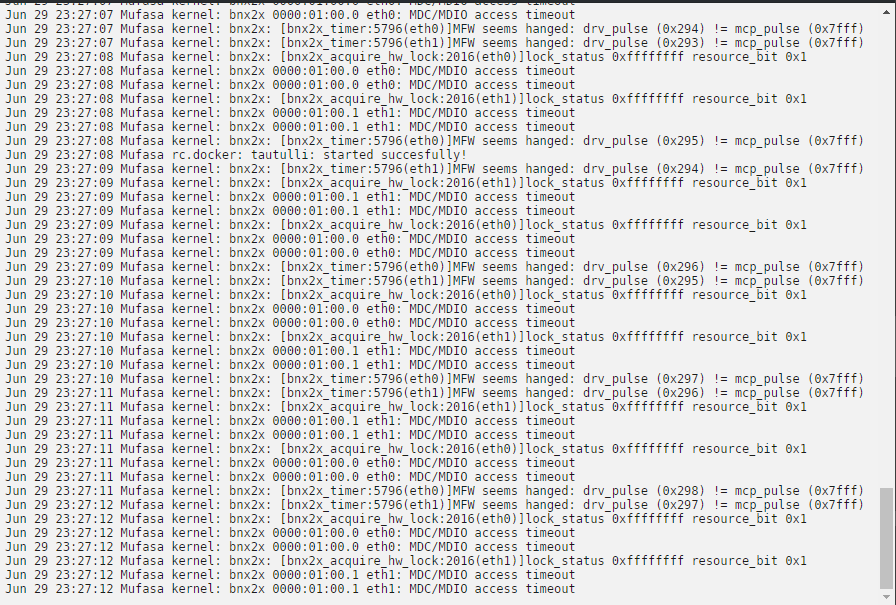
Hi all, Resurrecting this post from almost a year ago 😊. I just purchased a Dell Broadcom 57810 10GB duel nic and in the same situation as above. Below you can see my NetXtreme II BCM57810 in IOMMU Group 10 and my onboard duel 1GB nic's in group 13 & 14. So UNraid can see the new card. Problem is they just keep showing up as interface down Eth0 & 1 is set to the new 10GB card Eth 2 & 3 is set to the onboard 1GB card My log is currently being flooded with this. BNX2x is my 1 10GB port Attached is my diagnostics please help 😜 mufasa-diagnostics-20190629-2306.zip

-
192.168.0.4 i made it different for this container. I also use my network with LAG 802.3AD not sure if that can cause a problem?
-
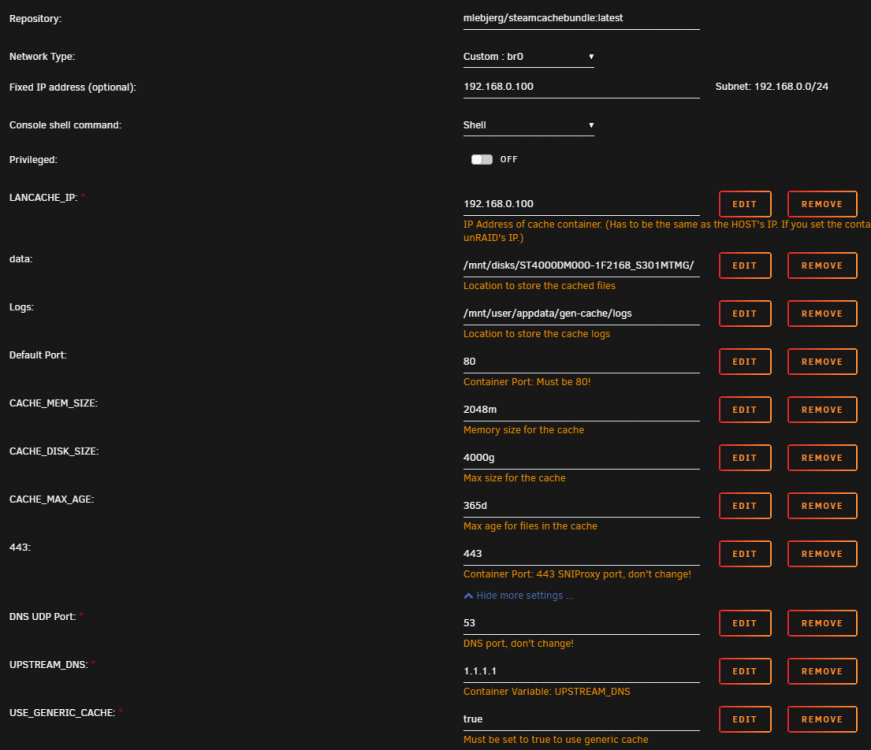
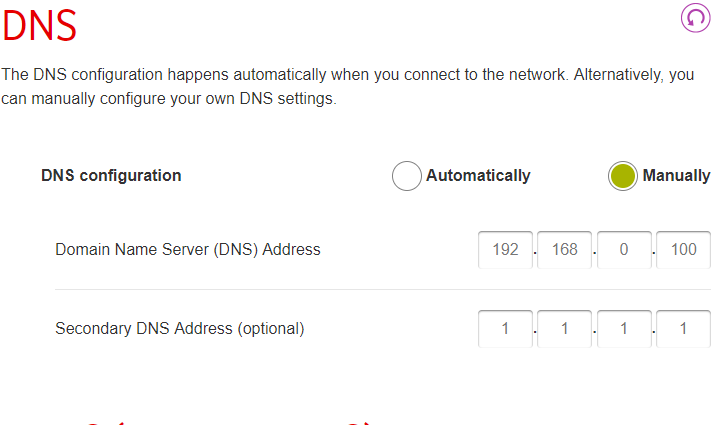
Hi All, I am having some trouble with the SteamCacheBundle container. I have it setup and it is working but not giving me internet (UPSTREAM_DNS) unless i put the alternate DNS in myself(IPV4 settings in Windows) it is not picking it up from the container. On my Windows PC this appears to be OK as i can see me getting items to cache when downloading but on my router it bypasses the Cache and goes to the alternate(Secondary). What am i doing wrong ? Here is my container setup And here is my current Router setup (It is a Vodafone Router in the UK) If i remove the Secondary i loose internet and all web pages display "DNS_PROBE_FINISHED_BAD_CONFIG" And i did do a ipconfig /release followed by /flushdns and /renew TIA
-
I got it all back up and running now. Thank you to everyone who advised me where to go the 6.4.0 update surely messed up my LE docker. This is where i am now with my settings for anyone else who has issues Settings - Identification - SSL Certificate settings Use SSL - Auto HTTP - 8080 HTTPS - 400 now access uunRAID GUI with serverrname:8080 in the settings when you expand the SSL section it reads this line below so i put my cert in but not sure if it makes a difference. "A Lets Encrypt or other user-generated SSL certificate, must be stored in the file /boot/config/ssl/csrts/certificate_bundle.pem. nginx will prefer ths certificate if present." I run 2 NIC's so my LE docker runs as Host with port 80 & 443 with those ports also forwarded on my router. I did try and run the container with br0 setting for network type however it only assigns the IP when the container runs and it did not stay running for long enough to get the cert and with my stup** vodafone router i have to map ports to an IP or device so it basically just did not work for me. Should work if you have a decent router unlike me. Finally i switched from NO-IP to DUCKDNS and i had to manually update my IP as DUCKDNS did not so to do that just use this URL. https://www.duckdns.org/update/domainname/token
-
This explains why the container started when i switched from "host" to "br0" thank you.
-
Correct me if i am wrong here @bonienl. Are you saying i can assign a different IP to Letsencrypt and not worry about the port problems? for example my UNraid runs on 192.168.1.2 and i can assign 192.168.1.3 for letsencrypt? is this in the "edit" template of the docker then?
-
@MowMdown - if i left it at 6.3.0 i would have been OK then? Thank you for the info @aptalca & @ijuarez i will go and test it all again tonight after work as i got a error last night on letsencrypt for to many cert renewal attempts. On a side note i had to change the network type from host to Br0 to stop the 443 error(got 2 nic's). will reply once sorted with what i have done.
-
Hi, I was using Letsencrypt for about 4 months then had to reset my router and remap my ports and with some extra fiddling around (updated to beta version) I broke it all. Currently having to set it all back up again however i cannot get the docker to start and not sure why. I am running latest 6.4.0 beta release rc11i and i did read some letsencrypt SSL renewal stuff but here is my container log. It keeps saying something else is using port 443 but nothing else is and i can change the port to anything it still says 443 is being used. please help? [cont-init.d] 10-adduser: exited 0. [cont-init.d] 20-config: executing... [cont-init.d] 20-config: exited 0. [cont-init.d] 30-keygen: executing... using keys found in /config/keys [cont-init.d] 30-keygen: exited 0. [cont-init.d] 50-config: executing... 2048 bit DH parameters present SUBDOMAINS entered, processing Only subdomains, no URL in cert Sub-domains processed are: -d XXX E-mail address entered: XXX Generating new certificate Saving debug log to /var/log/letsencrypt/letsencrypt.log Obtaining a new certificate Performing the following challenges: tls-sni-01 challenge for XXX Cleaning up challenges Could not bind TCP port 443 because it is already in use by another process on this system (such as a web server). Please stop the program in question and then try again. /var/run/s6/etc/cont-init.d/50-config: line 127: cd: /config/keys/letsencrypt: No such file or directory [cont-init.d] 50-config: exited 1. [cont-finish.d] executing container finish scripts... [cont-finish.d] done. [s6-finish] syncing disks. [s6-finish] sending all processes the TERM signal. [s6-finish] sending all processes the KILL signal and exiting. [s6-finish] sending all processes the KILL signal and exiting. Here is all my current port mappings, binhex-plex binhex-sonarr8989 9897 binhex-radarr7878 plexrequests3001 netdata jackett9117 dolphin8080 openvpn-as943 9444 1194 binhex-teamspeak headphones8282 binhex-rtorrentvpn3000 5000 9080 9443 8118 filezilla7809 7909 binhex-airsonic4040 letsencrypt 81 443 nextcloud 444 mariadb3306 plexpy8181 deluge Sorry they look rough, as you can see i cannot see what is using "443" On a separate note though my nextcloud when i open the gui it loads my UNraid gui however i do not have the option to map a port apart from the 444 that it already has not sure why it is using UNraid Gui port. Ports are mapped correctly on the router and i use no-ip (ddns.net) also checked ports are open Any help will be appreciated.
-
@binhex - This works great thank you. Have created accounts for all my friends and it is working flawlessly with my DDNS entry so i can use it outside of the home network.


