





Koreican
Members
-
Joined
-
Last visited
-
Alright got it working. Using binhex-plexpass as my container, I went back and installed previous version 1.23.0.4438-1-01 which is from 3 months ago. I just picked a random version and that seemed like the first 1.23.x. During docker setup I set repository to binhex/arch-plexpass:1.23.0.4438-1-01 to pull that version and Plex setup fine without error. I then shutdown the container, removed the tag so Plex would update to the latest 1.23.5.4801-1-01, restarted the container, and volia no issues with the database and it works perfectly. Confirmed in the Plex web interface that current version is indeed 1.23.5.4801 which looks like it came out 5 days ago. I also went ahead and set my /config directory to "Read/Write - Slave". Hopefully this helps anyone going forward if they are doing a fresh install with ZFS and Plex. It does seem like something must have recently changed where that table isn't being created properly so it's fine if you were previously running Plex but on new installs, it seems to prevent Plex from even getting started. Maybe if I have some time I will go through and see at which point the install falls and submit a report to Plex so they can investigate further. Edit: Also thanks for the suggestions and help everyone!
-
Hmm, so I just did a complete fresh install of the Unraid OS, reassigned my data/parity drives as normal, installs ZFS plugin, and then tried binhex-plex and same issue. So yeah something seems up with either the newer Plex versions being pulled or some weird interaction with zfs. Since this is fresh, it could be something weird that it's not making the tables right but for people who already had a database made and running, it doesn't matter since the tables were already there. I'll start tinkering with trying to get an older build of Plex installed.
-
Every test I have done has been after doing a zfs destroy on the dataset where the containers are installing to so it's fresh every time. I can also confirm permissions are being set as they should be. I can see all the files get created when the container sets up and the library file is there, but it seems like it can't create the table it's looking for for some odd reason. I am at the point that maybe I will try a fresh install of the OS and see if there is some underlying issue going on.
-
I just deleted my docker.img and let that rebuild and same issue. For funsies I re-setup Jellyfin without issue an didn't even have to do Read/Write - Slave. It seems like this is some weird issue I am getting with either Plex and their SQLite usage and zfs. For reference I am also on Unraid 6.9.2
-
Sadly I have tried that since I saw you suggest that previously. Still the same error. Here is the docker run command root@localhost:# /usr/local/emhttp/plugins/dynamix.docker.manager/scripts/docker run -d --name='binhex-plex' --net='host' -e TZ="America/Chicago" -e HOST_OS="Unraid" -e 'TRANS_DIR'='/config/transcode' -e 'NVIDIA_DRIVER_CAPABILITIES'='all' -e 'NVIDIA_VISIBLE_DEVICES'='' -e 'UMASK'='000' -e 'PUID'='99' -e 'PGID'='100' -v '/mnt/user/Holodeck/':'/media':'rw,slave' -v '/mnt/Engineering/Docker/Plex/':'/config':'rw' 'binhex/arch-plex' Here are my binhex-plexpass docker settings when setting it up new. /mnt/user/Holodeck is a standard share on Unraid with all my media. /mnt/Engineering/Docker/Plex/ is a zfs data set created with zfs create Engineering/Docker/Plex I've tried destroying the dataset and completely removing the Plex files, redownloading the container from scratch, server reboot, reinstalling the zfs plugin, and trying other plex containers. No matter what, same exact error saying SQLite3 has no such table. I've been on zfs for the past 6-12 months I believe and so far have never had this issue. Jellyfin worked fine with the same setup that I am trying to use for Plex so I'm not sure if there is something else going on that is causing this. Edit: I should also mention in the above setup, I have the media folder as read/write - slave. I have tried with the zfs config directory as read/write - slave as well to the same effect.
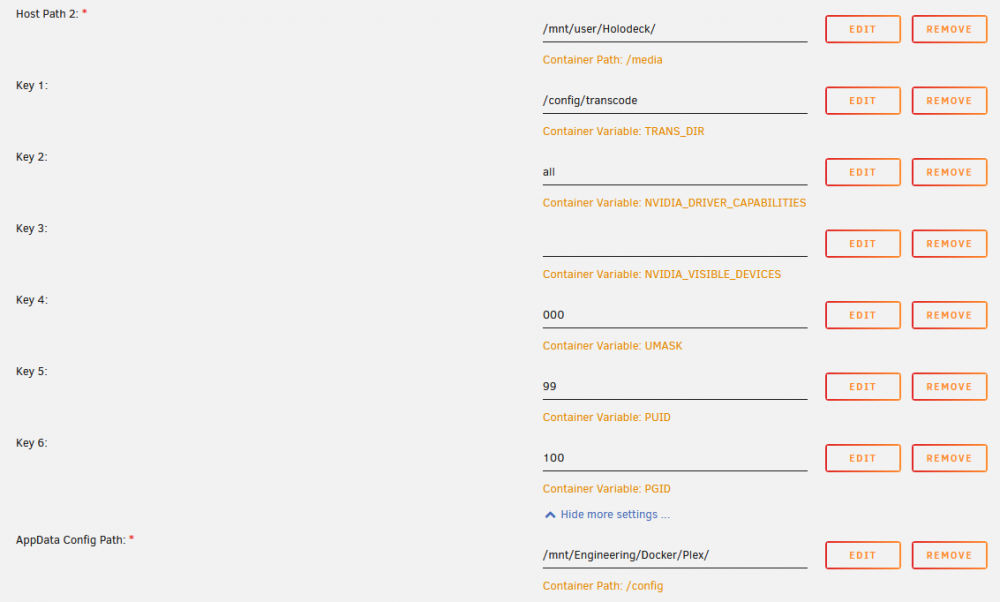
-
Has anyone ran into any issues lately trying to get Plex to run when the config is point to your zfs pool? No matter what container I try, binhex, linuxserver, the official one, I can not get plex to run. I get the same error when the container tries to start. Error: Unable to set up server: sqlite3_statement_backend::prepare: no such table: schema_migrations for SQL: select version from schema_migrations order by version (N4soci10soci_errorE) If I change the app /config path to just a share on the array, it works instantly. I've done some searching and stumbled across something that sqlite3 doesn't like the fuse file system and thus needs to be pointed to a specific disk or the cache drive. I can't imagine no one else uses plex on zfs so I'm not sure if I am doing something wrong. I had Jellyfin running previously without issue but am going to migrate back to Plex but am having this issue. I am setup similar to the main post. Zpool called "Engineering" that is under /mnt. I then have /Docker and /VMs as datasets under that for each container and VM I am running. So far only Plex is giving me this issue when I try to point the config path to /mnt/Engineering/Docker/Plex Any help or thoughts?
