





byographic
Members
-
Joined
-
Last visited
Everything posted by byographic
-
I did it today, I've updated the bios and changed - "Power Supply Idle Control" (or similar) and set it to "typical current idle" - I've also installed the NUT plugin to monitor the UPS which was already present but not monitored through software. lets hope it doesn't happen again
-
Hello I've activated the syslog server as indicated. and this morning roughly 3 hours ago the server rebooted again I've attached the new diagnostic. thanks byo02-diagnostics-20250623-0943.zip
-
I couldn't find the post link 😅
-
Thanks. I’ve enabled the syslog server and the option to mirror to flash. When the next shutdown occurs, I’ll post the updated diagnostics.
-
Hi, I’ve been experiencing unclean shutdowns lately. I thought the issue was due to an old drive, which I have now replaced, but the server still reboots randomly every few days. For example, it had an unclean shutdown yesterday evening (about 20 horus ago). I’ve attached the diagnostic file, if anyone could help me solve this issue, I would really appreciate it! Thanks byo02-diagnostics-20250617-0944.zip
-
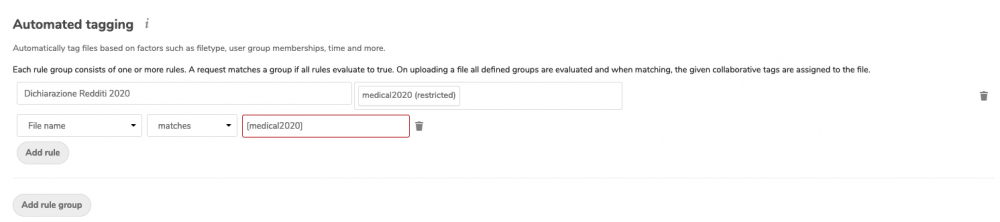
Hi I would like to execute a script that copy all the files that are tagged with "Automated tagging" any idea how to achieve this?
-
I've upgraded the RAM I still have a lot of garbage in the log but the container is working as expected. surely I'm seeing the good effect of more ram but I think the problem was fixed by the latest OS update 6.5.1 because they have downgraded the docker (We downgraded docker from 17.12.1 to 17.09.1 in order to improve compatibility) Thanks
-
I will report back when i`ve upgraded the RAM than! Thank you as always
-
I’ve tried google it without any luck for now. The only idea I have is: lately I`m syncing large files 3+ gb each so either the server has to little RAM (only 4GB) but I will expand it to 12 GB next week or the php memory is to low (512mb) Or something happened after I’ve updated to 13.0.2
-
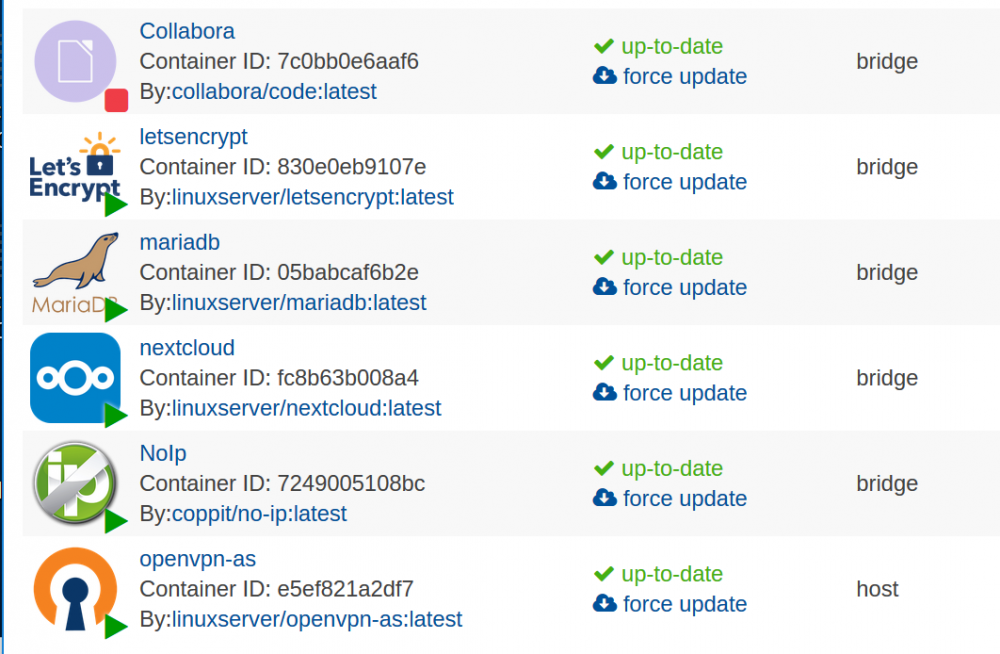
I know it's weird! I'm sure it's from your repository because these are the only docker I have installed on that server
-
Hi, lately I'm having some problems with nextcloud, randomly the container "hangs" while it's running and in the log appear something similar to this: [cont-init.d] 10-adduser: exited 0. [cont-init.d] 20-config: executing... [cont-init.d] 20-config: exited 0. [cont-init.d] 30-keygen: executing... using keys found in /config/keys [cont-init.d] 30-keygen: exited 0. [cont-init.d] 40-config: executing... [cont-init.d] 40-config: exited 0. [cont-init.d] 50-install: executing... [cont-init.d] 50-install: exited 0. [cont-init.d] 60-memcache: executing... [cont-init.d] 60-memcache: exited 0. [cont-init.d] done. [services.d] starting services [services.d] done. [owncloud][cli][1] Memcache \OC\Memcache\APCu not available for local cache [owncloud][cli][1] Memcache \OC\Memcache\APCu not available for distributed cache [owncloud][cron][0] Run OCA\OwnBackup\Jobs\BackupJob job with ID 25 PHP Fatal error: Allowed memory size of 134217728 bytes exhausted (tried to allocate 39981360 bytes) in /config/www/nextcloud/3rdparty/doctrine/dbal/lib/Doctrine/DBAL/Driver/PDOConnection.php on line 104 [owncloud][PHP][3] Allowed memory size of 134217728 bytes exhausted (tried to allocate 39981360 bytes) at /config/www/nextcloud/3rdparty/doctrine/dbal/lib/Doctrine/DBAL/Driver/PDOConnection.php#104 [owncloud][cli][1] Memcache \OC\Memcache\APCu not available for local cache [owncloud][cli][1] Memcache \OC\Memcache\APCu not available for distributed cache [owncloud][cron][0] Run OCA\UpdateNotification\Notification\BackgroundJob job with ID 7 [owncloud][cron][0] Finished OCA\UpdateNotification\Notification\BackgroundJob job with ID 7 in 20 seconds [owncloud][cron][0] Run OCA\Files_Sharing\DeleteOrphanedSharesJob job with ID 8 [owncloud][DeleteOrphanedSharesJob][0] 0 orphaned share(s) deleted [owncloud][cron][0] Finished OCA\Files_Sharing\DeleteOrphanedSharesJob job with ID 8 in 0 seconds [owncloud][cron][0] Run OCA\Files_Sharing\ExpireSharesJob job with ID 9 [owncloud][cron][0] Finished OCA\Files_Sharing\ExpireSharesJob job with ID 9 in 0 seconds [owncloud][cron][0] Run OCA\Federation\SyncJob job with ID 10 [owncloud][cron][0] Finished OCA\Federation\SyncJob job with ID 10 in 0 seconds [owncloud][cron][0] Run OCA\Files\BackgroundJob\DeleteOrphanedItems job with ID 13 [owncloud][DeleteOrphanedItems][0] 0 orphaned system tag relations deleted [owncloud][DeleteOrphanedItems][0] 0 orphaned user tag relations deleted [owncloud][DeleteOrphanedItems][0] 0 orphaned comments deleted [owncloud][DeleteOrphanedItems][0] 0 orphaned comment read marks deleted [owncloud][cron][0] Finished OCA\Files\BackgroundJob\DeleteOrphanedItems job with ID 13 in 0 seconds [owncloud][cron][0] Run OCA\Files\BackgroundJob\CleanupFileLocks job with ID 14 [owncloud][cron][0] Finished OCA\Files\BackgroundJob\CleanupFileLocks job with ID 14 in 0 seconds [owncloud][cron][0] Run OC\Authentication\Token\DefaultTokenCleanupJob job with ID 15 [owncloud][cron][0] Invalidating session tokens older than 2018-05-06T17:30:29+00:00 [owncloud][cron][0] Invalidating remembered session tokens older than 2018-04-22T17:30:29+00:00 [owncloud][cron][0] Finished OC\Authentication\Token\DefaultTokenCleanupJob job with ID 15 in 0 seconds [owncloud][cron][0] Run OCA\Deck\Cron\DeleteCron job with ID 26 [owncloud][cron][0] Finished OCA\Deck\Cron\DeleteCron job with ID 26 in 0 seconds [owncloud][cron][0] Run OCA\Files_Versions\BackgroundJob\ExpireVersions job with ID 11 [owncloud][cron][0] Finished OCA\Files_Versions\BackgroundJob\ExpireVersions job with ID 11 in 0 seconds [owncloud][cron][0] Run OCA\Files\BackgroundJob\ScanFiles job with ID 12 [owncloud][cron][0] Finished OCA\Files\BackgroundJob\ScanFiles job with ID 12 in 1 seconds [owncloud][cron][0] Run OCA\UpdateNotification\ResetTokenBackgroundJob job with ID 27 [owncloud][cron][0] Finished OCA\UpdateNotification\ResetTokenBackgroundJob job with ID 27 in 0 seconds [owncloud][cron][0] Run OCA\NextcloudAnnouncements\Cron\Crawler job with ID 2 [owncloud][cron][0] Finished OCA\NextcloudAnnouncements\Cron\Crawler job with ID 2 in 1 seconds [owncloud][cron][0] Run OC\Authentication\Token\DefaultTokenCleanupJob job with ID 28 [owncloud][cron][0] Invalidating session tokens older than 2018-05-06T17:30:33+00:00 [owncloud][cron][0] Invalidating remembered session tokens older than 2018-04-22T17:30:33+00:00 [owncloud][cron][0] Finished OC\Authentication\Token\DefaultTokenCleanupJob job with ID 28 in 0 seconds [owncloud][cron][0] Run OC\Log\Rotate job with ID 29 [owncloud][cron][0] Finished OC\Log\Rotate job with ID 29 in 0 seconds [owncloud][cron][0] Run OCA\Deck\Cron\ScheduledNotifications job with ID 121 [owncloud][cron][0] Finished OCA\Deck\Cron\ScheduledNotifications job with ID 121 in 0 seconds [owncloud][cron][0] Run OCA\Files_Trashbin\BackgroundJob\ExpireTrash job with ID 3 [owncloud][cron][0] Finished OCA\Files_Trashbin\BackgroundJob\ExpireTrash job with ID 3 in 0 seconds [owncloud][cron][0] Run OCA\Activity\BackgroundJob\EmailNotification job with ID 4 [owncloud][cron][0] Finished OCA\Activity\BackgroundJob\EmailNotification job with ID 4 in 0 seconds [owncloud][cron][0] Run OCA\Activity\BackgroundJob\ExpireActivities job with ID 5 [owncloud][cron][0] Finished OCA\Activity\BackgroundJob\ExpireActivities job with ID 5 in 0 seconds [owncloud][cron][0] Run OC\Command\CommandJob job with ID 122 [owncloud][cron][0] Finished OC\Command\CommandJob job with ID 122 in 0 seconds [owncloud][cron][0] Run OC\Command\CommandJob job with ID 123 [owncloud][cron][0] Finished OC\Command\CommandJob job with ID 123 in 0 seconds [owncloud][cron][0] Run OC\Command\CommandJob job with ID 124 [owncloud][cron][0] Finished OC\Command\CommandJob job with ID 124 in 0 seconds [owncloud][cli][1] Memcache \OC\Memcache\APCu not available for local cache [owncloud][cli][1] Memcache \OC\Memcache\APCu not available for distributed cache [owncloud][cron][0] Run OCA\Files\BackgroundJob\CleanupFileLocks job with ID 14 [owncloud][cron][0] Finished OCA\Files\BackgroundJob\CleanupFileLocks job with ID 14 in 0 seconds [owncloud][cron][0] Run OC\Authentication\Token\DefaultTokenCleanupJob job with ID 15 [owncloud][cron][0] Invalidating session tokens older than 2018-05-06T17:45:02+00:00 [owncloud][cron][0] Invalidating remembered session tokens older than 2018-04-22T17:45:02+00:00 [owncloud][cron][0] Finished OC\Authentication\Token\DefaultTokenCleanupJob job with ID 15 in 0 seconds [owncloud][cron][0] Run OCA\Deck\Cron\DeleteCron job with ID 26 [owncloud][cron][0] Finished OCA\Deck\Cron\DeleteCron job with ID 26 in 0 seconds [owncloud][cron][0] Run OCA\Files\BackgroundJob\ScanFiles job with ID 12 [owncloud][cron][0] Finished OCA\Files\BackgroundJob\ScanFiles job with ID 12 in 0 seconds [owncloud][cron][0] Run OCA\UpdateNotification\ResetTokenBackgroundJob job with ID 27 [owncloud][cron][0] Finished OCA\UpdateNotification\ResetTokenBackgroundJob job with ID 27 in 0 seconds [owncloud][cron][0] Run OC\Authentication\Token\DefaultTokenCleanupJob job with ID 28 [owncloud][cron][0] Invalidating session tokens older than 2018-05-06T17:45:04+00:00 [owncloud][cron][0] Invalidating remembered session tokens older than 2018-04-22T17:45:04+00:00 [owncloud][cron][0] Finished OC\Authentication\Token\DefaultTokenCleanupJob job with ID 28 in 0 seconds [owncloud][cron][0] Run OC\Log\Rotate job with ID 29 [owncloud][cron][0] Finished OC\Log\Rotate job with ID 29 in 0 seconds [owncloud][cron][0] Run OCA\Deck\Cron\ScheduledNotifications job with ID 121 [owncloud][cron][0] Finished OCA\Deck\Cron\ScheduledNotifications job with ID 121 in 0 seconds [owncloud][cli][1] Memcache \OC\Memcache\APCu not available for local cache [owncloud][cli][1] Memcache \OC\Memcache\APCu not available for distributed cache [owncloud][cron][0] Run OCA\Files\BackgroundJob\CleanupFileLocks job with ID 14 [owncloud][cron][0] Finished OCA\Files\BackgroundJob\CleanupFileLocks job with ID 14 in 0 seconds [owncloud][cron][0] Run OC\Authentication\Token\DefaultTokenCleanupJob job with ID 15 [owncloud][cron][0] Invalidating session tokens older than 2018-05-06T18:00:02+00:00 [owncloud][cron][0] Invalidating remembered session tokens older than 2018-04-22T18:00:02+00:00 [owncloud][cron][0] Finished OC\Authentication\Token\DefaultTokenCleanupJob job with ID 15 in 0 seconds [owncloud][cron][0] Run OCA\Deck\Cron\DeleteCron job with ID 26 [owncloud][cron][0] Finished OCA\Deck\Cron\DeleteCron job with ID 26 in 0 seconds [owncloud][cron][0] Run OCA\Files\BackgroundJob\ScanFiles job with ID 12 [owncloud][cron][0] Finished OCA\Files\BackgroundJob\ScanFiles job with ID 12 in 0 seconds [owncloud][cron][0] Run OCA\Activity\BackgroundJob\EmailNotification job with ID 4 [owncloud][cron][0] Finished OCA\Activity\BackgroundJob\EmailNotification job with ID 4 in 0 seconds [owncloud][cron][0] Run OCA\UpdateNotification\ResetTokenBackgroundJob job with ID 27 [owncloud][cron][0] Finished OCA\UpdateNotification\ResetTokenBackgroundJob job with ID 27 in 0 seconds [owncloud][cron][0] Run OC\Authentication\Token\DefaultTokenCleanupJob job with ID 28 [owncloud][cron][0] Invalidating session tokens older than 2018-05-06T18:00:03+00:00 [owncloud][cron][0] Invalidating remembered session tokens older than 2018-04-22T18:00:03+00:00 [owncloud][cron][0] Finished OC\Authentication\Token\DefaultTokenCleanupJob job with ID 28 in 0 seconds [owncloud][cron][0] Run OC\Log\Rotate job with ID 29 [owncloud][cron][0] Finished OC\Log\Rotate job with ID 29 in 0 seconds [owncloud][cron][0] Run OCA\Deck\Cron\ScheduledNotifications job with ID 121 [owncloud][cron][0] Finished OCA\Deck\Cron\ScheduledNotifications job with ID 121 in 0 seconds [owncloud][cron][0] Run OCA\Files_Sharing\DeleteOrphanedSharesJob job with ID 8 [owncloud][DeleteOrphanedSharesJob][0] 0 orphaned share(s) deleted [owncloud][cron][0] Finished OCA\Files_Sharing\DeleteOrphanedSharesJob job with ID 8 in 0 seconds [owncloud][cli][1] Memcache \OC\Memcache\APCu not available for local cache [owncloud][cli][1] Memcache \OC\Memcache\APCu not available for distributed cache [owncloud][cron][0] Run OCA\Files\BackgroundJob\CleanupFileLocks job with ID 14 [owncloud][cron][0] Finished OCA\Files\BackgroundJob\CleanupFileLocks job with ID 14 in 0 seconds [owncloud][cron][0] Run OC\Authentication\Token\DefaultTokenCleanupJob job with ID 15 [owncloud][cron][0] Invalidating session tokens older than 2018-05-06T18:15:02+00:00 [owncloud][cron][0] Invalidating remembered session tokens older than 2018-04-22T18:15:02+00:00 [owncloud][cron][0] Finished OC\Authentication\Token\DefaultTokenCleanupJob job with ID 15 in 0 seconds [owncloud][cron][0] Run OCA\Files_Versions\BackgroundJob\ExpireVersions job with ID 11 [owncloud][cron][0] Finished OCA\Files_Versions\BackgroundJob\ExpireVersions job with ID 11 in 0 seconds [owncloud][cron][0] Run OCA\Files\BackgroundJob\ScanFiles job with ID 12 [owncloud][cron][0] Finished OCA\Files\BackgroundJob\ScanFiles job with ID 12 in 0 seconds [owncloud][cron][0] Run OCA\Deck\Cron\DeleteCron job with ID 26 [owncloud][cron][0] Finished OCA\Deck\Cron\DeleteCron job with ID 26 in 0 seconds [owncloud][cron][0] Run OCA\Files_Trashbin\BackgroundJob\ExpireTrash job with ID 3 [owncloud][cron][0] Finished OCA\Files_Trashbin\BackgroundJob\ExpireTrash job with ID 3 in 0 seconds [owncloud][cron][0] Run OCA\Activity\BackgroundJob\EmailNotification job with ID 4 [owncloud][cron][0] Finished OCA\Activity\BackgroundJob\EmailNotification job with ID 4 in 0 seconds [owncloud][cron][0] Run OCA\UpdateNotification\ResetTokenBackgroundJob job with ID 27 [owncloud][cron][0] Finished OCA\UpdateNotification\ResetTokenBackgroundJob job with ID 27 in 0 seconds [owncloud][cron][0] Run OC\Authentication\Token\DefaultTokenCleanupJob job with ID 28 [owncloud][cron][0] Invalidating session tokens older than 2018-05-06T18:15:04+00:00 [owncloud][cron][0] Invalidating remembered session tokens older than 2018-04-22T18:15:04+00:00 [owncloud][cron][0] Finished OC\Authentication\Token\DefaultTokenCleanupJob job with ID 28 in 0 seconds [owncloud][cron][0] Run OC\Log\Rotate job with ID 29 [owncloud][cron][0] Finished OC\Log\Rotate job with ID 29 in 0 seconds [owncloud][cron][0] Run OCA\Files_Sharing\DeleteOrphanedSharesJob job with ID 8 [owncloud][DeleteOrphanedSharesJob][0] 0 orphaned share(s) deleted [owncloud][cron][0] Finished OCA\Files_Sharing\DeleteOrphanedSharesJob job with ID 8 in 0 seconds [owncloud][cron][0] Run OCA\Deck\Cron\ScheduledNotifications job with ID 121 [owncloud][cron][0] Finished OCA\Deck\Cron\ScheduledNotifications job with ID 121 in 0 seconds [owncloud][cli][1] Memcache \OC\Memcache\APCu not available for local cache [owncloud][cli][1] Memcache \OC\Memcache\APCu not available for distributed cache [owncloud][cron][0] Run OCA\Files\BackgroundJob\CleanupFileLocks job with ID 14 [owncloud][cron][0] Finished OCA\Files\BackgroundJob\CleanupFileLocks job with ID 14 in 0 seconds [owncloud][cron][0] Run OC\Authentication\Token\DefaultTokenCleanupJob job with ID 15 [owncloud][cron][0] Invalidating session tokens older than 2018-05-06T18:30:02+00:00 [owncloud][cron][0] Invalidating remembered session tokens older than 2018-04-22T18:30:02+00:00 [owncloud][cron][0] Finished OC\Authentication\Token\DefaultTokenCleanupJob job with ID 15 in 0 seconds [owncloud][cron][0] Run OCA\Files\BackgroundJob\ScanFiles job with ID 12 [owncloud][cron][0] Finished OCA\Files\BackgroundJob\ScanFiles job with ID 12 in 1 seconds [owncloud][cron][0] Run OCA\Deck\Cron\DeleteCron job with ID 26 [owncloud][cron][0] Finished OCA\Deck\Cron\DeleteCron job with ID 26 in 0 seconds [owncloud][cron][0] Run OCA\UpdateNotification\ResetTokenBackgroundJob job with ID 27 [owncloud][cron][0] Finished OCA\UpdateNotification\ResetTokenBackgroundJob job with ID 27 in 0 seconds [owncloud][cron][0] Run OC\Authentication\Token\DefaultTokenCleanupJob job with ID 28 [owncloud][cron][0] Invalidating session tokens older than 2018-05-06T18:30:04+00:00 [owncloud][cron][0] Invalidating remembered session tokens older than 2018-04-22T18:30:04+00:00 [owncloud][cron][0] Finished OC\Authentication\Token\DefaultTokenCleanupJob job with ID 28 in 0 seconds [owncloud][cron][0] Run OC\Log\Rotate job with ID 29 [owncloud][cron][0] Finished OC\Log\Rotate job with ID 29 in 0 seconds [owncloud][cron][0] Run OCA\Deck\Cron\ScheduledNotifications job with ID 121 [owncloud][cron][0] Finished OCA\Deck\Cron\ScheduledNotifications job with ID 121 in 0 seconds [owncloud][cron][0] Run OC\Command\CommandJob job with ID 125 [owncloud][cron][0] Finished OC\Command\CommandJob job with ID 125 in 0 seconds [owncloud][cli][1] Memcache \OC\Memcache\APCu not available for local cache [owncloud][cli][1] Memcache \OC\Memcache\APCu not available for distributed cache [owncloud][cron][0] Run OCA\Files\BackgroundJob\DeleteOrphanedItems job with ID 13 [owncloud][DeleteOrphanedItems][0] 0 orphaned system tag relations deleted [owncloud][DeleteOrphanedItems][0] 0 orphaned user tag relations deleted [owncloud][DeleteOrphanedItems][0] 0 orphaned comments deleted [owncloud][DeleteOrphanedItems][0] 0 orphaned comment read marks deleted [owncloud][cron][0] Finished OCA\Files\BackgroundJob\DeleteOrphanedItems job with ID 13 in 0 seconds [owncloud][cron][0] Run OCA\Activity\BackgroundJob\EmailNotification job with ID 4 [owncloud][cron][0] Finished OCA\Activity\BackgroundJob\EmailNotification job with ID 4 in 0 seconds [owncloud][cron][0] Run OCA\Files\BackgroundJob\ScanFiles job with ID 12 [owncloud][cron][0] Finished OCA\Files\BackgroundJob\ScanFiles job with ID 12 in 0 seconds [owncloud][cron][0] Run OCA\Files\BackgroundJob\CleanupFileLocks job with ID 14 [owncloud][cron][0] Finished OCA\Files\BackgroundJob\CleanupFileLocks job with ID 14 in 0 seconds [owncloud][cron][0] Run OC\Authentication\Token\DefaultTokenCleanupJob job with ID 15 [owncloud][cron][0] Invalidating session tokens older than 2018-05-06T18:45:03+00:00 [owncloud][cron][0] Invalidating remembered session tokens older than 2018-04-22T18:45:03+00:00 [owncloud][cron][0] Finished OC\Authentication\Token\DefaultTokenCleanupJob job with ID 15 in 0 seconds [owncloud][cron][0] Run OCA\Deck\Cron\DeleteCron job with ID 26 [owncloud][cron][0] Finished OCA\Deck\Cron\DeleteCron job with ID 26 in 0 seconds [owncloud][cron][0] Run OCA\Files_Sharing\DeleteOrphanedSharesJob job with ID 8 [owncloud][DeleteOrphanedSharesJob][0] 0 orphaned share(s) deleted [owncloud][cron][0] Finished OCA\Files_Sharing\DeleteOrphanedSharesJob job with ID 8 in 0 seconds [owncloud][cron][0] Run OCA\UpdateNotification\ResetTokenBackgroundJob job with ID 27 [owncloud][cron][0] Finished OCA\UpdateNotification\ResetTokenBackgroundJob job with ID 27 in 0 seconds [owncloud][cron][0] Run OC\Authentication\Token\DefaultTokenCleanupJob job with ID 28 [owncloud][cron][0] Invalidating session tokens older than 2018-05-06T18:45:04+00:00 [owncloud][cron][0] Invalidating remembered session tokens older than 2018-04-22T18:45:04+00:00 [owncloud][cron][0] Finished OC\Authentication\Token\DefaultTokenCleanupJob job with ID 28 in 0 seconds [owncloud][cron][0] Run OC\Log\Rotate job with ID 29 [owncloud][cron][0] Finished OC\Log\Rotate job with ID 29 in 0 seconds [owncloud][cron][0] Run OCA\Deck\Cron\ScheduledNotifications job with ID 121 [owncloud][cron][0] Finished OCA\Deck\Cron\ScheduledNotifications job with ID 121 in 0 seconds [owncloud][cron][0] Run OC\Command\CommandJob job with ID 126 [owncloud][cron][0] Finished OC\Command\CommandJob job with ID 126 in 0 seconds [owncloud][cli][1] Memcache \OC\Memcache\APCu not available for local cache [owncloud][cli][1] Memcache \OC\Memcache\APCu not available for distributed cache [owncloud][cron][0] Run OCA\Files_Versions\BackgroundJob\ExpireVersions job with ID 11 [owncloud][cron][0] Finished OCA\Files_Versions\BackgroundJob\ExpireVersions job with ID 11 in 0 seconds [owncloud][cron][0] Run OCA\Files\BackgroundJob\ScanFiles job with ID 12 [owncloud][cron][0] Finished OCA\Files\BackgroundJob\ScanFiles job with ID 12 in 0 seconds [owncloud][cron][0] Run OCA\Files\BackgroundJob\CleanupFileLocks job with ID 14 [owncloud][cron][0] Finished OCA\Files\BackgroundJob\CleanupFileLocks job with ID 14 in 0 seconds [owncloud][cron][0] Run OC\Authentication\Token\DefaultTokenCleanupJob job with ID 15 [owncloud][cron][0] Invalidating session tokens older than 2018-05-06T19:00:03+00:00 [owncloud][cron][0] Invalidating remembered session tokens older than 2018-04-22T19:00:03+00:00 [owncloud][cron][0] Finished OC\Authentication\Token\DefaultTokenCleanupJob job with ID 15 in 0 seconds [owncloud][cron][0] Run OCA\Deck\Cron\DeleteCron job with ID 26 [owncloud][cron][0] Finished OCA\Deck\Cron\DeleteCron job with ID 26 in 0 seconds [owncloud][cron][0] Run OCA\UpdateNotification\ResetTokenBackgroundJob job with ID 27 [owncloud][cron][0] Finished OCA\UpdateNotification\ResetTokenBackgroundJob job with ID 27 in 0 seconds [owncloud][cron][0] Run OC\Authentication\Token\DefaultTokenCleanupJob job with ID 28 [owncloud][cron][0] Invalidating session tokens older than 2018-05-06T19:00:04+00:00 [owncloud][cron][0] Invalidating remembered session tokens older than 2018-04-22T19:00:04+00:00 [owncloud][cron][0] Finished OC\Authentication\Token\DefaultTokenCleanupJob job with ID 28 in 0 seconds [owncloud][cron][0] Run OC\Log\Rotate job with ID 29 [owncloud][cron][0] Finished OC\Log\Rotate job with ID 29 in 0 seconds [owncloud][cron][0] Run OCA\Files_Trashbin\BackgroundJob\ExpireTrash job with ID 3 [owncloud][cron][0] Finished OCA\Files_Trashbin\BackgroundJob\ExpireTrash job with ID 3 in 0 seconds [owncloud][cron][0] Run OCA\Deck\Cron\ScheduledNotifications job with ID 121 [owncloud][cron][0] Finished OCA\Deck\Cron\ScheduledNotifications job with ID 121 in 0 seconds [owncloud][cli][1] Memcache \OC\Memcache\APCu not available for local cache [owncloud][cli][1] Memcache \OC\Memcache\APCu not available for distributed cache [owncloud][cron][0] Run OCA\Files\BackgroundJob\ScanFiles job with ID 12 [owncloud][cron][0] Finished OCA\Files\BackgroundJob\ScanFiles job with ID 12 in 1 seconds [owncloud][cron][0] Run OCA\Files\BackgroundJob\CleanupFileLocks job with ID 14 [owncloud][cron][0] Finished OCA\Files\BackgroundJob\CleanupFileLocks job with ID 14 in 0 seconds [owncloud][cron][0] Run OCA\Files_Sharing\DeleteOrphanedSharesJob job with ID 8 [owncloud][DeleteOrphanedSharesJob][0] 0 orphaned share(s) deleted [owncloud][cron][0] Finished OCA\Files_Sharing\DeleteOrphanedSharesJob job with ID 8 in 0 seconds [owncloud][cron][0] Run OC\Authentication\Token\DefaultTokenCleanupJob job with ID 15 [owncloud][cron][0] Invalidating session tokens older than 2018-05-06T19:15:03+00:00 [owncloud][cron][0] Invalidating remembered session tokens older than 2018-04-22T19:15:03+00:00 [owncloud][cron][0] Finished OC\Authentication\Token\DefaultTokenCleanupJob job with ID 15 in 0 seconds [owncloud][cron][0] Run OCA\Deck\Cron\DeleteCron job with ID 26 [owncloud][cron][0] Finished OCA\Deck\Cron\DeleteCron job with ID 26 in 0 seconds [owncloud][cron][0] Run OCA\UpdateNotification\ResetTokenBackgroundJob job with ID 27 [owncloud][cron][0] Finished OCA\UpdateNotification\ResetTokenBackgroundJob job with ID 27 in 0 seconds [owncloud][cron][0] Run OC\Authentication\Token\DefaultTokenCleanupJob job with ID 28 [owncloud][cron][0] Invalidating session tokens older than 2018-05-06T19:15:04+00:00 [owncloud][cron][0] Invalidating remembered session tokens older than 2018-04-22T19:15:04+00:00 [owncloud][cron][0] Finished OC\Authentication\Token\DefaultTokenCleanupJob job with ID 28 in 0 seconds [owncloud][cron][0] Run OC\Log\Rotate job with ID 29 [owncloud][cron][0] Finished OC\Log\Rotate job with ID 29 in 0 seconds [owncloud][cron][0] Run OCA\Activity\BackgroundJob\EmailNotification job with ID 4 [owncloud][cron][0] Finished OCA\Activity\BackgroundJob\EmailNotification job with ID 4 in 0 seconds [owncloud][cron][0] Run OCA\Deck\Cron\ScheduledNotifications job with ID 121 [owncloud][cron][0] Finished OCA\Deck\Cron\ScheduledNotifications job with ID 121 in 0 seconds [owncloud][cron][0] Run OC\Command\CommandJob job with ID 127 [owncloud][files_versions][1] Mark to expire /Apps/Enpass/sync_default.walletx next version should be 1525512510 or smaller. (prevTimestamp: 1525598910; step: 86400 [owncloud][files_versions][1] Mark to expire /Apps/Enpass/sync_default.walletx next version should be 1525512510 or smaller. (prevTimestamp: 1525598910; step: 86400 [owncloud][files_versions][1] Mark to expire /Apps/Enpass/sync_default.walletx next version should be 1525512510 or smaller. (prevTimestamp: 1525598910; step: 86400 [owncloud][files_versions][1] Mark to expire /Apps/Enpass/sync_default.walletx next version should be 1525512510 or smaller. (prevTimestamp: 1525598910; step: 86400 [owncloud][files_versions][1] Mark to expire /Apps/Enpass/sync_default.walletx next version should be 1525512510 or smaller. (prevTimestamp: 1525598910; step: 86400 [owncloud][files_versions][1] Mark to expire /Apps/Enpass/sync_default.walletx next version should be 1525512510 or smaller. (prevTimestamp: 1525598910; step: 86400 [owncloud][files_versions][1] Mark to expire /Apps/Enpass/sync_default.walletx next version should be 1525512510 or smaller. (prevTimestamp: 1525598910; step: 86400 [owncloud][files_versions][1] Mark to expire /Apps/Enpass/sync_default.walletx next version should be 1525512510 or smaller. (prevTimestamp: 1525598910; step: 86400 [owncloud][files_versions][1] Mark to expire /Apps/Enpass/sync_default.walletx next version should be 1525512510 or smaller. (prevTimestamp: 1525598910; step: 86400 [owncloud][files_versions][1] Expire: /Apps/Enpass/sync_default.walletx.v1525598614 [owncloud][files_versions][1] Expire: /Apps/Enpass/sync_default.walletx.v1525598467 [owncloud][files_versions][1] Expire: /Apps/Enpass/sync_default.walletx.v1525598385 [owncloud][files_versions][1] Expire: /Apps/Enpass/sync_default.walletx.v1525598299 [owncloud][files_versions][1] Expire: /Apps/Enpass/sync_default.walletx.v1525598173 [owncloud][files_versions][1] Expire: /Apps/Enpass/sync_default.walletx.v1525597085 [owncloud][files_versions][1] Expire: /Apps/Enpass/sync_default.walletx.v1525553431 [owncloud][files_versions][1] Expire: /Apps/Enpass/sync_default.walletx.v1525549544 [owncloud][files_versions][1] Expire: /Apps/Enpass/sync_default.walletx.v1525545807 [owncloud][cron][0] Finished OC\Command\CommandJob job with ID 127 in 2 seconds [owncloud][cli][1] Memcache \OC\Memcache\APCu not available for local cache [owncloud][cli][1] Memcache \OC\Memcache\APCu not available for distributed cache [owncloud][cron][0] Run OCA\Files\BackgroundJob\ScanFiles job with ID 12 [owncloud][cron][0] Finished OCA\Files\BackgroundJob\ScanFiles job with ID 12 in 1 seconds [owncloud][cron][0] Run OCA\Files\BackgroundJob\CleanupFileLocks job with ID 14 [owncloud][cron][0] Finished OCA\Files\BackgroundJob\CleanupFileLocks job with ID 14 in 0 seconds [owncloud][cron][0] Run OC\Authentication\Token\DefaultTokenCleanupJob job with ID 15 [owncloud][cron][0] Invalidating session tokens older than 2018-05-06T19:30:03+00:00 [owncloud][cron][0] Invalidating remembered session tokens older than 2018-04-22T19:30:03+00:00 [owncloud][cron][0] Finished OC\Authentication\Token\DefaultTokenCleanupJob job with ID 15 in 0 seconds [owncloud][cron][0] Run OCA\Deck\Cron\DeleteCron job with ID 26 [owncloud][cron][0] Finished OCA\Deck\Cron\DeleteCron job with ID 26 in 0 seconds [owncloud][cron][0] Run OCA\UpdateNotification\ResetTokenBackgroundJob job with ID 27 [owncloud][cron][0] Finished OCA\UpdateNotification\ResetTokenBackgroundJob job with ID 27 in 0 seconds [owncloud][cron][0] Run OC\Authentication\Token\DefaultTokenCleanupJob job with ID 28 [owncloud][cron][0] Invalidating session tokens older than 2018-05-06T19:30:04+00:00 [owncloud][cron][0] Invalidating remembered session tokens older than 2018-04-22T19:30:04+00:00 [owncloud][cron][0] Finished OC\Authentication\Token\DefaultTokenCleanupJob job with ID 28 in 0 seconds [owncloud][cron][0] Run OC\Log\Rotate job with ID 29 [owncloud][cron][0] Finished OC\Log\Rotate job with ID 29 in 0 seconds [owncloud][cron][0] Run OCA\Deck\Cron\ScheduledNotifications job with ID 121 [owncloud][cron][0] Finished OCA\Deck\Cron\ScheduledNotifications job with ID 121 in 0 seconds [owncloud][cron][0] Run OCA\Files_Versions\BackgroundJob\ExpireVersions job with ID 11 [owncloud][cron][0] Finished OCA\Files_Versions\BackgroundJob\ExpireVersions job with ID 11 in 0 seconds [owncloud][cron][0] Run OC\Command\CommandJob job with ID 128 [owncloud][cron][0] Finished OC\Command\CommandJob job with ID 128 in 0 seconds another issue that I'm having is whenever I update the container in the process of stopping it freezes and sometimes I've to delete and recreate the container from the template I've attached the diagnostic thanks byo02-diagnostics-20180507-2136.zip
-
if I remember it correctly I've: - run the mover - stop the array - selected "none" instead of the cache drive in the cache section - restart the array however, on this topic, there is an official explanation: https://lime-technology.com/forums/topic/46802-faq-for-unraid-v6/?tab=comments#comment-480418
-
When I had all these problems with the MariaDB I've discovered it was a faulty SSD cache, that was corrupting the databases
-
Hi, after the latest update nextcloud has stopped working, I've checked the logs and this is what is showing: [cont-init.d] 10-adduser: exited 0. [cont-init.d] 20-config: executing... [cont-init.d] 20-config: exited 0. [cont-init.d] 30-keygen: executing... using keys found in /config/keys [cont-init.d] 30-keygen: exited 0. [cont-init.d] 40-config: executing... [cont-init.d] 40-config: exited 0. [cont-init.d] 50-install: executing... [cont-init.d] 50-install: exited 0. [cont-init.d] 60-memcache: executing... [cont-init.d] 60-memcache: exited 0. [cont-init.d] done. [services.d] starting services [services.d] done. [owncloud][cli][1] Memcache \OC\Memcache\APCu not available for local cache [owncloud][cli][1] Memcache \OC\Memcache\APCu not available for distributed cache [owncloud][cron][0] Run OCA\Files_Versions\BackgroundJob\ExpireVersions job with ID 11 [owncloud][cron][0] Finished OCA\Files_Versions\BackgroundJob\ExpireVersions job with ID 11 in 0 seconds [owncloud][cron][0] Run OCA\Files\BackgroundJob\ScanFiles job with ID 12 [owncloud][cron][0] Finished OCA\Files\BackgroundJob\ScanFiles job with ID 12 in 0 seconds [owncloud][cron][0] Run OCA\Files_Sharing\DeleteOrphanedSharesJob job with ID 8 [owncloud][DeleteOrphanedSharesJob][0] 0 orphaned share(s) deleted [owncloud][cron][0] Finished OCA\Files_Sharing\DeleteOrphanedSharesJob job with ID 8 in 0 seconds [owncloud][cron][0] Run OCA\Files\BackgroundJob\CleanupFileLocks job with ID 14 [owncloud][cron][0] Finished OCA\Files\BackgroundJob\CleanupFileLocks job with ID 14 in 0 seconds [owncloud][cron][0] Run OC\Authentication\Token\DefaultTokenCleanupJob job with ID 15 [owncloud][cron][0] Invalidating session tokens older than 2017-11-23T23:30:02+00:00 [owncloud][cron][0] Invalidating remembered session tokens older than 2017-11-09T23:30:02+00:00 [owncloud][cron][0] Finished OC\Authentication\Token\DefaultTokenCleanupJob job with ID 15 in 0 seconds [owncloud][cron][0] Run OCA\Deck\Cron\DeleteCron job with ID 26 [owncloud][cron][0] Finished OCA\Deck\Cron\DeleteCron job with ID 26 in 0 seconds [owncloud][cron][0] Run OCA\Files_Trashbin\BackgroundJob\ExpireTrash job with ID 3 [owncloud][cron][0] Finished OCA\Files_Trashbin\BackgroundJob\ExpireTrash job with ID 3 in 0 seconds [owncloud][cron][0] Run OCA\UpdateNotification\ResetTokenBackgroundJob job with ID 27 [owncloud][cron][0] Finished OCA\UpdateNotification\ResetTokenBackgroundJob job with ID 27 in 0 seconds any idea? I didn't touche the php config or anithing
-
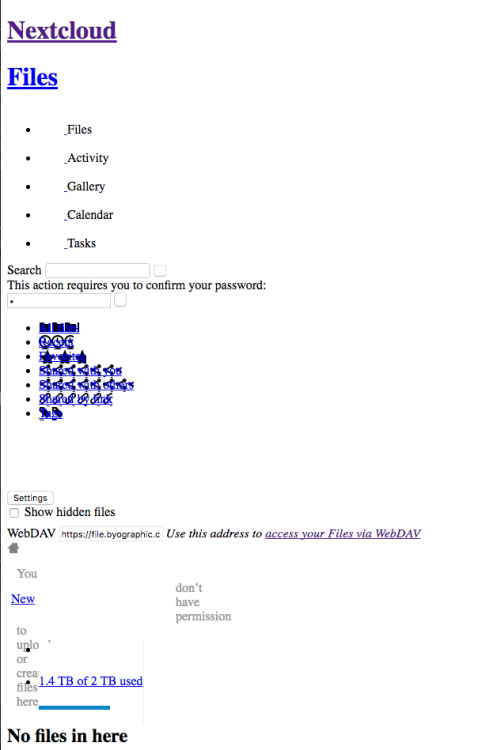
i've followed the procedure at the link, the only thing that doesn't work is the web interface, as if there were no css style in the webapp
-
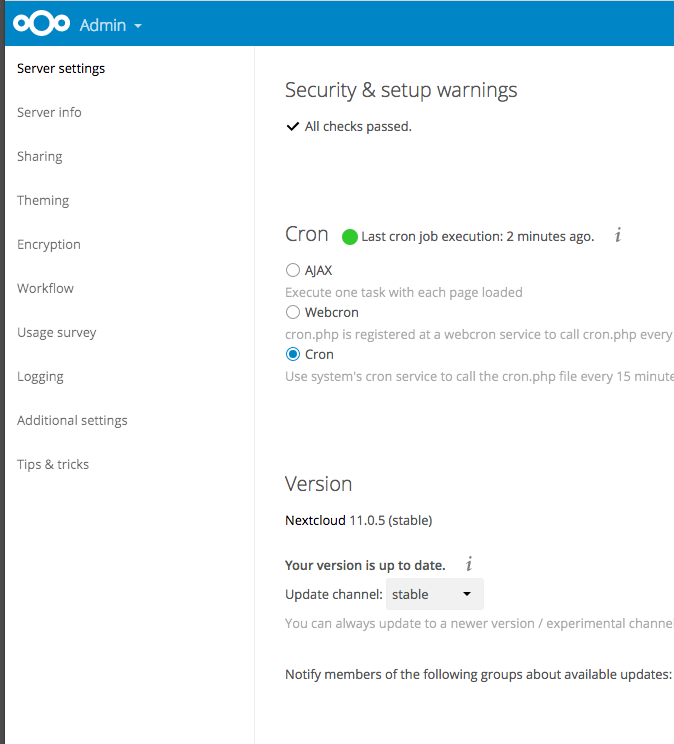
Hi, any idea how to upgrade from Nextcloud 11 to 12 from the server setting doesn't show up I've selected the channel "stable" thanks
-
nevermind issue seem resolved, it was the letsencrypt container that wasn't forwarding properly the domain thanks
-
Hi, after the appdata backup the containers restarted fine but now nextcloud does not work, container logs:
-
To be precise I didn't delete anything because i was scared to mess with the container. with the container stopped i've renamed the log folder as so: custom.cnf custom.cnf.bak databases/ log/ log.old/ restarted the container and everything was up and running inside the log.old/mysql/ there are these files: mariadb-bin.000148 mariadb-bin.000151 mariadb-bin.000154 mariadb-bin.index mariadb-bin.000149 mariadb-bin.000152 mariadb-bin.000155 mariadb-bin.state mariadb-bin.000150 mariadb-bin.000153 mariadb-bin.000156 hope this help happy to advise with further details if necessary thanks
-
Hi thank you but seem resolved, i've been digging into the issue these couple of days and I've found helpful an earlier solution that suggested to delete the log inside the container. I've also checked permissions and I did a logical backup inside the container with this command: mysqldump --single-transaction -h localhost -u root -p nextcloud > nextcloud-sqlbkp_`date +"%Y%m%d"`.bak I hope this will prevent future issue and help others solve similar issues also this morning i've just updated the container and everything seem to work fine
-
Hi I've the same issue I've tried to start a new container and copied from backup the folders inside appdata/mariadb/databases which in my case are nextcloud and MySQL but when I copy the MySQL folder the error persist, any suggestion? thanks
-
yes i was trying to connect remotely. i will set up OpenVPN it was already in my plans but i didn't had the chance yet thank you
-
Hi, I've a question regarding the set up of the application, basically when I put the address in the IP/host section i always get an error "please enter a valid ip address/hostname". I use a dynamic dns so it's a third level domain thank you


