





dstanley
Members
-
Joined
-
Last visited
Everything posted by dstanley
-
PIP INSTALL REQUESTS from the docker container fixed my problem - Mylar did a snatch, convert to CBZ, metatag and move just fine now. CHBMB: Thanks for your help!
-
Just noticed problems when Mylar tries to move my completed download comic: 2018-06-13 14:24:22 ERROR [POST-PROCESSING] Failed to move /usr/lib/python2.7/site-packages/requests/__init__.py:80: RequestsDependencyWarning: urllib3 (1.23) or chardet (3.0.4) doesn't match a supported version! RequestsDependencyWarning) Any help available for this problem!?
-
This is in my log file: 2018/05/16 09:50:52 [warn] 891#891: could not build optimal types_hash, you should increase either types_hash_max_size: 2048 or types_hash_bucket_size: 64; ignoring types_hash_bucket_size Anything to be concerned about? Is there something I can do for this warning? Thanks!
-
I have added several addresses to WebGUIs and have them revert at odd times. /mylar and /headphones always seem to get removed from my templates. It is annoying and I tried several different ‘fixes’ which never worked. Likely this is the same issue.
-
I just added my own custom path as /downloads rather than editing the profile path name. No reason at all that won’t work I should think!?
-
I added the three variables and have the container starting now - but this is my LOG file now: Could not locate exceptions.csv file. Make sure it is in datadir: /config/mylar Not too sure if Mylar is working correctly or not (nothing to download at the moment) - my lame attempts at copying and/or symlinking the CSV file just made things worse for me.
-
Some changes need to be MANUALLY made to the rtorrent.rc file in your appdata/binhex-rtorrentvpn/rtorrent/config folder in order to survive the container restart.
-
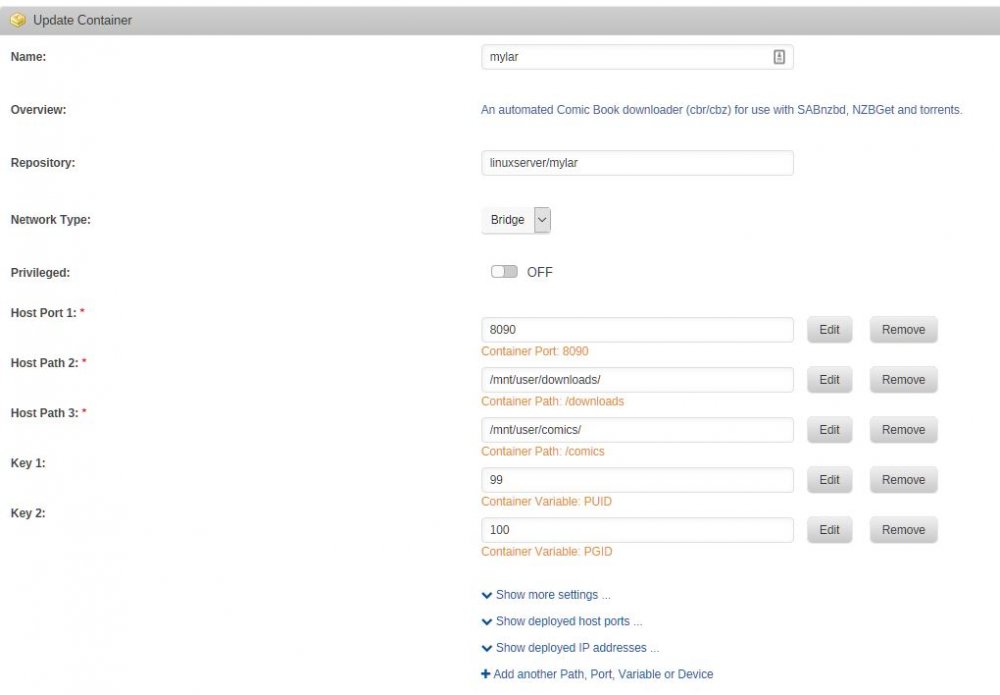
Lawlanator, The external 'path' to your books /mnt/user/Books/Comics is represented INSIDE the Docker as /comics - the docker does not know the path to /mnt/anything as it only knows /comics The same applies to your /mnt/user/Downloads/Comics location in the array - the Docker (Mylar) knows this location only as /downloads The docker has no other access to any of the folders on your array unless you define another custom container path. Also be very careful inside and outside of the docker of Upper Case in the file system - /downloads is NOT the same as /Downloads Glad this seems to have worked out for you!
-
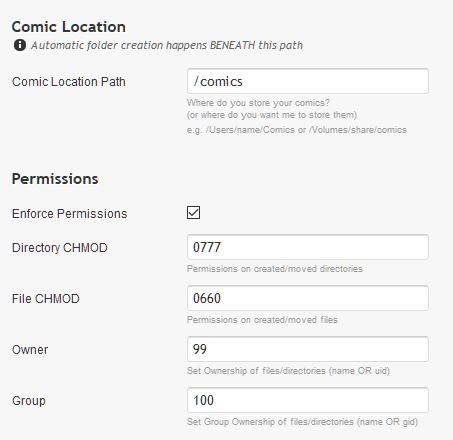
Your 'comic location' should just be /comics in Mylar - this is stated in your docker setup (container path: /comics) - I think that should correct your problems!?
-
Looking for an update if possible: "An update is available. Your version: 1.4.0. Latest version: 1.4.1. You seem to be running Hydra inside docker. Please update your container." Thanks for your work binhex!
-
Could I get some help or insight into this error? 2018-02-04 10:04:53,034 DEBG 'rutorrent-script' stderr output: 2018/02/04 10:04:53 [error] 1470#1470: *46 FastCGI sent in stderr: "PHP message: PHP Notice: Undefined offset: 29 in /usr/share/webapps/rutorrent/plugins/trafic/stat.php on line 165" while reading response header from upstream, client: 172.17.0.1, server: localhost, request: "POST /plugins/trafic/action.php HTTP/1.1", upstream: "fastcgi://127.0.0.1:7777", host: "rutorrent.server.xxxxxxx.com:443", referrer: "https://rutorrent.server.xxxxxxx.com/" xxxxxxx = myserver My webui seemed 'stuck' but restarting the docker brought that back - but the error was in the log again.
-
That's great - I really couldn't figure out what this meant: "/mnt/disks/172.16.1.79_downloads/complete/" That part was bugging me but I didn't have enough knowledge to address it. I would assume that Unraid will throw tons of errors if your Diskstation ever goes offline - are you thinking of converting all to the Unraid system at some point? You could always archive off to the Diskstation after Mylar and Sab does it's thing on the unraid system too ...
-
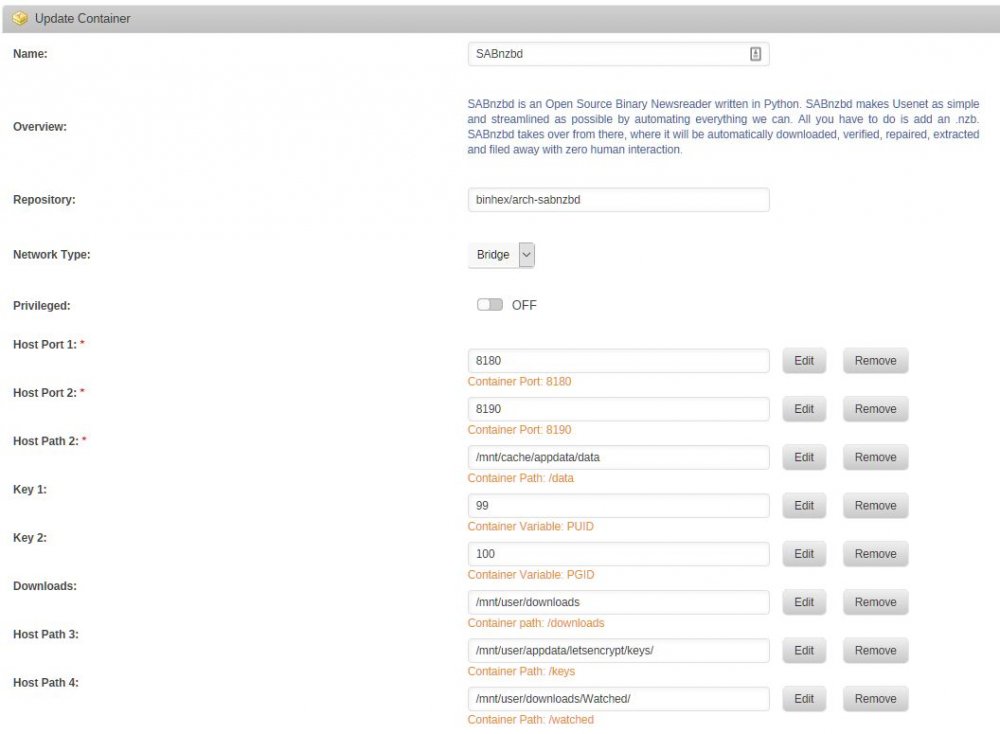
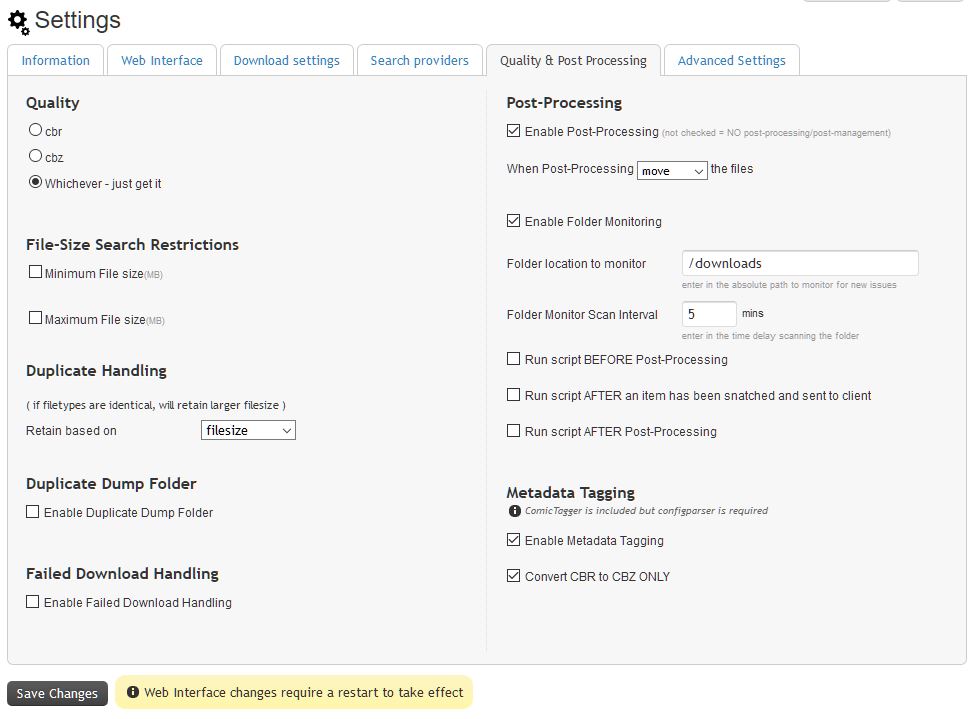
Look carefully at the two docker settings - the /downloads folder is CRITICAL that they match EXACTLY in both SABNZBd and Mylar for both dockers to have 'rights' to manipulate them. I have NO sorting done in SAB - although I have CATEGORIES - like comics, movies, tv, software, etc. Mylar finds the comic nzb from the 'search providers page' and gives it to the 'Download Client' SABNZbd through it's API SAB downloads the comic and moves it to the /downloads/comic folder as per it's Category Mylar 'sees' the download and it handles it according to the 'Post-Processing' and 'Advanced' settings - on my system it Converts CBRs to CBZ - tags, renames as I want it - then moves it to the /comics folder using the renamed folder and comic settings under 'Advanced' I suspect that there is a type of permission issue happening - enclosed is my settings under 'Web Interface' in Mylar - not sure if this is right or not but seems to work on my system.
-
I had a tremendous learning curve when I tried out the Unraid for the first time - I almost gave up as I had NO Linux experience at all - 90% PC and 10% Mac knowledge only. It seemed so overwhelming to me! But I persisted - even started over twice - and I have to say that this system is really great - the community is very helpful and the reward with such a system - for me - is darn near perfect. There are some great videos by @gridrunner on YouTube that helped me beyond words every could - perhaps watch his series from the start - believe me - once it 'clicks' and you get to know the system a bit you will NOT regret the effort put into it. I did not step into this conversation earlier as I was baffled by Mylar storing your comics in the cache folder and thought it best to leave to the experts like @CHBMB Please let us know how you make out
-
@CHBMB Please let that comment go and ignore it - your presence here and your guidance has been invaluable to me over the past year or so - I would NOT have got my system to the point it is now without reading your posts and benefiting from your generosity. @summerside1967 I suggest you approach your request for aid with a little more patience and respect - I have both Sabnzbd and Mylar running perfectly on my system and I will help you if I can. Enclosed are screen shots of my docker configurations for both - please study these and see if they help - the /downloads location MUST be identical in both container settings
-
Make sure your Mylar is configured to watch your /download folder as shown. This folder should be the SAME folder that is specified as /download in your SABNZBd docker.
-
I can't seem to determine what triggers the template to remove my '/mylar' added onto the WebUI address - it will work for a bit and then somehow revert to the original template address. Tried several things like removing the webui address - then adding it back in after a save - to editing the template file on the boot usb - nothing 'sticks' with the webui changed from: http://[IP]:[PORT:8090]/ to http://[IP]:[PORT:8090]/mylar as it always reverts (somehow/someway) to: http://[IP]:[PORT:8090]/ This is happening with these dockers on my system: Mylar Headphones Plexpy I cannot access these dockers locally through the Unraid webui as the trailing folder is being removed. I have the webui changed to make these dockers work with Let's Encrypt easiest and I do have them all working through that interface: http://(MyServer).com/mylar http://(MyServer).com/headphones http://(MyServer).com/plexpy Not a 'life-threatening' situation but a perplexing one ... Dwight
-
I have my reverse proxy setup like this and it works great - the issue I am having is that no matter what I try - when I change the WEBUI address in the Docker setup like this: http://[IP]:[PORT:8090]/mylar and restart the docker I can use the local docker webui to get to the program as well as the remote reverse proxy. For some reason this WEBUI is being erased and reset back to http://[IP]:[PORT:8090]/ so the local access obviously won't work anymore. Very strange indeed - I have several dockers that do the same thing for me Mylar, Headphones, Plexpy - these all reset themselves back to the template on me. I have even tried to change the templates on my flash drive in the xml files in the DockerMan/templates-user but they keep reverting to the default address. Not a huge deal but it is driving me nuts why they won't change and stay changed. I removed one of the docker completely and pulled a new template - altering it as I installed it - and it still reverted to the original WEBUI address. Dockers like Sonnar, Radarr, Deluge, Rtorrent, Jackett all accept changes ... Any suggestions? Dwight
-
This docker has been working GREAT for me - thank you so much! Noticed an error in my log files about fonts: StaticResourceMapper File /usr/lib/radarr/UI/Content/fonts/opensans-semibold.ttf not found StaticResourceMapper File /usr/lib/radarr/UI/Content/fonts/opensans-semibold.woff not found StaticResourceMapper File /usr/lib/radarr/UI/Content/fonts/opensans-semibold.woff2 not found StaticResourceMapper File /usr/lib/radarr/UI/Content/fonts/opensans-light.ttf not found StaticResourceMapper File /usr/lib/radarr/UI/Content/fonts/opensans-regular.ttf not found StaticResourceMapper File /usr/lib/radarr/UI/Content/fonts/opensans-light.woff not found StaticResourceMapper File /usr/lib/radarr/UI/Content/fonts/opensans-regular.woff not found StaticResourceMapper File /usr/lib/radarr/UI/Content/fonts/opensans-light.woff2 not found StaticResourceMapper File /usr/lib/radarr/UI/Content/fonts/opensans-regular.woff2 not found When I ssh into the docker and check the folders in the Content directory I see that the fonts folder is called Fonts (with a capital) and apparently Radarr is looking for fonts (no capital). I am very limited in my linux so some help in correcting this would be appreciated - thanks! Dwight NOTE: I copied Fonts folder and contents to 'fonts' within the container - need to know how this could be done permanently I think!?
-
Thanks Ken - I am truly a novice at anything Linux. I messed around with permissions in a terminal session and seem to have the error removed for now. I have noticed the following sequence of events but unsure if it is a problem. If I save a file to my Dropbox on my remote computer - it gets written to my Unraid share with permissions "nobody" "nogroup" If I use use something like Krusader to copy an Unraid local file to my Dropbox store the permissions are "nobody" "users" So I don't know if this is an issue or not - changing the group in the dockers advanced settings doesn't seem to affect the writing of this group permission difference. I noticed this issue after using the CA Backup/Restore plugin to make a copy of my Flash Drive to a Dropbox folder - both on the local Unraid server. Dwight
-
I have started getting the: "WARNING:tornado.access:404 HEAD /blocks/....." lines in my log file too - about 140 lines of them. Dropbox functionality seems to work still though - weird. To try 'fix' this I stopped the docker. Removed my local Dropbox share - recreated a new empty share. Started the docker on this new share and let it repopulate my files. These 'errors' returned in the log even in this situation. Another thing I noticed is that every time my docker is restarted I need to re-link it to my account - is that normal? Thanks for your docker work - I really appreciate it!
-
I have had your docker running flawlessly for a few weeks. Integrated with Mylar and Sonarr dockers - pulling files from them overnight last night fine. When I send an NZB to it through the API it works fine. I notice today that I cannot access the web-UI either locally or remotely - throws an " Access denied" on the attempt. Not too sure if this is due to a Docker update or something that I have done to break this. I actually removed the docker and reinstalled it with my config file to see if that helped but the result was the same - no web UI access. Everything seems fine EXCEPT I cannot access the web ... Any ideas on what I can try to regain web access to your SABnzbd Docker again!? ***** Just tried it from my WIN10 VM (remote desktop from my work) and I can access the Web UI from there **** So I guess it is an issue with me and my remote access to the SABnzb server ... **** SOLVED - For some unknown reason my setting for " External internet access" was set to FULL API - when I changed it to FULL WEB INTERFACE then I can use it the same as I used to use it - not sure what changed in the container to make this happen *********** Dwight supervisord.log
-
Thank you Gridrunner and Planetwilson - lots of good tips in your posts for me. (awesome that the UnRaid UI can be used to resize the VM - never thought to even try that!) I was able to finally create the larger VM - and I used the OSX Terminal with the 'diskutil resizeVolume' command to get OSX to use the whole VM. I just could not get the OSX desktop Disk Utility GUI to make any change to the 'drive' and expand it to the full VM. It just would not move the graphic slice no matter what I tried. After the terminal command change I was successful in transferring the IMG to a physical drive as well - I wanted to play around with the iCloud photo app and required a much larger VM so I can do that. No I need to do the same thing to my Win10 VM - expand it and move it to a larger physical drive to get it off my cache disk. Lots of fun!
-
I have this Sierra VM all done and working perfectly for me! Now I would like to expand on the 40GB partition and copy the whole setup to a physical hard drive (either a 250GB partition or the whole 500GB drive). I cannot seem to get my 40GB Mac partition expanded. I expanded the original 40GB sierra.img image to 200G using terminal instructions I found but when I boot the VM the main parition os still 40GB and I cannot get the 40GB partiton to change. Using Disk Utility, I cannot make any of the partition changes work. I successfully used terminal to copy the 40GB IMG to the hard drive and boot from it but I still cannot expand the hard drive partition larger than the 40GB. Is there any insight you can give me to accomplish either task!? Not super familiar with MacOSX or Unraid but I am learning - thanks to your wonderful video tutorials!



