






Greygoose
Members
-
Joined
-
Last visited
Everything posted by Greygoose
-
FIXED: CRON schedule not running Ok sorted it. I recreated the crontab.txt file in the docker console using vi. Now the cron is working. It must have been a permissions issue, I normally edit the txt file in notepad+ in my Windows 10 machine via the shared network drive. I will play around and see how I caused it and report back
-
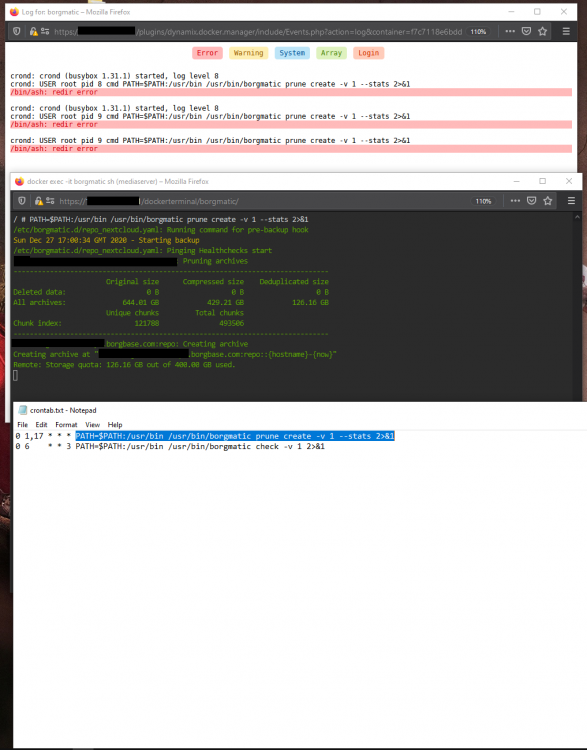
No, the cron runs when I manually run it like the image above. But when I leave to do it automatically I get the errors as above. Could this be down to privileges allowed to the cron scheduler?
-
ISSUE: Cron not running When I console into the borgmatic container I can run backups fine. I can even paste the cron entry, and it works, the cron is functioning as I monitored the logs just now, and it tried to run the cron again. If i paste this into the console it works and backs up correctly. PATH=$PATH:/usr/bin /usr/bin/borgmatic prune create -v 1 --stats 2>&1
-
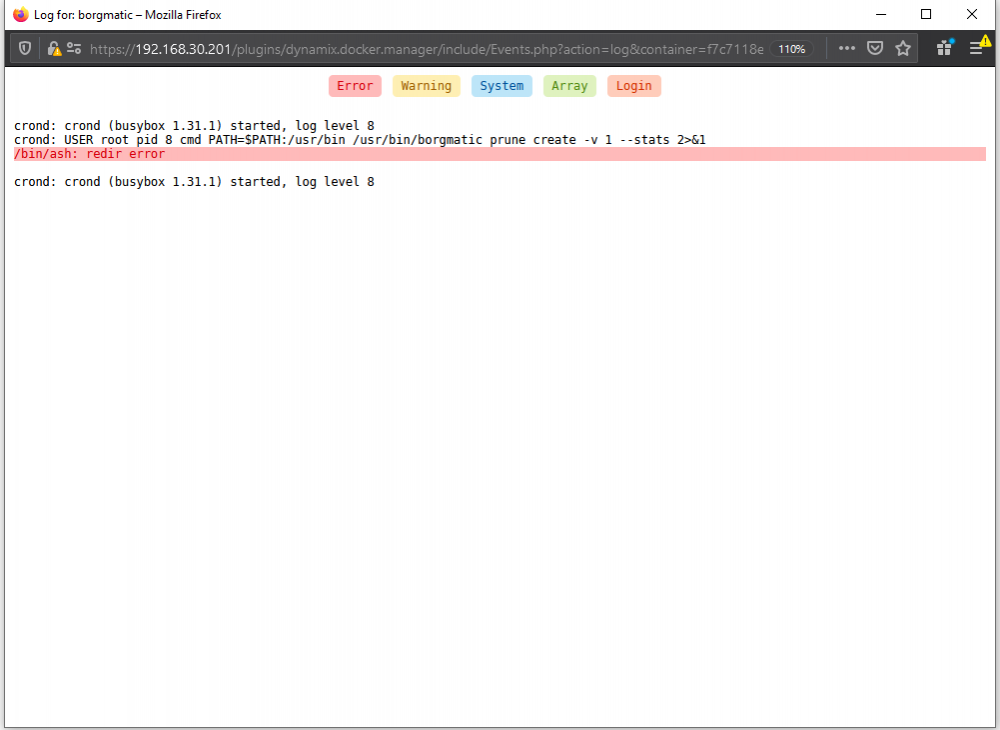
@T0a Thank you for the reply. The error was from the previous cron attempt. I just changed the cron time to run and restarted, so its atempting to run the cron but giving the error directory? Image attached
-
Please can you confirm the crontab.txt is just copied into the config folder and nothing else is required for automatic backups? It isn't working my end. crontab.txt 0 1,16 * * * PATH=$PATH:/usr/bin /usr/bin/borgmatic prune create -v 1 --stats 2>&1 0 6 * * 3 PATH=$PATH:/usr/bin /usr/bin/borgmatic check -v 1 2>&1
-
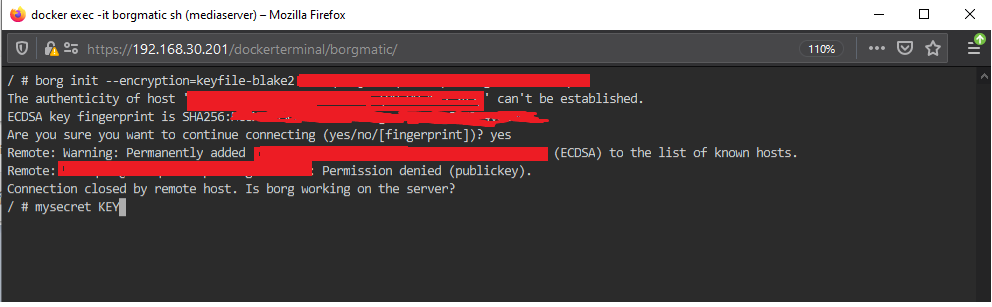
The above post was my error. The creation of the key needs to be done in the docker container, as explained on the borgbase site. https://docs.borgbase.com/faq/ssh/ Now working with borgbase without any issues.
-
@sdub I am in the process of setting this up with borgbase. I have registered an account (free) and setup a test repository, I have uploaded my SSH key but having no luck with the connection within the docker console. I have attached 2 images below. The console image shows me trying to connect to the

-
@sdub I have an issue which i'm not sure is my configuration or is not possible at all. I have the waseh rclone plugin installed, unraid is set to boot and mounts the OneDrive folder using the user scripts. I then have the folder set as a repository in the Borgmatic docker, I can see the folder mounts correctly in Borgmatic console., When I start the backup in borgmatic after init a new repo on the OneDrive rclone folder it backs up for a few minutes then the array crashes and I need to reboot. When I login to onedrive I can see the backup has started to upload onto the microsoft servers. I have tried a few times and always the same outcome.
-
@sdub Thank you so much, you have given me many options and I appreciate you taking the time for such a detailed reply. I will post back once I have it working
-
@sdub Testing this now, I will report back. Thank you I have this working using a local machine as a backup location. I now want to implement rclone, to have borgmatic upload to the remote folder, how can I implement this using the inbuilt fuse mount capabilities of borgmatic instead of using the USERSCRIPTS pluging to mount rclone.
-
I will double check firewall rules as its not possible to ping downloads.rclone.org. Thanks mate Sorted DNS and onedrive is working. Piece of cake once DNS was sorted. Thanks @Waseh
-
@Waseh Thanks for the fast reply. Ping doesn't work from command line. But all my internet works fine otherwise
-
Hi all, I am installing the plugin and it shows on the settings tab but nothing happens when i run the following command from terminal. rclone config plugin: installing: https://raw.githubusercontent.com/Waseh/rclone-unraid/master/plugin/rclone.plg plugin: downloading https://raw.githubusercontent.com/Waseh/rclone-unraid/master/plugin/rclone.plg plugin: downloading: https://raw.githubusercontent.com/Waseh/rclone-unraid/master/plugin/rclone.plg ... done +============================================================================== | Installing new package /boot/config/plugins/rclone/install/rclone-2020.09.29-bundle.txz +============================================================================== Verifying package rclone-2020.09.29-bundle.txz. Installing package rclone-2020.09.29-bundle.txz: PACKAGE DESCRIPTION: Package rclone-2020.09.29-bundle.txz installed. No internet - Skipping download - Trying to install existing binary Install failed - No binary found - Please try installing/updating the plugin again plugin: run failed: /bin/bash retval: 1 Updating Support Links Finished Installing. If the DONE button did not appear, then you will need to click the red X in the top right corner
-
I have lets encrypt running on Nginx proxy manager and i'm looking to come back to this docker as my lets encrypt certs are set to expire, and they won’t renew. I have followed Spaceinvaders guide, when I start lets encrypt docket i get Challenge failed for domain nextcloud.mydomain.co.uk ERROR: Cert does not exist! Please see the validation error above. The issue may be due to incorrect dns or port forwarding settings. Please fix your settings and recreate the container The confusing part is my dockers currently working, so its like the port forward settings work but not allowing certificate renewal.
-
My certs are to expire tomorrow and i'm trying to renew in the proxy manager and it gives an error. Help please error i get [8/23/2020] [8:38:40 AM] [Express ] › ⚠ warning Command failed: /usr/bin/certbot renew --non-interactive --config "/etc/letsencrypt.ini" --cert-name "npm-1" --preferred-challenges "dns,http" --disable-hook-validation
-
I was actually looking at CUPS when i come across this thread. What other options are there instead of CUPS
-
Hi, Just come across this docker, ashamed since i use lets encrypt so much. Very impressed, had nextcloud up running in around 2 minutes. I am now however not able to run airsonic, ive made the cert and proxy config exactly like nextcloud but with a new SSL cert for airsonic. But im getting 502 bad gateway. Any help would be appreciated EDIT: solved above How i fixed it: I turned it to http under the proxy settings but forced it to use SSL. Next question please: I have to goto https://airsonic.example.com/airsonic to reach the login. can i change it to reach it via a normal method, ie https://airsonic.example.com
-
Not sure how to resolve the issue im having. 2hrs of reading and trying stuff and still stuck. Need help please guys/girls

-
As posted above, the upgrade went fine. I then did the GUI update and that appeared to be fine. Nextcloud works, however when i try to click apps or settings i get the error below.
-
Thanks mate, i got a bit flustered yesterday after a long day. Knocking out nextcloud wasn't the wisest move. Did what you said, checked my version in the config folder. Then got the old file from here https://nextcloud.com/changelog/#latest15 Then followed the guide again changing that file to the download and all sorted. I was on version 15.0.2 😣
-
Hi, Big issue tonight, ive tried to upgrade my nextcloud docket following the above guide. I have the following errors. Even when i exit maintenance mode the webUi doesnt work. I would be most grateful for some assistance root@82iyhk8766:/# sudo -u abc php7 /config/www/nextcloud/occ upgrade Nextcloud or one of the apps require upgrade - only a limited number of commands are available You may use your browser or the occ upgrade command to do the upgrade Set log level to debug Exception: Updates between multiple major versions and downgrades are unsupported. Update failed Maintenance mode is kept active Reset log level
-
Hi, Happy new year everyone, I need some help please, i'm trying to get fail2ban to block IP address. I have followed above, i am not getting any IP ban's listed when console into docker and running fail2ban-client status nextcloud.
-
guys, sorry for wasting your time. all sorted now. I also changed the context path in the airsonic docker to work using airsonic.domain instead of the airsonic.domain/airsonic I was making things way too complex, you guys did all the work. Thank you, thnak you for now loosing it with me
-
PROGRESS I deleted the letsencrypt docker & folder. I started fresh with spaceinvader one guide. 10minutes later things look much better,. however I now get this error, its getting the airsonic docker via the domain but this error below

-
when i remove the airsonic file from the site-confs folder then nextcloud works fine without any issues. I'm lost. 4hrs into this now




