





rbronco21
Members
-
Joined
-
Last visited
-
My fans have been working fine for years with a min speed around 40%. Recently they'll ramp up and down every 10 seconds which I believe is the BIOS trying to keep them running. If I can catch them at the right point in this cycle and change the setting, the IPMI speed will kick in and the plugin will take over control, but I have been consistently upping the min speed (up to 70% and they lose control within a day) to keep them from stalling then bouncing between 0% and 100%. Is this a sign of failing fans? Are the MBD sensors or fan power controls failing? Are the fans too big for the MBD? Can the plugin check for this condition and try to recover by sending a new speed command? Is there too much overhead to send the command repeatedly to not allow it to even start? Supermicro A1SAi 2 Noctua 120mm fans (probably NF-S12A ULN)
-
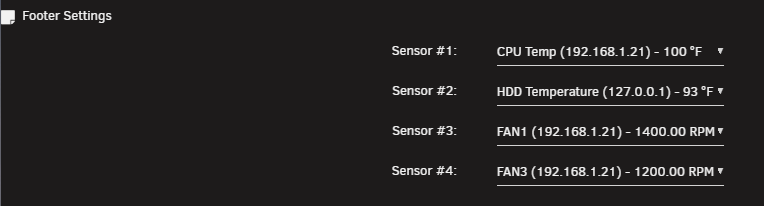
My Supermicro A1SAi hasn't worked since I updated unraid to 7. I am able to see my sensors: But no Fan Settings appear: My Sensors config shows the 2 fans, but I am not sure if this is a holdover from previous settings. Section 473_FAN1 ## Possible values: Yes/No Enable_All_Event_Messages Yes ## Possible values: Yes/No Enable_Scanning_On_This_Sensor Yes ## Possible values: Yes/No Enable_Assertion_Event_Lower_Critical_Going_Low Yes ## Possible values: Yes/No Enable_Assertion_Event_Lower_Non_Recoverable_Going_Low Yes ## Possible values: Yes/No Enable_Assertion_Event_Upper_Critical_Going_High Yes ## Possible values: Yes/No Enable_Assertion_Event_Upper_Non_Recoverable_Going_High Yes ## Possible values: Yes/No Enable_Deassertion_Event_Lower_Critical_Going_Low Yes ## Possible values: Yes/No Enable_Deassertion_Event_Lower_Non_Recoverable_Going_Low Yes ## Possible values: Yes/No Enable_Deassertion_Event_Upper_Critical_Going_High Yes ## Possible values: Yes/No Enable_Deassertion_Event_Upper_Non_Recoverable_Going_High Yes ## Give valid input for sensor type = Fan; units = RPM Lower_Non_Critical_Threshold 400.000000 ## Give valid input for sensor type = Fan; units = RPM Lower_Critical_Threshold 300.000000 ## Give valid input for sensor type = Fan; units = RPM Lower_Non_Recoverable_Threshold 300.000000 ## Give valid input for sensor type = Fan; units = RPM Upper_Non_Critical_Threshold 25300.000000 ## Give valid input for sensor type = Fan; units = RPM Upper_Critical_Threshold 25400.000000 ## Give valid input for sensor type = Fan; units = RPM Upper_Non_Recoverable_Threshold 25500.000000 ## Give valid input for sensor type = Fan; units = RPM; 'None' to not use hysteresis Positive_Going_Threshold_Hysteresis None ## Give valid input for sensor type = Fan; units = RPM; 'None' to not use hysteresis Negative_Going_Threshold_Hysteresis None EndSection Section 540_FAN2 EndSection Section 607_FAN3 ## Possible values: Yes/No Enable_All_Event_Messages Yes ## Possible values: Yes/No Enable_Scanning_On_This_Sensor Yes ## Possible values: Yes/No Enable_Assertion_Event_Lower_Critical_Going_Low Yes ## Possible values: Yes/No Enable_Assertion_Event_Lower_Non_Recoverable_Going_Low Yes ## Possible values: Yes/No Enable_Assertion_Event_Upper_Critical_Going_High Yes ## Possible values: Yes/No Enable_Assertion_Event_Upper_Non_Recoverable_Going_High Yes ## Possible values: Yes/No Enable_Deassertion_Event_Lower_Critical_Going_Low Yes ## Possible values: Yes/No Enable_Deassertion_Event_Lower_Non_Recoverable_Going_Low Yes ## Possible values: Yes/No Enable_Deassertion_Event_Upper_Critical_Going_High Yes ## Possible values: Yes/No Enable_Deassertion_Event_Upper_Non_Recoverable_Going_High Yes ## Give valid input for sensor type = Fan; units = RPM Lower_Non_Critical_Threshold 300.000000 ## Give valid input for sensor type = Fan; units = RPM Lower_Critical_Threshold 300.000000 ## Give valid input for sensor type = Fan; units = RPM Lower_Non_Recoverable_Threshold 300.000000 ## Give valid input for sensor type = Fan; units = RPM Upper_Non_Critical_Threshold 25300.000000 ## Give valid input for sensor type = Fan; units = RPM Upper_Critical_Threshold 25400.000000 ## Give valid input for sensor type = Fan; units = RPM Upper_Non_Recoverable_Threshold 25500.000000 ## Give valid input for sensor type = Fan; units = RPM; 'None' to not use hysteresis Positive_Going_Threshold_Hysteresis None ## Give valid input for sensor type = Fan; units = RPM; 'None' to not use hysteresis Negative_Going_Threshold_Hysteresis None EndSection

-
Has anyone tried a Lazytainer docker? I've never made my own docker and I am not sure if it would integrate with unRAID's docker system, so I figured I'd see if there's any info out there before I start a new project from scratch.
-
If I add "--max-filesize=200M --max-scansize=500M" to Post Arguments, my log is empty and I am unsure if it has done anything. If I add a -i, it fails with this in the log: clamd: illegal option -- i ERROR: Unknown option passed ERROR: Can't parse command line options These options also fail: -f /scan/appdata/clamav/clamavtargets.txt clamd: illegal option -- f ERROR: Unknown option passed ERROR: Can't parse command line options --file-list=/scan/appdata/clamav/clamavtargets.txt clamd: unrecognized option `--file-list=/scan/appdata/clamav/clamavtargets.txt' ERROR: Unknown option passed ERROR: Can't parse command line options I have to be missing something because there aren't other posts about this. What's going on?
-
Does recompiling mcelog make any difference? Is there any way to make it go away?
-
unraid-diagnostics-20220403-0951.zip
-
@Squid Feb 18 01:52:05 unRAID kernel: mce: [Hardware Error]: Machine check events logged Feb 18 01:52:05 unRAID kernel: mce: [Hardware Error]: CPU 0: Machine Check: 0 Bank 0: a600000007600410 Feb 18 01:52:05 unRAID kernel: mce: [Hardware Error]: TSC 0 ADDR fef80000 Feb 18 01:52:05 unRAID kernel: mce: [Hardware Error]: PROCESSOR 0:406d8 TIME 1645177864 SOCKET 0 APIC 0 microcode 12d Feb 20 04:20:16 unRAID root: mcelog: warning: 8 bytes ignored in each record Feb 20 04:20:16 unRAID root: mcelog: consider an update (repeats every 7 days, probably because that's when Fix Common Problems runs) This looks like the classic case of "this error happens during processor initialization due to the upgrading of the processor's microcode etc and is safely able to be ignored." Other posts seem to indicate that this error might go away if you recompile MCELog. If that's the case, can it be compiled and shared? I'd like to give recompiling a shot and would appreciate some instructions or a hint to get started. An update to your original post with the info might save you some trouble, too.
-
I'm getting some weird links that usually work, and sometimes they include VPNmanager and give me a good header and blank body. If I search for TurboWrite from the docker page, I get https://unraid/Docker/Turbo and it works. A Network Settings search gives me https://unraid/Turbo/NetworkSettings and it works. If I search intel and select "Enable Intel Turbo..." I get a broken link to https://unraid/NetworkSettings/VPNmanager. I can't nail down a pattern, but is it a coincidence VPNmanager pops up?
-
I'd love to figure out how to compile it on/for unraid if someone doesn't mind helping me out when I get stuck, even after the fix is included. I've installed devpack and a bunch of packages that got me started with make, including kernel-headers-4.14.37-x86-1.txz. I have the /usr/src/linux-5.10.28-Unraid folder, but it looks pretty sparse. Sounds like there should be headers in there? root@unRAID:~# ls -l /usr/src/linux-5.10.28-Unraid total 3752 -rw-r--r-- 1 root root 496 Apr 7 2021 COPYING -rw-r--r-- 1 root root 3785633 Apr 7 2021 System.map -rw-r--r-- 1 root root 2857 Apr 7 2021 acs_override.patch drwxr-xr-x 3 root root 60 Apr 7 2021 drivers/ -rw-r--r-- 1 root root 1850 Apr 7 2021 drivers_ata_libata-core.patch -rw-r--r-- 1 root root 294 Apr 7 2021 drivers_hpsa.patch -rw-r--r-- 1 root root 529 Apr 7 2021 drivers_md_Kconfig.patch -rw-r--r-- 1 root root 811 Apr 7 2021 drivers_md_Makefile.patch -rw-r--r-- 1 root root 401 Apr 7 2021 drivers_mvsas_rr_2782.patch -rw-r--r-- 1 root root 426 Apr 7 2021 fs_reiserfs_resize.patch -rw-r--r-- 1 root root 459 Apr 7 2021 fs_reiserfs_super.patch -rw-r--r-- 1 root root 454 Apr 7 2021 ignore_unhandled_msrs.patch -rw-r--r-- 1 root root 402 Apr 7 2021 increase_BLK_MAX_REQUEST_COUNT.patch -rw-r--r-- 1 root root 1348 Apr 7 2021 mozart_395S.patch -rw-r--r-- 1 root root 2365 Apr 7 2021 raid6_choose_xor.patch edit: binutils-2.31.1-x86_64-4.txz gc-8.0.4-x86_64-1.txz gcc-9.2.0-x86_64-4.txz glibc-2.30-x86_64-1.txz guile-2.2.3-x86_64-2.txz kernel-headers-4.14.37-x86-1.txz make-4.2.1-x86_64-3.txz
-
Is the Supermicro A1SAi with an Atom C2750 supported? I get a blank screen without a prompt in SSH when running corefreq-cli. I get a blinking cursor when I run corefreq-cli -c. When I ctrl-c, I get this:

-
Can I link dependent dockers so if I start/stop one, the other(s) follow suit?
-
Just swapped my unRAID MB from an older Supermicro X7SPA-HF where the sil3132 from Monoprice worked fine. I don't see anything in the MB BIOS that would directly affect it, but I have tried everything I could think of. The card's manual say its setup can be reached with F4 or Ctrl+S, so I disabled network booting which used Ctral+S and neither of those combos work. VGA is set to use onboard, so I guess it shouldn't be confusing the card for a video card. I don't see the card's setup after the BIOS and before unRAID boots. Any ideas? have 7 drives in my array, so I am stuck until this gets solved, I get another card that will work, or I swap all my old parts back into the case.Redundancy was the plan... I'm refreshing my server, so maybe I'll see how it handles without cache. Is this topic documented anywhere? Is it as simple as adding a second btrfs SSD, moving files over, then switching the current SSD to btrfs and adding it back?Well that was smooth. I was messing around with user images and decided to just delete the one I added. I guess that wasn't what that particular delete meant. Is there a way to recover the user, or is it even beneficial? Do I just create a new one and fix share permissions?
