






NewDisplayName
Members
-
Joined
-
Last visited
Everything posted by NewDisplayName
-
Thanks for this docker, just a small question, would it possible to throw fail2ban into the docker? It seems like you can try unlimited passwords...
-
My lan 192.168.86.* vm 192.168.86.105 unraid 192.168.86.103 (unraid ui works, but all other dockers on different ports cant be accessed) What i need to change? Like i put some of my dockers together in a "filesharing" grp so they can communicate (via --network=filesharing) I guess thats the problem, bc pihole (which is br0ed) can be accessed from VM. Other devices on my LAN (even other subnets) can be accessed also from VM. Any advise? unraid-server-diagnostics-20200815-1542.zip
-
I guess i have to add ssl to it for chrome allowing me to fugging use my clipboard, what a .......
-
Ure right, it says blocked, but its grey i cant enable it... XD
-
Yes i have chrome and no i didnt changed anything besides "SSH" "IP" "PORT" "USER" "PASSWORD". But it never asked for any permissions!?
-
Is there no workaround or setting to have the same "workflow" as if i would run the terminal via http from unraid?
-
No. I added the SSH from unraid to guacamole. But i cant right click paste in the window, like i could if i used the http ssh terminal from unraid.
-
Yes, that makes sense. Youre right. Any idea about right click paste?
-
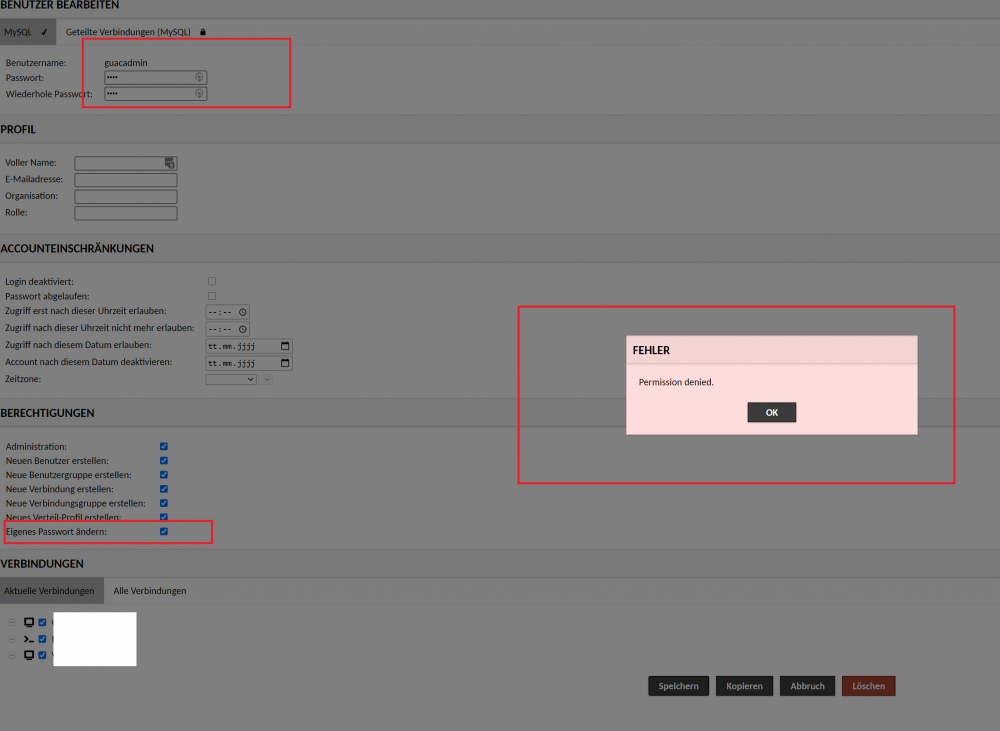
Actually this doenst make any sense, but when i k now it i can work with that. You cant change your own password because of security reasons if you dont know your own password, but you can change all other passwords without knowing theirs... anyway, thanks for the help, i simply disabled the guacadmin. One question: i added the SSH from unraid to this app, but sadly right click paste doenst work... any idea? (in the http terminal this works)
-
The screen i shared IS while logged into GUACADMIN. When i log into my 2. user i can change the password of guacadmin tho, but this is very unintuitive...
-
Nope.
-
Okay, if ound the problem. You NEED to be logged in as the 2. user before you can change the guacadmin account (you cant change your own password it seems)
-
This is logic. I created "test" and gave him all rights.
-
I would like to rename or disable guacadmin, how to do so? I cant even seem to be able to change the standard password, it just says permission denied..
-
Hi, ive posted this issue around 6.5 unraid and it got "fixed"? by 6.8.3, now its back... it seems to happen when i start the Windows 10 VM. I already tried to edit the template and click update, but didnt changed anything. While its spamming the log with the server is kinda unresponsive. Is this supposed to work or what i am doing wrong? Or is this bug still unresolved?
-
Im just guessing, but if you send a "stop" (sigterm) to minecraft, i guess its shutting down correctly (and therefore saving)...?! edit: ya https://gaming.stackexchange.com/questions/282498/is-sending-sigterm-to-a-minecraft-server-equal-to-using-the-stop-command btw i found this: https://gist.github.com/sbstp/9b4e3bfa36547da782cb428d61a062eb
-
Sorry, b ut i cant believe it. There are many dockers which do a correct shutdown...? What is the problem? Isnt there a script you can force to run on exit? I mean, on a hard STOP you cant do anything, sure, but if its normal stopped/restarted? https://stackoverflow.com/questions/41451159/how-to-execute-a-script-when-i-terminate-a-docker-container So just send a /stop (does save everything) upon stop...? This miencraft container does it right (itzg/minecraft-server)
-
wtf, doesnt it auto save on restart? I didnt notice any loss, but wtf? Using it for a month or so now... ?!
-
Thanks for the tip, i dont really need multiple local folders.. i just had it still in there bc i wanted to stay as close as possible to the tutorial.
-
Not too bad for me, i wasnt using that extra folder anyway... at some point i need to complete restructure everything, but currently its kinda working, so... For the "too late mounting" i guess the best would be one BIG script instead of multiple...?
-
Didnt really restartet after it worked... but till now. knock on wood. all working. It was really the RO, it seems line mergefs is not supporting too much directorys...??!
-
Ok, that seems to have fixed that issue. Ill report if i find any issues. Thanks for all your help, again!
-
I never used the upload folder so i just removed it now it looks more like in the tutorial: mergerfs /mnt/user/Archiv:/mnt/user/mount_rclone/google_vfs /mnt/user/mount_unionfs/google_vfs -o rw,async_read=false,use_ino,allow_other,func.getattr=newest,category.action=all,category.create=ff,cache.files=partial,dropcacheonclose=true I report back after restart. Edit: the mount script is too fast sometimes so i get: docker: Cannot connect to the Docker daemon at unix:///var/run/docker.sock. Is the docker daemon running?. See 'docker run --help'. mv: cannot stat '/mnt/user/appdata/other/mergerfs/mergerfs': No such file or directory /tmp/user.scripts/tmpScripts/rclone mount/script: line 84: mergerfs: command not found ive added a sleep 10 entering the commands now by hand in termianl.
-
That was the first i did... its not the local permissions... its the remote mount Read-only file system
-
I never changed these, i tried rw slave, but not difference. But its nothing about radarr. I cant even delete it in temerinal from unraid.. rm: cannot remove '/mnt/user/mount_unionfs/google_vfs/Filme/movie (1995)/movie 1995.avi': Read-only file system theres something wrong with the mergefs mount command mergerfs /mnt/user/Archiv:/mnt/user/rclone_upload/google_vfs:/mnt/user/mount_rclone/google_vfs=RO /mnt/user/mount_unionfs/google_vfs -o rw,async_read=false,use_ino,allow_other,func.getattr=newest,category.action=all,category.create=ff,cache.files=partial,dropcacheonclose=true mnt user archiv is my local storage (should be RW)

