






NewDisplayName
Members
-
Joined
-
Last visited
Everything posted by NewDisplayName
-
wtf
-
hmm im getting Feb 4 15:31:13 Unraid-Server kernel: traps: lsof[9355] general protection fault ip:14a86c037c6e sp:f82cd84126b6b03b error:0 in libc-2.37.so[14a86c01f000+169000] Feb 4 15:39:34 Unraid-Server kernel: traps: lsof[6297] general protection fault ip:14881de10c6e sp:79d5a8ef6d1aeb51 error:0 in libc-2.37.so[14881ddf8000+169000] everytime i try to delete something within plex (like click media info, and click delete file something.mp4), the circle spins and after a long time, it gets successfully deleted... anyone else n oticed this? Ive tried it now 3 or 4 times, same thing happend, some files work without a problem tho. interestingly is this error appears in the second the remove is successfull? edit: tryd running "lsof" in terminal, getting more of those errors..?
-
Ah, okay, i didnt know that. I thought you just link to nvidia... Then i dont see a fix for this.
-
Yes i understand that. I would suggest to keep all versions, so it never changes the version without user input. I guess you only store the links and versions, so not the real drivers, right? So that shouldnt be a problem.
-
Even the confusion is confused!!! You said "If you are upgrading or downgrading to another Unraid version where that specific driver version is not available it will indeed fall back to the latest option since this is the only viable option for me since the plugin can't know what version one would like use now." I told you i also did a update, so this is probably what happend? Are we on the same tracks now?
-
I cant tell you what exactly lead to this. I just noticed it atleast 3 times by now. (since u released this) I did numerous restarts and a update. If you say it defaults to latest when its no longer in the list, i think we have the problem already found... 🙂
-
Im a little bit confused. How can a nvidia update be "not avaible for unraid"? "It does because the second bullet point is only true if you are up- or downgrading the Unraid version." What does that mean? As far as i know it will download the latest (selected) version when restarting? (if needed) "Or do you mean that I should keep all driver versions for all Unraid versions?" Im not sure what you mean, do you keep the driver files? Or do you just keep the database? I mean if we just talk about some kb for each version, why not allow that?
-
So "is not available it will indeed fall back to the latest option" which is "latest"? Also this has nothing to do with up or downgrading, because it also happens after each restart. Why you cant keep the same version? I mean, these versions doesnt just disapear? Where comes the list from? you know its very frustrating when you try to find out what the issue is, and "every plugin" and "every setting" does they thjings on their own... do you understand? Too much variables. Also its very unintuitive if you select something and then later it just gets overwritten...
-
Hey, i m calm down. Please chill. Im just a bit sarcastic and its not my mother language. okay??? I always set it to a fixed value like what happens if that version vanishes out of the list?

-
Great plugin, but.. I dont know, i reported this bug (is it a feature?) 1000 years ago and it still does that. Why does it keep updating my graphic drivers on his own? Why does it not keep the setting ive set it to? Everytime i check this setting its back to "use the latest"... so why the f we can even change anything when it goes on his own back to "latest version" anyway?
-
Yesterday was my first "ipvlan freeze". I think it was the igpu, i lost the error, but it was something like "i915"... I just played back a movie in plex, but the fun part is, it wasnt even a movie where the igpu should have done anything (direct playback...)
-
To give some feedback, after switching to ipvlan no crashes so far, parity sync completed without problem also.
-
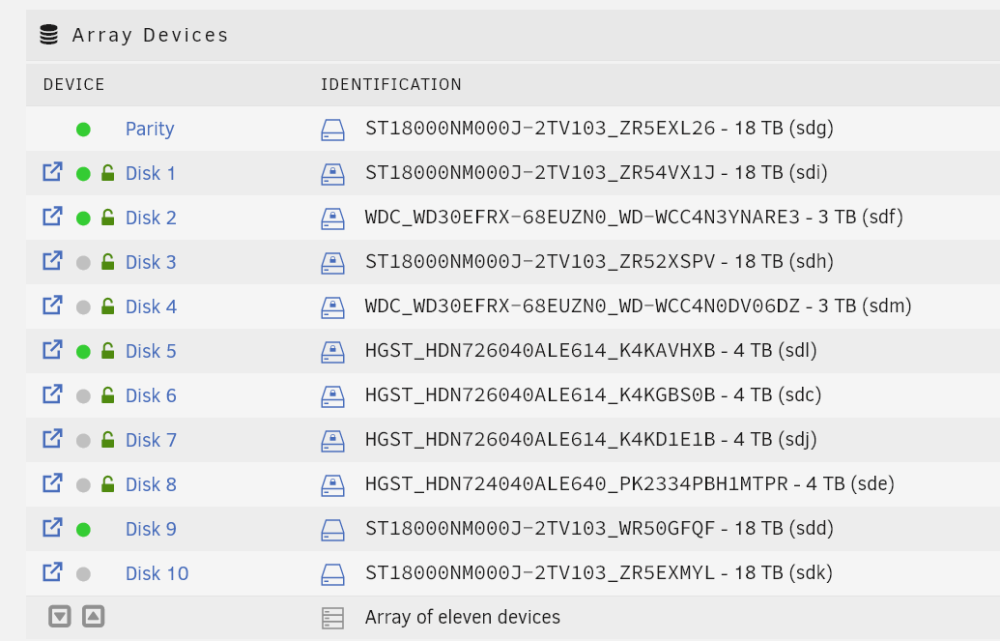
Array drive configuration = where the disks are 1,2,3,4,5,6,7 and so on. THIS!? I dont know what you mean. I did numerous parity checks with my method, not a single problem. So it is perfectly working fine. Sorry, what do you mean?
-
Its pretty easy, if its intented ADD IT TO THE BIG TEXT BOX SO ATLEAST USERS KNOW IT. If not, change it. Do you even know what setting im refering to? Thats exactly what im doin for years without a problem.
-
could you please add this as a suggestion to make unraid better?
-
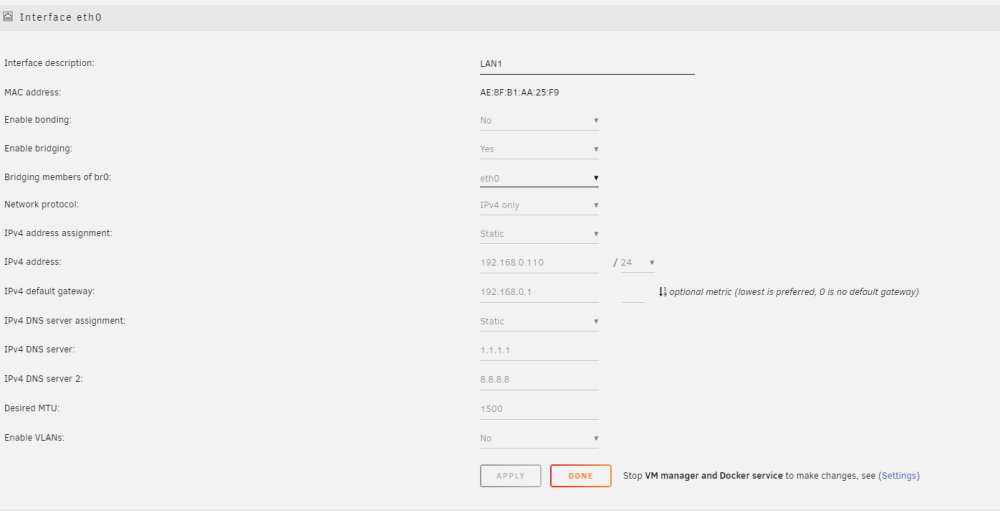
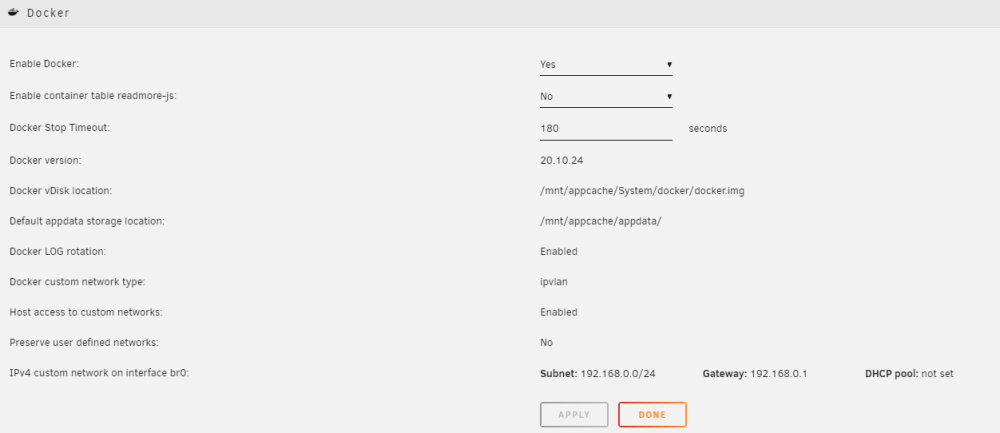
Yes, but why only when in macvlan? Maybe it just triggers it faster. Im currently rebuilding with ipvlan. root@Unraid-Server:~# docker network ls WARNING: Error loading config file: /root/.docker/config.json: read /root/.docker/config.json: is a directory NETWORK ID NAME DRIVER SCOPE 9c02e6451544 br0 ipvlan local ffa2b65b637b bridge bridge local ba7d287b5243 filesharing bridge local c426a08021c6 host host local d2b93c4c6a03 none null local a6339c7cf36b watchtower_default bridge local 514fa62878e3 watchtower_webserver bridge local 04fb1877a554 webserver_webserver bridge local does that look correct?
-
Yeah, we will see, if you want i report back in a week or so? I dont think we will see another crash for quite some time without macvlan. But do you know what i noticed? It didnt crash when i didnt parity SYNC, so it was just HOURS later after i pressed sync it crashed. Without sync it was running for like 2 days. Has macvlan anything to do with that? unraid was rock solid till 6.10 or something
-
Yes it could be. Also plex wasnt beeing used while it crashed. Maybe it did access some files for refresh or anything, but nothing playing. But how u explain not a single crash for months and years? I mean not a single crash or bluescreen or anything for a long time. Same dockers, plugins, vms, only difference is macvlan. Different CPU, RAM, MB, PS, but same problem with macvlan. Anyway it crashed again without any log, it just displayed a empty line. So im going back to ipvlan. Very sad that you couldnt figure this out. (and i dont feel like you guys can fix it)
-
Just tell me what you think. Its just files beeing accessed by dockers i know.
-
Why you think ive cut it away? Nothing unusual gets opend... You just need to know which drive it is.
-
They are, but you can still clearly see which drive it is.
-
Ill give up, it froze again, interestingly IT DIDNT crashed while doing NO parity. (i just let it sit because i thought like if it crashes again, no need to try to parity sync) Then after 2 days i was like maybe its working this time, so yesterday evening i enabled sync, and crash.... Oo (no logs at this point, but ill add them later) If there is again NOTHING in logs i go back to ipvlan (i just did some port forwardings i can use later)
-
Are you on Drugs? Please look another time at the photos. 🙂
-
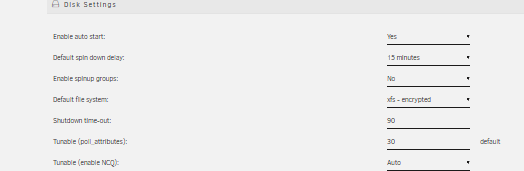
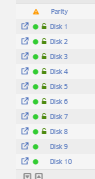
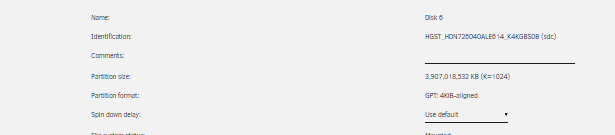
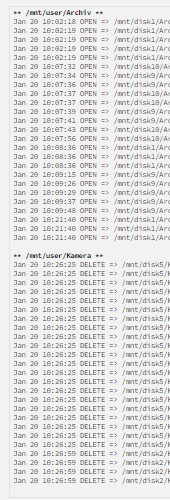
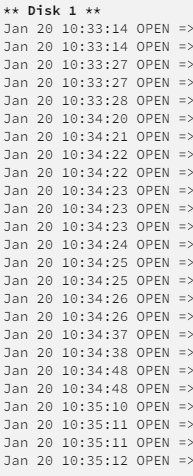
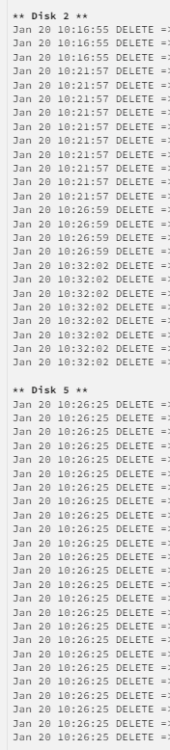
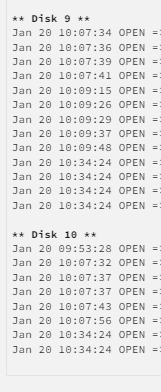
I also noticed drives dont spin down, it was set to 1h (since 9am, around 1,5h ago i changed it to 15min setting.) I enabled the activity plugin, and it says there was activity DISK 1,2,5,9,10 Wasnt that fixed years ago? As i startet my experiment, i spun down all drives. And unraid is like yeah, nows a good time for some smart data reading...? Jan 20 09:08:34 Unraid-Server emhttpd: spinning down /dev/sdm Jan 20 09:08:34 Unraid-Server emhttpd: spinning down /dev/sdj Jan 20 09:08:34 Unraid-Server emhttpd: spinning down /dev/sdk Jan 20 09:08:34 Unraid-Server emhttpd: spinning down /dev/sdh Jan 20 09:08:34 Unraid-Server emhttpd: spinning down /dev/sdg Jan 20 09:08:34 Unraid-Server emhttpd: spinning down /dev/sdd Jan 20 09:08:34 Unraid-Server emhttpd: spinning down /dev/sde Jan 20 09:08:34 Unraid-Server emhttpd: spinning down /dev/sdf Jan 20 09:08:34 Unraid-Server emhttpd: spinning down /dev/sdc Jan 20 09:08:34 Unraid-Server emhttpd: spinning down /dev/sdl Jan 20 09:08:34 Unraid-Server emhttpd: spinning down /dev/sdi Jan 20 09:08:50 Unraid-Server kernel: mdcmd (154): set md_num_stripes 1280 Jan 20 09:08:50 Unraid-Server kernel: mdcmd (155): set md_queue_limit 80 Jan 20 09:08:50 Unraid-Server kernel: mdcmd (156): set md_sync_limit 5 Jan 20 09:08:50 Unraid-Server kernel: mdcmd (157): set md_write_method Jan 20 09:09:18 Unraid-Server emhttpd: read SMART /dev/sdk Jan 20 09:09:18 Unraid-Server emhttpd: read SMART /dev/sdh Jan 20 09:09:18 Unraid-Server emhttpd: read SMART /dev/sdd Jan 20 09:09:18 Unraid-Server emhttpd: read SMART /dev/sdi Jan 20 09:09:30 Unraid-Server emhttpd: read SMART /dev/sdg Jan 20 09:10:00 Unraid-Server emhttpd: read SMART /dev/sdm Jan 20 09:10:00 Unraid-Server emhttpd: read SMART /dev/sdj Jan 20 09:10:00 Unraid-Server emhttpd: read SMART /dev/sde Jan 20 09:10:00 Unraid-Server emhttpd: read SMART /dev/sdf Jan 20 09:10:00 Unraid-Server emhttpd: read SMART /dev/sdc Jan 20 09:10:00 Unraid-Server emhttpd: read SMART /dev/sdl edit: another hour later, still not a single drive spun down, as per file activity still: 1,2,9,10
-
I think my crashes startet with https://forums.unraid.net/bug-reports/stable-releases/since-612-hard-freezes-cought-a-call-trace-r2518/page/2/?tab=comments#comment-25171 btw, im currently in my 2. "server" (so completly upgraded mainboard, cpu, ram and power) - and the problem persists. Is there a way to enable some sort of debug logs? Maybe we can find out what the problem is. If all goes to hell, i will switch to macvlan, redirect some ports, switch back to ipvlan. Because i cant add new port forwardings while in ipvlan, but things added before just work fine... oO Since there is such a big thread about this whole issue in the german section, maybe it is even a problem with macvlan and fritzbox?




