






NewDisplayName
Members
-
Joined
-
Last visited
Everything posted by NewDisplayName
-
No problem! Im glad u know what i mean now... i guess your log files are also getting big?
-
Did you change this? And yes im refering to the stroj/log folders
-
I found out why its not working. In template you name your storjmonitor key "MONITORKEY", but in entrypoint its: if [ -n "${STORJ_MONITOR_API_KEY}" ]; then sleep 10; sed -i "s/YOUR-TOKEN-HERE/${STORJ_MONITOR_API_KEY}/" /opt/StorjMonitor/storjMonitor.js; cd /opt/StorjMonitor; (/opt/StorjMonitor/storjMonitor.sh &) & i guess you need to change MONITORKEY to STORJ_MONITOR_API_KEY or remove the "if" Edit: Yes it works, you need to change MONITORKEY in template to STORJ_MONITOR_API_KEY...., then its filling in the correct API Key. Its because that IF checks if this key is there, and dont start storjmonitor when the key is not there... While you at it, you could add (or a working code) logs=$(find /storj/log/ -name '*.log');for log in $logs; do cat /dev/null > $log;done to the entrypoint script (dont work for me, i dont know why :()
-
btw, i found https://ssdynamite.com/ there you can check your log files of storj if there is any problem... seems like all instances are working.
-
For log deleting im using But i also tried yoru script via ssh, still there are logs in the storj containers...?! As far as i understand these logs has to be deleted from within the container!?
-
Hmm.. im confused some minutes ago all my dockers updated... and storj monitor is complete removed... With the replacement i understand what you mean, but your script is broken at this point (atleast for me) the last version try to change YOUR KEY HERE to my key, but there was not YOUR KEY HERE in your original file, you understand? Im also wondering i dont get any new MBs since i switched to your new template... i wonder if storj itself is working correctly. And now after update, all storj monitor is missing..
-
It seems the only thing you need to change now is: 1.) Make sure YOUR KEY HERE is in your original storjmonitor.js so your entrypoint script can cahnge it to the correct api key, besides this, it seems to work just fine! or change and dont look for YOUR KEY HERE, but for your api key "H8WvafR710FPK2zA4ZTd7NTX24HsGB5xc9curODs" and let it get changed to the real api key. 2.) let it delete the log folder (or the files in it) automatic (maybe just always on restart, or if its X days old.)
-
I cant write more without writing in red, so new thread... / # ls -l total 12 drwxr-xr-x 1 root root 218 Apr 26 09:45 StorjMonitor drwxr-xr-x 1 root root 808 Jan 9 19:36 bin drwxr-xr-x 5 root root 340 Apr 26 09:45 dev -rwxrwxrwx 1 root root 2016 Apr 19 07:10 entrypoint drwxr-xr-x 1 root root 530 Apr 24 13:31 etc drwxr-xr-x 1 root root 0 Jan 9 19:36 home drwxr-xr-x 1 root root 222 Jan 9 19:36 lib lrwxrwxrwx 1 root root 12 Jan 9 19:36 linuxrc -> /bin/busybox drwxr-xr-x 1 root root 28 Jan 9 19:36 media drwxr-xr-x 1 root root 0 Jan 9 19:36 mnt dr-xr-xr-x 580 root root 0 Apr 26 09:45 proc drwx------ 1 root root 56 Apr 26 09:43 root drwxr-xr-x 1 root root 0 Jan 9 19:36 run drwxr-xr-x 1 root root 766 Jan 9 19:36 sbin drwxr-xr-x 1 root root 0 Jan 9 19:36 srv drwxrwxrwx 1 99 users 16 Apr 24 12:05 storj dr-xr-xr-x 13 root root 0 Apr 26 09:45 sys drwxrwxrwt 1 root root 64 Apr 19 05:31 tmp drwxr-xr-x 1 root root 46 Apr 19 05:31 usr drwxr-xr-x 1 root root 78 Jan 9 19:36 var -rw-rw-rw- 1 root root 152 Apr 19 06:25 versions / # cd storj /storj # dir /bin/sh: dir: not found /storj # ls -l total 8 -rw-rw-rw- 1 99 users 3062 Apr 24 14:01 config.json -rw-rw-rw- 1 99 users 3062 Apr 24 14:01 config.json.bak drwxrwxrwx 1 99 users 108 Apr 26 00:00 log drwxrwxrwx 1 99 users 68 Apr 24 12:03 share /storj # Could it because of wrong rights? If so, you could add "set correct rights" at startup part? For my part, i dont need everything setup in template, i would rather set the correct values in the conf, so i know its working all correctly... Also, for me, in your entrypoint file, but i could have no idea about it, it seems like you dont use variables for ports? How does it even work? sed -i "s/YOUR-TOKEN-HERE/${MONITORKEY}/" /StorjMonitor/storjMonitor.js; mkdir -pv "${DATADIR}/share" "${DATADIR}/log"; if [ ! -f "${DATADIR}/config.json" ]; then storjshare create --storj "${WALLET_ADDRESS}" --storage "${DATADIR}/share" --size "${SHARE_SIZE}" --rpcport 4000 --rpcaddress "$ (later ports also no variable) What i can confirm, if you install it with your docker, you dont set YOUR-TOKEn-HERE in storjmonitor.js, so your script cant find that point and all dockers created with this use wrong api key... if i set YOUR TOKEN HERE, the api key g ets replaced just fine. (but still not working) - only manual. I would suggest to publish this container first without variables, just config files which needs to be edited (like you can access atm storj conf, but not storjmonitor from outside of docker) I also wonder why i cant use apt-get in the docker, shouldnt this all be installed via the install script? I also cant "find" (inside the docker) the daemon.log which storjmonitor should create... EDIT: okay some nodes seem to work and report their size correctly, i just edited the storjmonitor.js and replaced the key with mine. Ill try to find out if all work or what i have done other then on others (like if its needed to +x it) Edit2: GOOD NEWS! It seems to10 from 11 nodes are working, it doesnt matter if u +x it. U just need to replace the key in the conf. If you want to keep the variables, then you need to make sure that ur original storjhmonitor.js has actually YOUR_KEY_HERE in it. So the replacement works. Edit3: Seems like all 11 nodes are running fine now. Its just confusing because you get invalid farmer data and or error (and it works 15 min later on his own) (i guess there are a max 1 connection per 15 min setting on their server or something)
-
ITS WORKING. CALL ME GOD! 1.) Ur script doesnt seem to enter the API key correct. Make sure YOUR KEY HERE is in your original storjmonitor.js (its not in mine when i install from your template, its your key in there for me, every time) 2.) (Also it might be that ur scritp doenst set chmod +x? (executable?))? [doenst needed see last post] 3.) could u implement a "if share diretory = 0 bytes" dont open storjmonitor? (would reduce false positives) 4.) please add a "delete /log/" after X days or after X mbs You can skip the rest until the last post last words... It said var token = "H8WvafR710FPK2zA4ZTd7NTX24HsGB5xc9curODs"; (where does it get that from!?) I just "vi"ed it and changed it with my real api key... and ... /StorjMonitor # vi storjMonitor.js /StorjMonitor # ./storjMonitor.js /bin/sh: ./storjMonitor.js: Permission denied /StorjMonitor # chmod +x storjMonitor.js /StorjMonitor # ./storjMonitor.js [09:33:01] 5e2ce75d9e5d679d125eb2a2228c987f2f236a61 | Submit to Storjstat [09:33:02] 5e2ce75d9e5d679d125eb2a2228c987f2f236a61 | Success It also appears on the website finally.. THANK YOU FOR YOUR HELP! AND YOUR SCRIPTS! AND YOUR TIME! Now just one last question... when the docker gets updated, does this changes vanish? (the correct api key?) edit: It seems like its just manually working, in log still: * starting node with config at /storj/config.json{"level":"info","message":"got status query","timestamp":"2018-04-26T09:45:24.250Z"}[09:45:24] 6dd89bb44f8b72ed5cfe5be5f506161b8dac5b3f | Submit to Storjstat[09:45:24] ERROR {"error":"Invalid farmer data (spaceUsedBytes)"}
-
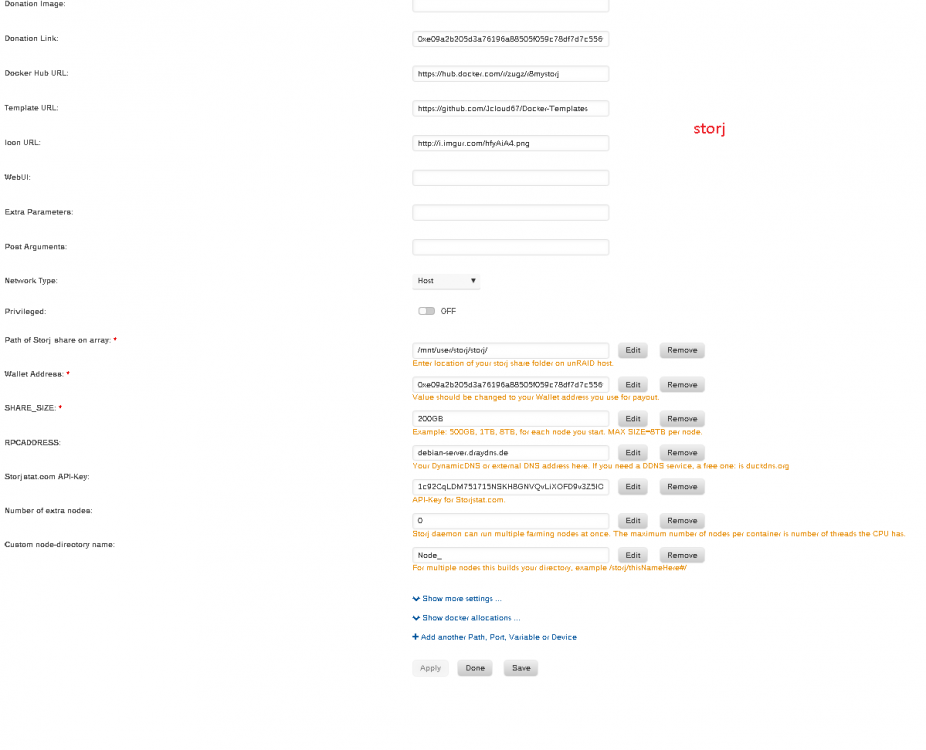
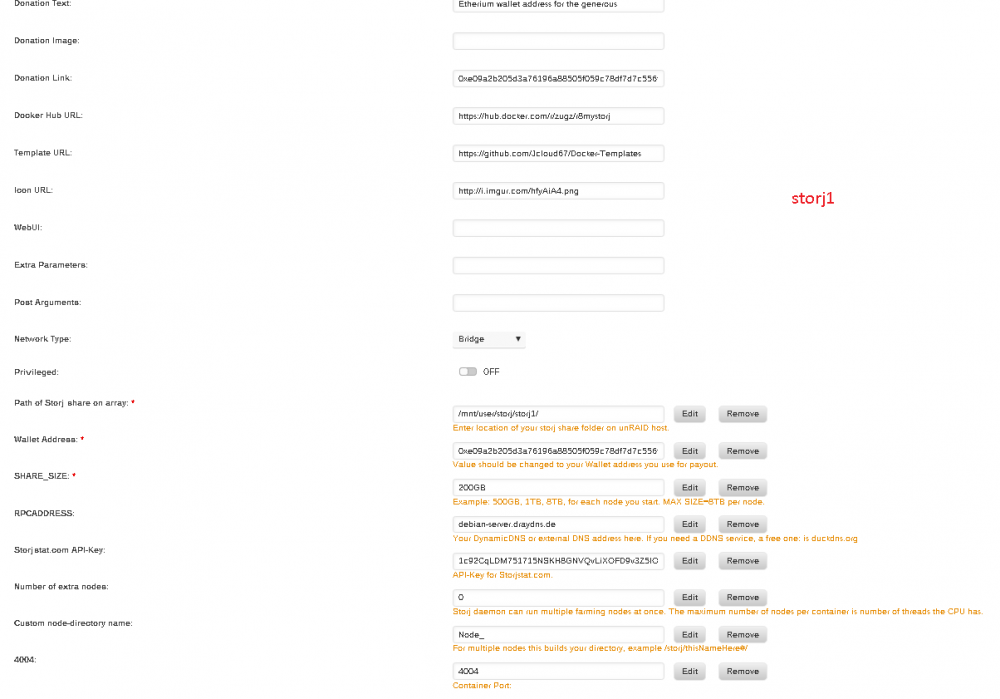
Till now: (storj) 1 fresh new install with ur new docker - some reputation gained, but no files stored so far, so it makes sense that storjmonitor is not working (storj1) 1 fresh install and then (stop) and copy old files over - i guess here it should report files stored, but didnt do 9 other nodes with just "old files with new docker" none of them show any data till now, (for storj1-10) im also concerned if they work correct, because i get many timeouts in log... also no increase in reputation.. but timeout goes down...?! BTW, while were at logs... in all of my dockers the log directory get bigger and bigger, could u implement an simple startup script which deleted logs after 3 days (or something like this?) Currently i have about 10GB of logs in my 11 nodes
-
Okay, it might be that your install scripts didnt run, because the node is already there... How to manually run the install script once? I wouldnt really like to remove all nodes. From my side it dont seem like he created anything new. The nodes also seem to run just fine, but just without storj monitor.. Can i manuall run the script to install the storj monitor script? If so, how? Would be a waste to start with all 11 nodes from scratch... edit: just to clarify this, i dont use your multi node thingy, im just adding a docker per node storj1 storj2 storj3 ... i accidently deleted my first storj node with 100gb data... and used ur script to do a fresh install, ofc it shows error, bc it has nothing stored, but this node should probably work. How can i get my other nodes working? i tried something by myself but it seems like i have no idea what im doin... root@Unraid-Server:~# docker run -it --entrypoint /bin/sh zugz/r8mystorj / # StorjMonitor/storjMonitor-install.sh /bin/sh: StorjMonitor/storjMonitor-install.sh: not found / # chmod +x StorjMonitor/storjMonitor-install.sh / # StorjMonitor/storjMonitor-install.sh /bin/sh: StorjMonitor/storjMonitor-install.sh: not found / # cd StorjMonitor /StorjMonitor # chmod +x storjMonitor-install.sh /StorjMonitor # ./storjMonitor-install.sh /bin/sh: ./storjMonitor-install.sh: not found /StorjMonitor # ls README.md bin node_modules package.json storjMonitor-install.sh storjMonitor.bat storjMonitor.js storjMonitor.sh /StorjMonitor # ./storjMonitor.sh [17:48:26] Error connecting to StorjShare Client, are you sure its running? [17:48:26] Error: connect ECONNREFUSED 127.0.0.1:45015 /StorjMonitor # sh storjMonitor-install.sh > [email protected] install /StorjMonitor/node_modules/weak > node-gyp rebuild gyp ERR! configure error gyp ERR! stack Error: Can't find Python executable "python", you can set the PYTHON env variable. gyp ERR! stack at failNoPython (/usr/lib/node_modules/npm/node_modules/node-gyp/lib/configure.js:401:14) gyp ERR! stack at /usr/lib/node_modules/npm/node_modules/node-gyp/lib/configure.js:330:11 gyp ERR! stack at F (/usr/lib/node_modules/npm/node_modules/which/which.js:69:16) gyp ERR! stack at E (/usr/lib/node_modules/npm/node_modules/which/which.js:81:29) gyp ERR! stack at /usr/lib/node_modules/npm/node_modules/which/which.js:90:16 gyp ERR! stack at /usr/lib/node_modules/npm/node_modules/which/node_modules/isexe/index.js:44:5 gyp ERR! stack at /usr/lib/node_modules/npm/node_modules/which/node_modules/isexe/access.js:8:5 gyp ERR! stack at FSReqWrap.oncomplete (fs.js:123:15) gyp ERR! System Linux 4.14.34-unRAID gyp ERR! command "/usr/bin/node" "/usr/lib/node_modules/npm/node_modules/node-gyp/bin/node-gyp.js" "rebuild" gyp ERR! cwd /StorjMonitor/node_modules/weak gyp ERR! node -v v6.7.0 gyp ERR! node-gyp -v v3.3.1 gyp ERR! not ok [email protected] /StorjMonitor +-- [email protected] +-- [email protected] | `-- [email protected] +-- [email protected] +-- [email protected] +-- [email protected] +-- [email protected] +-- [email protected] `-- [email protected] npm ERR! Linux 4.14.34-unRAID npm ERR! argv "/usr/bin/node" "/usr/bin/npm" "install" npm ERR! node v6.7.0 npm ERR! npm v3.10.3 npm ERR! code ELIFECYCLE npm ERR! [email protected] install: `node-gyp rebuild` npm ERR! Exit status 1 npm ERR! npm ERR! Failed at the [email protected] install script 'node-gyp rebuild'. npm ERR! Make sure you have the latest version of node.js and npm installed. npm ERR! If you do, this is most likely a problem with the weak package, npm ERR! not with npm itself. npm ERR! Tell the author that this fails on your system: npm ERR! node-gyp rebuild npm ERR! You can get information on how to open an issue for this project with: npm ERR! npm bugs weak npm ERR! Or if that isn't available, you can get their info via: npm ERR! npm owner ls weak npm ERR! There is likely additional logging output above. npm ERR! Please include the following file with any support request: npm ERR! /StorjMonitor/npm-debug.log
-
If i use host this container uses (only) the Standard ports, even when i add new -> add port 4005, it still uses 4000-4003 Only in bridge i can select my ports and this container use it... I dont understand whats happening. What did i do? I stopped old storj and installed new storj in same directory. -> its not working on any of my nodes (11), the first i can run in host, but all others i need to run in bridge (i dont like one docker for multiple nodes) and in host i cant change the ports (i dont know why this happens) Doesnt matter if i use host or bridge, none of the nodes seem to be able to report to storj monitor. If host is needed, why i cant change the ports? And also, the first node, which is in host, should work, but it fails to send data to storjstat, like all other nodes. This node is running for months: (and currently in Host mode) ┌─────────────────────────────────────────────┬─────────┬──────────┬──────────┬─────────┬───────────────┬─────────┬──────────┬───────────┬──────────────┐ │ Node │ Status │ Uptime │ Restarts │ Peers │ Allocs │ Delta │ Port │ Shared │ Bridges │ ├─────────────────────────────────────────────┼─────────┼──────────┼──────────┼─────────┼───────────────┼─────────┼──────────┼───────────┼──────────────┤ │ 1d065de2cb7e749bcb6415f4b4f555e8b475a5d0 │ running │ 2m 27s │ 0 │ 120 │ 0 │ -109ms │ 4000 │ 52.34GB │ connected │ │ → /storj/share │ │ │ │ │ 0 received │ │ (TCP) │ (26%) │ │ └─────────────────────────────────────────────┴─────────┴──────────┴──────────┴─────────┴───────────────┴─────────┴──────────┴───────────┴──────────────┘ * starting daemon in foreground{"level":"info","message":"attempting to start node with config at path /storj/config.json","timestamp":"2018-04-24T12:25:48.841Z"}* starting node with config at /storj/config.json{"level":"info","message":"got status query","timestamp":"2018-04-24T12:25:49.094Z"}[12:25:49] 1d065de2cb7e749bcb6415f4b4f555e8b475a5d0 | Submit to Storjstat[12:25:49] ERROR {"error":"Invalid farmer data (spaceUsedBytes)"}{"level":"info","message":"attempting to start node with config at path /storj/config.json","timestamp":"2018-04-24T12:30:33.688Z"}{"level":"info","message":"attempting to start node with config at path /storj/config.json","timestamp":"2018-04-24T12:30:51.931Z"}{"level":"info","message":"attempting to start node with config at path /storj/config.json","timestamp":"2018-04-24T12:32:03.657Z"}{"level":"info","message":"attempting to start node with config at path /storj/config.json","timestamp":"2018-04-24T12:32:21.563Z"}{"level":"info","message":"attempting to start node with config at path /storj/config.json","timestamp":"2018-04-24T12:32:25.463Z"}{"level":"info","message":"attempting to start node with config at path /storj/config.json","timestamp":"2018-04-24T12:33:50.235Z"}{"level":"info","message":"attempting to start node with config at path /storj/config.json","timestamp":"2018-04-24T12:37:46.575Z"}{"level":"info","message":"got status query","timestamp":"2018-04-24T12:40:49.179Z"}[12:40:49] 1d065de2cb7e749bcb6415f4b4f555e8b475a5d0 | Submit to Storjstat[12:40:49] 1d065de2cb7e749bcb6415f4b4f555e8b475a5d0 | Error{"level":"info","message":"got status query","timestamp":"2018-04-24T12:55:49.281Z"}[12:55:49] 1d065de2cb7e749bcb6415f4b4f555e8b475a5d0 | Submit to Storjstat[12:55:49] 1d065de2cb7e749bcb6415f4b4f555e8b475a5d0 | Error{"level":"info","message":"got status query","timestamp":"2018-04-24T13:10:49.380Z"}[13:10:49] 1d065de2cb7e749bcb6415f4b4f555e8b475a5d0 | Submit to Storjstat[13:10:49] 1d065de2cb7e749bcb6415f4b4f555e8b475a5d0 | Error{"level":"info","message":"got status query","timestamp":"2018-04-24T13:25:49.485Z"}[13:25:49] 1d065de2cb7e749bcb6415f4b4f555e8b475a5d0 | Submit to Storjstat[13:25:49] 1d065de2cb7e749bcb6415f4b4f555e8b475a5d0 | Error{"level":"info","message":"attempting to start node with config at path /storj/config.json","timestamp":"2018-04-24T13:31:36.720Z"}{"level":"info","message":"got status query","timestamp":"2018-04-24T13:40:49.583Z"}[13:40:49] 1d065de2cb7e749bcb6415f4b4f555e8b475a5d0 | Submit to Storjstat[13:40:49] 1d065de2cb7e749bcb6415f4b4f555e8b475a5d0 | Error{"level":"info","message":"got status query","timestamp":"2018-04-24T13:55:49.685Z"}[13:55:49] 1d065de2cb7e749bcb6415f4b4f555e8b475a5d0 | Submit to Storjstat[13:55:49] 1d065de2cb7e749bcb6415f4b4f555e8b475a5d0 | Error
-
I just changed host to briged, bc i dont want that many uselss IPs in my network... also i wonder, i dont see anything from storjstat in the directory? Okay, i changed back to host, now the node is atleast reachable from outside (i dont know why its no longer working in bridge mode) Still, storjmonitor throws: * starting daemon in foreground{"level":"info","message":"attempting to start node with config at path /storj/config.json","timestamp":"2018-04-24T12:25:48.841Z"}* starting node with config at /storj/config.json{"level":"info","message":"got status query","timestamp":"2018-04-24T12:25:49.094Z"}[12:25:49] 1d065de2cb7e749bcb6415f4b4f555e8b475a5d0 | Submit to Storjstat[12:25:49] ERROR {"error":"Invalid farmer data (spaceUsedBytes)"}
-
Hmm, id ont get it. I copied conf files, startet new storj + cli, and get * starting daemon in foreground{"level":"info","message":"attempting to start node with config at path /storj/config.json","timestamp":"2018-04-24T12:02:33.433Z"}* starting node with config at /storj/config.json{"level":"info","message":"got status query","timestamp":"2018-04-24T12:02:33.750Z"}[12:02:33] 1d065de2cb7e749bcb6415f4b4f555e8b475a5d0 | Submit to Storjstat[12:02:34] ERROR {"error":"Invalid farmer data (spaceUsedBytes)"}
-
hey, thanks for the update. dont wonder, ill try and report back asap, but im currently in egypt and come monday back. thanks!! edit: am i right, i can just put files and config from old docker into new?
-
Will this get updated automatic?
-
Is my problem known? Can i provide any help? But this addon already helped me, i saw my ssds were connected to 3gbs instead of 6gbs..
-
Okay... what does fios mean?
-
sadly it doenst work for me. It recognize everything (impressive!) But - wont spin up drives after clicking start benchmark (if i spin up manually, it starts) - is not able to do benchmark to the end (it says "abort?") and after some times all disks go to sleep again... edit: i try new version edit2: Nop, still wont spin up, but if i spin up, it works, lets see if it can finish atleast... edit3: what does SAS2116 PCI-Express Fusion-MPT SAS-2 [Meteor]: Scanning Disk 7 (sdm) at 0 GB (0%) - Speed Gap of 58.98 MB (max allowed is 50 MB), retrying (2) mean? edit4: okay it wont finish this time also, it says it benchmarks disk 8, but 8 is already spun down... so it will never finish..
-
Nop. I dont think nginx can, out of the box, "just" redirect other traffic then http/https.
-
Perfedct, thanks, you should probably edit the 1. post. Ill try, thank you very much.
-
When do you think you can add this to community plugin?
-
Yes, i thought about that, but.. i have dynamic ip. And also, i guess, letsencrypt needs to redo the cert at some time and will check again on 80 and 443, or not!?
-
Sorry, i would help you, but i googled yesterday docker tutorial... and i dont find any usefull information on how to create dockers. I dont know where to start.
-
I guess, i cant use that with a free dns. I really dont like exposing 80 or 443 to the internet...


