






NewDisplayName
Members
-
Joined
-
Last visited
Everything posted by NewDisplayName
-
just btw, is it known that the dashboard is not looking correct? like under docker it shows these nice folders, but not under dashboard, or is that just me beeing stupid? and just btw i really think this should be included in unraid, i never knew that would be possible, its so much better to see and everything. Impressive.
-
Ill never said its no work. But if it want to be successfull, you have to invest in usability. I dont know the sales, but my guess is this is more hobby software?
-
and when i read this thats just horror (the new share stuff and it was even confusing for ppl before all those changes) for ppl who have no idea i really wonder how that is done in the ui but i guess it will be a MESS. Its great that there are so many technical things done, but there are probably more noobs then pros. YOU guys know what questions gets asked most, do a top 10 list and add these functionalities self-explanatory into unraid...
-
You dont understand. Instead of users need to search or seek for help, there should be an guided way in the unraid ui to do certain things like remove disk, add disks, change raid levels, upgrade unraid. What happens when a disk goes bad? You need to replace it, i dont know out of my head how to do it right, so i would have to search for it (where you could find outdated stuff), it would be better for all if there would just be a procedure inside the unraid ui. Like click drive, replace -> step by step guide (like next, ok, balbla,)
-
Its resource intensive, ofc, BUT it frees time for supporting and it improves user expierince.
-
I suggest something better then a documentation. You say its better to make more documentation... and then say they dont use it. Welcome in 2023. Ofc the user is not using documentation, what a surprise. There should be a installshield wizard for all the important things. No need for documentation.
-
Hi, i really think the next step would be an system where the user could simply click what he wants to do... so that in the end all common tasks can be done by someone who doenst has any knowledge. Benefit would be that much more would be done RIGHT and you dont get every day the same questions over and over again. E.g.: Remove Disk Add Disk Add Cache drive Remove Cache Drive Update unraid os (with backup process) ...many many more which i cant think off By clicking the topic the user comes to a step by step process like if you install something or (installshield or something) e.g. Remove Disk 1.) select the correct drive (be sure its the correct one blabla) 2.) click here 3.) blabla 4.) shut the server down, unplug the drive 5.) when restartet "you successfull removed drive X". 6.) click here to blabla
-
i explizit said "or should". Who the f wants to enter the key every time? Thats just not for the mass.
-
just for the lolz, this config works that way that it wont complain about it, but it also will only update the first.... my head cant understand why you publish such a tool without proper guide and or... i opend a issue, for now i just create 22 different dockers
-
Ha i found it { "cloudflare": [ { "authentication": { "api_token": "XXXXXX", "api_key": { "api_key": "api_key_here", "account_email": "your_email_here" } }, "zone_id": "XXX", "subdomains": [ { "name": "", "proxied": true }, { "name": "www", "proxied": true }, { "name": "forum", "proxied": true } ], "zone_id": "XXXXXX", "subdomains": [ { "name": "", "proxied": true }, { "name": "www", "proxied": true } ] } ], "a": true, "aaaa": true, "purgeUnknownRecords": false, "ttl": 300 }
-
If i may suggest everyone will start it first and will have the same problem, you could have saved some ppl some time and just write to it, "if you startet it before creating, remove folder." Its very unusual that you need to do it before installing. Could also be automatic be done? and just btw, your provided config is (still) not working. you cant leave out the api key. but still twith that, it wont work. (i didnt found a working solu tion for multiple domains, and even the documentation doesnt show an example...)
-
what i really find annoying is that its working FOR MONTHS without problems and then it breaks with out any meaningfull error message... Oo maybe i should go over to igpu, but currenlt yit worki ng (with old version) anyway, someone know where the dvr settings are saved? i had dvr added years ago b ut i cant delete or find anythi ng via ui, so i wanna try to remove the wh ole settings for this.
-
reverted to <tryin to find latest working rls>, "latest" version again does not transcode... edit: coulnt find a plex version working, maybe nvidia update? I also updated unraid (rebooted), but unraid didnt changed anything too obv about transcode... its crazy i dont know what the problem is i had working Now the only combo working i found is Unraid 6.11.5 Plex 1.27.1.5891-c29537f86 Nvidia 515.76 anyone any idea? Only thing changed is unraid? Am i the only one with problems?
-
what do you mean? I mean it that way that if you upgrade it will have a checkbox which is normal checked (option to not backup). So its noob safe, if you dont change anything you have a working backup.
-
No, it did not download anything, becasue it already downloaded it earlier if i remember correctly.
-
this
-
Hi. Yo since you suggest to make abackup before upgrading... why not automate that? You know... make it easier and safer for noobs.
-
Hi. So first im not sure who maintains the nvidia plugin now, but it looks like its inside unraid? Yeah so i dont like to just run the latest nvidia driver after each update, thats why i picked v520.56.06 and clicked update & download. After that i rebootet unraid and got greeted by so there might be a bug? Also a "save" button maybe usefull if i dont want to download it, just hwant to have it saved for next reboot...?
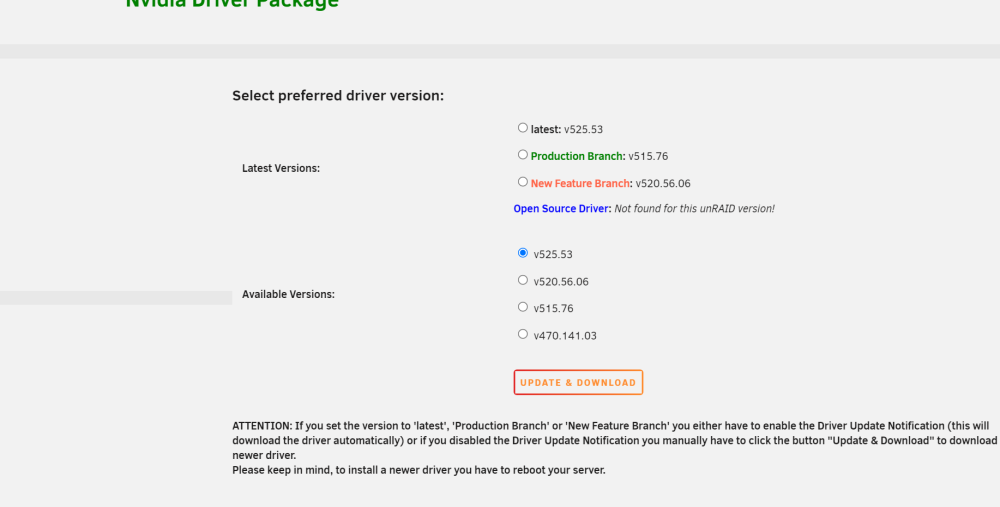
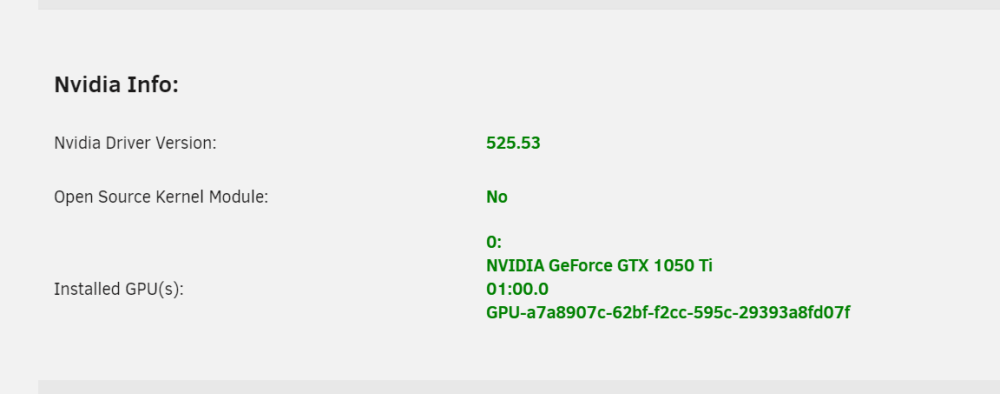
-
yea today i also tried latest version again, not working... crazy i could change something inside the docker, but if im not mistaken, that should be done from the linuxserver crew, because it could be overwritten the next update...??! edit: i rechecked everything and forgot when you remove -e version then it wont update, so i didnt test with latest. NVIDIA I upgraded to 525.53 PLEX (PLEXPASS) "latest", which is currently 1.30.0.6359-1185e28d9 UNRAID 6.11.3 Everything working again!
-
very annoying i downgraded from plex version to public and now public has the same problem, trying 1.29.0.6244-819d3678c as suggested they really good test their stuff edit: yes its working again... THANKS lets hope they fix it in the next 5 years its crazy how many things they add to plex, but the core is so buggy (?) edit2: btw i also have i7 6700k, and 1050 edit3: "it should be using i965 not iHD" What does that mean? Plex decides itself which hardware it uses
-
Afaik u cant say what plex should use. So what does that mean? Whats Vaapi? Ive removed dev dri, which was working fine, just to be sure. Did the latest patches change anything GPU related? Oo I think i was on 6.10
-
I dont know what happend. I just upgraded to latest unraid and GPU transcode has stopped, but hard stoped, i cant play any movies anymore via plex. (normal it would just not use transcode?) Anyway... [Req#118/Transcode/ec33qfmi88cv4bzjjq1ohr2i/b6bfb839-e15b-4bae-bf0c-9c6a65ed0751] [AVHWDeviceContext @ 0x154e61322780] Failed to initialise VAAPI connection: -1 (unknown libva error). [Req#11d/Transcode/ec33qfmi88cv4bzjjq1ohr2i/b6bfb839-e15b-4bae-bf0c-9c6a65ed0751] Failed to set value 'vaapi=vaapi:/dev/dri/renderD129' for option 'init_hw_device': I/O error [Req#13d/Transcode/ec33qfmi88cv4bzjjq1ohr2i/b6bfb839-e15b-4bae-bf0c-9c6a65ed0751] Device creation failed: -5. I dont know where to start. Your plugin seems to be able to see the card normally. No other erros and shinobi seems to be working with the card okay +-----------------------------------------------------------------------------+ | NVIDIA-SMI 515.76 Driver Version: 515.76 CUDA Version: 11.7 | |-------------------------------+----------------------+----------------------+ | GPU Name Persistence-M| Bus-Id Disp.A | Volatile Uncorr. ECC | | Fan Temp Perf Pwr:Usage/Cap| Memory-Usage | GPU-Util Compute M. | | | | MIG M. | |===============================+======================+======================| | 0 NVIDIA GeForce ... Off | 00000000:01:00.0 Off | N/A | | 20% 34C P0 N/A / 75W | 584MiB / 4096MiB | 0% Default | | | | N/A | +-------------------------------+----------------------+----------------------+ +-----------------------------------------------------------------------------+ | Processes: | | GPU GI CI PID Type Process name GPU Memory | | ID ID Usage | |=============================================================================| | 0 N/A N/A 26480 C ...gins/yolo/shinobi-yolo.js 455MiB | | 0 N/A N/A 28870 C /usr/bin/ffmpeg 127MiB | +-----------------------------------------------------------------------------+
-
just disable it anyway did they add a manual way like each week?
-
are you sure this is how it works? Ive read there is hbbs and hbbr (relay or something) is both included bc in your command it seem slike only hbbs? (what ever that means xD)
-
Hi, i think there was a forum where you could ask for templates for dockers, but i coulnt find it, so please shove it there if there is a better place for this. Ive found the following docker: https://github.com/rustdesk/rustdesk its a free teamviewer alternate you can host on your own server (which would be perfect for unraid if you ask me). I could install it via community apps but i cant find any variables and there is no log. The docker starts and stops immediatly. The tutorials are complete useless for me, i cant figure it out. Maybe someone knows something. I tried: root@localhost:# /usr/local/emhttp/plugins/dynamix.docker.manager/scripts/docker run -d --name='rustdesk-server' --net='bridge' -e TZ="Europe/Berlin" -e HOST_OS="Unraid" -e HOST_HOSTNAME="Unraid-Server" -e HOST_CONTAINERNAME="rustdesk-server" -e 'Community_Applications_Conversion'='true' -l net.unraid.docker.managed=dockerman 'rustdesk/rustdesk-server' Thanks!


