





Johan71
Members
-
Joined
-
Last visited
Everything posted by Johan71
-
No one?
-
Hi everyone, I'm encountering an issue when trying to install the PredBat add-on in Home Assistant. The installation seems to fail with a "No such file or directory" error. Here's the relevant part of the log: 2025-05-14 05:44:27.826 INFO (SyncWorker_4) [supervisor.docker.manager] Export image 6adb4f0d/amd64-addon-predbat done 2025-05-14 05:44:48.673 ERROR (MainThread) [supervisor.addons.addon] Can't write tarfile <securetar._InnerSecureTarFile object at 0x7fb97f552cf0>: Error adding /data/addons/data/6adb4f0d_predbat to tarfile: [Errno 2] No such file or directory: '/data/addons/data/6adb4f0d_predbat' (FileNotFoundError) 2025-05-14 05:44:48.673 ERROR (MainThread) [supervisor.backups.backup] Can't create backup for 6adb4f0d_predbat 2025-05-14 05:44:48.674 WARNING (MainThread) [supervisor.backups.backup] Can't save Add-on 6adb4f0d_predbat: Can't create backup for 6adb4f0d_predbat 2025-05-14 05:44:48.676 INFO (MainThread) [supervisor.addons.addon] Building backup for add-on cc2581ab_predai 2025-05-14 05:45:44.251 INFO (MainThread) [supervisor.homeassistant.api] Updated Home Assistant API token 2025-05-14 05:49:55.211 INFO (SyncWorker_5) [supervisor.docker.manager] Export image cc2581ab/amd64-addon-predai to /data/tmp/tmpjvc0xr2l/image.tar 2025-05-14 05:53:56.510 ERROR (SyncWorker_5) [supervisor.docker.manager] Can't write tar file /data/tmp/tmpjvc0xr2l/image.tar: [Errno 28] No space left on device 2025-05-14 05:53:56.735 ERROR (MainThread) [supervisor.backups.backup] Can't create backup for cc2581ab_predai 2025-05-14 05:53:56.735 WARNING (MainThread) [supervisor.backups.backup] Can't save Add-on cc2581ab_predai: Can't create backup for cc2581ab_predai 2025-05-14 05:53:56.735 INFO (MainThread) [supervisor.backups.manager] Backup 0ebec207 starting stage folders 2025-05-14 05:53:56.737 INFO (SyncWorker_2) [supervisor.backups.backup] Backing up folder ssl 2025-05-14 05:53:56.819 INFO (SyncWorker_2) [supervisor.backups.backup] Backup folder ssl done 2025-05-14 05:53:56.820 INFO (MainThread) [supervisor.backups.manager] Backup 0ebec207 starting stage finishing_file 2025-05-14 05:53:56.858 INFO (MainThread) [supervisor.backups.manager] Creating partial backup with slug 0ebec207 completed 2025-05-14 06:05:39.542 INFO (MainThread) [supervisor.host.info] Updating local host information 2025-05-14 06:05:39.989 INFO (MainThread) [supervisor.host.services] Updating service information 2025-05-14 06:05:39.992 INFO (MainThread) [supervisor.host.network] Updating local network information 2025-05-14 06:05:40.061 INFO (MainThread) [supervisor.host.sound] Updating PulseAudio information 2025-05-14 06:05:40.247 INFO (MainThread) [supervisor.host.manager] Host information reload completed 2025-05-14 06:15:50.030 INFO (MainThread) [supervisor.homeassistant.api] Updated Home Assistant API token 2025-05-14 06:21:57.971 ERROR (SyncWorker_1) [supervisor.utils.json] Can't write /data/addons/data/6adb4f0d_predbat/options.json: [Errno 2] No such file or directory: '/data/addons/data/6adb4f0d_predbat/tmpwjbzf7vs' 2025-05-14 06:21:57.971 ERROR (MainThread) [supervisor.addons.addon] Add-on 6adb4f0d_predbat can't write options [supervisor.addons.addon] Add-on 6adb4f0d_predbat can't write options This looks like it's happening during the installation process, as it's trying to write the options.json file for PredBat. Has anyone else experienced this when installing an add-on? Any ideas on what could be preventing the creation of these directories or the writing of this file? Thanks for any help!
-
Beer money on the way, tnx Beer money on the way, tnx
-
Of course, I'll try it.
-
can you please explain how?
-
I'm home now so now I've downloaded it here it is tower-diagnostics-20241130-1058.zip
-
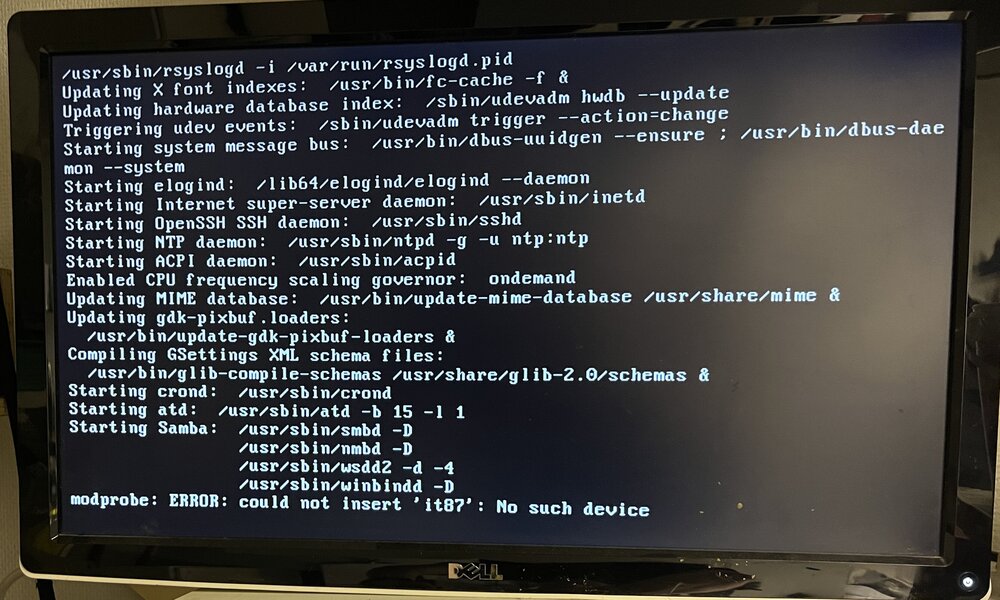
This morning I updated unraid but forgot to restart the server. I only did that when I got home later in the afternoon. When I restarted nothing much happened as I have the server in my garage so I had to go outside and plug in a monitor. Then see that it boots up as it should and it says that it gets an IP number, but the IP number when I ping it does not respond. it seems like it won't start up properly. Does anyone have any suggestions on how I should proceed. It's Friday night, so I'll get to it tomorrow. Unfortunately, I don't have a log file right now that I can share I also get an error at startup, but I may have had that before. Nothing that I know anything about.
-
Same here
-
Did that and nog it works pefect, tnx
-
Today nothing works anymore, does anyone have the same problem? I feel like I've tried everything but I'm getting nowhere Aug 17, 2022 21:28:10.000 [0x151e2c069b38] Error — [Req#3cc] [Transcoder] [eac3_eae @ 0x14e96271af40] EAE timeout! EAE not running, or wrong folder? Could not read '/tmp/pms-5a3b6c90-a96d-4e00-b35e-0edacb0caf0d/EasyAudioEncoder/Convert to WAV (to 8ch or less)/479eiah32n9dbfsz8iccrrh4_424-0-16.wav' Aug 17, 2022 21:28:10.000 [0x151e2c0afb38] Error — [Req#3cf] [Transcoder] [eac3_eae @ 0x14e96271af40] error reading output Aug 17, 2022 21:28:10.000 [0x151e2c610b38] Error — [Req#3d2] [Transcoder] Error while decoding stream #0:1: I/O error Aug 17, 2022 21:28:13.000 [0x151e2c069b38] Error — [Req#3d5] [Transcoder] [eac3_eae @ 0x14e96271af40] EAE timeout! EAE not running, or wrong folder? Could not read '/tmp/pms-5a3b6c90-a96d-4e00-b35e-0edacb0caf0d/EasyAudioEncoder/Convert to WAV (to 8ch or less)/479eiah32n9dbfsz8iccrrh4_424-0-17.wav' Aug 17, 2022 21:28:13.000 [0x151e2c0afb38] Error — [Req#3dd] [Transcoder] [eac3_eae @ 0x14e96271af40] error reading output Aug 17, 2022 21:28:13.000 [0x151e2c610b38] Error — [Req#3e1] [Transcoder] Error while decoding stream #0:1: I/O error Aug 17, 2022 21:28:16.000 [0x151e2c069b38] Error — [Req#3e4] [Transcoder] [eac3_eae @ 0x14e96271af40] EAE timeout! EAE not running, or wrong folder? Could not read '/tmp/pms-5a3b6c90-a96d-4e00-b35e-0edacb0caf0d/EasyAudioEncoder/Convert to WAV (to 8ch or less)/479eiah32n9dbfsz8iccrrh4_424-0-18.wav' Aug 17, 2022 21:28:16.000 [0x151e2c0afb38] Error — [Req#3e6] [Transcoder] [eac3_eae @ 0x14e96271af40] error reading output Aug 17, 2022 21:28:16.000 [0x151e2c610b38] Error — [Req#3ea] [Transcoder] Error while decoding stream #0:1: I/O error Aug 17, 2022 21:28:19.000 [0x151e2c069b38] Error — [Req#3ed] [Transcoder] [eac3_eae @ 0x14e96271af40] EAE timeout! EAE not running, or wrong folder? Could not read '/tmp/pms-5a3b6c90-a96d-4e00-b35e-0edacb0caf0d/EasyAudioEncoder/Convert to WAV (to 8ch or less)/479eiah32n9dbfsz8iccrrh4_424-0-19.wav' Aug 17, 2022 21:28:19.000 [0x151e2c0afb38] Error — [Req#3ef] [Transcoder] [eac3_eae @ 0x14e96271af40] error reading output Aug 17, 2022 21:28:19.000 [0x151e2c610b38] Error — [Req#3f3] [Transcoder] Error while decoding stream #0:1: I/O error Aug 17, 2022 21:28:22.000 [0x151e2c069b38] Error — [Req#3f6] [Transcoder] [eac3_eae @ 0x14e96271af40] EAE timeout! EAE not running, or wrong folder? Could not read '/tmp/pms-5a3b6c90-a96d-4e00-b35e-0edacb0caf0d/EasyAudioEncoder/Convert to WAV (to 8ch or less)/479eiah32n9dbfsz8iccrrh4_424-0-20.wav' Aug 17, 2022 21:28:22.000 [0x151e2c0afb38] Error — [Req#3f8] [Transcoder] [eac3_eae @ 0x14e96271af40] error reading output Aug 17, 2022 21:28:22.000 [0x151e2c610b38] Error — [Req#3fc] [Transcoder] Error while decoding stream #0:1: I/O error Aug 17, 2022 21:28:25.000 [0x151e2c610b38] Error — [Req#3ff] [Transcoder] [eac3_eae @ 0x14e96271af40] EAE timeout! EAE not running, or wrong folder? Could not read '/tmp/pms-5a3b6c90-a96d-4e00-b35e-0edacb0caf0d/EasyAudioEncoder/Convert to WAV (to 8ch or less)/479eiah32n9dbfsz8iccrrh4_424-0-21.wav' Aug 17, 2022 21:28:25.000 [0x151e2c0afb38] Error — [Req#424] [Transcoder] [eac3_eae @ 0x14e96271af40] error reading output Aug 17, 2022 21:28:25.000 [0x151e2c069b38] Error — [Req#427] [Transcoder] Error while decoding stream #0:1: I/O error Aug 17, 2022 21:28:28.000 [0x151e2c610b38] Error — [Req#42a] [Transcoder] [eac3_eae @ 0x14e96271af40] EAE timeout! EAE not running, or wrong folder? Could not read '/tmp/pms-5a3b6c90-a96d-4e00-b35e-0edacb0caf0d/EasyAudioEncoder/Convert to WAV (to 8ch or less)/479eiah32n9dbfsz8iccrrh4_424-0-22.wav' Aug 17, 2022 21:28:28.000 [0x151e2c0afb38] Error — [Req#42f] [Transcoder] [eac3_eae @ 0x14e96271af40] error reading output Aug 17, 2022 21:28:28.000 [0x151e2c069b38] Error — [Req#432] [Transcoder] Error while decoding stream #0:1: I/O error
-
You're an angel, thank you very much
-
Unfortunately not so easy to do according to spaceinvade's video as the field Nvidia Visible Devices: no longer exists. Unfortunately, I do not know what to fill in anywhere under Key: Value: Default Value:
-
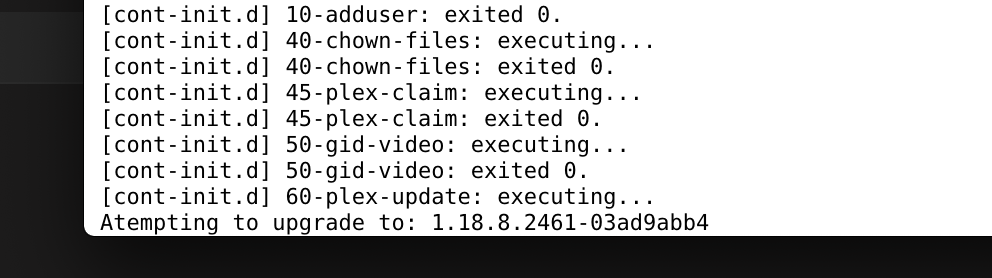
Tried to restart my plex-server tonight but it tries to upgrade but nothing happens, what should/can I do?
-
Tnx m8 all is solved now.
-
Yes it works but now i have to find out witch temp i what. in0: 1.07 V (min = +0.00 V, max = +1.74 V) in1: 1.02 V (min = +0.00 V, max = +0.00 V) ALARM in2: 3.42 V (min = +0.00 V, max = +0.00 V) ALARM in3: 3.38 V (min = +0.00 V, max = +0.00 V) ALARM in4: 1.02 V (min = +0.00 V, max = +0.00 V) ALARM in5: 152.00 mV (min = +0.00 V, max = +0.00 V) ALARM in6: 768.00 mV (min = +0.00 V, max = +0.00 V) ALARM in7: 3.42 V (min = +0.00 V, max = +0.00 V) ALARM in8: 3.28 V (min = +0.00 V, max = +0.00 V) ALARM in9: 1.85 V (min = +0.00 V, max = +0.00 V) ALARM in10: 0.00 V (min = +0.00 V, max = +0.00 V) in11: 688.00 mV (min = +0.00 V, max = +0.00 V) ALARM in12: 1.03 V (min = +0.00 V, max = +0.00 V) ALARM in13: 608.00 mV (min = +0.00 V, max = +0.00 V) ALARM in14: 1.53 V (min = +0.00 V, max = +0.00 V) ALARM fan1: 0 RPM (min = 0 RPM) fan2: 1560 RPM (min = 0 RPM) fan3: 884 RPM (min = 0 RPM) fan4: 852 RPM (min = 0 RPM) fan5: 750 RPM (min = 0 RPM) SYSTIN: +39.0°C (high = +80.0°C, hyst = +75.0°C) sensor = CPU diode CPUTIN: +40.0°C (high = +115.0°C, hyst = +90.0°C) sensor = thermistor AUXTIN0: +39.0°C (high = +115.0°C, hyst = +90.0°C) sensor = thermistor AUXTIN1: -128.0°C sensor = thermistor AUXTIN2: +44.0°C sensor = thermistor AUXTIN3: -2.0°C sensor = thermistor SMBUSMASTER 0: +51.5°C PCH_CHIP_CPU_MAX_TEMP: +0.0°C PCH_CHIP_TEMP: +0.0°C PCH_CPU_TEMP: +0.0°C intrusion0: ALARM intrusion1: ALARM beep_enable: disabled
-
Yes and i got I don't really know what to do after I do. root@Tower:~# sensors-detect # sensors-detect version 3.6.0 # System: Micro-Star International Co., Ltd. MS-7B89 [1.0] # Board: Micro-Star International Co., Ltd. B450M MORTAR MAX (MS-7B89) # Kernel: 4.19.88-Unraid x86_64 # Processor: AMD Ryzen 5 3600 6-Core Processor (23/113/0) This program will help you determine which kernel modules you need to load to use lm_sensors most effectively. It is generally safe and recommended to accept the default answers to all questions, unless you know what you're doing. Some south bridges, CPUs or memory controllers contain embedded sensors. Do you want to scan for them? This is totally safe. (YES/no): Silicon Integrated Systems SIS5595... No VIA VT82C686 Integrated Sensors... No VIA VT8231 Integrated Sensors... No AMD K8 thermal sensors... No AMD Family 10h thermal sensors... No AMD Family 11h thermal sensors... No AMD Family 12h and 14h thermal sensors... No AMD Family 15h thermal sensors... No AMD Family 16h thermal sensors... No AMD Family 17h thermal sensors... Success! (driver `k10temp') AMD Family 15h power sensors... No AMD Family 16h power sensors... No Hygon Family 18h thermal sensors... No Intel digital thermal sensor... No Intel AMB FB-DIMM thermal sensor... No Intel 5500/5520/X58 thermal sensor... No VIA C7 thermal sensor... No VIA Nano thermal sensor... No Some Super I/O chips contain embedded sensors. We have to write to standard I/O ports to probe them. This is usually safe. Do you want to scan for Super I/O sensors? (YES/no): Probing for Super-I/O at 0x2e/0x2f Trying family `National Semiconductor/ITE'... No Trying family `SMSC'... No Trying family `VIA/Winbond/Nuvoton/Fintek'... No Trying family `ITE'... No Probing for Super-I/O at 0x4e/0x4f Trying family `National Semiconductor/ITE'... No Trying family `SMSC'... No Trying family `VIA/Winbond/Nuvoton/Fintek'... Yes Found `Nuvoton NCT6797D Super IO Sensors' Success! (address 0xa20, driver `nct6775') Some systems (mainly servers) implement IPMI, a set of common interfaces through which system health data may be retrieved, amongst other things. We first try to get the information from SMBIOS. If we don't find it there, we have to read from arbitrary I/O ports to probe for such interfaces. This is normally safe. Do you want to scan for IPMI interfaces? (YES/no): Probing for `IPMI BMC KCS' at 0xca0... No Probing for `IPMI BMC SMIC' at 0xca8... No Some hardware monitoring chips are accessible through the ISA I/O ports. We have to write to arbitrary I/O ports to probe them. This is usually safe though. Yes, you do have ISA I/O ports even if you do not have any ISA slots! Do you want to scan the ISA I/O ports? (yes/NO): Lastly, we can probe the I2C/SMBus adapters for connected hardware monitoring devices. This is the most risky part, and while it works reasonably well on most systems, it has been reported to cause trouble on some systems. Do you want to probe the I2C/SMBus adapters now? (YES/no): Using driver `i2c-piix4' for device 0000:00:14.0: AMD KERNCZ SMBus Module i2c-dev loaded successfully. Next adapter: SMBus PIIX4 adapter port 0 at 0b00 (i2c-0) Do you want to scan it? (yes/NO/selectively): Next adapter: SMBus PIIX4 adapter port 2 at 0b00 (i2c-1) Do you want to scan it? (yes/NO/selectively): Next adapter: SMBus PIIX4 adapter port 3 at 0b00 (i2c-2) Do you want to scan it? (yes/NO/selectively): Next adapter: SMBus PIIX4 adapter port 4 at 0b00 (i2c-3) Do you want to scan it? (yes/NO/selectively): Next adapter: NVIDIA i2c adapter 0 at 26:00.0 (i2c-4) Do you want to scan it? (yes/NO/selectively): Next adapter: NVIDIA i2c adapter 1 at 26:00.0 (i2c-5) Do you want to scan it? (yes/NO/selectively): Next adapter: NVIDIA i2c adapter 6 at 26:00.0 (i2c-6) Do you want to scan it? (yes/NO/selectively): Next adapter: NVIDIA i2c adapter 8 at 26:00.0 (i2c-7) Do you want to scan it? (yes/NO/selectively): Now follows a summary of the probes I have just done. Just press ENTER to continue: Driver `k10temp': * Chip `AMD Family 17h thermal sensors' (confidence: 9) Driver `nct6775': * ISA bus, address 0xa20 Chip `Nuvoton NCT6797D Super IO Sensors' (confidence: 9) Do you want to generate /etc/sysconfig/lm_sensors? (yes/NO): To load everything that is needed, add this to one of the system initialization scripts (e.g. /etc/rc.d/rc.local): #----cut here---- # Chip drivers modprobe k10temp modprobe nct6775 /usr/bin/sensors -s #----cut here---- You really should try these commands right now to make sure everything is working properly. Monitoring programs won't work until the needed modules are loaded. Unloading i2c-dev... OK
-
Hello I changed the hardware a few days ago and after that my Dynamix System Temperature pluign no longer works. I've searched the forum but can't solve my problem I have run sensors-detect in cli but get this problem. Do you want to generate /etc/sysconfig/lm_sensors? (yes/NO): To load everything that is needed, add this to one of the system initialization scripts (e.g. /etc/rc.d/rc.local): #----cut here---- # Chip drivers modprobe k10temp modprobe nct6775 /usr/bin/sensors -s #----cut here---- You really should try these commands right now to make sure everything is working properly. Monitoring programs won't work until the needed modules are loaded. root @ Tower: ~ # modprobe k10temp root @ Tower: ~ # modprobe nct6775 modprobe: ERROR: could not insert 'nct6775': No such device root @ Tower: ~ # / usr / bin / sensors -s No sensors found! Make sure you have loaded all the kernel drivers you need. Try sensors-detect to find out which these are. root @ Tower: ~ # My hardware is M/B: Micro-Star International Co., Ltd. B450M MORTAR MAX (MS-7B89) Version 1.0 - s/n: J916249308 BIOS: American Megatrends Inc. Version 2.50. Dated: 11/07/2019 CPU: AMD Ryzen 5 3600 6-Core @ 3600 MHz
-
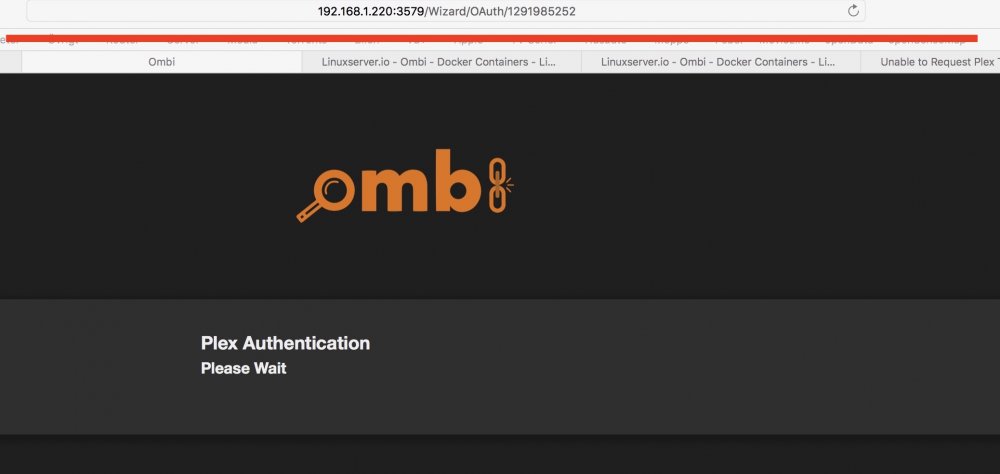
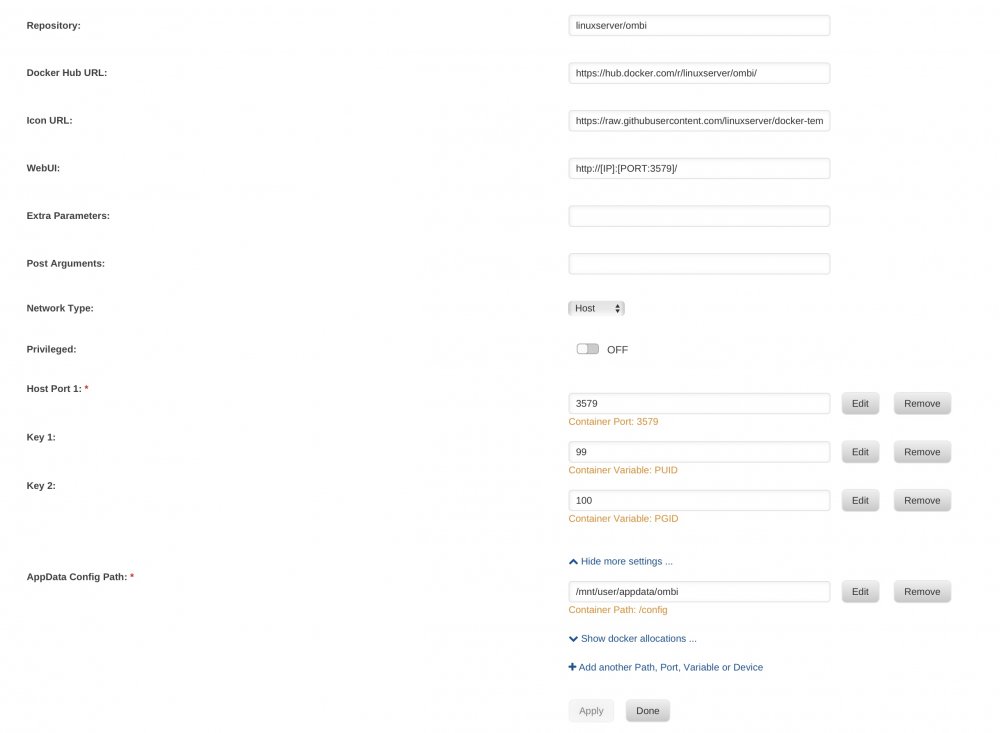
Can someone solve this I got stuck here?
-
got some problems with this now no transcoding works everything worked ok with 6.3.3 but now i got truble [Transcoder] [ac3_eae @ 0x192aa00] EAE timeout! EAE not running, or wrong folder? Could not read '/config/tmp/pms-b1390c86-08d5-4f75-b806-117aeae488c0/EasyAudioEncoder/Convert to WAV (to 8ch or less)/9qhsvnovuymah5ees7nv1wrp_971-1-30.wav'
-
Do this trick still works?



