snowmirage
Members
-
Joined
-
Last visited
Everything posted by snowmirage
-
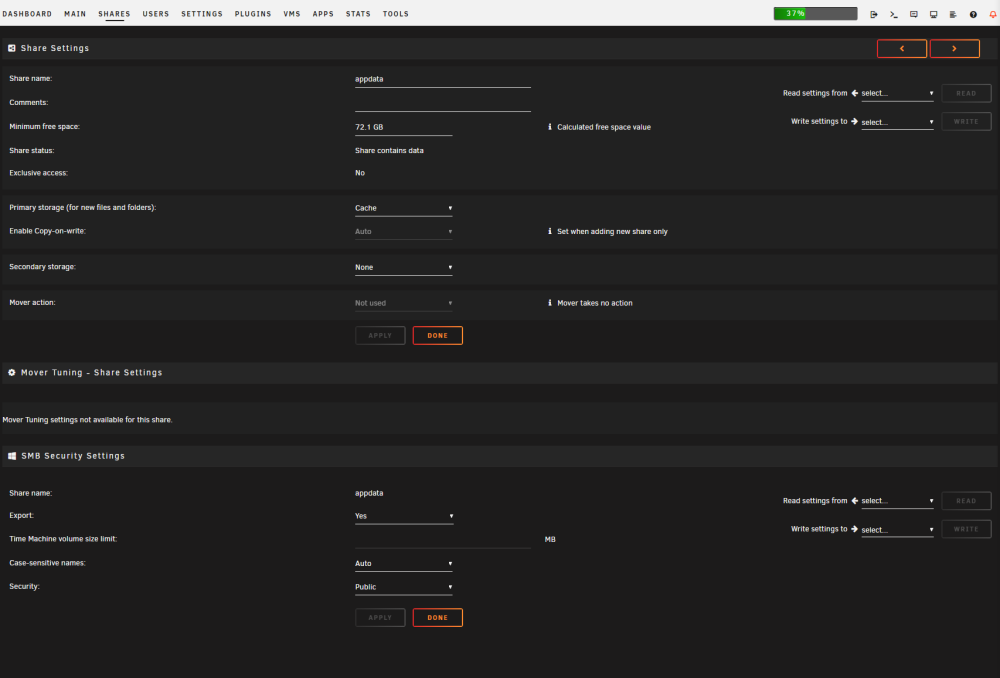
I recently replaced some failing drives, and followed the process in one of space invader one's videos to encrypt the last few drives in my array. After the rebuild process completed I noticed the docker tab was missing. I might have disabled docker sometime during that week long process but cant recall for sure. When I re-enabled docker none of my containers show up in the GUI. I've spent a few days trying to figure out what went wrong. Firstly.... I think I may remember late one night seeing a warning / error from Fix Common Problems advising me to change the "primary storage" for the appdata share to Cache. But I'm not 100% sure on that. Lesson learned... don't change multiple things at once... and don't try to fix extra stuff when half asleep at 2am... I also think I may have followed another of space invader one's guides quite some time ago to move appdata, or docker stuff?, or maybe it was just the VMs.. onto an unassigned device that is a NVME ssd I have in the system. But I couldn't find that in my notes, or which guide that may have been searching through his videos. There's one thing I could think of to try to fix this. I recalled my docker.img running out of space years back and all the containers vanishing. Searching the forums and documentation I found this section. https://docs.unraid.net/unraid-os/manual/docker-management/ "Re-Create the Docker image file" Maybe that is what I need to try to do here, but I was hoping to get input on that decision before I do it. I feel I've already made things bad enough and don't want to make them worse still. phoenix-diagnostics-20231025-0901.zip
-
Thank you (sincerely) itimpi for pointing me in the right direction, which was basically RTFM.... I've replaced so many drives in Unraid over the years I just assumed I remembered all the steps, skimmed over the first few and thought "O ya I remember this".
-
Earlier this week I had two drives, 1 parity one data, show up as disabled. Red X "device disabled". I shutdown, removed those devices, and installed new drives. They're still showing up disabled. I even moved one of the drives to a free slot in my 24 bay chassis same problem. Am I missing something simple? Or do I really have "part" of a cable (I say part as they are SPF 8087 cables between the SAS expander and the chassis backplane, so if one of the cables was bad some how I'd assume one whole "tray" of drives would be failing? Or Is the backplane of the chassis bad already? I've only had it a few months now, can you even get parts for such a case? I was able to run an extended smart self test on both drives which passed. phoenix-diagnostics-20231022-2137.zip
-
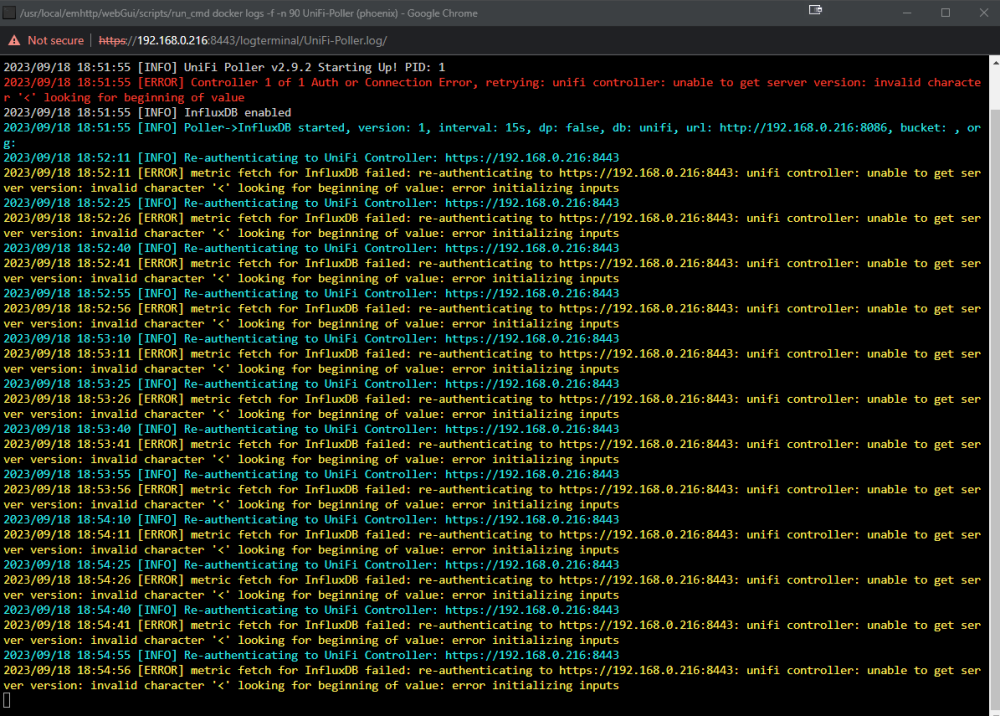
I just noticed an issue with my unifi poller as well. Looks to me like its authenticating with my Unifi Controller successfully but attempting to parse data (the server version) in this case is failing. If thats correct I'm guessing this is an issue with unpoller (I checked I am running the latest version v2.9.2).
-
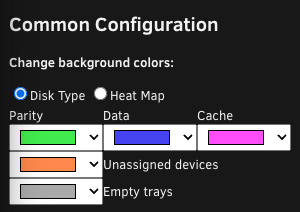
That was exactly my issue thank you! I keep that window on a side monitor and never even noticed the custom color option as it was off the edge of the screen. That reset fix it all.
-
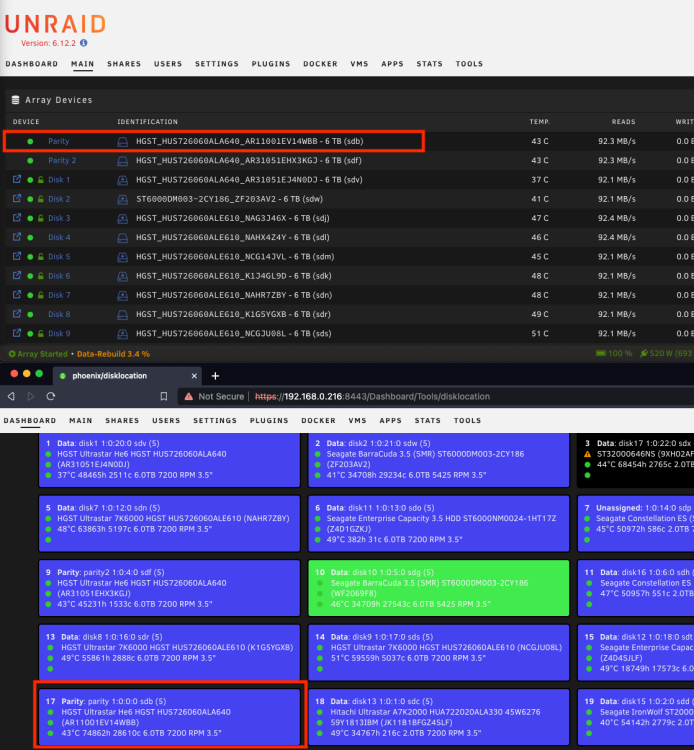
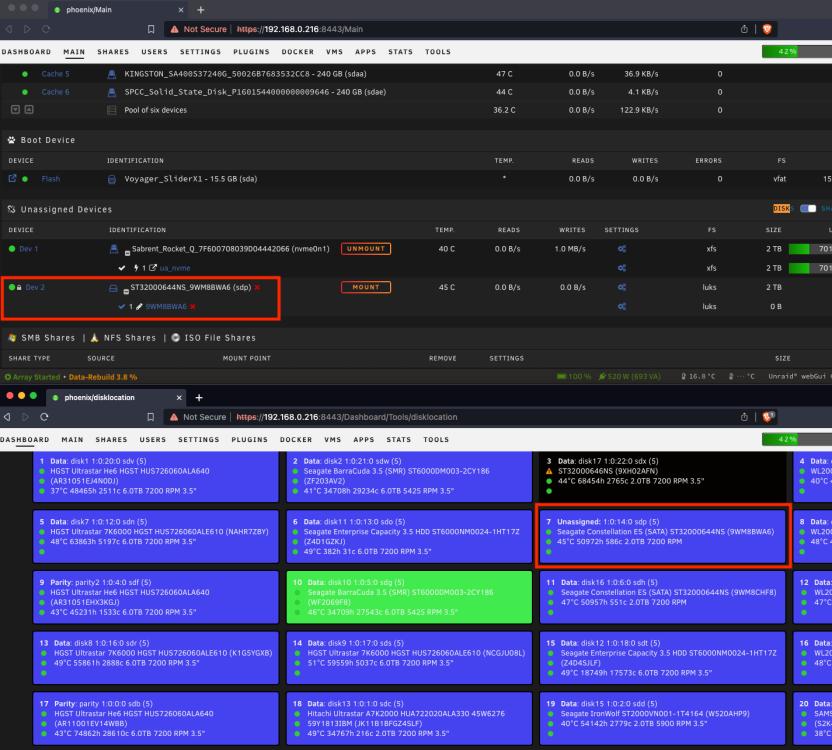
Minor bug I may have found. Unless I just don't understand when the background colors should get updated. I have 2 drives 1 that is parity, and one as an unassigned device, that both show up with the "data" color still.
-
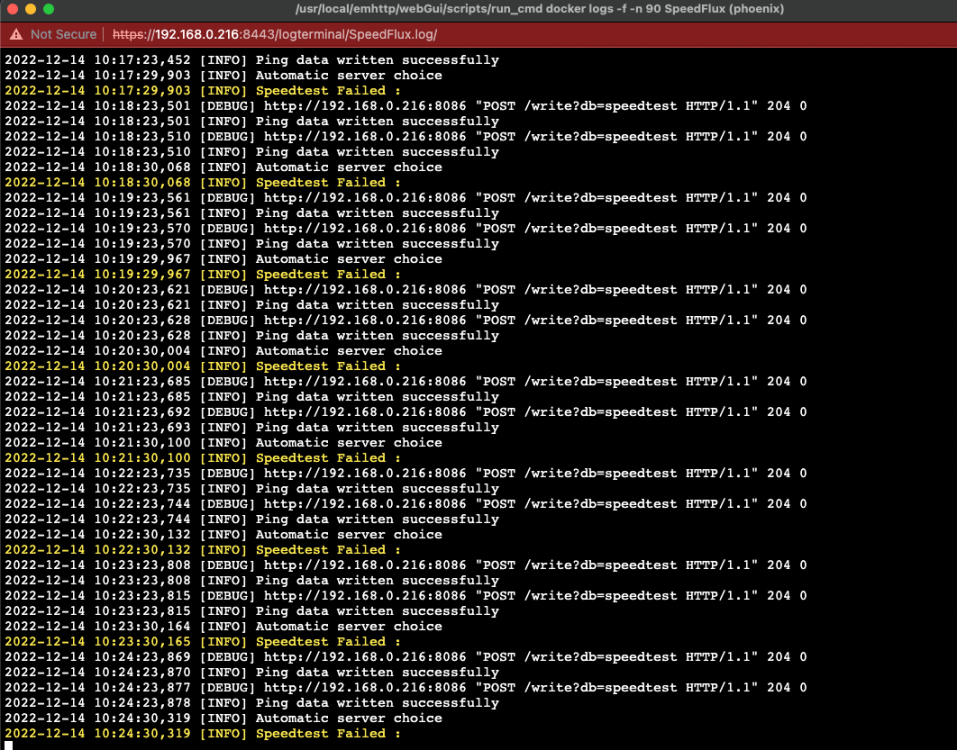
Anyone still have this docker working, I was using speedtest-tracker it started failing tests. Tried to set this one up and I continue to have "Speedtest Failed" messages in the logs. I have been able to console into the container and manually run a speed test though.
-
I'm attempting to setup this container and I am getting the error when logging in to the /super page about the database not being setup, as mentioned in the first page of this thread. However I can't execute the commands to setup the database it lists when I am in the console of the container /opt/shinobi # mysql ERROR 1045 (28000): Access denied for user 'root'@'localhost' (using password: NO) /opt/shinobi # Anyone find a way around this? From what I've read the DB is setup by default to not allow password less root login. Do we know what database user / password this container is configured with?
-
Regarding my post above my only guess at the moment is that the container for some reason doesn't have access to the internet to download packages etc as it needs.
-
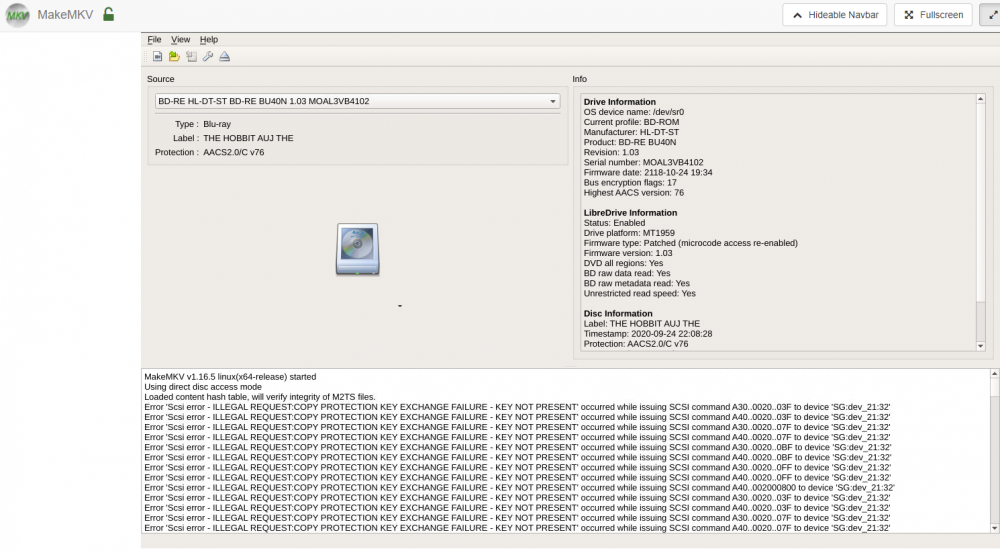
Anyone able to point me down a possible troubleshooting path here. Trying to open this Blue-ray Disc in this docker in Unraid and it fails loading the disc. But on my windows machine using the same version of mkmkv and the same usb drive it reads it fine. I can see the LibreDrive info in both windows (below pics) and linux/unraid docker (above) and both say the same info that its enabled. But in the output in those screen shots the windows box has MakeMKV v1.16.5 win(x64-release) started Using LibreDrive mode (v06.2 id=866A98CB9C4E) Using direct disc access mode but in the unraid docker it doesnt seem to use LibreDrive mode MakeMKV v1.16.5 linux(x64-release) started Using direct disc access mode Loaded content hash table, will verify integrity of M2TS files. Error 'Scsi error - ILLEGAL REQUEST: COPY PROTECTION KEY EXCHANGE FAILURE
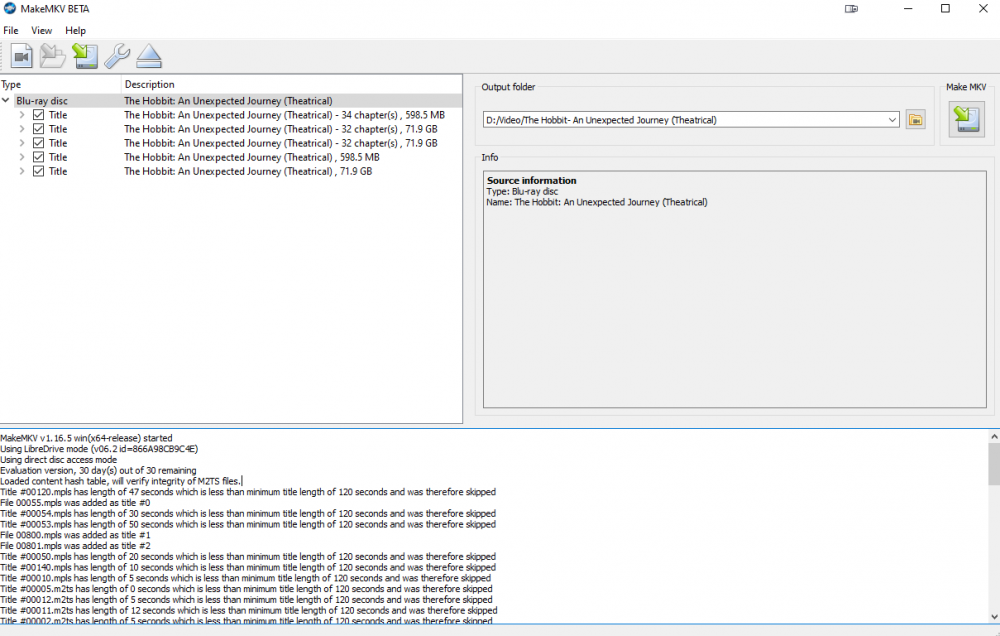
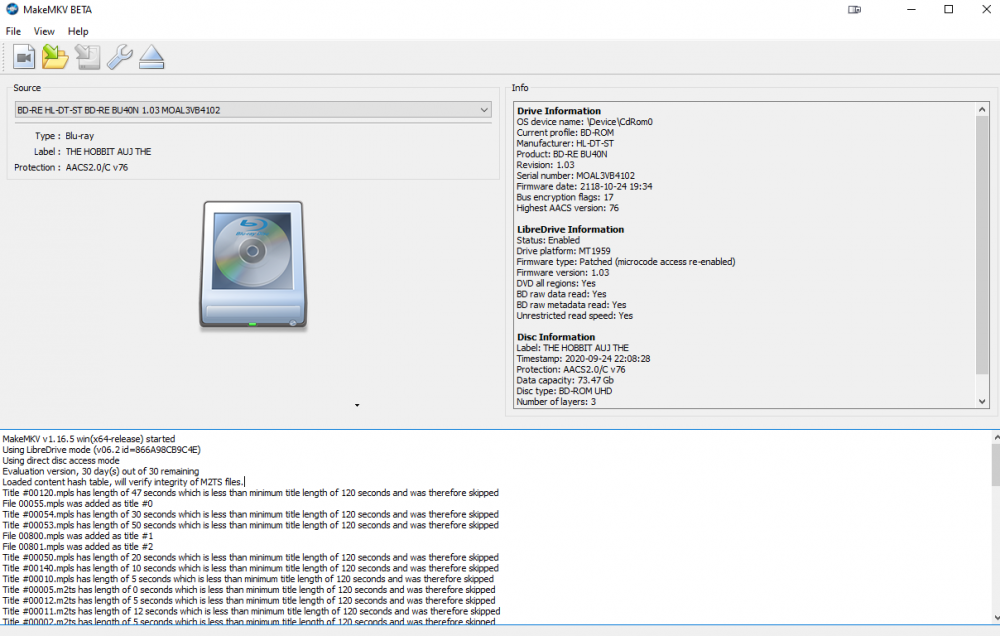
-
Took me a while to get time to jump back to this but over the last few days I did some tests of all the drives in my unraid server. I was able to write to all the drives at the expected rates (i.e. more than a minimum of 50MB/s, which in those rare cases seemed likely something else hit the drive other than the test.) I removed the docker container for urbackup, removed its appdata folder. Uninstalled the app from my desktop. Then reinstall the docker container. I removed my previous "backup" share or what ever I had called it. made a new share called "backup" set its min free space to 300GB. And configured the urbackup container to point there when I installed it. I can't imagine this has anything to do with it, but I'll mention it just incase. My appdata dir is on an unassigned device (a 2TB nvme ssd) as such I have the containers config path set to R/W Slave instead of just read write as Fix Common Problems suggested to me (all my dockers are like that). But the "/mnt/user/backup/" path mounted as /media in the urbackup container is just setup as "Read/Write" I reinstalled the urbackup client on my desktop and I'm seeing the same issue again sub 1MB/s writes. I'm a bit stumped here. Stepping away from the problem for a bit if I think of anything else I'll report back. Hopefully someone might have some ideas. I have to guess there is something wrong with my Unraid array / config or something but not even sure where to begin.
-
That would be pretty slick I look forward to testing it out. Since your advice yesterday I've been going back through and trying to test all the drives. I've found several that are getting that "speed gap" notice. I've tried a few times now to test them with "Disable speed gap detection" checked and I still see reads start 90-100+ drop to 60-70 then repeated "retries" even when I have that disable speed gap detection checked.
-
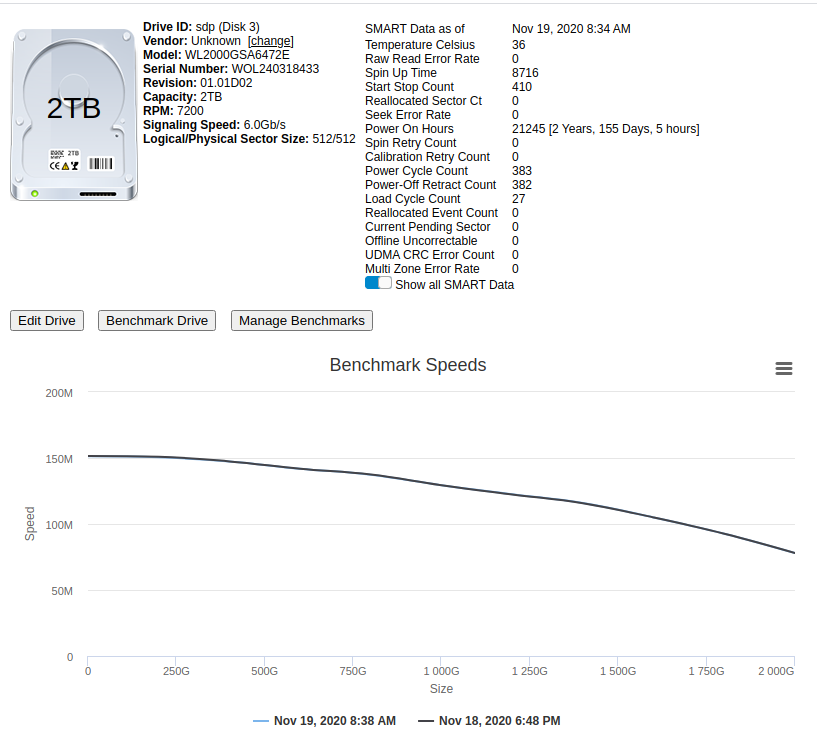
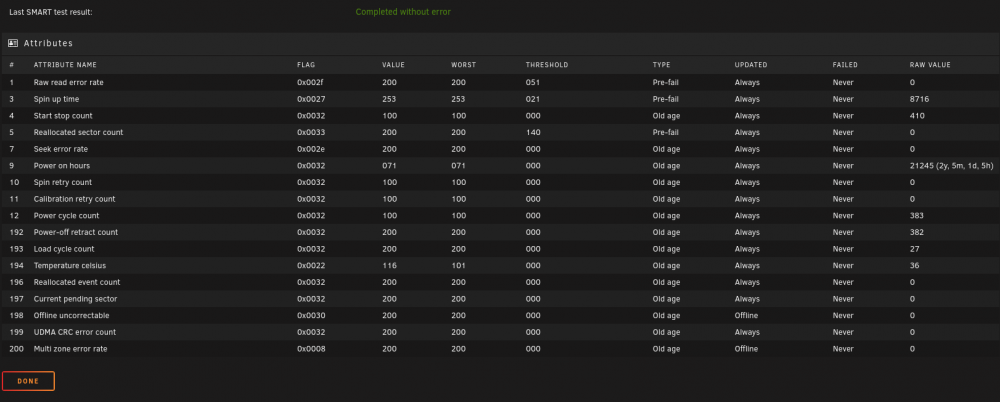
That seems to have done it. Test for that drive finished following your suggestions. To be honest I haven't looked at a SMART report closely in years and need to go refresh my memory on what "bad" really looks like.
-
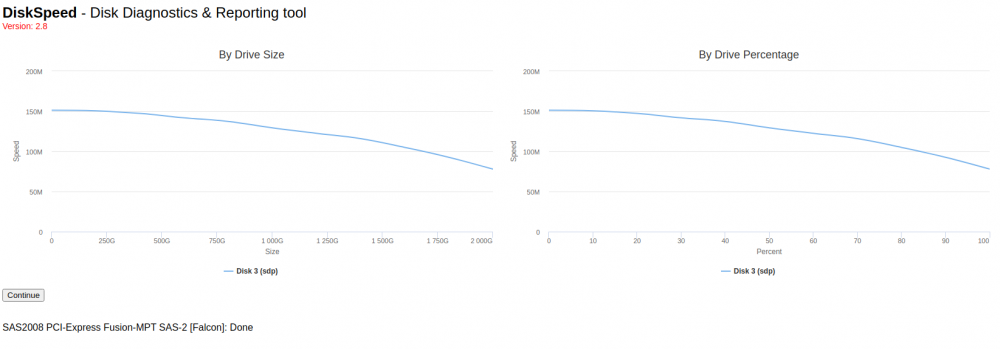
I suspect this is an issue with my system, and not with this container, but I'm hoping someone might be able to point me in the right direction here. I've had issues with very slow writes to my array (sub 1MB/s) at first I thought it was just the type of writes, lots of very small files with another CA docker container (urbackup). But after nuking all its shares and existing backup data and starting over thinking there was a config issue with that backup app, I decided to run this speed benchmark to check all the drives. I have 24x 3.5" drives in the 2TB and 6TB range in the array. When I start the bench mark it seem to keep getting "stuck" testing Disk 3 (sdp). Most tests took in the range of a few min (maybe 5?) but this drives has been stuck at 36% for over half an hour. I don't see any reads on the main tab on that drive being reported. if I reopen the webui it goes back to the main page where I can start another benchmark. Doing so seems to hang up in the same spot. I've attached the diag from the main page below. diskspeed_20201118_182405.tar.gz I'm afraid I have a bad drive or something and worse if thats the case that Unraid hasn't given me any warning about it. *edit* To rule out as many background processes and disk i/o as possible I stopped all of my other Docker containers and VMs (well 2 of the 4 vms I actually paused but that shouldn't make a difference in this case I don't think).
-
Thanks for the advice. I'll try starting again from scratch. I know around the time I was first trying this I was also setting up timemachine, and some other stuff, and ended up filling my cache drive. That was where I had appdata and all my VMs.... they were not happy about that... I've since moved all my appdata and vms to a 2TB nvme ssd, but its possible some left over config either server or client side is still messing stuff up. So I'll nuke it all and start from scratch. I also found a docker container in CA that will test each drives read and writes. I'll turn off everything else and give that a try, as well as just try to move some files to the array via a windows share. That should give me some comparisons between urbackup speeds and what I can verify the system can do. My end up pointing out some bigger system problem... though I can't imagine what atm.
-
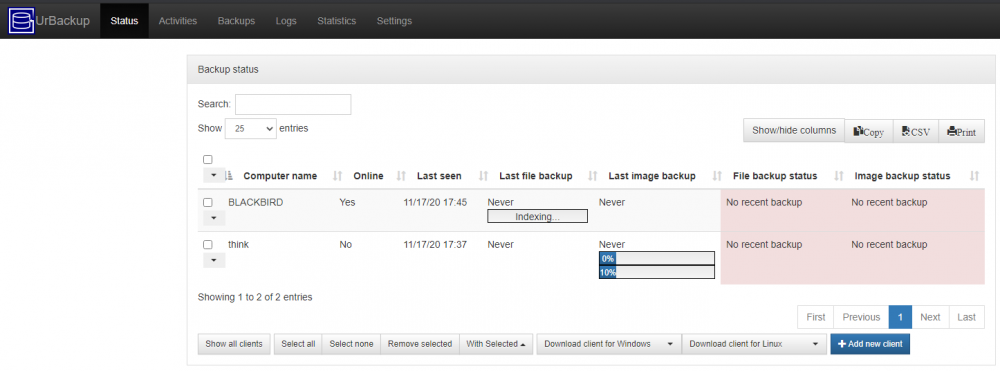
For those that have completed backups with this from a Windows Client to unraid How long did it take? What was the docker app pointing at to store the backups? Unassigned device / Unraid Cache / Unraid Array I have this setup and it appears to be working but my 500GB SSD on my windows host has been running for nearly 24hrs now and its still listed in the webUI as "indexing" I'm seeing writes to the array in the <1MB/s range I have it set to a share that doesn't use the cache.
-
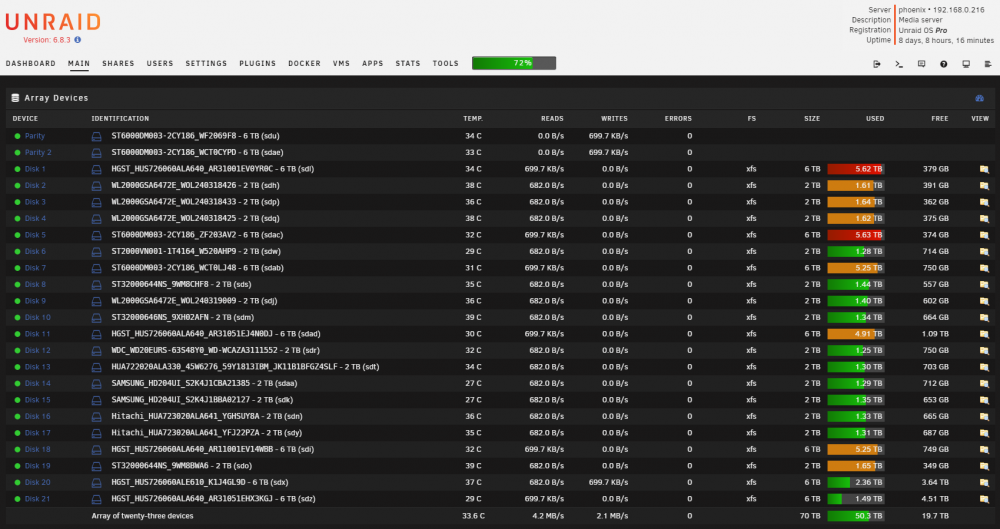
I'm up to 70TB Building a custom case has been a bit of a nightmare.... 100% due to my crap design lol o well at least it looks nice + works well when it doesn't need maintenance. Images from last weekends replacement of a bad sata cable... More pics of the initial build up here https://linustechtips.com/topic/353971-an-introduction-to-project-egor-the-never-ending-story/ I've since replaced the motherboard. The old SR-2 died folding for a cure to COVID
-
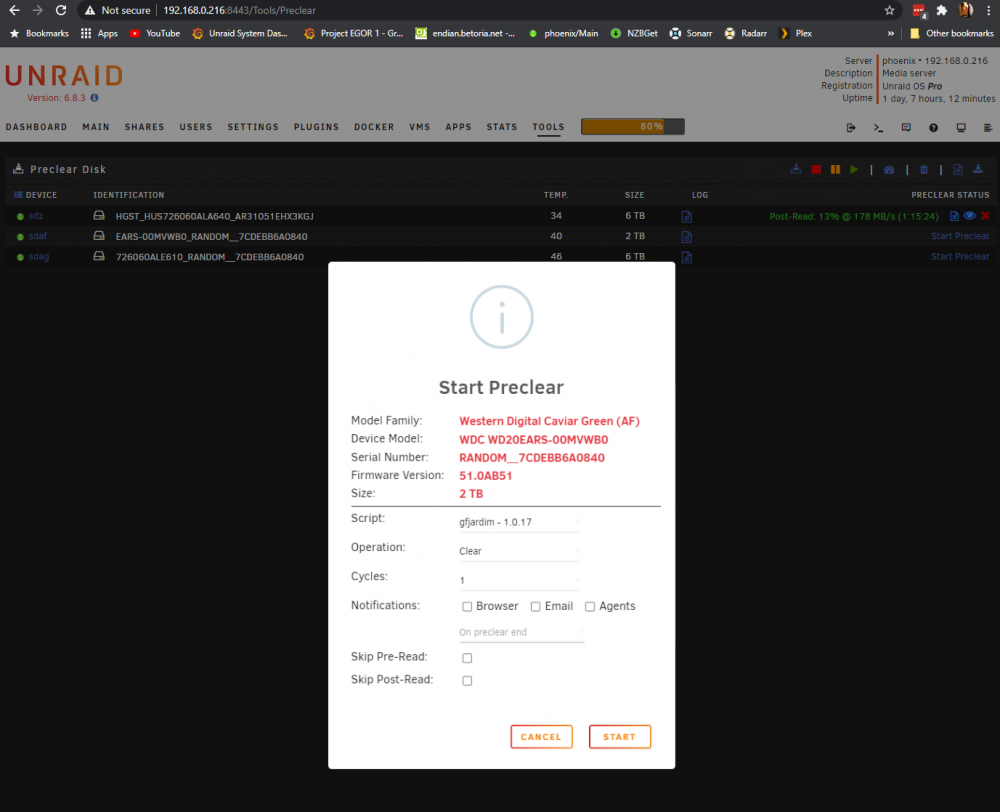
Messing around with it I flipped the disks in the external USB desktop thing. The Identification strings for both drives in unassigned device now appear to be the S/N of the 6TB drive. And the issues above are now the same but for the 6TB drive now instead of the 2TB drive. Maybe my USB enclosure is just a kinda garbage and doing some wacky stuff with drive identification?
-
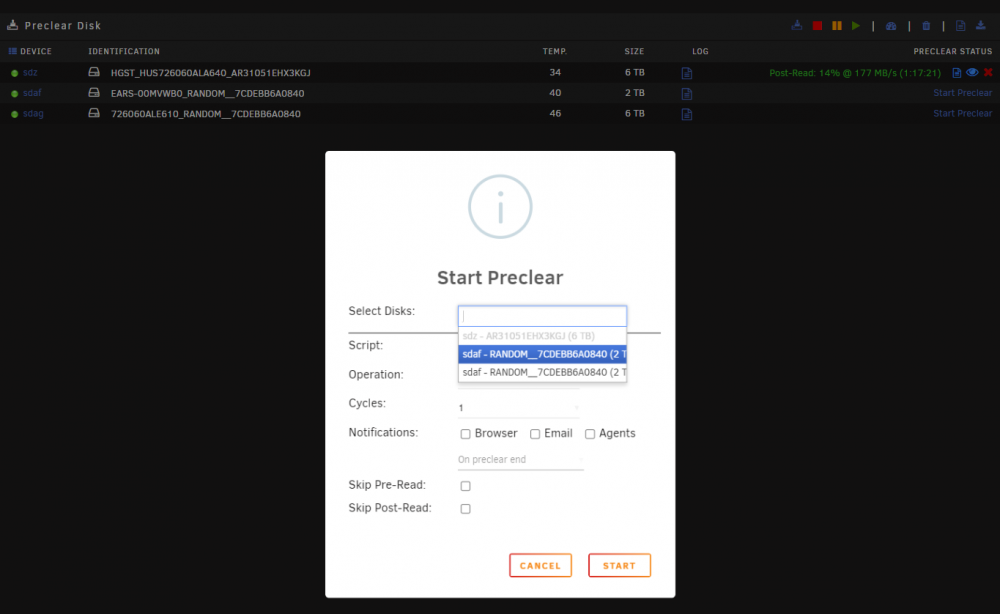
If I try the option in the top right for "start multiple sessions" it lists the sdaf (2TB) drive twice...
-
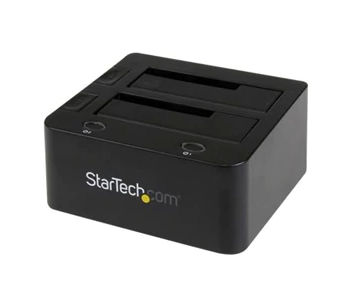
I think I'm having an odd problem with the plugin, or I'm doing something that completely isn't supported and don't realize it... I have a 2 bay external USB 3 sata desktop thing. Something like this but a different brand. I have several drives I wanted to test and preclear. I put 2 in that unit, one 2TB drive and one 6TB drive. They detected in unassigned devices. Though.... if the end of the names seem strangely familiar. (The 3rd disk there that is preclearing is a 6 TB connected internally (was connected and preclearing before connecting this USB desk station thing) I went into Tool > Preclear > and started to preclear the 2TB drive but when I did the link on the right side to preclear the 6TB drive was no longer there. I stopped the preclear on the 2TB drive Now when I click the preclear link on the lower 6TB drive (the one not already running that is in the USB encloser) it reports as the 2TB drive. Any ideas whats going on here I'm more than a bit confused.

-
I'm seeing the same behavior on 2 other computers. I started to try to look at the logs for grafana but haven't found them yet. opening the console for the docker container I don't see a grafana.log file inside of /var/log/grafana in fact I don't see any files in there. Maybe they aren't visible to the grafana user? /usr/share/grafana $ cd /var/log/grafana/ /var/log/grafana $ ls -lh total 0 /var/log/grafana $ /usr/share/grafana $ cd /var/log/grafana/ /var/log/grafana $ ls -lh total 0 /var/log/grafana $ I found a few topics that pointed me to a still active bug in grafana that maybe is related https://github.com/grafana/grafana/issues/16638 but appears to be way back Version 6.1.4 we look to be on 7.2.1
-
Tried another test had the same dashboard up in a normal chrome window for right around 20 min and was kicked to the grafana login screen. This time I was running a Wireshark capture looking at the network traffic thought maybe I'd see the TCP / HTTP session get reset or something but no such luck. I'll have to give this some more thought still can't figure out what could be causing this behavior. I'll try on another machine shortly maybe that will give some clue.
-
Previously what I had noticed was a popup window in chrome asking something along the lines of "Are you sure you want to leave this page?" with a leave and cancel button. As though I had started writing an email or something and tried to close the browser before I sent / saved it or such. If I hit cancel the popup would just come back. Leave button would dump me to the grafana login screen. Started doing some testing opened up 3 browser windows Chrome, Chrome Incognito Mode, Edge logged into all of them and put up the same dashboard with in a few seconds of each other. ~10 min later Edge had dropped me back out to the login screen. ~30 min the Incognito window did the same. then around ~40 min the normal chrome window did the same, I actually visually caught that one. 1 second Its on my dashboard the next at the login screen
-
Cool thanks for the info, gives me a direction to troubleshoot in anyway! Thanks
-
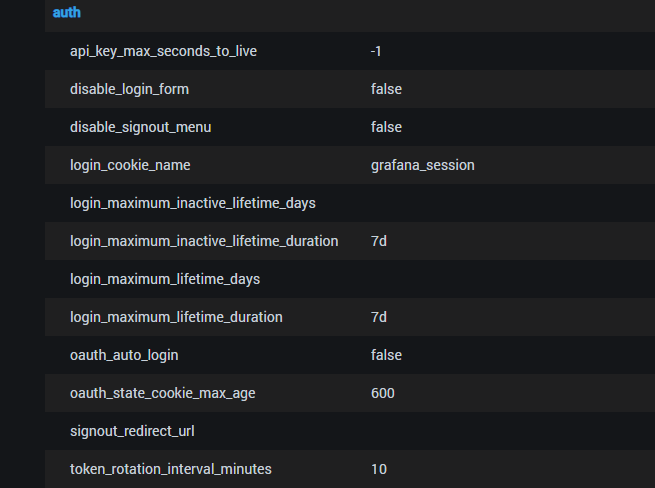
Any chance anyone knows how I can prevent grafana from logging me out / requiring me to relogin so often? I haven't timed it but I'm guessing its ~10 min Looking at the settings page in the grafana webui I was taking a guess I might need to change the "token_rotation_interval_minutes" value? But I'm not sure what environment variable I'd need to set. Tried GF_TOKEN_ROTATION_INTERVAL_MINUTES TOKEN_ROTATION_INTERVAL_MINUTES token_rotation_interval_minutes and none of them seemed to change it.