





Sn3akyP3t3
Members
-
Joined
Everything posted by Sn3akyP3t3
-
I too am looking for a solution to this problem as my ISP is StarLink as well. As of right now I'm thinking IPv6 is the only viable option, but I'd like to hear what others may be using. I've also heard of https://ngrok.com as an potential option, but I didn't look into it yet.
-
I find this tool quite valuable in monitoring disk use growth so that I can project needed upgrades. However, I'm not finding an easy way to automatically track duplicate files. It would be great if UnRaid's file system took care of duplicates on its own, but it cannot so some additional manual effort is required here. Thankfully Diskover provides means of duplicate file detection, but it's a chore to have to run it every time. Is there any way to schedule this so it does it automatically after every scan it does? I couldn't come up with something on my own to solve this so I'm asking the collective hive
-
So you want to use access a docker container within another docker container? This can be done via linking containers: https://docs.docker.com/network/links/#communication-across-links with the example similar to --link <name or id>:alias I believe some recent changes to the version of docker will require you to use a user defined custom bridged network to do this as well. Documentation on that is here: https://docs.docker.com/network/bridge/#differences-between-user-defined-bridges-and-the-default-bridge unfortunately this is a command line only creation process that I know of. The reason for this i believe is because --link is legacy and may be removed in future versions, although I have no idea how to link without it when it goes away... I'm willing to bet they really want people to use Docker compose instead, but I'm not really sure... just the speculation train rolling through.
-
I didn't spot a particular problem like the one I'm seeing so here I go. I believe I have all the minimum requirements listed on the readme and I'm getting data on the landing page, but when I try to interact with anything in analytics or duplicate files I'm getting either this error, "Unable to open customtags.txt! Check if exists and permissions.", or a blank page with the query that was used in the search bar. I don't see any errors in the logs, but I don't have any additional logging enabled either. Is there any additional logging I can enable to expose the cause?
-
Something changed in a recent update, month(s) ago possibly, regarding CA's suggested repo source installation. I don't remember the exact behavior it used to be. I believe the Apps section used to offer an icon to change the source of the repo to the official Docker Registry as an alternative to UnRaid's internal providers. Its been a long time since I've been able to install new containers and now that I'm able to I'm not finding an easy way to install from the official Docker Registry. Is there a setting to re-enable this or drop to command line with additional params as a substitute?
-
This thread is for the entire repo which contains multiple applications. I'm assuming you must mean either MySQL or Postgres. It sounds like customizations and/or data is not being preserved on a restart of a docker container. This can be achieved by mapping the host directory to the container's directory through UnRaid's settings for that docker container. Look for a setting that the container asks for "Container Path: /config" and maybe even "Container Path: /data" and map that back to your appdata directory you have set aside on your UnRaid server. I use the MariaDB and Postgres official repos for my work and not these Docker containers from this repo so I don't have exact settings to share.
-
I haven't made a dockerized application before, but I have been using a dedicated customized dockerized python container with all the necessary loaded libraries to conduct batch like processing on a schedule. The data that it collects is mapped back to the UnRaid file shares. You can link that also through settings in UnRaid. I suggest you also do that for the config files and application data so that they are not lost when the docker container restarts. Docker data doesn't persist between restarts without doing that. Dig into the docker build documentation and check out examples. I'm not yet sure what you need to do to keep your docker container saved after that so you can safely upgrade or migrate from server to server. I think it may require a docker container running the docker registry, but maybe someone has more experience with that.
-
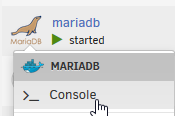
Docker does have its own IP address, but its not exposed. You're basically left with two feasible options. Set your network to bridge mode and then you can expose your port as you seem to have already done. Then you access your Mysql instance at the IP address of your UnRaid server, example 192.168.100.11:3306, with the port you specified. This will be useful for you to validate your migration before you pull in your applications if that is your intent. If you proceed to dockerize your applications then you can use Docker's built-in link container capabilities. This you would basically enable linking by putting something similar to this on the Extra Parameters section of Unraid: --link postgres:postgresql. The syntax is basically the flag --link followed by the name of your running instance with a colon separating them and then the name of the instance you wish to be referenced internally within the dockerized container which doesn't really matter. Once you've done that you can log into the dockarized container and view the linked environment variables to confirm settings by running "printenv" from the console. Attached is a photo where you can check the link settings have applied. I use mariadb instead of Mysql, but that doesn't matter.
-
Additionally, if you are using Two Factor Authentication you will need to create an app password and use that vice your Google Account credentials.
-
I must have captured a version of GitLab that had this short-lived defect. An update to the image corrected this behavior... yuck!
-
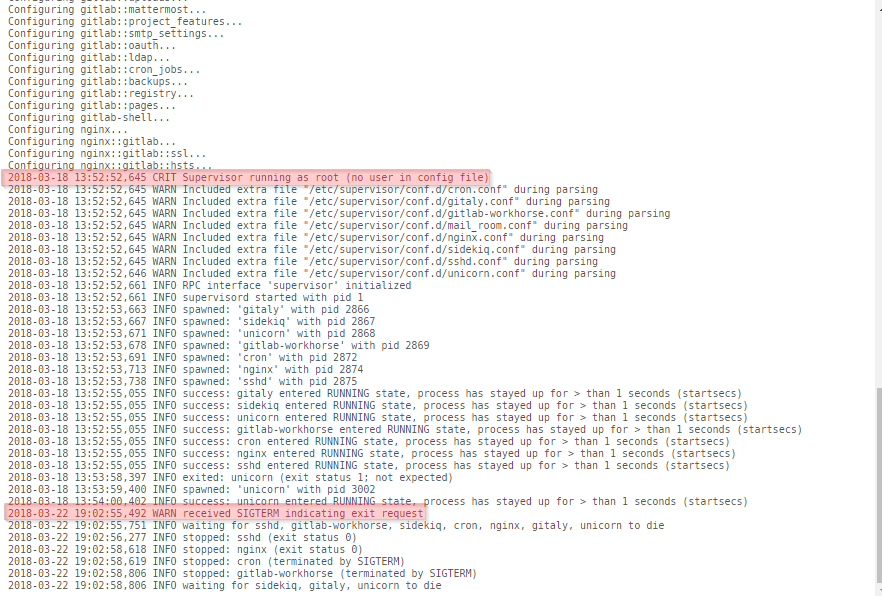
Does anyone have a long-term solution to this problem where the container refuses to stay running? I've found a temporary solution, but an update wipes this out, https://oplatform.club/t/topic/50 Image attached shows logging details of the failure to startup.
-
There sitting in the man page was my solution. Thanks Dase for giving me some syntax of your mount so I could easily see what I was missing. The problem in my case is how the cifs protocol default mounts for file permissions. Taken from: http://www.samba.org/samba/docs/man/manpages-3/mount.cifs.8.html or and knowing that the behavior is like this helps too: Since my Linux box is a single user environment I will add uid to my syntax to resolve my issue.Despite following the saying, "Choose the path of least resistance", I will not allow guest level access since it really isn't necessary or desired. A fair enough approach at troubleshooting the problem, but not for me. I want to identify what I'm doing wrong and solve that without creating security risks. Correct and understood, thats pretty much the reason I'm posting about it because it is feasible and I need help identifying my problem. I know there is something amiss, but I haven't a good idea exactly what it is. I know it is something with my mounting syntax. I have a feeling that Dase shotgunned the problem but didn't identify the exact point of failure. I have a feeling that my syntax failure is because a lack of either uid=<username> or gid=users or even something else of that nature that grants specific local linux user or groups access to the mounted drive/share.I'm running Ubuntu 10.04 on the Linux machine. Unraid is running 4.7 Pro. The mentioned windows machine is running XP Pro. The user share that I'm trying to mount has these settings: Share name: UnraidShare Allocation method: High Water Min. free space: 0 Export (SMB): Export read/write Valid users: UnraidUsernameI have only one linux machine, but I have written to the user shares from a windows machine. I do believe I may have generated confusion in my initial post. The username on my linux machine is not the same as the username of the unraid box. I have modified my previous post to reflect that.I'm getting more experience with umask now and then, but still something about mounting network shares in Linux evades me. I don't know what the cause of my problem is, but the symptoms are a bit heavy and require workaround to move/copy files. The problem I'm encountering is that my user account on Linux does not have write access to the mounted user share from UnRaid. I have to run any file operations as root to do anything which really isn't what I'm trying to accomplish. My goal is to set up the user share mount as write access to only root and my user account. If I can identify my problem then later I can set up access to a group which will probably be needed in the future. I'm using this command to mount: mount -t cifs -o username=UnraidUsername,umask=000,rw //192.168.2.12/UnraidShare /mnt/LocalShare/ I realize umask 000 is not a good idea, but at the moment I'm not sure why the mounted share doesn't allow me to write to it. Before mounting: drwxrwxrwx 2 root LocalUsername 4096 2011-06-01 00:04 LocalShare After mounting: drwxr-xr-x 1 root root 0 2010-06-13 15:16 LocalShare Also, one directory inside of LocalShare drwxr-xr-x 0 root root 0 2010-06-13 12:18 InsideLocalShare Initially the LocalShare ownership was root root and I had the same symptoms although I didn't review the permissions flags to see if they were same. If someone could identify what I'm doing wrong that would help me for sure and hopefully someone else like me that has my same faulted logic.


