





YouAreTheOneNeo
Members
-
Joined
-
Last visited
Everything posted by YouAreTheOneNeo
-
I was using the .htaccess because I am stupid. Managed to get the root domain to point to my static IP rather than forward the request via the .htaccess file that I was doing before. Everything fine now. Thanks!
-
Thanks - it is forwarded correctly, but my site-conf has a permanent 301 redirect from HTTP to HTTPS: server { listen 80 default_server; root /config/www; index index.html index.htm index.php; server_name _; return 301 https://$host$request_uri; } Presumably this is redirecting the certbot to https when it needs to use insecure http to do validation. Is there a way to add an exception to the site config? I am not too hot on nginx configuration. I would assume the more secure method of validation is to use the dns method, perhaps it is time for me to switch over. Edit: I also had the .htaccess file on my domain provider set up with the following redirect from example.com to www.example.com: RewriteEngine On RewriteCond %{REQUEST_URI} !\.well-known/acme-challenge RewriteCond %{HTTP_HOST} ^www\.(.*)$ [NC] RewriteRule ^(.*)$ https://%1/$1 [R=301,L] I have removed that now, and when browsing to http://example.com, nginx is now rewriting the URL to httpS://www.example.com/example, and I can't figure out why. Browsing to http://example.com/.well-known/acme-challenge/CHALLENGEKEY is returning https://example.com/404.
-
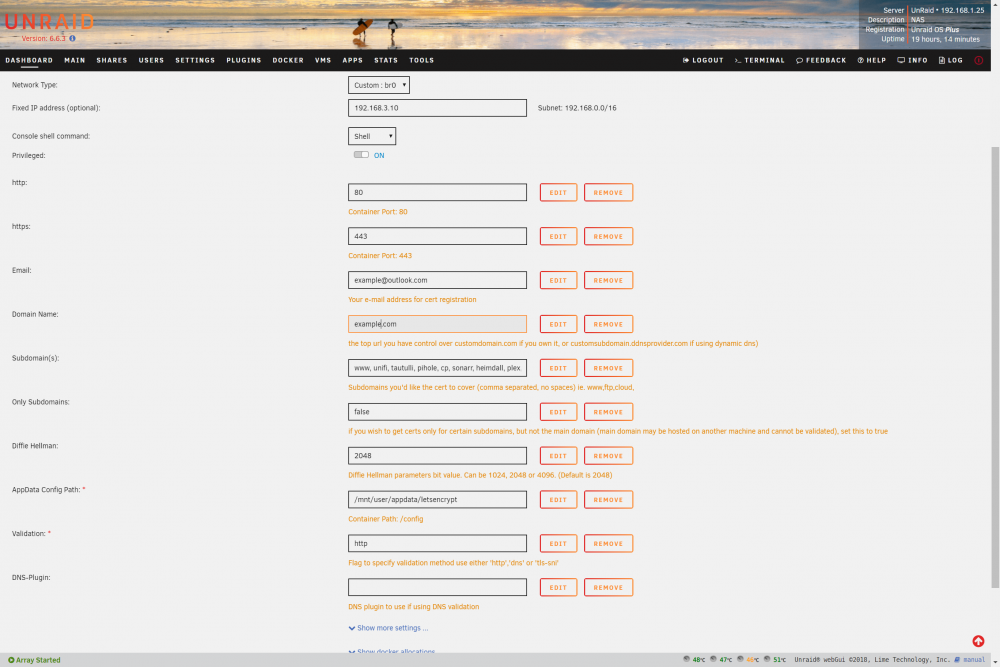
Log: ------------------------------------- _ () | | ___ _ __ | | / __| | | / \ | | \__ \ | | | () | |_| |___/ |_| \__/ Brought to you by linuxserver.io We gratefully accept donations at: https://www.linuxserver.io/donate/ ------------------------------------- GID/UID ------------------------------------- User uid: 99 User gid: 100 ------------------------------------- [cont-init.d] 10-adduser: exited 0. [cont-init.d] 20-config: executing... [cont-init.d] 20-config: exited 0. [cont-init.d] 30-keygen: executing... using keys found in /config/keys [cont-init.d] 30-keygen: exited 0. [cont-init.d] 50-config: executing... Variables set: PUID=99 PGID=100 TZ=Europe/London URL=example.com SUBDOMAINS=www, unifi, tautulli, pihole, cp, sonarr, heimdall, plex, calibre, ombi EXTRA_DOMAINS=vpn.example.com ONLY_SUBDOMAINS=false DHLEVEL=2048 VALIDATION=http DNSPLUGIN= [email protected] STAGING= 2048 bit DH parameters present SUBDOMAINS entered, processing SUBDOMAINS entered, processing Sub-domains processed are: -d www.example.com -d unifi.example.com -d tautulli.example.com -d pihole.example.com -d cp.example.com -d sonarr.example.com -d heimdall.example.com -d plex.example.com -d calibre.example.com -d ombi.example.com EXTRA_DOMAINS entered, processing Extra domains processed are: -d vpn.example.com E-mail address entered: [email protected] http validation is selected Certificate exists; parameters unchanged; attempting renewal <-------------------------------------------------> <-------------------------------------------------> cronjob running on Thu Oct 25 08:50:56 BST 2018 Running certbot renew Saving debug log to /var/log/letsencrypt/letsencrypt.log - - - - - - - - - - - - - - - - - - - - - - - - - - - - - - - - - - - - - - - - Processing /etc/letsencrypt/renewal/example.com.conf - - - - - - - - - - - - - - - - - - - - - - - - - - - - - - - - - - - - - - - - Cert is due for renewal, auto-renewing... Plugins selected: Authenticator standalone, Installer None Running pre-hook command: if ps aux | grep [n]ginx: > /dev/null; then s6-svc -d /var/run/s6/services/nginx; fi Renewing an existing certificate Performing the following challenges: http-01 challenge for calibre.example.com http-01 challenge for cp.example.com http-01 challenge for heimdall.example.com http-01 challenge for ombi.example.com http-01 challenge for pihole.example.com http-01 challenge for plex.example.com http-01 challenge for sonarr.example.com http-01 challenge for tautulli.example.com http-01 challenge for unifi.example.com http-01 challenge for vpn.example.com http-01 challenge for www.example.com http-01 challenge for example.com Waiting for verification... Cleaning up challenges Cleaning up challenges Attempting to renew cert (example.com) from /etc/letsencrypt/renewal/example.com.conf produced an unexpected error: Failed authorization procedure. example.com (http-01): urn:ietf:params:acme:error:unauthorized :: The client lacks sufficient authorization :: Invalid response from http://example.com/.well-known/acme-challenge/xxxxxxxxxxxxxxxxxxxxxxxxxxxxxxxxxxxxxxxxxxxxx [88.98.197.66]: 404. Skipping. All renewal attempts failed. The following certs could not be renewed: /etc/letsencrypt/live/example.com/fullchain.pem (failure) - - - - - - - - - - - - - - - - - - - - - - - - - - - - - - - - - - - - - - - - All renewal attempts failed. The following certs could not be renewed: /etc/letsencrypt/live/example.com/fullchain.pem (failure) - - - - - - - - - - - - - - - - - - - - - - - - - - - - - - - - - - - - - - - - Running post-hook command: if ps aux | grep 's6-supervise nginx' | grep -v grep > /dev/null; then s6-svc -u /var/run/s6/services/nginx; fi; cd /config/keys/letsencrypt && openssl pkcs12 -export -out privkey.pfx -inkey privkey.pem -in cert.pem -certfile chain.pem -passout pass: && cat {privkey,fullchain}.pem > priv-fullchain-bundle.pem Hook command "if ps aux | grep 's6-supervise nginx' | grep -v grep > /dev/null; then s6-svc -u /var/run/s6/services/nginx; fi; cd /config/keys/letsencrypt && openssl pkcs12 -export -out privkey.pfx -inkey privkey.pem -in cert.pem -certfile chain.pem -passout pass: && cat {privkey,fullchain}.pem > priv-fullchain-bundle.pem" returned error code 1 Error output from if: cat: {privkey,fullchain}.pem: No such file or directory 1 renew failure(s), 0 parse failure(s) IMPORTANT NOTES: - The following errors were reported by the server: Domain: example.com Type: unauthorized Detail: Invalid response from http://example.com/.well-known/acme-challenge/xxxxxxxxxxxxxxxxxxxxxxxxxxxxxxxxxxxxxxxxxxxxx [1.1.1.1]: 404 To fix these errors, please make sure that your domain name was entered correctly and the DNS A/AAAA record(s) for that domain contain(s) the right IP address. [cont-init.d] 50-config: exited 0. [cont-init.d] done. [services.d] starting services [services.d] done. Server ready and container settings:
-
I'm getting a 404 on the /.well-known/acme-challenge, causing cert renewal to fail, and i can't seem to find it hunting through the files and folders in the container. I have no idea where to look, and it only stopped working recently. The container is running on it's own IP, 80 and 443 are forwarded from the router (I can still browse to the site as the cert is still valid, although only for another 5 or so days), and it's proxying a bunch of other containers, each with their own IP. The / location is proxied to heimdall, is that possibly why certbot is retrieving a 404 for the acme-challenge? I'll post any conf's needed for info, I just don't want to spam them all unnecessarily up front. Thanks in advance.
-
Works perfectly for me too so far, many thanks.
-
Indeed, many thanks for the effort you're putting into this. I updated the plugin this morning, but running ipmi2json from the command line (and the configure button) just gives me "Please stop ipmifan [19466]. Running ipmifan gives my board is not supported. I reinstalled the plugin after I wiped out the files at /boot/config/plugins/ipmi but no dice. An issue detecting my board for some reason? Ipmifan is shown as not running in the web GUI... Edit: Managed to get ipmi2json to produce a board.json file, although I'm not entirely sure how... Linux 4.9.30-unRAID. root@UnRaid:~# ipmifan ipmifan is not enabled in /boot/config/plugins/ipmi/fan.cfg type: ipmifan -f to force start root@UnRaid:~# ipmifan --debug ipmifan is not enabled in /boot/config/plugins/ipmi/fan.cfg type: ipmifan -f to force start root@UnRaid:~# ipmifan --help Process settings in ipmi plugin fan config. Control fans based on config values and [options]. Usage: ipmifan [options] -a, --auto set fans to auto --full set fans to full speed -f, --force force start -q, --quiet suppress all messages --debug turn on debugging --daemon run in the background --help display this help and exit --quit stop daemon if running --version output version information and exit root@UnRaid:~# ipmifan --quit 9502 is not currently running root@UnRaid:~# nano /boot/config/plugins/ipmi/fan.cfg root@UnRaid:~# ipmifan ipmifan[14512]: Your ASRock motherboard is not supported or setup yet Your ASRock motherboard is not supported or setup yet root@UnRaid:~# ipmifan --debug ipmifan[14810]: Your ASRock motherboard is not supported or setup yet Your ASRock motherboard is not supported or setup yet root@UnRaid:~# ipmifan --debug ipmifan[14972]: Your ASRock motherboard is not supported or setup yet Your ASRock motherboard is not supported or setup yet root@UnRaid:~# ipmifan --debug ipmifan[15016]: Your ASRock motherboard is not supported or setup yet Your ASRock motherboard is not supported or setup yet root@UnRaid:~# ipmifan --debug ipmifan[15062]: Your ASRock motherboard is not supported or setup yet Your ASRock motherboard is not supported or setup yet root@UnRaid:~# dmidecode -t 2 | grep 'Manufacturer' | awk -F 'r:' '{print $2}' ASRock root@UnRaid:~# dmidecode -t 2 | grep 'Product Name' | awk -F 'e:' '{print $2}' EP2C602 root@UnRaid:~# ipmi2json Please stop ipmifan [15062] then try again root@UnRaid:~# ps -A | grep 15062 root@UnRaid:~# ps -A | grep ipmi 8199 ? 00:00:32 kipmi0 root@UnRaid:~# ipmifan --quit 15062 is not currently running root@UnRaid:~# ipmi2json Checking IPMI fan Locations... Location 0-1: FRNT_FAN3 100%: 2400.00 33%: 1600.00 Location 0-2: none Location 0-3: FRNT_FAN1 100%: 2500.00 33%: 800.00 Location 0-4: FRNT_FAN2 100%: 2400.00 33%: 700.00 Location 0-5: FRNT_FAN3 100%: 2400.00 33%: 800.00 Location 1-1: CPU_FAN2_1 100%: 1400.00 33%: 500.00 Location 1-2: REAR_FAN2 100%: 2300.00 33%: 700.00 Location 1-3: none Saving board configuration... I manually modified the board.json file to reflect the board: root@UnRaid:/boot/config/plugins/ipmi# cat board.json { "ASRock": { "raw": "00 3a 01", "auto": "00 00 00 00 00 00", "full": "01 64 64 64 64 64", "fans": { "CPU_FAN1_1": "00", "REAR_FAN1": "00", "FRNT_FAN1": "00", "FRNT_FAN2": "00", "FRNT_FAN3": "00" } }, "ASRock1": { "raw": "00 3a 11", "auto": "00 00 00 00", "full": "01 64 64 64", "fans": { "CPU_FAN2_1":"00", "REAR_FAN2": "00", "FRNT_FAN4": "00" } } }root@UnRaid:/boot/config/plugins/ipmi# I have no idea why it decided to start working in the end, everything I could see suggested that ipmifan was not running.
-
I'll see if I can finish something to test soon. Much obliged.
-
Ah, okay. Yes, those are the commands that work. Here is an excerpt from the script that I wrote to do the fan speed control using a cron job based on the disk temperatures of the array: # IPMI Raw Command to run. For the EP2C602 there are two commands used to set various # fan speeds. These two commands are both set below. Replace with the appropriate raw # commands for your MotherBoard. IPMI_RAW_1="ipmi-raw 00 3a 01" IPMI_RAW_2="ipmi-raw 00 3a 11" # IPMI_RAW_1 Format: ipmi-raw 00 3a 01 CPU_1_OVERRIDE CPU_1 REAR_1 FRONT_1 FRONT_2 UNKNOWN # # IPMI_RAW_2 Format: ipmi-raw 00 3a 11 CPU_2_OVERRIDE CPU_2 REAR_2 UNKNOWN # # IMPI Fan speeds are defined as values between 00 and 64, where 00 is Auto, 01 is Min, and 64 is Max speed. I have only got 4 fans in my system at the moment, so I'm not sure which fans the unknown slots control. There's also room for two more CPU fans, so I would assume there is another raw IPMI command to control those ones. The board's smart fan setting lets the CPU get uncomfortably hot before rolling up the fan speed, and I find it unreliable. I also can't find a way to adjust the curve in the bios. Setting the CPU override to 00 ignores whatever CPU_X setting you put in the IPMI command and leaves them on auto. If you need any more info then let me know. Thanks for getting back to me so quickly.
-
I've been having trouble with getting this working for an age now. I have an EP2C602, and everything is detected ok, all the sensors report the correct fan speeds / temperatures etc. ipmi-fan gives me "Your ASRock Board is not supported or setup yet", and the configure button on the fan page gives me the error "Please stop ipmifan [12820] then try again". I had to write a script to control the fan speeds and run it as a cron job, but this has had lots of updates now and I'm sure it's supposed to work. Have I missed something? How do I setup the plugin for my board? Thanks

