





Ezro
Members
-
Joined
-
Last visited
Everything posted by Ezro
-
Hey, I'm really digging Gitea (especially how fast the UI is). Do you know how I can set up your container with the LetsEncrypt + DuckDns linuxserver.io docker containers? I'm ultimately trying to get gitea to be accessible from https://mydomain.com/gitea but can't seem to figure out the configuration for it.
-
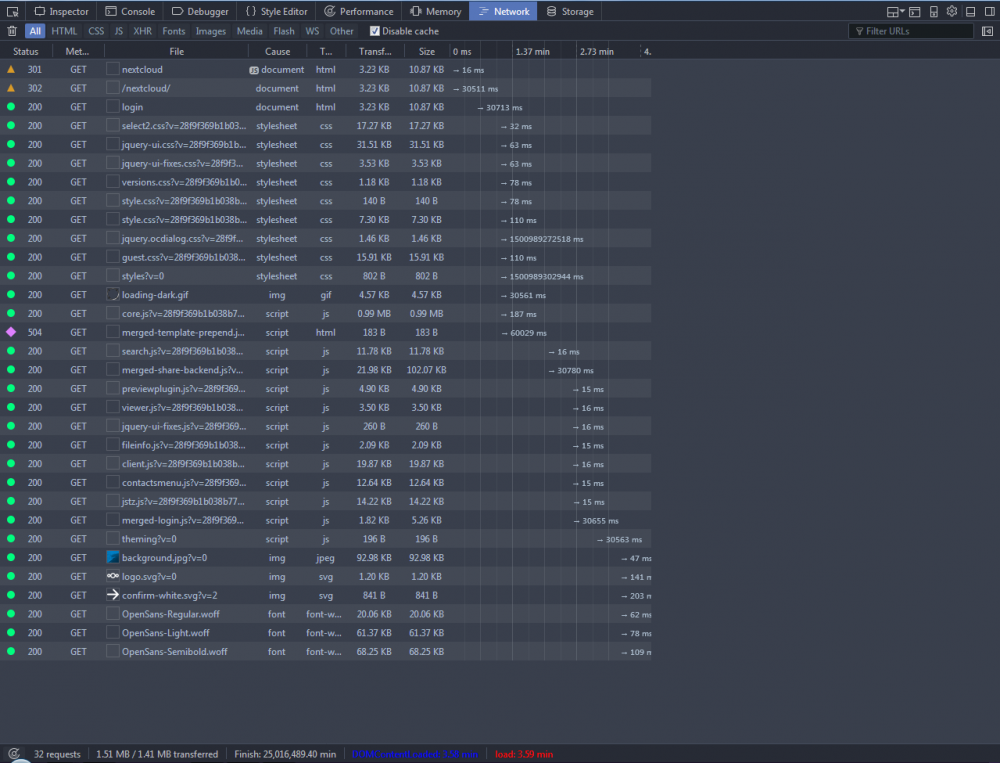
I was finally able to get my domain to be visible from the outside world, but it takes almost 4 minutes to load the login page. Previously on my laptop, I had LetsEncrypt + Nextcloud + DuckDNS working much faster, but it looks like something (possibly with my default Nextcloud config in unRAID) is causing slowness. Does anyone have any experience with slowness when using DuckDNS + Nextcloud + LetsEncrypt in unRAID?
-
I've attached my configs for letsencrypt and nextcloud. Can someone take a look to see if my config is correct? letsencrypt_default nextcloud_config.php nextcloud_default
-
Sorry to bump, but I'm still having issues with Gitlab routing. Also, I tried getting Nextcloud to work using this guide, and when I try to access https://192.168.1.207:444 I receive an "Insecure Connection" error. When I try to access server.duckdns.org/nextcloud/ I get a 502 bad gateway. Does anyone know what I should look at in order to fix the Nextcloud routing?
-
Does anyone know how to get this to work with the gitlab docker? (https://forums.lime-technology.com/topic/48653-support-gitlab-ce/) I set my letsencrypt\nginx\site-confs to the following location /gitlab { include /config/nginx/proxy.conf; proxy_pass http://192.168.1.207:9080/gitlab; } When I go to my server.duckdns.org/gitlab, I get a '404 not found' error. Anyone have an idea how to fix this?
-
Hey everyone, I'm trying to get my CouchPotato docker container to view my current list of movies in /mnt/user/plex/Movies I mapped the volume in the container as /movies <-> /mnt/user/plex/Movies, but when I go to the Manage section in CouchPotato, the Movie Folder entry is empty. Does anyone know how I can get the volume to appear?
-
Hey everyone, How do I know if the deluge docker container is using my VPN?
-
It appears it was solely a result of my appdata folder originally being out of space. Thanks a lot for the help everyone!
-
It doesn't have to rescan, it remembers all of my media. But the issue is that I have a list of all the old servers still, and I don't know how to remove them. I just tried setting my appdata folder to use /mtn/disk2, instead of /mnt/user, which allowed me to download all of the metadata.
-
That makes sense. I need to get an SSD at some point to use as my cache drive. I actually had another issue / question about the docker container. Whenever I restart the container, I have to go through the setup process all over again in the webui. As a result, I have a huge list of plex servers in my Plex.tv account. Is this supposed to happen?
-
If I do that, once that disk fills up won't I run into the same issue? I was hoping it'd use the whole array, and not really care about which disk(s) it's writing to.
-
The docker container's at 81%. I'm not sure why it's saying there's no space left.
-
I actually don't have any cache drives at the moment. How can I check if the docker image is full? Also, how can I remove the temp metadata in the docker image in order to continue downloading metadata?
-
My volume mappings for PlexMediaServer are: /data <-> /mnt/user/plex /config <-> /mnt/user/appdata/PlexMediaServer And my appdata share is set up like this:
-
I have my appdata set to fill-up using all of my drives, with a 50GB minimum free space. Do you happen to know what else could be causing that "No space left on device" issue? (And how to fix it)
-
Hey everyone, I'm running into a space issue in my Plex Docker container (I think). When I try to download the metadata for my media, I see the following errors in the log: Traceback (most recent call last): File "/usr/lib/plexmediaserver/Resources/Python/lib/python2.7/logging/__init__.py", line 885, in emit self.flush() File "/usr/lib/plexmediaserver/Resources/Python/lib/python2.7/logging/__init__.py", line 845, in flush self.stream.flush() IOError: [Errno 28] No space left on device Logged from file runtime.py, line 1128 I have plenty of space in my array, but I'm not sure how I can set it so that the metadata is downloaded to my drives, rather than into the docker container. Does anyone know how I can set the download path for the metadata?
-
What do you think I should do in order to achieve my endgoal?
-
My endgoal is to have my unRAID host a VPN internally. Then I would get transmission docker container and point it to the OpenVPN. With those two set up, I'd want to use my Windows 7 VM to point CouchPotato to the unRAID's transmission container.
-
Would someone be able to help me set this container up using a Windscribe .opvn file? I'm not sure what I need to change in order to get it working.
