





m4rkl4r
Members
-
Joined
-
Last visited
-
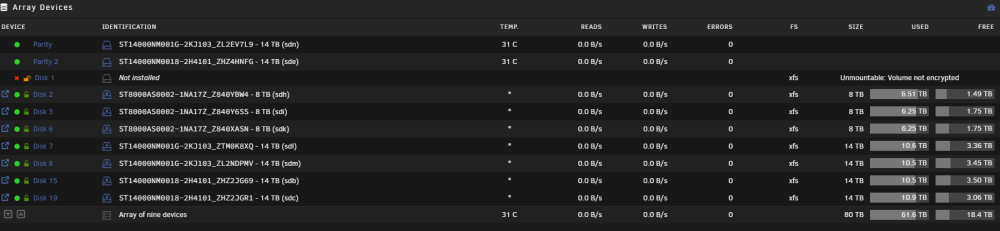
Connecting the drives to the old controller resolved the "All data disks unmountable" issue. Writing to parity.
-
unraid01-diagnostics-20240122-0729.zip
-
Yes.
-
I created a new config, started the array with "parity is already valid", the disk isn't being emulated. If the data drive is unrecoverable it's not the end of the world.
-
I was able to get the parity drives to show up, however when I start he array it immediately starts to write to them. I'm not seeing a "parity is already valid" option, where would that be located? This is 6.12.6.
-
The parity drives are visible in the controller, but for some reason they're showing as needing to be initialized which would erase them. I can try plugging them into a SATA port on the motherboard, or I could try to connect the parity drives to the new controller since I know they will come up on there. I'll post a status update if I'm able to kick off a rebuild on the data drive.
-
I don't think rebuilding is an option, Unraid began to rebuild the parity drives when the new controller was in there.
-
The original card was a Adaptec 5405G. I swapped it into the new hardware and the drives came up, however I've run into a few new issues, one of which I know is self inflicted. The parity drives are not being detected in the GUI. I haven't looked at the HBA to see if they show up in there, but I can probably figure out how to get them up. On one of the data drives I ran a check without the -n flag when it was connected to the new controller. The data drive that the check was ran against is currently marked as "device to be encrypted" and "Unmountable: Volume not encrypted" when connected to the old controller. Any tips on fixing that non-destructively would be appreciated. Latest diagnostics attached. unraid01-diagnostics-20240121-1934.zip
-
I replaced the motherboard, CPUs, HBA, and the backplane, but kept all of the drives. The drives were showing up as "Wrong disk" so I did a new config with Preserve current assignments: All. When I bring the array up the cache drives are recognized fine, but the data drives show "Unmountable: Unsupported partition layout". The all of the drives are encrypted using Unraid, all with the same passkey, and are unlocking successfully. Diagnostics attached. Any help would be appreciated. Note, the NVMe drives can be ignored, they're new. unraid01-diagnostics-20240121-1636.zip
