





furtive
Members
-
Joined
-
Last visited
-
Great, it's working now. Many thanks
-
Hi again. Thanks for all of your support. Because of your message above, I removed the Docker image and deleted everything and reinstalled it to replace Server Manager with Stracker. However I am not able to connect to the Stracker UI via port 50041. Looking at the logs, everything is ok on startup, and this is the only message I am getting that indicates there may be a problem: "tail: cannot open '/serverdata/serverfiles/stracker.log' for reading: No such file or directory" Any idea what I might be doing wrong?
-
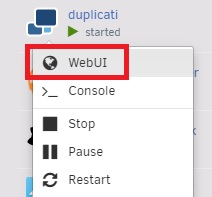
Other Docker apps have a WebUI option under the menu (see attached image). I just thought it would be useful to have a link to the Assetto Corsa Server WebUI (serverIP:8772) so you can access it directly from the Docker image. I had to try and figure out how to access it once I had installed the Docker image. I don't have Stacker enabled.
-
Great, many thanks all sorted now. It might be worth adding a link to the WebUI from the Docker container?
-
Hello I've installed the Assetto Corsa gameserver docker on my Unraid server using a new dedicated Steam account, and have forwarded ports on my router. I can see all of the game and files in the appdata share. Now what? There is no web interface as part of the docker, so how do I configure the server? Thanks.

