





napalmyourmom
Members
-
Joined
-
Last visited
-
I am hoping you all can help me determine why my system keeps shutting down after upgrading to version 7.0.1. I never had this issue before. It is definitely an unclean shutdown as parity check is initiated every time. Diagnostics attached. Thanks in advance! tower-diagnostics-20250522-1558.zip
-
2024-05-23 16:59:45,927 INFO success: mariadb entered RUNNING state, process has stayed up for > than 1 seconds (startsecs) 2024-05-23 16:59:45,930 WARN exited: mariadb (exit status 1; not expected) 2024-05-23 16:59:46,971 INFO spawned: 'mariadb' with pid 66 2024-05-23 16:59:48,407 INFO success: mariadb entered RUNNING state, process has stayed up for > than 1 seconds (startsecs) 2024-05-23 16:59:48,412 WARN exited: mariadb (exit status 1; not expected) 2024-05-23 16:59:49,461 INFO spawned: 'mariadb' with pid 71 2024-05-23 16:59:50,927 INFO success: mariadb entered RUNNING state, process has stayed up for > than 1 seconds (startsecs) 2024-05-23 16:59:50,930 WARN exited: mariadb (exit status 1; not expected) 2024-05-23 16:59:51,979 INFO spawned: 'mariadb' with pid 79 2024-05-23 16:59:53,392 INFO success: mariadb entered RUNNING state, process has stayed up for > than 1 seconds (startsecs) 2024-05-23 16:59:54,399 WARN exited: mariadb (exit status 1; not expected) 2024-05-23 16:59:55,447 INFO spawned: 'mariadb' with pid 83 2024-05-23 16:59:56,861 INFO success: mariadb entered RUNNING state, process has stayed up for > than 1 seconds (startsecs) 2024-05-23 16:59:56,865 WARN exited: mariadb (exit status 1; not expected) 2024-05-23 16:59:57,874 INFO spawned: 'mariadb' with pid 102 2024-05-23 16:59:58,941 INFO success: mariadb entered RUNNING state, process has stayed up for > than 1 seconds (startsecs) 2024-05-23 16:59:58,942 WARN exited: mariadb (exit status 1; not expected) 2024-05-23 16:59:59,952 INFO spawned: 'mariadb' with pid 109 My mariadb process keeps starting and crashing. Does this happen to anyone else? How would I go about fixing this?
-
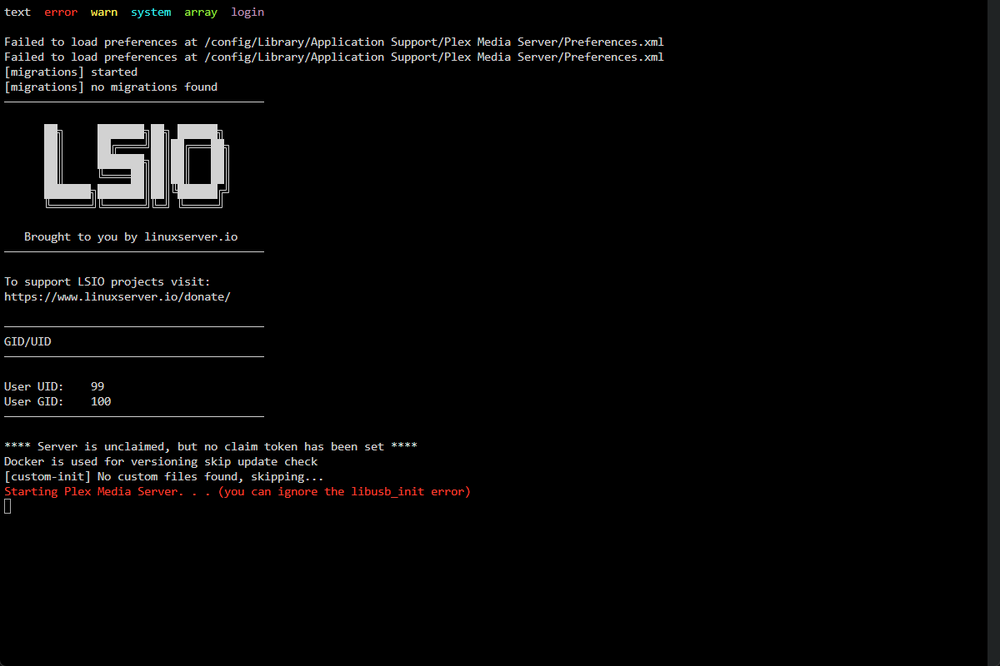
I recently starting having an issue where Plex does not startup correctly (see screenshot). It just gets to "Starting Plex Media Server. . . (you can ignore the libusb_init error)" in red and does not continue from there. I have tried uninstalling and reinstalling from Previous Apps but I get the same behavior. Not sure where to start with troubleshooting. Before I blow this container away and start from scratch, I was hoping someone on here will be able to help. Thanks!
-
Thanks for the response. I guess I didn't realize how much I was doing at once. Can you tell me how I would go about listing current services and their cpu load, perhaps in the CLI? I suspect a docker container to be the main culprit... and I intend on limiting the container to using a specific number of cores that way it does not saturate my CPU.
-
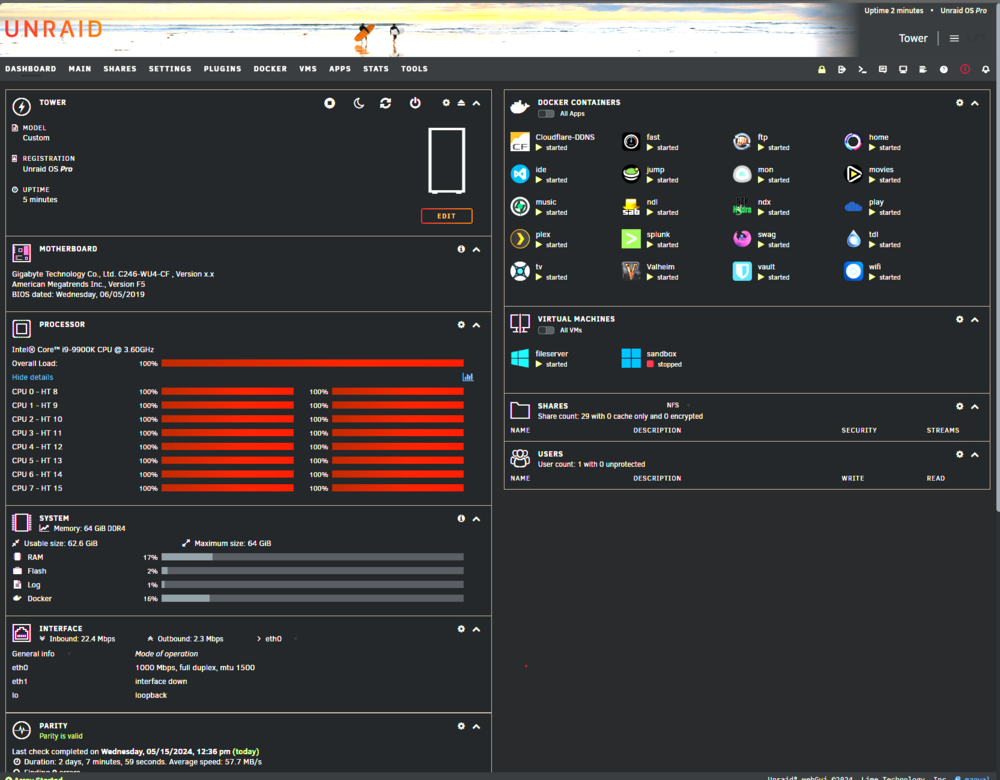
Hello, I am experiencing unexplained high CPU utilization (see screenshot). I have attached diagnostics for analysis. Please HELP! tower-diagnostics-20240515-1629.zip
-
I ultimately deleted my docker.img and reinstalled my containers by following the instructions here: https://docs.unraid.net/unraid-os/manual/docker-management/#re-create-the-docker-image-file https://docs.unraid.net/unraid-os/manual/docker-management/#re-installing-docker-applications
-
I suddenly am unable to Unable to Update, Modify, or Delete Docker containers. No recent system updates/changes to correlate it with. "Error response from daemon: Conflict. The container name "movies" is already in use by container "7b9c21616f4b5619fdb54690c9ae378067f7d6e2815e0a0e71123d2bc6ab38b2". You have to remove (or rename) that container to be able to reuse that name." The container ID correlates with the existing container that I am trying to update. I see no orphaned containers. I have found other threads suggesting to delete the docker.img and recreate all containers. Before doing so, I was hoping you brilliant ladies and gentlemen could look at my diagnostics to see if there is another route to take. Diagnostics attached. tower-diagnostics-20240502-2218.zip
-
Unfortunately I have not found a solution to this issue. I just scrapped the VM How are you getting along?
-
Hello, I suddenly am unable to Unable to Update, Modify, or Delete Docker containers. No recent system updates/changes to correlate it with. "Error response from daemon: Conflict. The container name "/4kmovies" is already in use by container "7b9c21616f4b5619fdb54690c9ae378067f7d6e2815e0a0e71123d2bc6ab38b2". You have to remove (or rename) that container to be able to reuse that name." The container ID correlates with the existing container that I am trying to update. I see no orphaned containers. I have found other threads suggesting to delete the docker.img and recreate all containers. Before doing so, I was hoping you brilliant ladies and gentlemen could look at my diagnostics to see if there is another route to take. Thanks in advance! tower-diagnostics-20240502-2218.zip
-
I recently started having issues with my swag container and I am hoping you all can help. I try restarting the container and editing the config to recreate the container, but I get the same thing. Server reboot did not help. The logs are as follows: /docker-mods: line 109: 25 Bus error cat <<-'EOF' > /usr/bin/lsiown #!/bin/bash MAXDEPTH=("-maxdepth" "0") OPTIONS=() while getopts RcfvhHLP OPTION do if [[ "${OPTION}" != "?" && "${OPTION}" != "R" ]]; then OPTIONS+=("-${OPTION}") fi if [[ "${OPTION}" = "R" ]]; then MAXDEPTH=() fi done shift $((OPTIND - 1)) OWNER=$1 IFS=: read -r USER GROUP <<< "${OWNER}" if [[ -z "${GROUP}" ]]; then printf '**** Permissions could not be set. Group is missing or incorrect, expecting user:group. ****\n' exit 0 fi ERROR='**** Permissions could not be set. This is probably because your volume mounts are remote or read-only. ****\n**** The app may not work properly and we will not provide support for it. ****\n' PATH=("${@:2}") /usr/bin/find "${PATH[@]}" "${MAXDEPTH[@]}" \( ! -group "${GROUP}" -o ! -user "${USER}" \) -exec chown "${OPTIONS[@]}" "${USER}":"${GROUP}" {} + || printf "${ERROR}" EOF /docker-mods: line 109: 26 Bus error chmod +x /usr/bin/lsiown /docker-mods: line 142: 27 Bus error rm -rf /usr/bin/with-contenv /docker-mods: line 142: 28 Bus error cat <<-EOF > /usr/bin/with-contenv #!/bin/bash if [[ -f /run/s6/container_environment/UMASK ]] && { [[ "\$(pwdx \$\$)" =~ "/run/s6/legacy-services/" ]] || [[ "\$(pwdx \$\$)" =~ "/run/s6/services/" ]] || [[ "\$(pwdx \$\$)" =~ "/servicedirs/svc-" ]]; }; then umask "\$(cat /run/s6/container_environment/UMASK)" fi exec /command/with-contenv "\$@" EOF /docker-mods: line 142: 29 Bus error chmod +x /usr/bin/with-contenv /docker-mods: line 366: 30 Bus error cat <<-EOF > /etc/s6-overlay/s6-rc.d/init-adduser/branding ─────────────────────────────────────── ██╗ ███████╗██╗ ██████╗ ██║ ██╔════╝██║██╔═══██╗ ██║ ███████╗██║██║ ██║ ██║ ╚════██║██║██║ ██║ ███████╗███████║██║╚██████╔╝ ╚══════╝╚══════╝╚═╝ ╚═════╝ Brought to you by linuxserver.io ─────────────────────────────────────── EOF /docker-mods: line 22: 31 Bus error mkdir -p /etc/{cont-init.d,services.d} /docker-mods: line 22: 32 Bus error chmod +x /etc/cont-init.d/* /etc/services.d/*/* 2> /dev/null s6-rc-oneshot-run: fatal: unable to exec /etc/s6-overlay/s6-rc.d/init-migrations/run: Exec format error s6-rc-oneshot-run: fatal: unable to exec /etc/s6-overlay/s6-rc.d/init-envfile/run: Exec format error s6-rc: warning: unable to start service init-migrations: command exited 126 s6-rc: warning: unable to start service init-envfile: command exited 126 /run/s6/basedir/scripts/rc.init: warning: s6-rc failed to properly bring all the services up! Check your logs (in /run/uncaught-logs/current if you have in-container logging) for more information. /run/s6/basedir/scripts/rc.init: fatal: stopping the container. /docker-mods: line 20: syntax error: bad substitution /run/s6/basedir/scripts/rc.init: warning: hook /docker-mods exited 2 s6-rc-oneshot-run: fatal: unable to exec /etc/s6-overlay/s6-rc.d/init-migrations/run: Exec format error s6-rc-oneshot-run: fatal: unable to exec /etc/s6-overlay/s6-rc.d/init-envfile/run: Exec format error s6-rc: warning: unable to start service init-migrations: command exited 126 s6-rc: warning: unable to start service init-envfile: command exited 126 /run/s6/basedir/scripts/rc.init: warning: s6-rc failed to properly bring all the services up! Check your logs (in /run/uncaught-logs/current if you have in-container logging) for more information. /run/s6/basedir/scripts/rc.init: fatal: stopping the container. /docker-mods: line 20: syntax error: bad substitution /run/s6/basedir/scripts/rc.init: warning: hook /docker-mods exited 2 s6-rc-oneshot-run: fatal: unable to exec /etc/s6-overlay/s6-rc.d/init-migrations/run: Exec format error s6-rc-oneshot-run: fatal: unable to exec /etc/s6-overlay/s6-rc.d/init-envfile/run: Exec format error s6-rc: warning: unable to start service init-migrations: command exited 126 s6-rc: warning: unable to start service init-envfile: command exited 126 /run/s6/basedir/scripts/rc.init: warning: s6-rc failed to properly bring all the services up! Check your logs (in /run/uncaught-logs/current if you have in-container logging) for more information. /run/s6/basedir/scripts/rc.init: fatal: stopping the container. /docker-mods: line 20: syntax error: bad substitution /run/s6/basedir/scripts/rc.init: warning: hook /docker-mods exited 2 s6-rc-oneshot-run: fatal: unable to exec /etc/s6-overlay/s6-rc.d/init-envfile/run: Exec format error s6-rc-oneshot-run: fatal: unable to exec /etc/s6-overlay/s6-rc.d/init-migrations/run: Exec format error s6-rc: warning: unable to start service init-migrations: command exited 126 s6-rc: warning: unable to start service init-envfile: command exited 126 /run/s6/basedir/scripts/rc.init: warning: s6-rc failed to properly bring all the services up! Check your logs (in /run/uncaught-logs/current if you have in-container logging) for more information. /run/s6/basedir/scripts/rc.init: fatal: stopping the container. Any help would be greatly appreciated.
-
I have a Windows 11 VM that I have used for a few months with little to no problems. Without introducing any significant changes to the environment, it suddenly will not start up, it doesn't even get to Windows. VNC is just a black screen with a white looping circle. RAID restart does not resolve the issue. I am not doing anything fancy with this VM, no hardware passthrough etc. Other VMs are working fine. I am not sure where to go from here, can anyone point me in the right direction? Thanks! Logs are as follows: -device '{"driver":"ich9-usb-uhci3","masterbus":"usb.0","firstport":4,"bus":"pci.0","addr":"0x7.0x2"}' \ -device '{"driver":"virtio-serial-pci","id":"virtio-serial0","bus":"pci.0","addr":"0x4"}' \ -blockdev '{"driver":"file","filename":"/mnt/user/vdi/sandbox/vdisk1.img","node-name":"libvirt-1-storage","cache":{"direct":false,"no-flush":false},"auto-read-only":true,"discard":"unmap"}' \ -blockdev '{"node-name":"libvirt-1-format","read-only":false,"cache":{"direct":false,"no-flush":false},"driver":"raw","file":"libvirt-1-storage"}' \ -device '{"driver":"virtio-blk-pci","bus":"pci.0","addr":"0x5","drive":"libvirt-1-format","id":"virtio-disk2","bootindex":1,"write-cache":"on"}' \ -netdev tap,fd=35,id=hostnet0 \ -device '{"driver":"virtio-net","netdev":"hostnet0","id":"net0","mac":"52:54:00:24:05:70","bus":"pci.0","addr":"0x3"}' \ -chardev pty,id=charserial0 \ -device '{"driver":"isa-serial","chardev":"charserial0","id":"serial0","index":0}' \ -chardev socket,id=charchannel0,fd=33,server=on,wait=off \ -device '{"driver":"virtserialport","bus":"virtio-serial0.0","nr":1,"chardev":"charchannel0","id":"channel0","name":"org.qemu.guest_agent.0"}' \ -chardev socket,id=chrtpm,path=/run/libvirt/qemu/swtpm/1-sandbox-swtpm.sock \ -tpmdev emulator,id=tpm-tpm0,chardev=chrtpm \ -device '{"driver":"tpm-tis","tpmdev":"tpm-tpm0","id":"tpm0"}' \ -device '{"driver":"usb-tablet","id":"input0","bus":"usb.0","port":"1"}' \ -audiodev '{"id":"audio1","driver":"none"}' \ -vnc 0.0.0.0:0,websocket=5700,audiodev=audio1 \ -k en-us \ -device '{"driver":"qxl-vga","id":"video0","max_outputs":1,"ram_size":67108864,"vram_size":67108864,"vram64_size_mb":0,"vgamem_mb":16,"bus":"pci.0","addr":"0x2"}' \ -device '{"driver":"ich9-intel-hda","id":"sound0","bus":"pci.0","addr":"0x8"}' \ -device '{"driver":"hda-duplex","id":"sound0-codec0","bus":"sound0.0","cad":0,"audiodev":"audio1"}' \ -device '{"driver":"virtio-balloon-pci","id":"balloon0","bus":"pci.0","addr":"0x6"}' \ -sandbox on,obsolete=deny,elevateprivileges=deny,spawn=deny,resourcecontrol=deny \ -msg timestamp=on char device redirected to /dev/pts/0 (label charserial0) qxl_send_events: spice-server bug: guest stopped, ignoring 2023-10-19T16:06:42.404358Z qemu-system-x86_64: terminating on signal 15 from pid 4639 (/usr/sbin/libvirtd) 2023-10-19 16:06:42.959+0000: shutting down, reason=destroyed 2023-10-19 16:06:47.038+0000: Starting external device: TPM Emulator /usr/bin/swtpm socket --ctrl type=unixio,path=/run/libvirt/qemu/swtpm/3-sandbox-swtpm.sock,mode=0600 --tpmstate dir=/var/lib/libvirt/swtpm/2e5acf8e-d232-f52f-41b2-36bac122daf1/tpm2,mode=0600 --log file=/var/log/swtpm/libvirt/qemu/sandbox-swtpm.log --terminate --tpm2 2023-10-19 16:06:47.093+0000: starting up libvirt version: 8.7.0, qemu version: 7.1.0, kernel: 6.1.34-Unraid, hostname: Tower LC_ALL=C \ PATH=/bin:/sbin:/usr/bin:/usr/sbin \ HOME=/var/lib/libvirt/qemu/domain-3-sandbox \ XDG_DATA_HOME=/var/lib/libvirt/qemu/domain-3-sandbox/.local/share \ XDG_CACHE_HOME=/var/lib/libvirt/qemu/domain-3-sandbox/.cache \ XDG_CONFIG_HOME=/var/lib/libvirt/qemu/domain-3-sandbox/.config \ /usr/local/sbin/qemu \ -name guest=sandbox,debug-threads=on \ -S \ -object '{"qom-type":"secret","id":"masterKey0","format":"raw","file":"/var/lib/libvirt/qemu/domain-3-sandbox/master-key.aes"}' \ -blockdev '{"driver":"file","filename":"/usr/share/qemu/ovmf-x64/OVMF_CODE-pure-efi-tpm.fd","node-name":"libvirt-pflash0-storage","auto-read-only":true,"discard":"unmap"}' \ -blockdev '{"node-name":"libvirt-pflash0-format","read-only":true,"driver":"raw","file":"libvirt-pflash0-storage"}' \ -blockdev '{"driver":"file","filename":"/etc/libvirt/qemu/nvram/2e5acf8e-d232-f52f-41b2-36bac122daf1_VARS-pure-efi-tpm.fd","node-name":"libvirt-pflash1-storage","auto-read-only":true,"discard":"unmap"}' \ -blockdev '{"node-name":"libvirt-pflash1-format","read-only":false,"driver":"raw","file":"libvirt-pflash1-storage"}' \ -machine pc-i440fx-7.1,usb=off,dump-guest-core=off,mem-merge=off,memory-backend=pc.ram,pflash0=libvirt-pflash0-format,pflash1=libvirt-pflash1-format \ -accel kvm \ -cpu host,migratable=on,hv-time=on,hv-relaxed=on,hv-vapic=on,hv-spinlocks=0x1fff,hv-vendor-id=none,host-cache-info=on,l3-cache=off \ -m 16384 \ -object '{"qom-type":"memory-backend-ram","id":"pc.ram","size":17179869184}' \ -overcommit mem-lock=off \ -smp 8,sockets=1,dies=1,cores=4,threads=2 \ -uuid 2e5acf8e-d232-f52f-41b2-36bac122daf1 \ -no-user-config \ -nodefaults \ -chardev socket,id=charmonitor,fd=37,server=on,wait=off \ -mon chardev=charmonitor,id=monitor,mode=control \ -rtc base=localtime \ -no-hpet \ -no-shutdown \ -boot strict=on \ -device '{"driver":"ich9-usb-ehci1","id":"usb","bus":"pci.0","addr":"0x7.0x7"}' \ -device '{"driver":"ich9-usb-uhci1","masterbus":"usb.0","firstport":0,"bus":"pci.0","multifunction":true,"addr":"0x7"}' \ -device '{"driver":"ich9-usb-uhci2","masterbus":"usb.0","firstport":2,"bus":"pci.0","addr":"0x7.0x1"}' \ -device '{"driver":"ich9-usb-uhci3","masterbus":"usb.0","firstport":4,"bus":"pci.0","addr":"0x7.0x2"}' \ -device '{"driver":"virtio-serial-pci","id":"virtio-serial0","bus":"pci.0","addr":"0x4"}' \ -blockdev '{"driver":"file","filename":"/mnt/user/vdi/sandbox/vdisk1.img","node-name":"libvirt-1-storage","cache":{"direct":false,"no-flush":false},"auto-read-only":true,"discard":"unmap"}' \ -blockdev '{"node-name":"libvirt-1-format","read-only":false,"cache":{"direct":false,"no-flush":false},"driver":"raw","file":"libvirt-1-storage"}' \ -device '{"driver":"virtio-blk-pci","bus":"pci.0","addr":"0x5","drive":"libvirt-1-format","id":"virtio-disk2","bootindex":1,"write-cache":"on"}' \ -netdev tap,fd=40,id=hostnet0 \ -device '{"driver":"virtio-net","netdev":"hostnet0","id":"net0","mac":"52:54:00:24:05:70","bus":"pci.0","addr":"0x3"}' \ -chardev pty,id=charserial0 \ -device '{"driver":"isa-serial","chardev":"charserial0","id":"serial0","index":0}' \ -chardev socket,id=charchannel0,fd=35,server=on,wait=off \ -device '{"driver":"virtserialport","bus":"virtio-serial0.0","nr":1,"chardev":"charchannel0","id":"channel0","name":"org.qemu.guest_agent.0"}' \ -chardev socket,id=chrtpm,path=/run/libvirt/qemu/swtpm/3-sandbox-swtpm.sock \ -tpmdev emulator,id=tpm-tpm0,chardev=chrtpm \ -device '{"driver":"tpm-tis","tpmdev":"tpm-tpm0","id":"tpm0"}' \ -device '{"driver":"usb-tablet","id":"input0","bus":"usb.0","port":"1"}' \ -audiodev '{"id":"audio1","driver":"none"}' \ -vnc 0.0.0.0:0,websocket=5700,audiodev=audio1 \ -k en-us \ -device '{"driver":"qxl-vga","id":"video0","max_outputs":1,"ram_size":67108864,"vram_size":67108864,"vram64_size_mb":0,"vgamem_mb":16,"bus":"pci.0","addr":"0x2"}' \ -device '{"driver":"ich9-intel-hda","id":"sound0","bus":"pci.0","addr":"0x8"}' \ -device '{"driver":"hda-duplex","id":"sound0-codec0","bus":"sound0.0","cad":0,"audiodev":"audio1"}' \ -device '{"driver":"virtio-balloon-pci","id":"balloon0","bus":"pci.0","addr":"0x6"}' \ -sandbox on,obsolete=deny,elevateprivileges=deny,spawn=deny,resourcecontrol=deny \ -msg timestamp=on char device redirected to /dev/pts/0 (label charserial0) qxl_send_events: spice-server bug: guest stopped, ignoring
-
Figured this out myself. My reports were saved with permissions as user and user data is not persisted. I had to add the following to a path variable to persist its data: /opt/splunk/etc/users As for saving the admin password, license, and free license configuration, I had to add the following paths: /opt/splunk/etc/licenses /opt/splunk/etc/system Now when I recreate the container I do not have to reset the password or reapply the free license.
-
When I modify the container and it gets rebuilt, I lose all of the reports and dashboards I have created. The password also gets reset to default and I have to reconfigure the trial license. Is there any way to retain all of these things on rebuild so I don't have to keep reconfiguring and storing copies of my report/dashboard SPL elsewhere? EDIT: To clarify - my indexes, datasets, and installed apps are all preserved. So some of my configurations are persistent, just not (most importantly) reports and dashboards. Perhaps my docker configuration is wrong, but it seems pretty straight forward...
-
Just finished the disk rebuild and I am good to go. Thanks for the help @JorgeB!
-
So I have to actually rebuild the 10tb of data on this disk? What is actually causing this? If the partition/data were truly corrupt, it shouldn't be functional when I downgrade. I just want to avoid having to deal with this ever again...


