






Josh.5
Members
-
Joined
-
Last visited
-
📣 📣 After 4 years and 8 months, Steam Headless v2 is being released this weekend. 🎆 🎊 🎉 I'm not going to post any details here (mostly because I am never really online in these forums), just head over to the new website for more info. Steam HeadlessHigh-performance, containerised gaming and remote desktop infrastructure for Linux servers, NAS appliances, and homelabs. Run multiple independent desktops on a single GPU with built-in Sunshine strea The old Unraid Apps template is not compatible with v2. If you want to upgrade, you will need to install fresh from the Unraid Apps tab and link it up with your existing Steam games path. If you like the updated container, please consider giving the GitHub repo and Docker Hub repo some starts so other people can also discover it. - https://hub.docker.com/r/josh5/steam-headless - https://github.com/Steam-Headless/docker-steam-headless Also consider spreading the word yourself on your socials and help others get setup with it. Happy gaming! 🎮
-
To me that indicates that the plugin settings JSON has somehow gotten into an incorrect state. I did push a fix for something similar (which could also fix whatever is going wrong on your install) to the staging branch. You can check it out by changing "latest" to "staging" on your template. It should just work after that as it will revert an "null" values to defaults in the plugin settings (null is not a valid value ever, so it is strange that it even got there). Also, on a few other points that is suspicious.... settings #4 on the transcode videos plugin is the video encoder selector. What did you have selected (specifically interested in if are you using an NVENC)? NVENC has been reported to have issues on docker on Unraid. It seems like sometimes the container can lose access to the GPU from the NVIDIA docker runtime. I thought this was fixed a while back, but it is possible this is what is happening. The symptoms of this happening is that the transcode videos plugin no longer sees the NVIDIA GPU so files start failing to be trainscoded. When you then open the plugin settings, the NVENC options will dissappears and if you then close it, you will change the encoder config. I have never heard of this chaining it to "null" tho. Normally it reverts to one of the libx encoders.
-
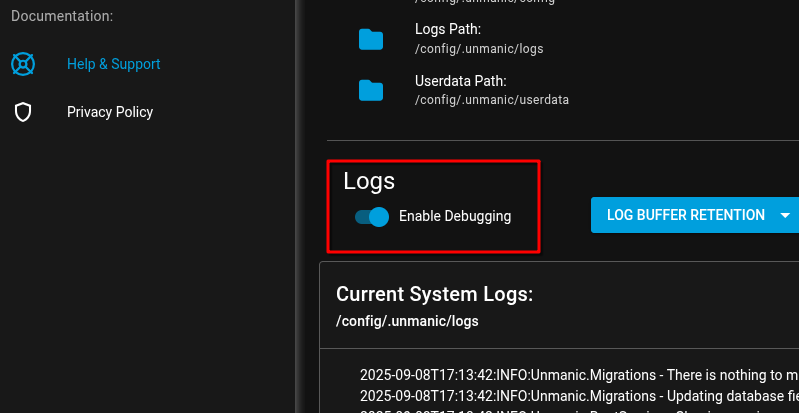
@BVTJ Can you send me some screenshots of the issue and the Unmanic logs? Enable debug logging and restart Unmanic before reproducing the errors again. Then click "Download system logs" and send me those.
-
Have you tried restarting the container? The mist recent update of the transcode videos plugin was not compatible with the module reload and it kinda broke. But a restart if the app sets everything right.
-
EmuDeck can be installed by opening a terminal and entering: sh -c 'curl -L https://raw.githubusercontent.com/dragoonDorise/EmuDeck/main/install.sh | bash' When prompted to enter your password, just click enter (there is no password). When asked about the location, select a custom directory of your choosing. When asked about the OS or device, select Linux. Wait for ages as it just takes forever to install - especially on the array. I have removed the "one click" installation for things like Lutris and EmuDeck. I did not realise that was still in the docs. We have been maintaining our own set of init scripts for Steam Headless in the Discord chats which has automated setups for things like Retroarch and ESDE along with a bunch of other things. These init scripts are auto run during the container startup to ensure you emulators are up-to-date with the confing in github here: https://github.com/Steam-Headless/init.d . I personally would recommend using these init.d scripts and helping out on GitHub to build on them or maintain them over using EmuDeck if you are up for it.
-
I must have pasted this in there by mistake. Thanks for the heads up. I'll remove it as soon as i have time.
-
Have you also booted unraid in gui mode? This would also be wrong.
-
It is failing because you have. -v '/dev/input/':'/dev/input/':'ro' -v '/run/udev/data/':'/run/udev/data/':'ro' You have not updated your container template.
-
@MarianKoniuszkopost your docker run command. Looks symptomatic of you mounting /run/udev or /dev/input
-
I'll post a quick update here since there are people still coming here for support rather than discord. This weeks update adds some improvements to input devices. Your templates need to be updated to remove any mounts of /run/udev and /dev/input and you need ENABLE_EVDEV_INPUTS=true for mouse and keyboard support on moonlight. If you dont want to update, you can lock in docker tag :debian-0.1.0 rather than :latest. The easiest way to update your template is to just delete the docker container and reinstall it all from the apps tab.
-
Did you mention the other day that you installed a custom kernel on Unraid and your Denuvo games started working? If so, this tells me that something is missing from the Unraid kernel. Just to be clear, this is not an issue with the Steam Headless Docker image.
-
Not on the same GPU. This is something being looked into as time permits. (For better support or just for general discussions on future features in Steam Headless, join our conversation on discord. See link in first post of this thread.)
-
Ive decided that Kasm is not a good fit for steam headless. Id advise you to use moonlight for gaming and only use the web UI for managing the desktop as required. Ive forked NoVNC and have started working on some solutions of my own. But it will take a long time before they are ready. (For better support or just for general discussions on future features in Steam Headless, join our conversation on discord. See link in first post of this thread.)
-
This happens when you have an AMD or Intel GPU and you dont use an HDMI or DP dummy plug. (For better support or just for general discussions on future features in Steam Headless, join our conversation on discord. See link in first post of this thread.)
-
You need to enable privileged mode for now. This is something im still working on improving. (For better support or just for general discussions on future features in Steam Headless, join our conversation on discord. See link in first post of this thread.)


