mrbilky
Members
-
Joined
-
Last visited
Everything posted by mrbilky
-
This may be a stupid question but I can see and set my onboard audio in the VM setup and the VM will launch but when I get all the drivers up and running I don't get any audio, so for the purpose of making this work do I need speakers connected to the unRAID box in order for the system to work, I'm logging in from my MacBook and pc but no sound?
-
Although I don't have more than 1 mac pointed to this drive I don't see why you couldn't just point to it individually from each machine but not sure as I did a disk share or just create 3 different shares on a drive i.e. mac 1, mac 2, mac 3 and just select the right share from each pc, when you setup shares under AFP you will have the option to export to time machine as a test I just changed export on one of my shares and it does show up on my mac as a drive option in time machine
-
I have time machine working without issue I did isolate 1 drive just for that and mapped it in time machine on my macbook to use both my airport extreme and my NAS drive as backups seems to work fine I think if I remember correctly you have to make the share/drive private time machine didn't like it without it but it has been awhile so not quite sure on that and if anything has changed
-
Nice work!
-
Yeah tried that and all other configs the bummer is that I don't use it much so it went through a OS upgrade, a new config in tools and a new permissions and who knows what else prior to knowing that it doesn't work
-
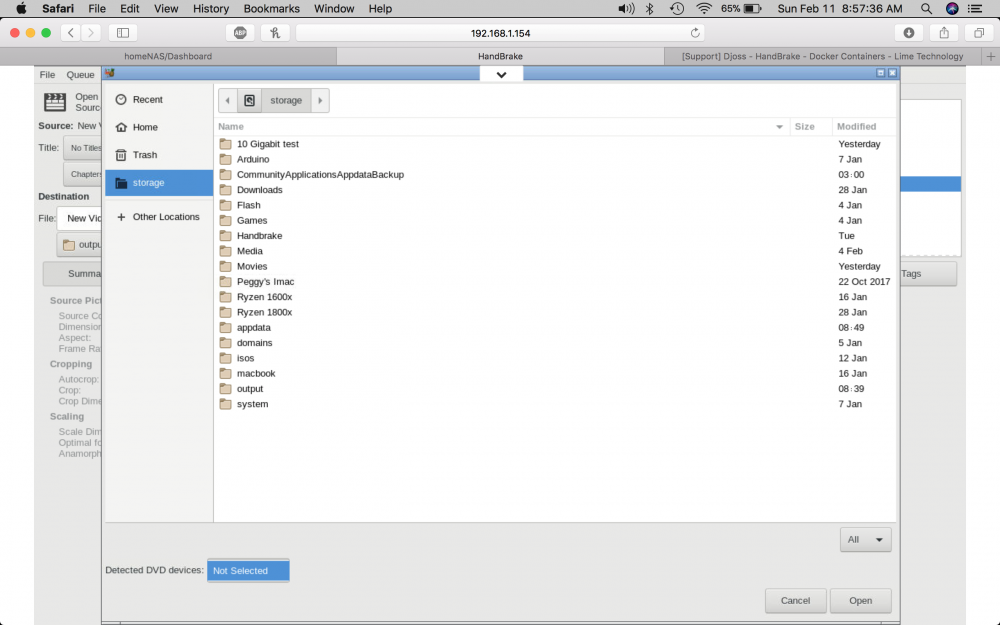
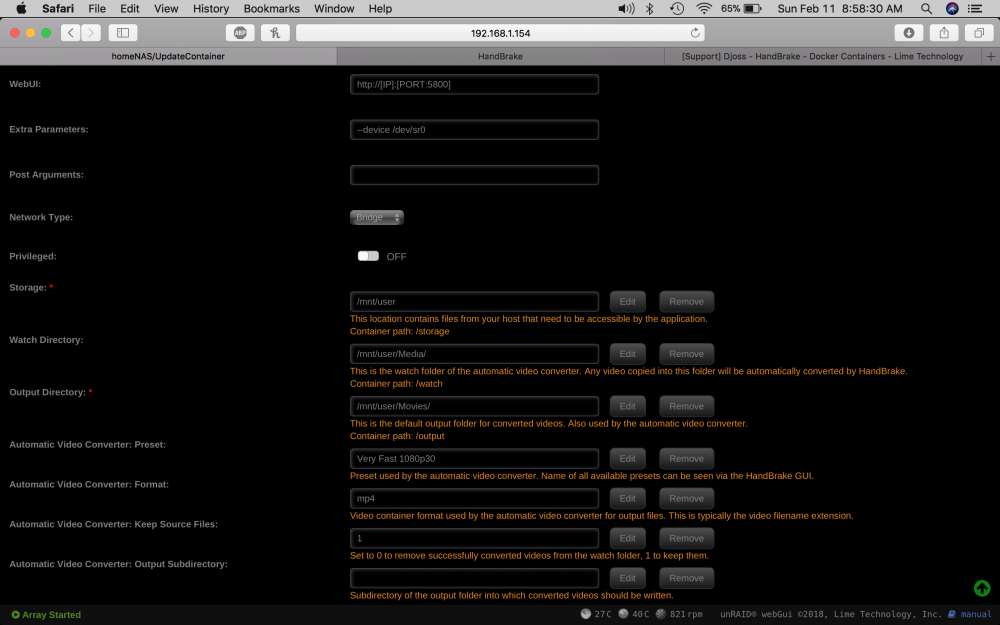
I moved and reassigned a few disks in the array putting 1 empty disk into parity (went with 2nd parity) and my plex docker will no longer load up I'm not fully setup yet so I just removed the docker and used clean appdata to remove it but new installs won't load up so is there some file hanging around that I need to remove or some other setting that remains that is causing this issue any help greatly appreciated! homenas-diagnostics-20180517-1710 (1).zip Log for_ binhex-plex.htmlQuick question I see that simple machines forums requires SQL has anyone tried to run a web forum from unRAID using this?Short answer is there an advantage using bridge over custom eth0 when setting up a docker, they both seem to work or is it just to run whatever the default is which seems to be bridge? i'm running the latest unRAID 6.5.2- rc1Will do thanks for the advice!Have a strange issue occurring I have encoded 5 movies that I own and I'm using Handbrake so I'm going to float this here first and see if its something known to Plex first since that is where the metadata seems to populate, when I encoded these video's even though the title was correct in the save as dialog box when I open Plex the video is always listed as of all things Madagascar 3 can't seem to find where this issue is hiding has anyone had this issue with Plex or am I barking up the wrong treeQuick question I set pihole up works great so do I delete adblocker, turn it off or remove it all together / does it hurt to run both?Just saw this my bad that's my daily driver not my unRAID box don't want to be misleading that's my octa core with a GTX 1080Please heed the above warning as before I asked the question I allowed this to happen thankfully I had absolutely no files on the array yet but I was hacked to crap immediately!Excellent finally got something working, thank you for your patience docker is working as advertised!Sounds reasonable enough where would that be located I searched in Krusader but didn't get a hit?Can someone tell me if they see why handbrake cannot see my dvd drive? (Solved!)
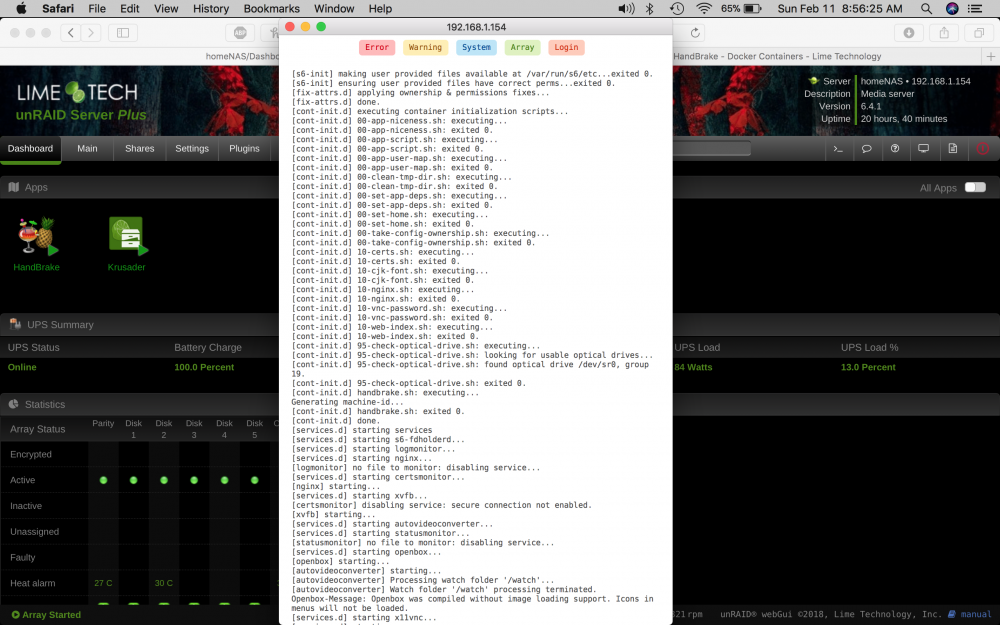
 Yep it was its identical or so it appears as the first one I posted think I'll go to the extreme of pulling my 10GB nic is that is the only hardware change made to this and I had plex running on this server without issue several times when I first built it guess I should have left well enough alone but I was trying too many things at once and getting bogged down so I removed all but what I needed at the time the only other change is the updates anyone have the link to older versions namely 6.3.5 that was the version it ran onHere it is but I had to stop the docker or it would just keep posting "Starting Plex Media Server." [s6-init] making user provided files available at /var/run/s6/etc...exited 0.[s6-init] ensuring user provided files have correct perms...exited 0.[fix-attrs.d] applying ownership & permissions fixes...[fix-attrs.d] done.[cont-init.d] executing container initialization scripts...[cont-init.d] 10-adduser: executing...-------------------------------------_ ()| | ___ _ __| | / __| | | / \| | \__ \ | | | () ||_| |___/ |_| \__/Brought to you by linuxserver.ioWe gratefully accept donations at:https://www.linuxserver.io/donations/-------------------------------------GID/UID-------------------------------------User uid: 99User gid: 100-------------------------------------[cont-init.d] 10-adduser: exited 0.[cont-init.d] 30-dbus: executing...[cont-init.d] 30-dbus: exited 0.[cont-init.d] 40-chown-files: executing...[cont-init.d] 40-chown-files: exited 0.[cont-init.d] 50-plex-update: executing...###################################################### Login via the webui at http://<ip>:32400/web ## and restart the docker, because there was no ## preference file found, possibly first startup. ######################################################[cont-init.d] 50-plex-update: exited 0.[cont-init.d] done.[services.d] starting servicesStarting Plex Media Server.Starting dbus-daemon[services.d] done.dbus[271]: [system] org.freedesktop.DBus.Error.AccessDenied: Failed to set fd limit to 65536: Operation not permittedStarting Plex Media Server.Starting Avahi daemonFound user 'avahi' (UID 106) and group 'avahi' (GID 107).Successfully dropped root privileges.avahi-daemon 0.6.32-rc starting up.No service file found in /etc/avahi/services.*** WARNING: Detected another IPv4 mDNS stack running on this host. This makes mDNS unreliable and is thus not recommended. ****** WARNING: Detected another IPv6 mDNS stack running on this host. This makes mDNS unreliable and is thus not recommended. ***Joining mDNS multicast group on interface veth51be318.IPv6 with address fe80::204e:f2ff:febe:a047.New relevant interface veth51be318.IPv6 for mDNS.Joining mDNS multicast group on interface docker0.IPv6 with address fe80::42:40ff:fe25:e4ec.New relevant interface docker0.IPv6 for mDNS.Joining mDNS multicast group on interface docker0.IPv4 with address 172.17.0.1.New relevant interface docker0.IPv4 for mDNS.Joining mDNS multicast group on interface eth2.IPv4 with address 192.168.51.2.New relevant interface eth2.IPv4 for mDNS.Joining mDNS multicast group on interface eth1.IPv4 with address 192.168.50.2.New relevant interface eth1.IPv4 for mDNS.Joining mDNS multicast group on interface eth0.IPv6 with address fe80::ec4:7aff:fe81:28d3.New relevant interface eth0.IPv6 for mDNS.Joining mDNS multicast group on interface eth0.IPv4 with address 192.168.1.154.New relevant interface eth0.IPv4 for mDNS.Network interface enumeration completed.Registering new address record for fe80::204e:f2ff:febe:a047 on veth51be318.*.Registering new address record for fe80::42:40ff:fe25:e4ec on docker0.*.Registering new address record for 172.17.0.1 on docker0.IPv4.Registering new address record for 192.168.51.2 on eth2.IPv4.Registering new address record for 192.168.50.2 on eth1.IPv4.Registering new address record for fe80::ec4:7aff:fe81:28d3 on eth0.*.Registering new address record for 192.168.1.154 on eth0.IPv4.Starting Plex Media Server.Server startup complete. Host name is homeNAS.local. Local service cookie is 7152946.Starting Plex Media Server.Starting Plex Media Server.Starting Plex Media Server.Starting Plex Media Server.Starting Plex Media Server.Starting Plex Media Server.Starting Plex Media Server.Starting Plex Media Server.Starting Plex Media Server.Starting Plex Media Server.Starting Plex Media Server.Starting Plex Media Server.Starting Plex Media Server.Starting Plex Media Server.Starting Plex Media Server.Starting Plex Media Server.Starting Plex Media Server.Starting Plex Media Server.Starting Plex Media Server.Starting Plex Media Server.Starting Plex Media Server.Starting Plex Media Server.Starting Plex Media Server.Starting Plex Media Server.Starting Plex Media Server.Got SIGTERM, quitting.Leaving mDNS multicast group on interface veth51be318.IPv6 with address fe80::204e:f2ff:febe:a047.Leaving mDNS multicast group on interface docker0.IPv6 with address fe80::42:40ff:fe25:e4ec.Leaving mDNS multicast group on interface docker0.IPv4 with address 172.17.0.1.Leaving mDNS multicast group on interface eth2.IPv4 with address 192.168.51.2.Leaving mDNS multicast group on interface eth1.IPv4 with address 192.168.50.2.Leaving mDNS multicast group on interface eth0.IPv6 with address fe80::ec4:7aff:fe81:28d3.Leaving mDNS multicast group on interface eth0.IPv4 with address 192.168.1.154.[cont-finish.d] executing container finish scripts...[cont-finish.d] done.[s6-finish] syncing disks.avahi-daemon 0.6.32-rc exiting.[s6-finish] sending all processes the TERM signal.[s6-finish] sending all processes the KILL signal and exiting.No and for shits and giggles I disabled the ports for both under network settings still no changeYeah I did see that that was why I was wondering if my 10GB nic was part of the issue here's the diags: homenas-diagnostics-20180204-1453.zipThanks for the honest attemptis this the log you're suggesting?
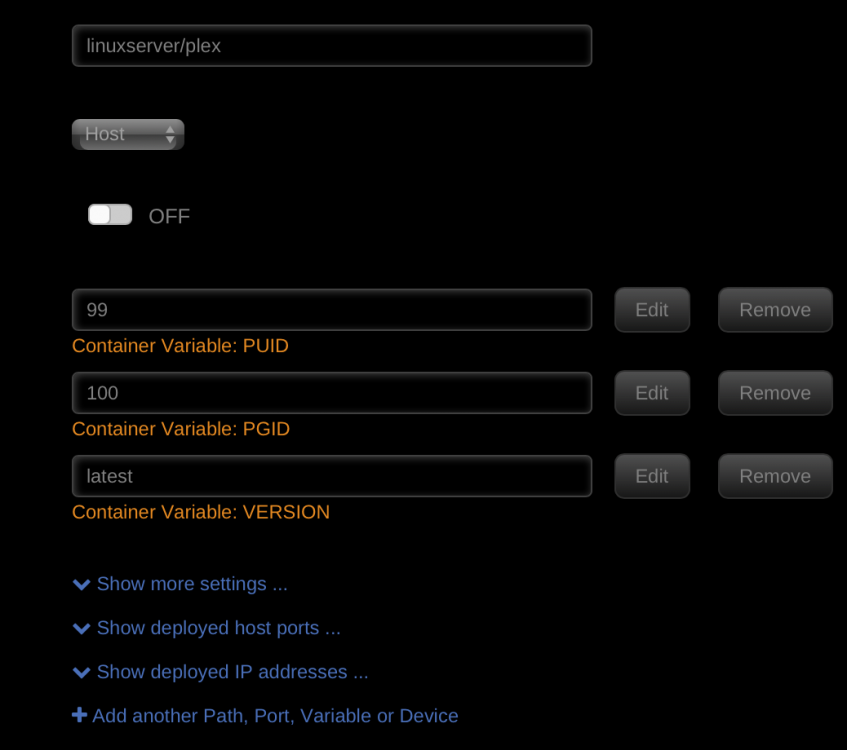
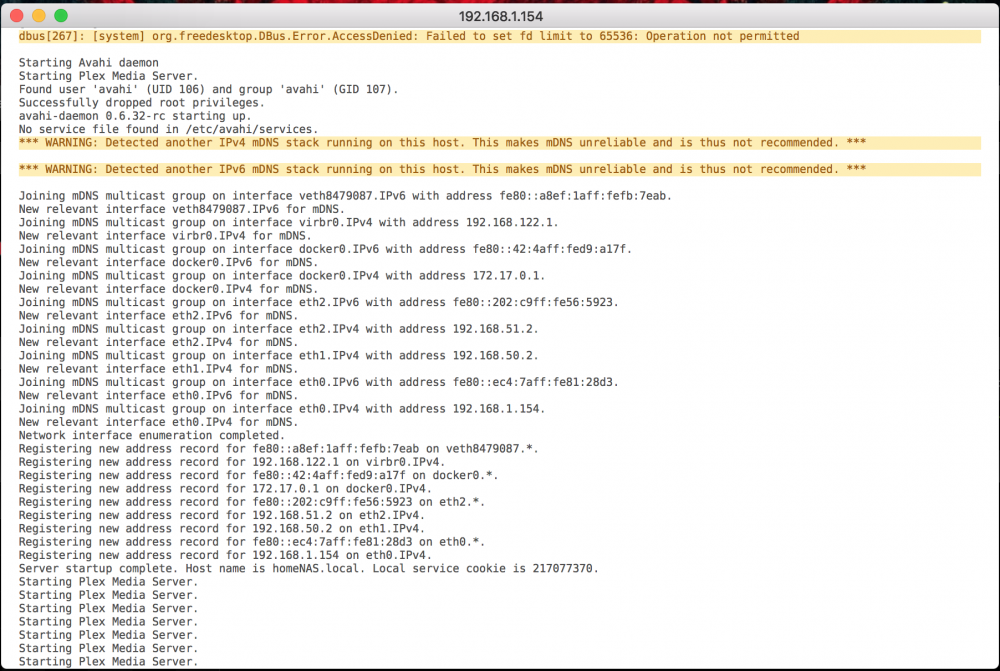 Thanks for the input I think I'm doing it right a couple months ago it worked just fine, can adding a 10GB nic interfere cause thats the only variable thats changed. I don't see a deployed host port for plex could that be a problem?
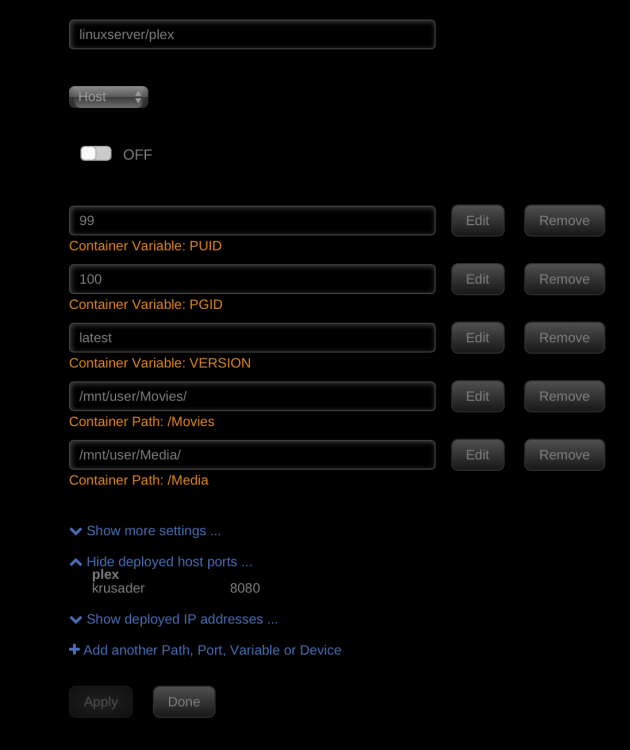 Can someone point me to a good tutorial for plex I'm on the latest stable version of unRAID and for some reason I can't get any plex docker to work, I had it installed in the past but now I'm ready to set it up for the family and now for the life of me can"t figure out how I did it? I'm not well versed in linux and the command prompt so either something has changed with the docker or I followed some tutorial that I can't seem to find on the net All attempts to start up plex has resulted in: Strange thing is that I can access the server by just the ip just plex won't open I'm quite sure I'm missing allot of required entries here but this is where I'm at: