





8064r7
Members
-
Joined
-
Last visited
-
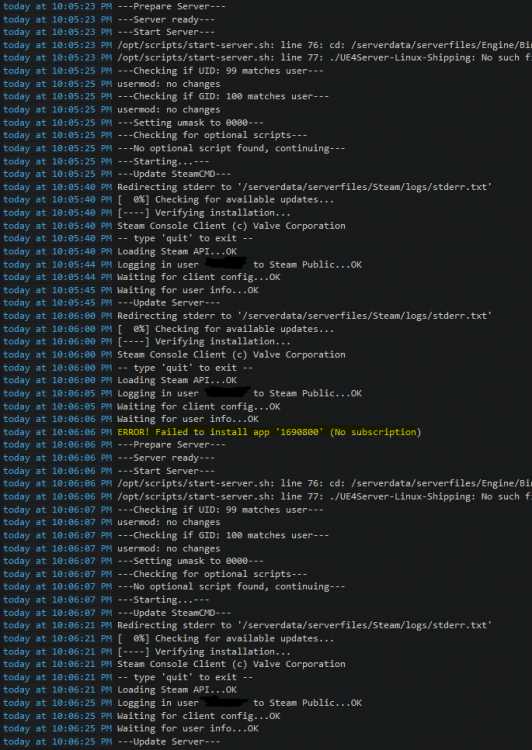
**Removing my steam user/pass info from the instance resolved this error** I did not change anything from the default template other than adding the steam acct user/pass I use for dedicated servers (this account owns a copy of satisfactory, cannot verify if setting it in other clients to experimental is carried over to other instances). I have 2 cache pools, a standard one which Unraid is using for its tasks (210 GBs free) as well as being my /downloads & a separate one strictly being used by docker/vms (418 GBs free). /appdata as stated only uses the docker-vm cache pool & it is set to "only" in the shares context. Went ahead and followed suggestions to: 1. Remove the docker & its image, clear its template, & download a new one from CA. 2. Placed unraid server by mac/ip in a group on all piholes where no adlists are being applied to its A/AAAA/C-name requests. No changes when implementing these suggestions, but did some additional research this morning across twitter & the Satisfactory Q&A and I found something: Different people are having issues creating multiplayer dedicated instances & it appears the fix is for some thankfully to not use your login info at all, especially those using steamcmd. **Removing my steam user/pass info from the instance resolved this error**
-
I appear to be experiencing an error asking about a subscription, yet I own the game and have logged in at least via my client to Epic Online Services. Any ideas?
-
So where would I look to disable the OpenVPN connection from utilizing DNSoverTLS to pull the A/AAAA records for the tunnel setup? Been currently seeing for the last few days this output (haven't changed anything that was working for 2 months now): [info] Setting up OpenVPN tunnel [info] Create tunnel device [info] Allow DnS-over-TLS for openvpn to lookup VPN server [info] Connecting to VPN on port 1198 with proto udp... [info] Connection in progress, wait 10s... [info] Connection in progress, wait 10s... (this x1000!) It appears to be hanging on attempting to query the A/AAAA record. Any guidance on where to look on solving this?
-
As of April 01 I wasn't able to find any NA servers working for PIA. Simply use a EU or another service other than PIA all together for the time being.
-
Was there an update last night to the container? While I can via the log see activity going on regarding my folders and normal Sonarr activities the web server no longer appears to be reachable (It is hanging on waiting for x.x.x.x:8989). Going to monitor it for 24 hours and see if I see any changes. Will attach diagnostic files and additional data at that time if it doesn't course correct.
