





crazykidguy
Members
-
Joined
-
Last visited
Everything posted by crazykidguy
-
The mappings in this container seem to differ from Crafty documentation. I just upgraded the docker via the UI and the application basically reset itself. The default template has a mapping mounted to /config, but that is actually not a directory used by Crafty accord to the documentation. I'm not sure if others have ran into the same issue but it seems like /config is either not where the application keeps it's persistent data anymore or it was never used. Either way, upgrading this docker will cause the equivalent of a fresh install. On fresh installs, the default-creds.txt is located at /opt/crafty/app/config/default-creds.txt
-
Sometimes I want to browse what files are available after a successful backup just to confirm or look through the files. I currently have a script that unmounts, runs borgmatic backup, then remounts the latest archive. Just wondering if that's a good practice and curious to know what other folks are doing to be able to browse their latest archive. My archive destination is a rclone-encryted mount of backblaze.
-
I noticed that the container was outputting a lot of logs very frequently and most of the logs seem to be for debugging purposes. What could be causing these logs to be written so often? I don't remember seeing this behavior before, at least not this level of frequency. Quick edit add: the container is working perfectly (WebUI, seeding, VPN, etc), just the log size is significantly bigger than other dockers and a lot of writing to cache. 2022-03-08 14:52:52,702 DEBG 'watchdog-script' stdout output: [debug] Checking we can resolve name 'www.google.com' to address... 2022-03-08 14:52:52,859 DEBG 'watchdog-script' stdout output: [debug] DNS operational, we can resolve name 'www.google.com' to address '172.217.2.196' 2022-03-08 14:52:52,860 DEBG 'watchdog-script' stdout output: [debug] Waiting for iptables chain policies to be in place... 2022-03-08 14:52:52,872 DEBG 'watchdog-script' stdout output: [debug] iptables chain policies are in place 2022-03-08 14:52:52,882 DEBG 'watchdog-script' stdout output: [debug] VPN incoming port is 43701 [debug] Deluge incoming port is 43701 [debug] VPN IP is 10.11.112.4 2022-03-08 14:52:52,882 DEBG 'watchdog-script' stdout output: [debug] Deluge IP is 10.11.112.4 2022-03-08 14:53:22,885 DEBG 'watchdog-script' stdout output: [debug] Checking we can resolve name 'www.google.com' to address... 2022-03-08 14:53:23,037 DEBG 'watchdog-script' stdout output: [debug] DNS operational, we can resolve name 'www.google.com' to address '172.217.2.196' 2022-03-08 14:53:23,038 DEBG 'watchdog-script' stdout output: [debug] Waiting for iptables chain policies to be in place... 2022-03-08 14:53:23,048 DEBG 'watchdog-script' stdout output: [debug] iptables chain policies are in place 2022-03-08 14:53:23,061 DEBG 'watchdog-script' stdout output: [debug] VPN incoming port is 43701 [debug] Deluge incoming port is 43701 [debug] VPN IP is 10.11.112.4 2022-03-08 14:53:23,061 DEBG 'watchdog-script' stdout output: [debug] Deluge IP is 10.11.112.4 2022-03-08 14:53:53,064 DEBG 'watchdog-script' stdout output: [debug] Checking we can resolve name 'www.google.com' to address... 2022-03-08 14:53:58,219 DEBG 'watchdog-script' stdout output: [debug] DNS operational, we can resolve name 'www.google.com' to address '172.217.2.196' 2022-03-08 14:53:58,220 DEBG 'watchdog-script' stdout output: [debug] Waiting for iptables chain policies to be in place... 2022-03-08 14:53:58,234 DEBG 'watchdog-script' stdout output: [debug] iptables chain policies are in place 2022-03-08 14:53:58,249 DEBG 'watchdog-script' stdout output: [debug] VPN incoming port is 43701 [debug] Deluge incoming port is 43701 [debug] VPN IP is 10.11.112.4 2022-03-08 14:53:58,250 DEBG 'watchdog-script' stdout output: [debug] Deluge IP is 10.11.112.4 2022-03-08 14:54:28,252 DEBG 'watchdog-script' stdout output: [debug] Checking we can resolve name 'www.google.com' to address... 2022-03-08 14:54:28,378 DEBG 'watchdog-script' stdout output: [debug] DNS operational, we can resolve name 'www.google.com' to address '216.58.209.164' 2022-03-08 14:54:28,379 DEBG 'watchdog-script' stdout output: [debug] Waiting for iptables chain policies to be in place... 2022-03-08 14:54:28,390 DEBG 'watchdog-script' stdout output: [debug] iptables chain policies are in place 2022-03-08 14:54:28,405 DEBG 'watchdog-script' stdout output: [debug] VPN incoming port is 43701 [debug] Deluge incoming port is 43701 [debug] VPN IP is 10.11.112.4 2022-03-08 14:54:28,405 DEBG 'watchdog-script' stdout output: [debug] Deluge IP is 10.11.112.4
-
Unfortunately I never got an answer to my issue. I ended up routinely going into Deluge to pause all the torrents and then restarting them, then I would verify it's being seen by the trackers. It doesn't seem to have been happening since I made my last post about this but I would say probably check if there's any updates you can make to the image or if everything is ok with your VPN port-forwarding service. I was using PIA and believe the endpoint for my port-forwarding went down and I had to update that.
-
Yea it sounds like the same kind of error I was seeing. Rebooting the entire array multiple times can sometimes bring the cache back -- otherwise I usually had to do a hard reset. Even adding nvme_core.default_ps_max_latency_us=0 as suggested by JorgeB didn't help. I also tried switching the file system on the NVME from btrfs to xfs, no success. It could have been a power state issue could sometimes pop up without any activity on the drive (so the temp of the drive would just be at idle temp). Perhaps a BIOS update could help like JorgeB mentioned. My motherboard is a MSI Tomahawk B450 MAX v.7C02v35 paired with a Ryzen 2700X but I've never tried updating the BIOS to resolve this issue. Eventually I gave up trying to diagnose the problem and switched over to a WD NVME drive. Have been solid ever since. Interestingly, I don't have a heat sink on this one whereas I did on the ADATA but temps have been fine.
-
Is the key in the CA template correct for the username and pass? On a fresh pull, the keys DB_USER and DB_PASS don't seem to flow over to www/.env. Took me a couple hours of fidgeting to check .env and see the values weren't matching what I was passing through. I edited the keys on the template to DB_USERNAME and DB_PASSWORD and was able to hit the login page.
-
Thanks, I added it last time when I brought this up but realize now that I had it in the incorrect order, after the initrd section. I'll make the fix and see if the issue resolves.
-
Picking back up on this old thread since the problem still persists and has been appearing here and there since the last time I posted. I was able to grab the diagnostics from the most recent time when this happened and it seems to start with the I/O errors on the nvme drive, similar to the linked post. However I don't think the drive temperatures ever exceeded 40C in my case. The system logs are unfortunately cluttered with a lot of FTP logs so the first error starts around line 8980. My array is on xfs and I've since switched the cache drive in question to xfs from btrfs. However, I do have xfs, ntfs, and btrfs drives in use through UD. tower-diagnostics-20201127-1739.zip
-
@rjlan were you able to set up totp 2fa using that frontend repo you linked to? I've got everything working but 2fa using totp. I've tried passing through an EXTENSION:auth-totp variable with no luck. Every time I'm still able to log in as the cloned admin user without the 2fa prompt.
-
Can anyone advise on how do you properly configure a reverse proxy host to use websockets in a reverse proxy? I'm trying to put code-server behind a reverse proxy and Authelia. I can get authenticated and hit the code-server container but I think something is not being routed correctly for websocket since I see the browser kicking out a bunch of script related errors. I have it enabled in the GUI and below is my config. I'm aware that depending on how the application was written, I have to proxy absolute paths as well for to get the appropriate resources and that's what the additional locations are doing (hopefully). 16.conf.txt
-
Thanks, I opened an issue with code-server and they weren't able to reproduce the problem with a fresh install and on the same version. Here are some additional logs from the remote extension host in vscode when I try to run the command. According to code-server, it seems like packages were missing during installation in /node_modules/code-server/lib/vscode/extensions/emmet. I followed their suggested workaround and ran sudo yarn in /node_modules/code-server/lib/vscode/extensions/emmet and that has properly installed the missing packages and Emmet is working again. [2020-08-11 15:54:20.929] [exthost] [error] [vscode.emmet] provider FAILED [2020-08-11 15:54:20.931] [exthost] [error] Error: Cannot find module 'vscode-emmet-helper' Require stack: - /node_modules/code-server/lib/vscode/extensions/emmet/dist/extension.js - /node_modules/code-server/lib/vscode/out/vs/loader.js - /node_modules/code-server/lib/vscode/out/bootstrap-amd.js - /node_modules/code-server/lib/vscode/out/bootstrap-fork.js at Function.Module._resolveFilename (internal/modules/cjs/loader.js:966:15) at Function.Module._load (internal/modules/cjs/loader.js:842:27) at Function.t._load (/node_modules/code-server/lib/vscode/out/vs/workbench/services/extensions/node/extensionHostProcess.js:956:846) at Function.n._load (/node_modules/code-server/lib/vscode/out/vs/workbench/services/extensions/node/extensionHostProcess.js:926:106) at Function.i._load (/node_modules/code-server/lib/vscode/out/vs/workbench/services/extensions/node/extensionHostProcess.js:922:391) at Module.require (internal/modules/cjs/loader.js:1026:19) at require (internal/modules/cjs/helpers.js:72:18) at Object.<anonymous> (/node_modules/code-server/lib/vscode/extensions/emmet/dist/extension.js:1:59931) at n (/node_modules/code-server/lib/vscode/extensions/emmet/dist/extension.js:1:158) at Object.t.getEmmetHelper (/node_modules/code-server/lib/vscode/extensions/emmet/dist/extension.js:1:3341) at t.DefaultCompletionItemProvider.provideCompletionItemsInternal (/node_modules/code-server/lib/vscode/extensions/emmet/dist/extension.js:1:53050) at t.DefaultCompletionItemProvider.provideCompletionItems (/node_modules/code-server/lib/vscode/extensions/emmet/dist/extension.js:1:52275) at /node_modules/code-server/lib/vscode/out/vs/workbench/services/extensions/node/extensionHostProcess.js:675:521 at /node_modules/code-server/lib/vscode/out/vs/workbench/services/extensions/node/extensionHostProcess.js:51:988 at new Promise (<anonymous>) at Object.t.asPromise (/node_modules/code-server/lib/vscode/out/vs/workbench/services/extensions/node/extensionHostProcess.js:51:960) at H.provideCompletionItems (/node_modules/code-server/lib/vscode/out/vs/workbench/services/extensions/node/extensionHostProcess.js:675:492) at /node_modules/code-server/lib/vscode/out/vs/workbench/services/extensions/node/extensionHostProcess.js:694:883 at e._withAdapter (/node_modules/code-server/lib/vscode/out/vs/workbench/services/extensions/node/extensionHostProcess.js:685:862) at e.$provideCompletionItems (/node_modules/code-server/lib/vscode/out/vs/workbench/services/extensions/node/extensionHostProcess.js:694:861) at e._doInvokeHandler (/node_modules/code-server/lib/vscode/out/vs/workbench/services/extensions/node/extensionHostProcess.js:790:363) at e._invokeHandler (/node_modules/code-server/lib/vscode/out/vs/workbench/services/extensions/node/extensionHostProcess.js:790:55) at e._receiveRequest (/node_modules/code-server/lib/vscode/out/vs/workbench/services/extensions/node/extensionHostProcess.js:788:688) at e._receiveOneMessage (/node_modules/code-server/lib/vscode/out/vs/workbench/services/extensions/node/extensionHostProcess.js:787:518) at /node_modules/code-server/lib/vscode/out/vs/workbench/services/extensions/node/extensionHostProcess.js:785:754 at e.fire (/node_modules/code-server/lib/vscode/out/vs/workbench/services/extensions/node/extensionHostProcess.js:46:67) at v.fire (/node_modules/code-server/lib/vscode/out/vs/workbench/services/extensions/node/extensionHostProcess.js:232:615) at /node_modules/code-server/lib/vscode/out/vs/workbench/services/extensions/node/extensionHostProcess.js:958:347 at e.fire (/node_modules/code-server/lib/vscode/out/vs/workbench/services/extensions/node/extensionHostProcess.js:46:67) at v.fire (/node_modules/code-server/lib/vscode/out/vs/workbench/services/extensions/node/extensionHostProcess.js:232:615) at t.PersistentProtocol._receiveMessage (/node_modules/code-server/lib/vscode/out/vs/workbench/services/extensions/node/extensionHostProcess.js:237:17) at /node_modules/code-server/lib/vscode/out/vs/workbench/services/extensions/node/extensionHostProcess.js:234:155 at e.fire (/node_modules/code-server/lib/vscode/out/vs/workbench/services/extensions/node/extensionHostProcess.js:46:67) at p.acceptChunk (/node_modules/code-server/lib/vscode/out/vs/workbench/services/extensions/node/extensionHostProcess.js:230:129) at /node_modules/code-server/lib/vscode/out/vs/workbench/services/extensions/node/extensionHostProcess.js:229:483 at e.fire (/node_modules/code-server/lib/vscode/out/vs/workbench/services/extensions/node/extensionHostProcess.js:46:67) at f._acceptChunk (/node_modules/code-server/lib/vscode/out/vs/workbench/services/extensions/node/extensionHostProcess.js:241:182) at /node_modules/code-server/lib/vscode/out/vs/workbench/services/extensions/node/extensionHostProcess.js:239:346 at Socket.t (/node_modules/code-server/lib/vscode/out/vs/workbench/services/extensions/node/extensionHostProcess.js:238:565) at Socket.emit (events.js:315:20) at addChunk (_stream_readable.js:295:12) at readableAddChunk (_stream_readable.js:271:9) at Socket.Readable.push (_stream_readable.js:212:10) at TCP.onStreamRead (internal/stream_base_commons.js:186:23) [2020-08-11 15:55:01.133] [exthost] [error] TypeError: s.updateExtensionsPath is not a function at c (/node_modules/code-server/lib/vscode/extensions/emmet/dist/extension.js:1:2978) at Object.t.getEmmetHelper (/node_modules/code-server/lib/vscode/extensions/emmet/dist/extension.js:1:3348) at Object.t.expandEmmetAbbreviation (/node_modules/code-server/lib/vscode/extensions/emmet/dist/extension.js:1:41608) at /node_modules/code-server/lib/vscode/extensions/emmet/dist/extension.js:1:48572 at e._executeContributedCommand (/node_modules/code-server/lib/vscode/out/vs/workbench/services/extensions/node/extensionHostProcess.js:627:753) at e.$executeContributedCommand (/node_modules/code-server/lib/vscode/out/vs/workbench/services/extensions/node/extensionHostProcess.js:628:104) at e._doInvokeHandler (/node_modules/code-server/lib/vscode/out/vs/workbench/services/extensions/node/extensionHostProcess.js:790:363) at e._invokeHandler (/node_modules/code-server/lib/vscode/out/vs/workbench/services/extensions/node/extensionHostProcess.js:790:55) at e._receiveRequest (/node_modules/code-server/lib/vscode/out/vs/workbench/services/extensions/node/extensionHostProcess.js:788:739) at e._receiveOneMessage (/node_modules/code-server/lib/vscode/out/vs/workbench/services/extensions/node/extensionHostProcess.js:787:518) at /node_modules/code-server/lib/vscode/out/vs/workbench/services/extensions/node/extensionHostProcess.js:785:754 at e.fire (/node_modules/code-server/lib/vscode/out/vs/workbench/services/extensions/node/extensionHostProcess.js:46:67) at v.fire (/node_modules/code-server/lib/vscode/out/vs/workbench/services/extensions/node/extensionHostProcess.js:232:615) at /node_modules/code-server/lib/vscode/out/vs/workbench/services/extensions/node/extensionHostProcess.js:958:347 at e.fire (/node_modules/code-server/lib/vscode/out/vs/workbench/services/extensions/node/extensionHostProcess.js:46:67) at v.fire (/node_modules/code-server/lib/vscode/out/vs/workbench/services/extensions/node/extensionHostProcess.js:232:615) at t.PersistentProtocol._receiveMessage (/node_modules/code-server/lib/vscode/out/vs/workbench/services/extensions/node/extensionHostProcess.js:237:17) at /node_modules/code-server/lib/vscode/out/vs/workbench/services/extensions/node/extensionHostProcess.js:234:155 at e.fire (/node_modules/code-server/lib/vscode/out/vs/workbench/services/extensions/node/extensionHostProcess.js:46:67) at p.acceptChunk (/node_modules/code-server/lib/vscode/out/vs/workbench/services/extensions/node/extensionHostProcess.js:230:129) at /node_modules/code-server/lib/vscode/out/vs/workbench/services/extensions/node/extensionHostProcess.js:229:483 at e.fire (/node_modules/code-server/lib/vscode/out/vs/workbench/services/extensions/node/extensionHostProcess.js:46:67) at f._acceptChunk (/node_modules/code-server/lib/vscode/out/vs/workbench/services/extensions/node/extensionHostProcess.js:241:182) at /node_modules/code-server/lib/vscode/out/vs/workbench/services/extensions/node/extensionHostProcess.js:239:346 at Socket.t (/node_modules/code-server/lib/vscode/out/vs/workbench/services/extensions/node/extensionHostProcess.js:238:565) at Socket.emit (events.js:315:20) at addChunk (_stream_readable.js:295:12) at readableAddChunk (_stream_readable.js:271:9) at Socket.Readable.push (_stream_readable.js:212:10) at TCP.onStreamRead (internal/stream_base_commons.js:186:23) emmet.expandAbbreviation From the
-
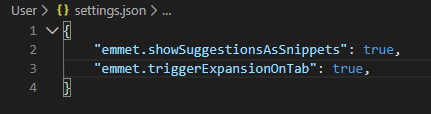
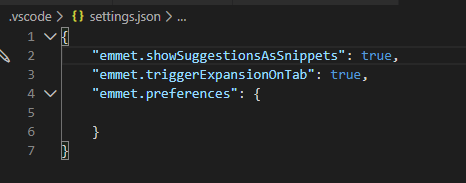
Hi, I'm getting the following error trying to use Emmet expansions: Running the contributed command: 'emmet.expandAbbreviation' failed. Here are my setting configs: I thought it was because I messed up some config but I removed the docker + wiped appdata folder but the issue persists. I get the expansion error trying to expand ! or anything like ul>li*3 for example. Is this a code-server issue?
-
I bought a ADATA SX8100NP to replace my smaller capacity Samsung 850 EVO a while back. The Adata drive has been running fine but recently it will just disappear from the array and won't show until I completely shutdown and restart the server. I tried re-seating it the very first time it happened but recently the issue kept coming back. I forgot to grab the full diagnostics from last time before I restarted the server but I've attached SMART report. I've been reading mixed info about SMART tests on NVME drives so I'm not sure if this is an indication there's something wrong with the drive's functionality. The drive is plugged in directly to my motherboard (B450 Tomahawk Max) via the M.2 slot. ADATA_SX8100NP_2J3620078167-20200618-0908.txt
-
Anyone else getting an issue like below where the torrents stop announcing/ updating to the trackers? They seed perfectly normal for an amount of time and when I happen to check it after some time, they look like the ones below with (0) on Seeds and Peers. I have to manually pause and restart the seed to get the Seeds and Peers to display and the Tracker Status to read OK. Any idea what's causing this? I'm behind PIA and again, things seem to seed perfectly find initially after I restart the torrents. It's after some unknown time for some unknown reason they stop announcing.

-
Hi, I've gotten everything working according to detailed post on reddit and have Telegraf configured to report every 30s to InfluxDB. But I'm noticing that my disks are not spinning down ever since I started using Telegraf, InfluxDB, Grafana, and HDDTemp. Are the disks unable to be spun down because Telegraf and HDDTemp is collecting disk info? I tried disabling HDDTemp for now but it doesn't seem to be allowing the disks to be kept spun down. To be clear, I mean to keep the disks spun down within the array and on Unassigned Devices. I can spin down the disks in the array perfectly fine but they don't stay spun down even when nothing is accessing the array.
-
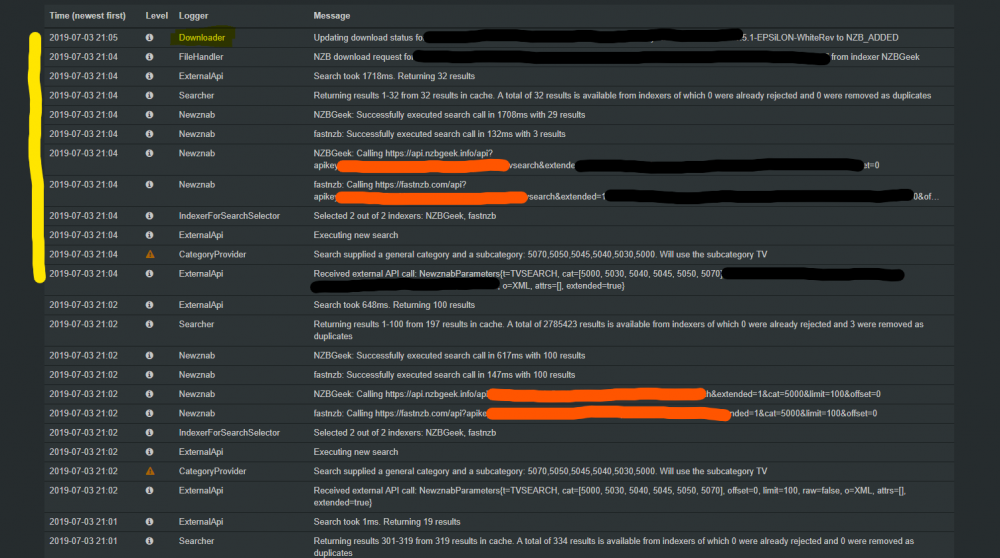
So I think I've found the problem which is when a batch search doesn't return results for any particular search, it botches for some reason and nothing gets piped over to sab, even if there were legit hits before.
-
I've this weird issue where season searches from within Sonarr will return results from my indexers but they don't get forwarded to SABnzbd. However everything works fine if I search each episode individually using the auto search function. Any idea why? The logs indicate there were results returned but it's just missing that last step of pushing it to SAB. The yellow logs are from the manual search.
-
Thanks for the tip. The password was generated and it just happened to coincide with this little issue. Will take note of that in the future.
-
Hello, I may have stumbled onto a small bug regarding VPN passwords. The password I'm using with my VPN servicer contains a "&". The reason I think it may be the password is that every time I enter the password and try to pull the container down, I get this message: Warning: SimpleXMLElement::addChild(): unterminated entity reference <my_pw_after_the_&> in /usr/local/emhttp/plugins/dynamix.docker.manager/include/CreateDocker.php on line 211 Every time I edit the docker again, the password field has been reset to the default. Additionally, I don't know if it's that error throwing the whole docker off but I also get this line right underneath: Removing container: binhex-delugevpn Successfully removed container 'binhex-delugevpn' After that, the docker log keeps repeating this message no matter what I do: 2018-02-20 01:00:24,953 DEBG received SIGCLD indicating a child quit e":"No such container: 4ca46b76cce4"} Hopefully more capable people will be able to tell me whether it's my set up that's incorrect or something with the code. I followed spaceinvaderone's video for the set up. Ninja edit: I found a workaround(?) by editing the pw field through the edit button and typing in the pw in quotes. Just typing it in quotes directly into the field did not yield the same results. I am able to launch the Web UI now with VPN enabled.

