





TheBawse
Members
-
Joined
-
Last visited
Everything posted by TheBawse
-
Jan 21 20:28:33 Tower kernel: sd 10:0:10:0: task abort: SUCCESS scmd(0x000000004380e880) Jan 21 20:28:33 Tower kernel: sd 10:0:10:0: attempting task abort!scmd(0x0000000051f87a4f), outstanding for 30516 ms & timeout 30000 ms Jan 21 20:28:33 Tower kernel: sd 10:0:10:0: [sdu] tag#2860 CDB: opcode=0x88 88 00 00 00 00 00 01 96 80 f0 00 00 04 00 00 00 Jan 21 20:28:33 Tower kernel: scsi target10:0:10: handle(0x0014), sas_address(0x5001e67464526ff6), phy(22) Jan 21 20:28:33 Tower kernel: scsi target10:0:10: enclosure logical id(0x5001e67464526fff), slot(22) Jan 21 20:28:33 Tower kernel: sd 10:0:10:0: No reference found at driver, assuming scmd(0x0000000051f87a4f) might have completed Jan 21 20:28:33 Tower kernel: sd 10:0:10:0: task abort: SUCCESS scmd(0x0000000051f87a4f) Jan 21 20:28:33 Tower kernel: sd 10:0:10:0: attempting task abort!scmd(0x000000001715f78a), outstanding for 30431 ms & timeout 30000 ms Jan 21 20:28:33 Tower kernel: sd 10:0:10:0: [sdu] tag#2848 CDB: opcode=0x88 88 00 00 00 00 00 01 96 9c f0 00 00 04 00 00 00 Jan 21 20:28:33 Tower kernel: scsi target10:0:10: handle(0x0014), sas_address(0x5001e67464526ff6), phy(22) Jan 21 20:28:33 Tower kernel: scsi target10:0:10: enclosure logical id(0x5001e67464526fff), slot(22) Jan 21 20:28:33 Tower kernel: sd 10:0:10:0: No reference found at driver, assuming scmd(0x000000001715f78a) might have completed Jan 21 20:28:33 Tower kernel: sd 10:0:10:0: task abort: SUCCESS scmd(0x000000001715f78a) Yeah...No idea what it means though
-
I'll check again. Didn't see any first time.
-
Thanks. Did you see disk errors in the diag file? I'll look into the firmware on my HBAs. I assumed I had the lastest.
-
PSU is new and all cables were replaced a few months ago with startech SAS to SATA cables.
-
No, I turned off docker and want doing any other work.
-
I just upgraded a drive to something larger and upon starting my rebuild I noticed my speeds are really slow. I usually am between 75-100mb/s and I haven't gone above 25mb/s. I took a look through my logs but I didn't see anything that could explain the bottleneck. I have attached my diagnostics if someone could take a look and give me a second opinion it would be much appreciated. tower-diagnostics-20230121-2028.zip
-
Thanks for this. Up and running now. I looked but didn't see if there was a unraid team # to join?
-
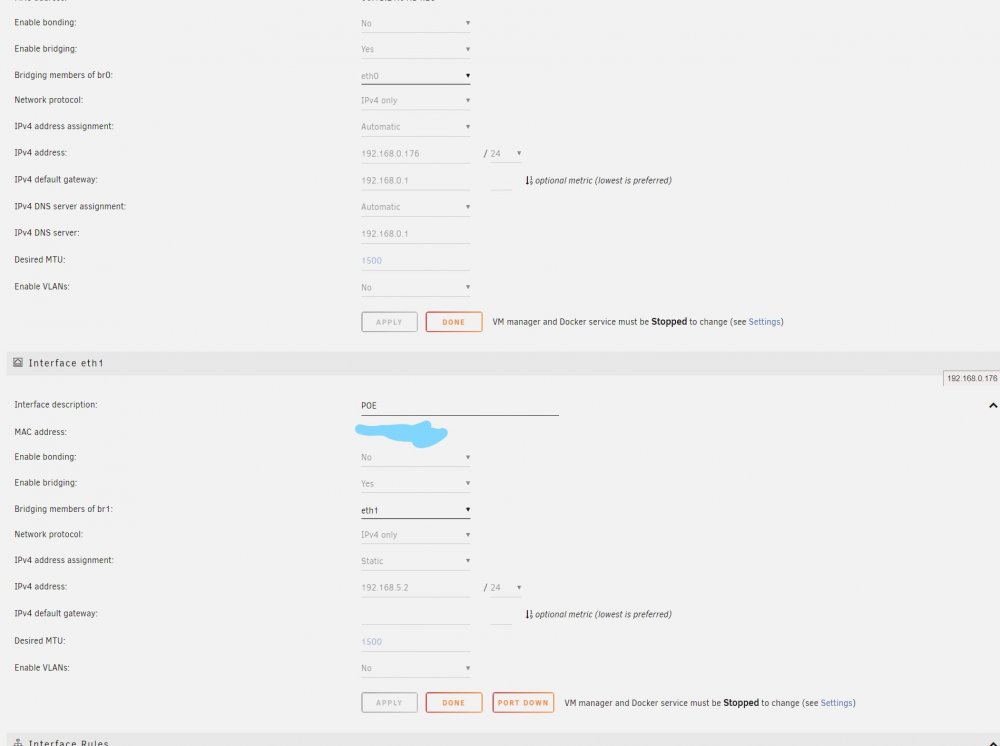
Has anyone managed to get the two NIC's option spaceinvader referenced instead of the VLAN to work properly? I followed his video and couldn't get it to work. I have two NIC's (eth0 or Br0 and eth1 or Br1) and I have set docker to use the Br1 custom network I created. When I open the WebUI for Shinobi in the browser it times out and won't connect to the IP. I wanted to have my cameras on a separate network isolated from my main that has my home devices and internet access as was mentioned in the YT video. I currently have eth1 connected to an old router set to the 192.168.5.0 range and from there a POE unmanaged switch powering my IP cameras.
.thumb.png.764f9e79b965e9c922d365ccea9b64f2.png)
.thumb.png.ce22b6ebd43de647115162cac7bf1a18.png)
-
Not sure if this is the correct thread to post in. Ever since updating to V6.7 my Plex container has stopped working. The issue I'm having is when attempting to login through the browser I'm getting "This site can’t be reached". I'm going through the IP http://192.168.0.130:32400/web/index.html. It has been working fine for over a year since I first installed until now.
-
Thanks. I just started using it. The issue i'm having is even when I attempt to manually add metadata through searching on the various databases available it won't apply it to the media in question. e.g: simpsons. I search on tvdb...find it...tell plex to apply it...and no thumbnails or episode title are applied. Weird thing is for movies there are no metedata issues plex found most of them and added thumbnails and titles, and for the ones it couldn't find i was able to apply manually. its just tv shows that won't work. Another question. If I wanted to start again from scratch. How would I go about removing plexserver along with all of the files and docker container off the share its using and start over? 100% clean re-install Thanks
-
Has anyone ever experienced Plex not loading the proper Metadata for certain scanned playlists? My plex server is setup and all of my Movie playlists have been properly scanned and the thumbnails loaded and applied, but in my TV playlist only a quarter have been properly scanner and the rest are blank and even when doing manually not proper title or thumbnails are applied.

.png.72ac48e132bd5aedf875797248d84035.png)
.png.141a628575bca42b838af462a9a7a30e.png)
