





Invincible
Members
-
Joined
-
Last visited
Everything posted by Invincible
-
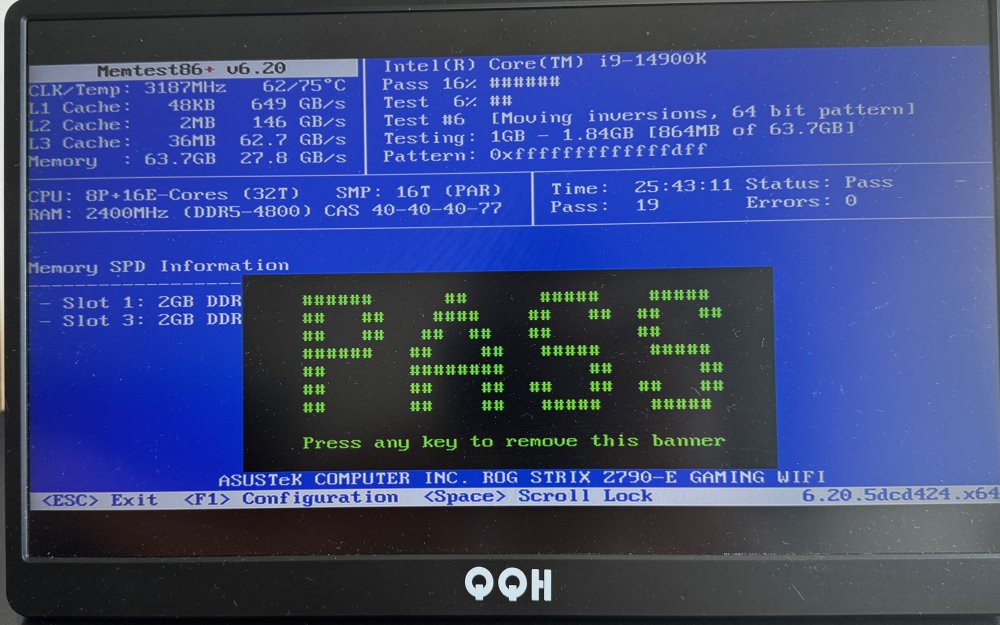
I ran the unraid built in memtest for 24 hours with both ram sticks and it found no errors. I never had XMP enabled in the first place. Is there anything else I can test? I attached the latest syslog with a crash as well syslog-previous
-
Pulled this from the logs but does anyone know whats going on beside the plex being the culprit? syslog-previous
-
Here are the logs from the latest crashsyslog-previous
-
It ran 6 passes in the last 7.5 hours with 0 errors, is there anything else it could be? I've already tried swapping ram to a new pair and that didnt resolve it.
-
This is a fresh build so no, should I do the one included in my bios or is there another recommended one?
-
Server hasnt crashed since this change but just wondering if this is something I should be concerned about? Feb 27 12:04:08 Anton kernel: invalid opcode: 0000 [#1] PREEMPT SMP NOPTI Feb 27 12:04:08 Anton kernel: CPU: 8 PID: 2951 Comm: find Tainted: P O 6.1.74-Unraid #1 Feb 27 12:04:08 Anton kernel: Hardware name: ASUS System Product Name/ROG STRIX Z790-E GAMING WIFI, BIOS 2001 02/15/2024 Feb 27 12:04:08 Anton kernel: RIP: 0010:task_work_run+0x70/0x80 Feb 27 12:04:08 Anton kernel: Code: 8d a5 74 07 00 00 4c 89 e7 e8 50 68 7f 00 4c 89 e7 e8 2e 69 7f 00 48 89 df 48 8b 1b 48 8b 47 08 ff d0 0f 1f 00 e8 1e 29 7f 00 <48> 85 db 75 e7 eb 9b 5b 5d 41 5c c3 cc cc cc cc 0f 1f 44 00 00 48 Feb 27 12:04:08 Anton kernel: RSP: 0018:ffffc9003b187ef0 EFLAGS: 00010286 Feb 27 12:04:08 Anton kernel: RAX: 0000000000000000 RBX: 0000000000000000 RCX: 00000000000017ab Feb 27 12:04:08 Anton kernel: RDX: 0000000080000000 RSI: ffffffff820d8766 RDI: 0000000000000008 Feb 27 12:04:08 Anton kernel: RBP: ffff8889bdf0a000 R08: 0000000000000000 R09: ffff888966d10538 Feb 27 12:04:08 Anton kernel: R10: 0000000000000000 R11: 0000000000000000 R12: ffff8889bdf0a774 Feb 27 12:04:08 Anton kernel: R13: 0000000000000000 R14: 0000000000000000 R15: 0000000000000000 Feb 27 12:04:08 Anton kernel: FS: 0000150524948740(0000) GS:ffff88903f200000(0000) knlGS:0000000000000000 Feb 27 12:04:08 Anton kernel: CS: 0010 DS: 0000 ES: 0000 CR0: 0000000080050033 Feb 27 12:04:08 Anton kernel: CR2: 000014c0da18a000 CR3: 00000009bb6cc000 CR4: 0000000000752ee0 Feb 27 12:04:08 Anton kernel: PKRU: 55555554 Feb 27 12:04:08 Anton kernel: Call Trace: Feb 27 12:04:08 Anton kernel: <TASK> Feb 27 12:04:08 Anton kernel: ? __die_body+0x1a/0x5c Feb 27 12:04:08 Anton kernel: ? die+0x30/0x49 Feb 27 12:04:08 Anton kernel: ? do_trap+0x7b/0xfe Feb 27 12:04:08 Anton kernel: ? task_work_run+0x70/0x80 Feb 27 12:04:08 Anton kernel: ? task_work_run+0x70/0x80 Feb 27 12:04:08 Anton kernel: ? do_error_trap+0x6e/0x98 Feb 27 12:04:08 Anton kernel: ? task_work_run+0x70/0x80 Feb 27 12:04:08 Anton kernel: ? exc_invalid_op+0x4c/0x60 Feb 27 12:04:08 Anton kernel: ? task_work_run+0x70/0x80 Feb 27 12:04:08 Anton kernel: ? asm_exc_invalid_op+0x16/0x20 Feb 27 12:04:08 Anton kernel: ? task_work_run+0x70/0x80 Feb 27 12:04:08 Anton kernel: exit_to_user_mode_prepare+0x75/0x112 Feb 27 12:04:08 Anton kernel: syscall_exit_to_user_mode+0x18/0x2c Feb 27 12:04:08 Anton kernel: do_syscall_64+0x77/0x81 Feb 27 12:04:08 Anton kernel: entry_SYSCALL_64_after_hwframe+0x64/0xce Feb 27 12:04:08 Anton kernel: RIP: 0033:0x150524a4f190 Feb 27 12:04:08 Anton kernel: Code: 8b 05 8c 3c 0e 00 64 c7 00 0d 00 00 00 eb a9 66 2e 0f 1f 84 00 00 00 00 00 90 80 3d 51 c4 0e 00 00 74 17 b8 03 00 00 00 0f 05 <48> 3d 00 f0 ff ff 77 48 c3 0f 1f 80 00 00 00 00 48 83 ec 18 89 7c Feb 27 12:04:08 Anton kernel: RSP: 002b:00007ffec98eb758 EFLAGS: 00000202 ORIG_RAX: 0000000000000003 Feb 27 12:04:08 Anton kernel: RAX: 0000000000000000 RBX: 0000000000444c90 RCX: 0000150524a4f190 Feb 27 12:04:08 Anton kernel: RDX: 0000000000000000 RSI: 000000000000000c RDI: 000000000000000c Feb 27 12:04:08 Anton kernel: RBP: 000000000000000b R08: 000000000000000b R09: 000000000044ed30 Feb 27 12:04:08 Anton kernel: R10: 0000000000000100 R11: 0000000000000202 R12: 0000000000000000 Feb 27 12:04:08 Anton kernel: R13: 000000000000000b R14: 000000000000000b R15: 0000000000444c90 Feb 27 12:04:08 Anton kernel: </TASK> Feb 27 12:04:08 Anton kernel: Modules linked in: xt_mark xt_CHECKSUM ipt_REJECT nf_reject_ipv4 ip6table_mangle ip6table_nat iptable_mangle xt_nat xt_tcpudp vhost_net tun vhost vhost_iotlb tap veth xt_conntrack nf_conntrack_netlink nfnetlink xfrm_user xfrm_algo xt_addrtype br_netfilter xfs dm_crypt dm_mod md_mod zfs(PO) zunicode(PO) zzstd(O) zlua(O) zavl(PO) icp(PO) zcommon(PO) znvpair(PO) spl(O) tcp_diag inet_diag hwmon_vid iptable_nat xt_MASQUERADE nf_nat nf_conntrack nf_defrag_ipv6 nf_defrag_ipv4 wireguard curve25519_x86_64 libcurve25519_generic libchacha20poly1305 chacha_x86_64 poly1305_x86_64 ip6_udp_tunnel udp_tunnel libchacha ip6table_filter ip6_tables iptable_filter ip_tables x_tables efivarfs bridge stp llc bonding tls i915 intel_rapl_msr intel_rapl_common x86_pkg_temp_thermal intel_powerclamp coretemp kvm_intel kvm iosf_mbi drm_buddy i2c_algo_bit ttm drm_display_helper btusb crct10dif_pclmul btrtl crc32_pclmul crc32c_intel btbcm drm_kms_helper ghash_clmulni_intel btintel sha512_ssse3 Feb 27 12:04:08 Anton kernel: sha256_ssse3 sha1_ssse3 bluetooth aesni_intel drm crypto_simd cryptd mei_hdcp mei_pxp intel_gtt rapl ecdh_generic ecc intel_cstate wmi_bmof mpt3sas agpgart i2c_i801 mei_me intel_uncore nvme i2c_smbus mei igc ahci i2c_core syscopyarea nvme_core raid_class libahci sysfillrect scsi_transport_sas vmd sysimgblt fb_sys_fops thermal fan video tpm_crb tpm_tis tpm_tis_core wmi tpm backlight intel_pmc_core acpi_tad acpi_pad button unix Feb 27 12:04:08 Anton kernel: ---[ end trace 0000000000000000 ]--- Feb 27 12:04:08 Anton kernel: RIP: 0010:task_work_run+0x70/0x80 Feb 27 12:04:08 Anton kernel: Code: 8d a5 74 07 00 00 4c 89 e7 e8 50 68 7f 00 4c 89 e7 e8 2e 69 7f 00 48 89 df 48 8b 1b 48 8b 47 08 ff d0 0f 1f 00 e8 1e 29 7f 00 <48> 85 db 75 e7 eb 9b 5b 5d 41 5c c3 cc cc cc cc 0f 1f 44 00 00 48 Feb 27 12:04:08 Anton kernel: RSP: 0018:ffffc9003b187ef0 EFLAGS: 00010286 Feb 27 12:04:08 Anton kernel: RAX: 0000000000000000 RBX: 0000000000000000 RCX: 00000000000017ab Feb 27 12:04:08 Anton kernel: RDX: 0000000080000000 RSI: ffffffff820d8766 RDI: 0000000000000008 Feb 27 12:04:08 Anton kernel: RBP: ffff8889bdf0a000 R08: 0000000000000000 R09: ffff888966d10538 Feb 27 12:04:08 Anton kernel: R10: 0000000000000000 R11: 0000000000000000 R12: ffff8889bdf0a774 Feb 27 12:04:08 Anton kernel: R13: 0000000000000000 R14: 0000000000000000 R15: 0000000000000000 Feb 27 12:04:08 Anton kernel: FS: 0000150524948740(0000) GS:ffff88903f200000(0000) knlGS:0000000000000000 Feb 27 12:04:08 Anton kernel: CS: 0010 DS: 0000 ES: 0000 CR0: 0000000080050033 Feb 27 12:04:08 Anton kernel: CR2: 000014c0da18a000 CR3: 00000009bb6cc000 CR4: 0000000000752ee0 Feb 27 12:04:08 Anton kernel: PKRU: 55555554 syslog
-
Thanks this worked for the other error i was getting! I'm not seeing that now
-
syslog-previous Here is the syslog after the shutdown
-
I enabled it on a cache only share on my server, when does the file populate? I thought it would start posting the logs there instantly I'll keep it running till i see a crash again and then post here
-
I recently changed my server hardware (CPU, MB, RAM) and since doing that i've been dealing with random shutdowns overnight. I can see the computer is still on since my motherboard still has power and the Q-Code LED is still showing me CPU temp but i get nothing on a monitor if i connect to it and I can't ping the server either. All I can do is reboot to get it back online. I'm seeing xfs corruption on my disks in the log but i've tried running xfs_repair through the webUI with just changing the flag from -n to -v but that doesn't seem to resolve it either. Is there something else i'm missing? Feb 26 09:39:23 Anton kernel: XFS (dm-3): Metadata corruption detected at xfs_dinode_verify+0xa0/0x732 [xfs], inode 0x1876666ce dinode While i was reading into this error I saw it could be either disk3 or disk4 so i ran the repair on both but I still see this error after anton-diagnostics-20240226-0945.zip
-
Recently upgraded from 6.11.5 to 6.12 and i'm getting random crashes where the entire server just dies. I would let it run by itself for a while and then when I go to check on it later it would be offline. I'd lose connection to the web server, I\wouldn't be able to ping the server and there's nothing displayed when I connect a monitor to it so i'd have to hard reboot it. I'm just downgrading back to 6.11.5 to see if it's an update specific issue but attaching the logs here to see if anyone knows why this would be happening anton-diagnostics-20230616-1335.zip
-
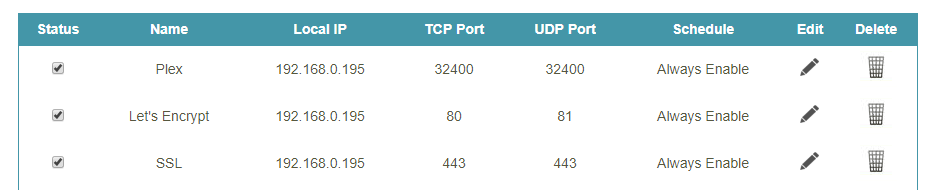
Looks like there was a separate section on my router to configure this. That seemed to fix it, thanks!
-
It doesn't sound like that's what is causing the error though. It used to work with the settings I had before which is why i'm not sure why it would just stop working overnight.
-
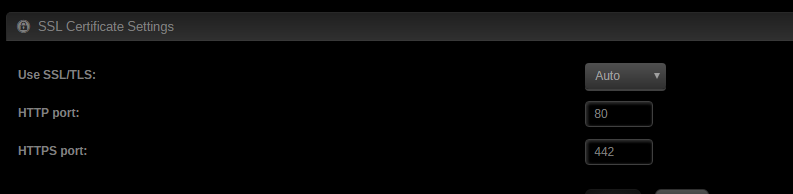
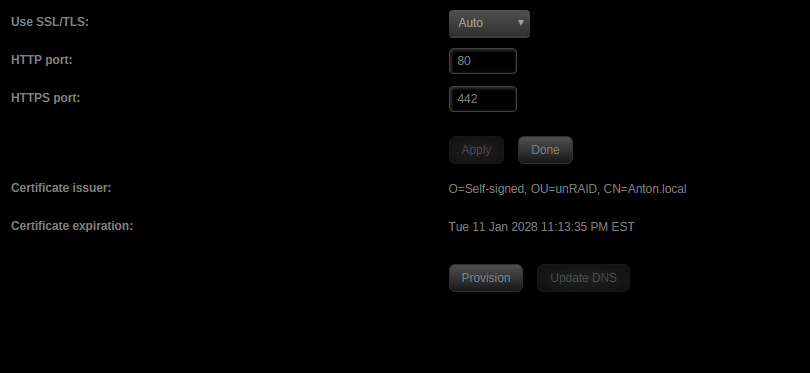
If you're referring to the first image then that's the unraid internal settings (Under Settings -> Identification) not the docker settings. I changed unraid to go to port 442 so it doesn't interfere with LE's 443 setting.
-
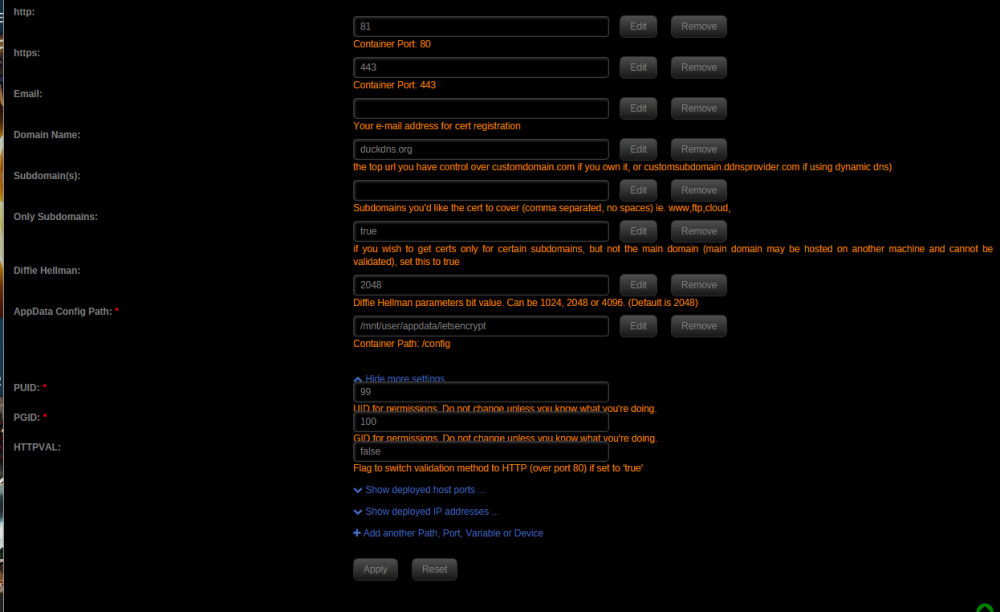
The latest update (from last night) seems to have broken something for me. I haven't changed any of the settings however i noticed there was a new "Validation" option in the docker settings which is set to HTTP. I also noticed that the HTTPVAL setting was missing from the show more settings tab. Any ideas what would have broken the config for me? Here are the logs: [cont-init.d] 10-adduser: exited 0. [cont-init.d] 20-config: executing... [cont-init.d] 20-config: exited 0. [cont-init.d] 30-keygen: executing... using keys found in /config/keys [cont-init.d] 30-keygen: exited 0. [cont-init.d] 50-config: executing... Backwards compatibility check. . . 2048 bit DH parameters present SUBDOMAINS entered, processing Only subdomains, no URL in cert Sub-domains processed are: -d ******.duckdns.org E-mail address entered: ********** Generating new certificate Saving debug log to /var/log/letsencrypt/letsencrypt.log Plugins selected: Authenticator standalone, Installer None Obtaining a new certificate Performing the following challenges: http-01 challenge for ******.duckdns.org Waiting for verification... Cleaning up challenges Failed authorization procedure. ******.duckdns.org (http-01): urn:acme:error:unauthorized :: The client lacks sufficient authorization :: Invalid response from http://******.duckdns.org/.well-known/acme-challenge/MKKaK-NvviGlS4ME6FlQ5uTBojzr8WHznM36sgR8Ujo: "<html> <head><title>404 Not Found</title></head> <body bgcolor="white"> <center><h1>404 Not Found</h1></center> <hr><center>" IMPORTANT NOTES: - The following errors were reported by the server: Domain: ******.duckdns.org Type: unauthorized Detail: Invalid response from http://******.duckdns.org/.well-known/acme-challenge/MKKaK-NvviGlS4ME6FlQ5uTBojzr8WHznM36sgR8Ujo: "<html> <head><title>404 Not Found</title></head> <body bgcolor="white"> <center><h1>404 Not Found</h1></center> <hr><center>" To fix these errors, please make sure that your domain name was entered correctly and the DNS A/AAAA record(s) for that domain contain(s) the right IP address. ERROR: Cert does not exist! Please see the validation error above. The issue may be due to incorrect dns or port forwarding settings. Please fix your settings and recreate the container root@localhost:# /usr/local/emhttp/plugins/dynamix.docker.manager/scripts/docker run -d --name="letsencrypt" --net="bridge" --privileged="true" -e TZ="America/New_York" -e HOST_OS="unRAID" -e "EMAIL"="*********" -e "URL"="duckdns.org" -e "SUBDOMAINS"="******" -e "ONLY_SUBDOMAINS"="true" -e "DHLEVEL"="2048" -e "VALIDATION"="http" -e "DNSPLUGIN"="" -e "PUID"="99" -e "PGID"="100" -p 81:80/tcp -p 443:443/tcp -v "/mnt/user/appdata/letsencrypt":"/config":rw linuxserver/letsencrypt 2dab690e979f92d6a66c2a7506fbb121324e105cd195d576fa5c141d067d0952
-
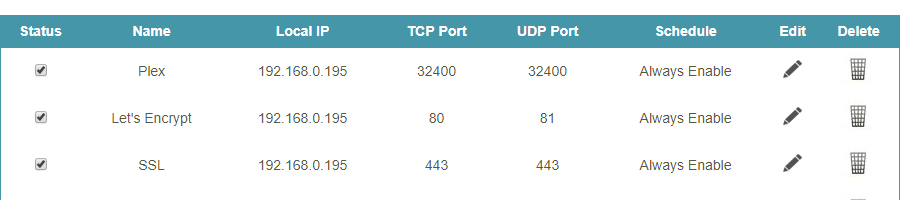
Going to mydomain.duckdns.org seems to take me to the unraid webgui instead of going through lets encrypt. I've been playing around with the settings as mentioned in the last few pages but i can't seem to get this working. I changed most of it back to what i had before. Here's what it is right now. I feel like it has to do with Unraid's HTTP port being set to 80 by default but i've tried changing that to 8008 and that didn't work either.
-
I was running into some issues after updating to unraid 6.4.0 so I tried to do a fresh install of plexpy i'm getting this error when i load up the web interface for the first time. I've tried deleting the previous appdata folder and letting it recreate all the files but that doesn't seem to have done anything . Any help would be appreciated, thanks in advance. 2018-01-14 20:49:06 - ERROR :: CP Server Thread-4 : WebUI :: /welcome : Uncaught TypeError: Cannot set property 'logging' of undefined. (welcome:202)
-
Is there any way to get a specific appdata folder out of the tarred file? I tried opening the file with both 7zip and winrar but then it throws an error once it reads 500k files or so. I have ~1 million files due to video thumbnail generation in plex
-
Which port should i be forwarding if im using this with PIA? Is it just 58946?


