






prongATO
Members
-
Joined
-
Last visited
Everything posted by prongATO
-
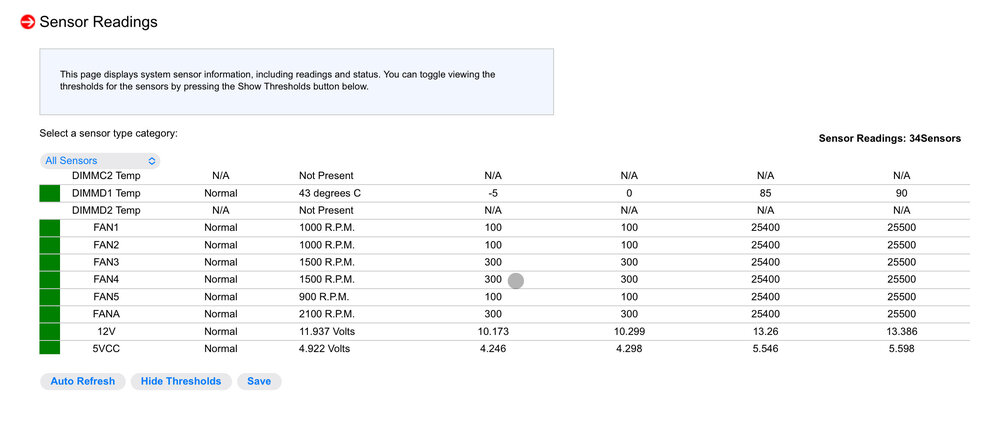
Sounds like you might need to use IPMITool to reset your values. Do you know what your lower threshold is for your fans? You’ll need to figure out how low you can run them and use IPMITool to set that in the BMC so it doesn’t freak out and ramp them up to full power. I set mine to correspond to my different fans in the system.
-
It makes total sense and I can’t believe I didn’t think about it. I don’t understand all the inner-workings of Unraid but I completely forgot I changed it from Auto to Reconstruct write when I was having to rebuild drives over and over again while tracking down the issue of drives intermittently throwing read and write errors. (It was a combination of things, an add on, software side and a 5 in 3 hot-swap cage where the backplane had something fail and had to be replaced)
-
Aka reconstruct write? Yes, I had that enabled instead of auto when I was troubleshooting my disk error issues. I think you’re spot-on, I just checked the logs and when the mover script ran overnight, it spun up the whole array when it moved a few items.
-
Just accessed the Windows Backup share manually to copy the files to a spinning HDD on the MCX1 system and it did NOT spin up the whole array. So, it's not anything to do with disk 9, it's something the process Windows Backup is doing when opening and modifying the files. I am at a loss, I'm just going to quit using unraid for Windows Backups. Nobody else seems to have an idea of what's going on, so F it.
-
I guess, at this point, if I want to keep all my drives from spinning up every hour, stop using unraid for my windows backup location. BTW, it's Windows 10.
-
I just tried opening another file on disk 9. It also stores my User shares (for Windows), Time Machine for my MacOS and a few other things and accessing a file manually by opening it via user share, it does NOT spin up the whole array. So it's SOMETHING Windows Backup is doing.
-
I just checked and disk 9 is on one of the standard SATA motherboard ports.
-
BTW, I appreciate your help. Can't seem to get anyone else to even look at it. I feel like I've narrowed it down considerably but just need someone that understands the innerworkings of Unraid more than I do. If it's a setting I need to check or change. I've tried everything, I tried changing the Windows Backup share (only on disk 9) to use the cache instead of writing to the array, I've managed to see a repeatable, maybe ancillary cause, when Windows Backup writes to disk 9. Other than when that happens, the array stays spun down. I can also demonstrate that when I have Kodi access a TV show, Movie or Song, it doesn't spin up the entire array, just the disk it's on.
-
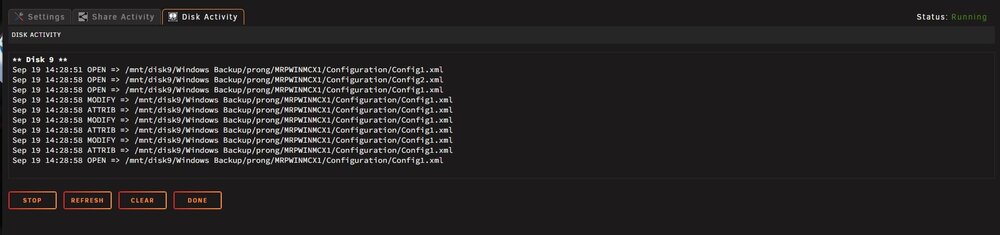
I've tried disabling all plugins and dockers, no joy. I can spin the array down and it stays down until 30 past the hour when Windows Backup opens a file and modifies it on disk 9. As you can see referenced in the diagnostics attached. Windows Backup opens and modifies a file every hour at 30 past the hour. So I've seen what seems to cause the array to spin up and can predict when it happens. I just don't get why when only disk 9 and parity should spin up, the whole array spins up and has 5-10 reads, per disk. mrpunrfsx1-diagnostics-20240919-2010.zip
-
I uninstalled Fix Common Problems as part of my investigation. I did have that option checked (skip spun down disks) I just can't figure out why when Windows Backup accesses JUST disk 9 , it spins the whole array up.
-
I just wanted to add, I think this was a multi-faceted issue. I think there was an add-on that contributed to the intermittent write/read errors to disks. I ended up changing/upgrading every single component in my system. I changed the motherboard, processor (E3 to E5 Xeon), RAM (DDR3 to DDR4), drive SATA cables, LBA breakout cables, power supply (660W Seasonic to 850W Seasonic), power supply cables, PS cabling configuration and LBA card. Even after changing all that, I ended up with errors again on one disk and it couldn't be rebuilt, even in safe mode (like worked before). I just ordered a new 5 in 3 hot swap cage, I narrowed down the lion's-share of the issues to one 5 in 3 hot swap cage (an old iStarUSA cage) and am replacing that cage. I am OCD so I'll eventually change the other 3 cages (I have space for a total of 20 3.5" spinning HDD) but at 130.00 a pop, it's not cheap. I will say that I think the Silverstone 5 in 3 I chose is the nicest HDD cage I've used and I like that it's tray-less. this is the one I ended up going with:https://www.amazon.com/dp/B07ZWK1337?ref=ppx_yo2ov_dt_b_fed_asin_title
-
I changed the backup shares to use the cache_sdd then move to the array. We will see if that helps the spin-up issue. Thanks for all the help, BTW..
-
I just noticed a correlation, not sure why it's happening; hopefully someone can explain what's going on. Windows Backup is writing to a file on disk 9 at approximately 30 minutes past, every hour. It should be spinning Disk 9 and Parity up. Then within seconds, the entire array spins up corresponding to Windows Backup writing to Disk 9. Windows Backup only exists on Disk 9, by design. The share is only on Disk 9. Additional information: the share Windows Backup is set to not use the cache disk and write directly to the array. From File Activity (disk): ** Disk 9 ** Sep 19 15:29:19 MODIFY => /mnt/disk9/Windows Backup/prong/MRPWINMCX1/Configuration/Config1.xml Sep 19 15:29:19 ATTRIB => /mnt/disk9/Windows Backup/prong/MRPWINMCX1/Configuration/Config1.xml Sep 19 15:29:19 MODIFY => /mnt/disk9/Windows Backup/prong/MRPWINMCX1/Configuration/Config1.xml Sep 19 15:29:19 ATTRIB => /mnt/disk9/Windows Backup/prong/MRPWINMCX1/Configuration/Config1.xml Sep 19 15:29:19 OPEN => /mnt/disk9/Windows Backup/prong/MRPWINMCX1/Configuration/Config1.xml Sep 19 16:29:40 OPEN => /mnt/disk9/Windows Backup/prong/MRPWINMCX1/Configuration/Config1.xml Sep 19 16:29:40 OPEN => /mnt/disk9/Windows Backup/prong/MRPWINMCX1/Configuration/Config2.xml Sep 19 16:29:40 OPEN => /mnt/disk9/Windows Backup/prong/MRPWINMCX1/Configuration/Config1.xml Sep 19 16:29:40 MODIFY => /mnt/disk9/Windows Backup/prong/MRPWINMCX1/Configuration/Config1.xml Sep 19 16:29:40 ATTRIB => /mnt/disk9/Windows Backup/prong/MRPWINMCX1/Configuration/Config1.xml Sep 19 16:29:40 MODIFY => /mnt/disk9/Windows Backup/prong/MRPWINMCX1/Configuration/Config1.xml Sep 19 16:29:40 ATTRIB => /mnt/disk9/Windows Backup/prong/MRPWINMCX1/Configuration/Config1.xml Sep 19 16:29:40 MODIFY => /mnt/disk9/Windows Backup/prong/MRPWINMCX1/Configuration/Config1.xml Sep 19 16:29:40 ATTRIB => /mnt/disk9/Windows Backup/prong/MRPWINMCX1/Configuration/Config1.xml Sep 19 16:29:40 OPEN => /mnt/disk9/Windows Backup/prong/MRPWINMCX1/Configuration/Config1.xml Sep 19 17:30:02 OPEN => /mnt/disk9/Windows Backup/prong/MRPWINMCX1/Configuration/Config1.xml Sep 19 17:30:02 OPEN => /mnt/disk9/Windows Backup/prong/MRPWINMCX1/Configuration/Config2.xml Sep 19 17:30:02 OPEN => /mnt/disk9/Windows Backup/prong/MRPWINMCX1/Configuration/Config1.xml Sep 19 17:30:02 MODIFY => /mnt/disk9/Windows Backup/prong/MRPWINMCX1/Configuration/Config1.xml Sep 19 17:30:02 ATTRIB => /mnt/disk9/Windows Backup/prong/MRPWINMCX1/Configuration/Config1.xml Sep 19 17:30:02 MODIFY => /mnt/disk9/Windows Backup/prong/MRPWINMCX1/Configuration/Config1.xml Sep 19 17:30:02 ATTRIB => /mnt/disk9/Windows Backup/prong/MRPWINMCX1/Configuration/Config1.xml Sep 19 17:30:02 MODIFY => /mnt/disk9/Windows Backup/prong/MRPWINMCX1/Configuration/Config1.xml Sep 19 17:30:02 ATTRIB => /mnt/disk9/Windows Backup/prong/MRPWINMCX1/Configuration/Config1.xml Sep 19 17:30:02 OPEN => /mnt/disk9/Windows Backup/prong/MRPWINMCX1/Configuration/Config1.xml Syslog Spin-ups: (I've shortened these logs so it's not a WOT but it is spinning up the entire array along with disk 9 and parity) Sep 19 15:29:20 MRPUNRFSX1 emhttpd: read SMART /dev/sdh Sep 19 15:29:20 MRPUNRFSX1 emhttpd: read SMART /dev/sdg Sep 19 15:29:20 MRPUNRFSX1 emhttpd: read SMART /dev/sdd ... Sep 19 16:29:41 MRPUNRFSX1 emhttpd: read SMART /dev/sdj Sep 19 16:29:41 MRPUNRFSX1 emhttpd: read SMART /dev/sdi Sep 19 16:29:50 MRPUNRFSX1 emhttpd: read SMART /dev/sdh ... Sep 19 17:30:03 MRPUNRFSX1 emhttpd: read SMART /dev/sdj Sep 19 17:30:03 MRPUNRFSX1 emhttpd: read SMART /dev/sdi Sep 19 17:30:12 MRPUNRFSX1 emhttpd: read SMART /dev/sdh
-
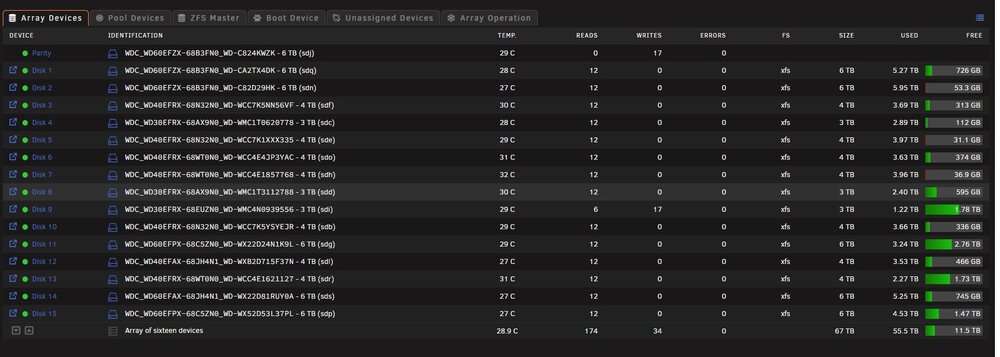
I have no idea what is spinning the disks up. I tried disabling all plugins and dockers and something still spins them up every hour. I spun them down and can see when file activity (windows backup) accessed disk 9 but all the others spun up with something making a few reads to the entire array shortly afterward. I'd understand if disk 9 and Parity spun up but why did the entire damn array spin up? Maybe because I have a MacOS machine with Time Machine pointed to disk 9 also? mrpunrfsx1-diagnostics-20240919-1435.zip
-
It's a cheap one I got from Amazon Vine. We will see if it causes issues or not. I'm about to upgrade my router on the other side of my AT&T router to a Ubiquiti Cloud Gateway Max or Dream Machine. I haven't decided how much I want to allot for that purchase yet. I was looking at bifurcation on the new motherboard and can choose PCIE 1.0, 2.0 or 3.0 per slot in the BIOS.
-
Since I have all the new expansion slots on my new board, I'm going to get an SFP+ card to take over the non-IPMI on my unraid server. I see people keep recommending Mellanox but I'd probably rather go with Intel. What would your choice be for a single direct connected SFP+ card to my switch with a SFP+ interface? This is the one I was planning on picking up: https://www.amazon.com/gp/product/B06WWB5RT7/ref=ox_sc_saved_title_2?smid=A2WW81I15Z72MC&th=1
-
Thanks for the suggestion, I have my ISOS, Appdata, domains and system on an NVMe SSD already.
-
I’ve searched other threads, installed the File Activity plug-in and I can’t figure out why my drives won’t stay spun down. I rolled back from 6.12.13 to 6.12.8 to see if that helped but it didn’t. I’ve tried disabling each docker and even disabling dockers altogether and nothing seems to work. Any help is greatly appreciated. They either spin right back up or after about 5 to 12 minutes, the entire array spins back up. I’ve just let the server sit there with a movie playing in the background and the spin down time I have set to 45 minutes happens, the disks all spin back up minutes later, without fail. mrpunrfsx1-diagnostics-20240917-0208.zip
-
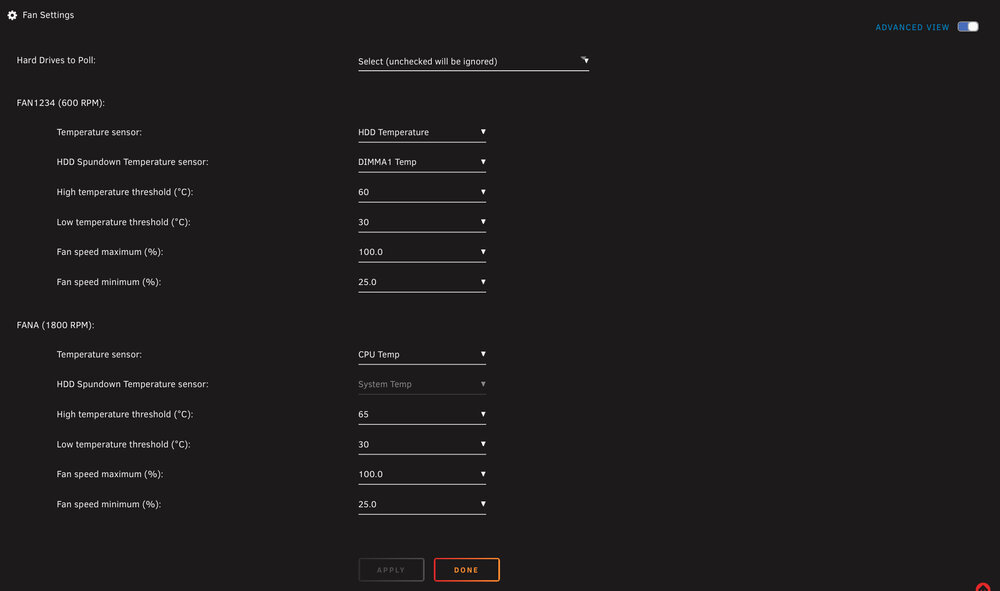
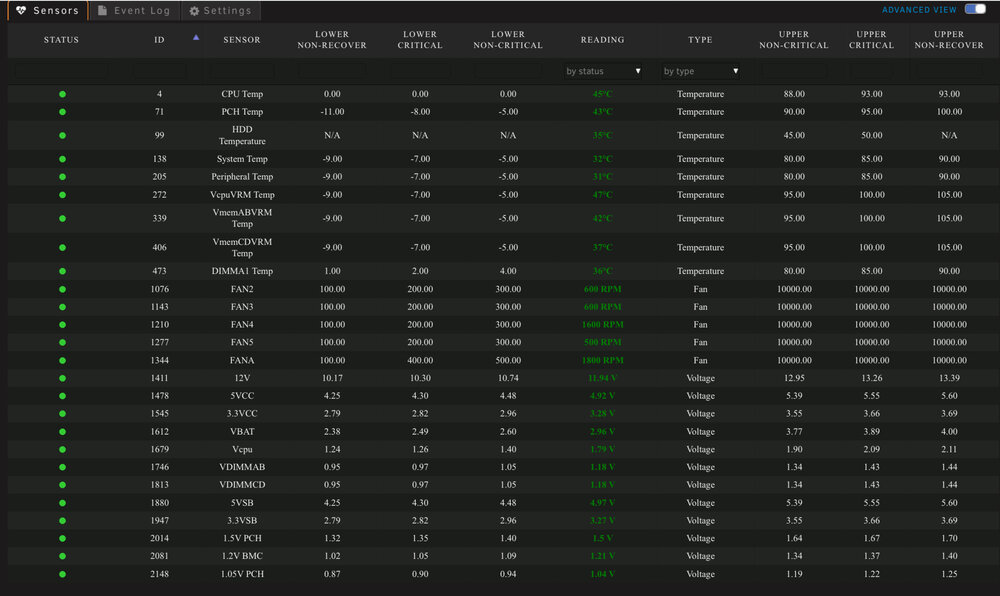
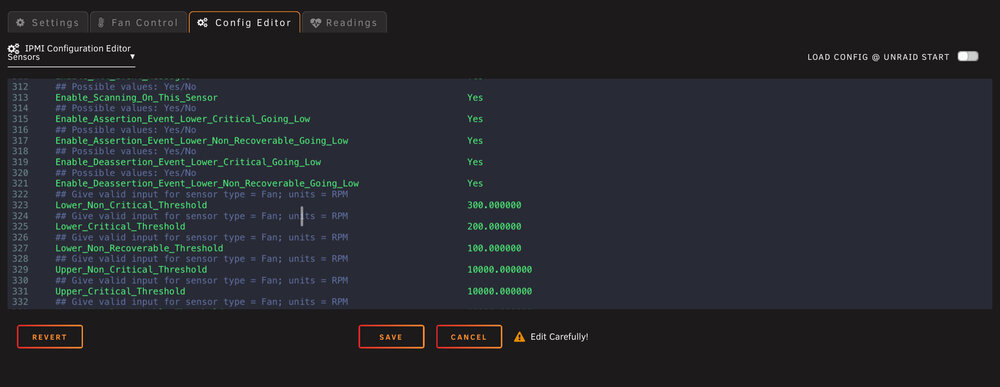
I ran into an issue with the plug-in IPMI Support fan control and figured out how to resolve it. I replaced my Supermicro X10SL7-F with an X10SRL-F and the fan speed wasn’t working properly. Every time the plug-in would poll the temperatures and adjust the fans, it would adjust them then would immediately ramp back up to full speed. I tried everything, reconfiguring the fans and what headers they were plugged into, checking and double checking the BIOS, etc. SOLUTION: Log into the Supermicro IPMI web interface. You need to log into the BMC/IPMI web interface and choose Maintenance > Unit Reset > Reset (click on the reset button to reboot the IPMI device). After I performed that reset, all of the PWM fans responded properly to the IPMI Support/Fan Control configuration. Additionally, most tell you how to use impitool (nerd tools) to define the low and high for the fans. I highly recommend using the IPMI Support plug-in to edit the sensors file (Settings > IPMI > Config Editor > Sensors). Put in your values that match the fans you’re using. If you’re using lower spinning fans, the default values will start throwing errors for the fans going low. For instance, my Noctua PWM fans can run as low as 300 RPM but with the default values of the sensors file, it would cause errors for the fans going low non critical and critical because the low values are set too high by default.
-
As we spoke in private messages, I have the new motherboard/processor and RAM coming sometime this week. The drive that was referenced with all the errors was the 3TB drive I removed from the array and system. I've seen no errors booted into normal mode since I removed about 14 plugins. I think you were spot-on when you postulated that it may be a software issue, rather than a hardware issue. Again, I've experienced 0 disk errors since removing the plugins. Next week, I will be installing the new motherboard/processor/RAM when everything arrives. I will also complete the modifications to the remaining three 5-in-3 cages. (completely cleaning every cage, replacing the fans with Noctua NF-R8 redux-1800 and making some minor modifications to fit the 25mm depth of the fans). I am 99% sure your idea that it was, in fact, a software issue causing the intermittent HD errors that plagued me for months. I will mark this as solved. Thank you SO much for your help. When I get all the new hardware installed and configured, I'll post a final diagnostic package to see if there's anything else you think I need to address. Here is the latest diagnostics package. mrpunrfsx1-diagnostics-20240910-1637.zip
-
well, left the server alone today and decided to erase and preclear the 3TB drive before I remove it from the server. The diagnostics are spammed with errors but no "disk errors" per se. this started spamming the log: ### [PREVIOUS LINE REPEATED 1 TIMES] ### Sep 8 00:49:51 MRPUNRFSX1 kernel: ata3.00: configured for UDMA/133 (device error ignored) Sep 8 00:49:51 MRPUNRFSX1 kernel: ata3: EH complete Sep 8 00:49:51 MRPUNRFSX1 kernel: ata3.00: exception Emask 0x0 SAct 0x0 SErr 0x0 action 0x0 Sep 8 00:49:51 MRPUNRFSX1 kernel: ata3.00: irq_stat 0x40000001 Sep 8 00:49:51 MRPUNRFSX1 kernel: ata3.00: failed command: READ DMA Sep 8 00:49:51 MRPUNRFSX1 kernel: ata3.00: cmd c8/00:08:00:00:00/00:00:00:00:00/e0 tag 9 dma 4096 in Sep 8 00:49:51 MRPUNRFSX1 kernel: res 61/04:08:00:00:00/00:00:00:00:00/e0 Emask 0x1 (device error) Sep 8 00:49:51 MRPUNRFSX1 kernel: ata3.00: status: { DRDY DF ERR } Sep 8 00:49:51 MRPUNRFSX1 kernel: ata3.00: error: { ABRT } Sep 8 00:49:51 MRPUNRFSX1 kernel: ata3.00: failed to enable AA (error_mask=0x1) mrpunrfsx1-diagnostics-20240908-0031.zip
-
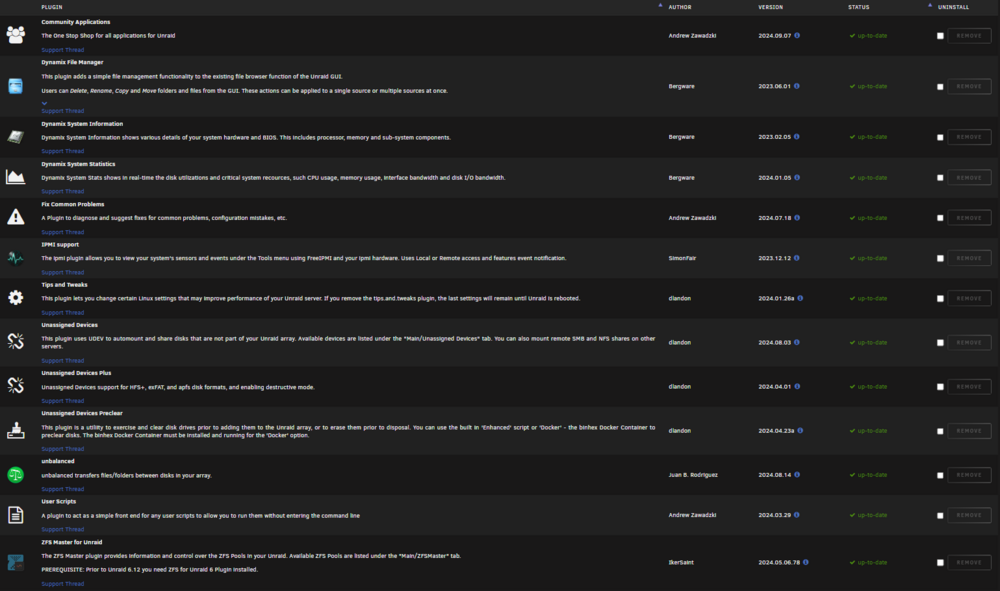
I removed all the plugins I either no longer use or thought might be the genesis of the issue. I also removed disk location. I paid special attention to the plugins that haven't been updated in a while and removed them. I now only have the following plugins installed
-
So, I am guessing any plug-in that directly interacts with disks?
-
I think we can tentatively conclude that a plug-in is what is causing the disk errors. In safe-mode, the parity drive was rebuilt with no issues. (Shrinking the array, taking out disk 16) is there a known process to determine what plug-in is causing the issues? mrpunrfsx1-diagnostics-20240907-1204.zip
-
I think you've finally solved it. It's been over 4 hours in safe mode, rebuilding parity and zero errors. Now, I wonder what plugin is causing all this mess.



