





Everything posted by mmenanno
-
Hey team! I don't use this plugin but it currently reports a TypeError in the CommunityApplications debugger download, thought you might want to know: [27-Apr-2026 00:00:01 America/New_York] PHP Fatal error: Uncaught TypeError: Unsupported operand types: string / int in /usr/local/emhttp/plugins/dynamix.share.floor/scripts/share_floor:42 Stack trace: #0 /usr/local/emhttp/plugins/dynamix.share.floor/scripts/share_floor(59): scale('', 'B') #1 {main} thrown in /usr/local/emhttp/plugins/dynamix.share.floor/scripts/share_floor on line 42
-
Ahhh, will do! Thanks!
-
I don't have any issues happening that I see in the application but thought I would report in the CA debugging download it looks like there is a TypeError: [27-Apr-2026 00:00:01 America/New_York] PHP Fatal error: Uncaught TypeError: Unsupported operand types: string / int in /usr/local/emhttp/plugins/dynamix.share.floor/scripts/share_floor:42 Stack trace: #0 /usr/local/emhttp/plugins/dynamix.share.floor/scripts/share_floor(59): scale('', 'B') #1 {main} thrown in /usr/local/emhttp/plugins/dynamix.share.floor/scripts/share_floor on line 42
-
Well must have been the onboard NIC that died. I went out and bought a PCIe NIC, disabled the onboard one and everything works now.
-
Last night the network on my unraid server suddenly stopped working, I've restarted several times, including into safe mode and the server doesn't seem to ever get an IP anymore. I've attached diagnostics. This server has been working just fine for so long and this came out of nowhere. My motherboard does have the intel® i225v 2.5gbps NIC and I see a bunch of threads ranting about that controller, do you think that could be to blame here? If so is there a way for me to confirm? (I don't have any external NICs laying around to use). leviathan-diagnostics-20241026-1135.zip
-
I asked and answered a question here but the TL;DR is if using ZFS any datasets / shares will fail when trying to move files between them over SFTP. I assume it isn't properly seeing that it needs to do a copy + delete instead of a rename behaviour.
-
Ok so I've figured out the issue. I previously had Movies / TV Shows / etc as their own top level shares, which zfs treats as datasets. I've been converting things to be under a top level "/data" share/dataset now and if I move things within this share/dataset over SFTP it works no problem. So it would appear that when using unraid zfs datasets with SFTP that the protocol doesn't understand that it will have to do a copy + delete for this type of move instead of just a rename. Is this something that could be improved in the OS? Or is this an incompatibility of zfs with sftp?
-
For awhile I've used Transmit on my mac to organize my files over SFTP when I need to quickly move some things around (much smarter than things like Apple's Finder that would download the file locally and upload it to the other spot on the array instead of just issuing a remote path change). As I slowly started to switch my drives over to ZFS in a Hybrid array I noticed I would occasionally get a "Protocol error" when I tried to move certain files between two different spots on the array using the two GUI panes. After not figuring out a way around this I would end up booting up a Krusader docker container to do the moves instead. Last week the last drive in my array was converted to ZFS, so now that every drive is ZFS but still using Unraid parity. That being said every single file move I try over SFTP fails now. I wanted to rule out this being an issue with the particular Transmit app so I've tried several SFTP managers now, as well as tried basic command line SFTP commands and moves (or renames as the SFTP protocol calls them) always fail now. None of the errors have been helpful either, even with verbose logging, Transmit just says protocol error, SFTP on the command like just says "Failed", and the other programs have similar basic unhelpful errors. Anyone know what is going on? Is there something I need to tweak? Would there be a log anywhere on the UnRaid side that has a more helpful error that could help get to a resolution here?
-
Yeah I've already done that for myself, but was hoping to make sure it gets fixed for everyone.
-
Does Siwat2545 support the regular homebridge app too? I only see that username on the HomeBridge-with-webGUI app. The "Support thread" link on the regular homebridge app just goes to the homebridge official discord. The regular says @geoff.gibby is the maintainer? I see in https://github.com/Squidly271/Community-Applications-Moderators/blob/master/Repositories.json that this repo is referenced: https://github.com/geoffgbsn/unraid-templates If I open a PR to update https://github.com/geoffgbsn/unraid-templates/blob/main/homebridge/homebridge.xml and if @geoff.gibby is active to approve/merge it would that fix the issue? Also unfortunately the node version if updated in the app doesn't seem to persist (sometimes restarts seem to reset it) and it reverts to the container version. So it is still ideal to be using the right repo.
-
The homebridge plugin listed on CA is using a deprecated repo. Currently it pulls from oznu/homebridge:ubuntu which hasn't been updated in 8 months. You can see on the oznu/homebridge repo at the top of the readme that they moved the image https://github.com/homebridge/docker-homebridge#important-update So the listing should be updated to use homebridge/homebridge:ubuntu (which was updated as recently as last month) Old: https://registry.hub.docker.com/r/oznu/homebridge New: https://registry.hub.docker.com/r/homebridge/homebridge The newer one has much newer versions of Ubuntu and Node.js preinstalled as well
-
I'm on a mac running macos 13.5.1 and using Chrome Version 116.0.5845.140 , I just disabled all extensions and went to an Incognito window and can still replicate the issue. Anything I can grab or try that might help narrow it down?
-
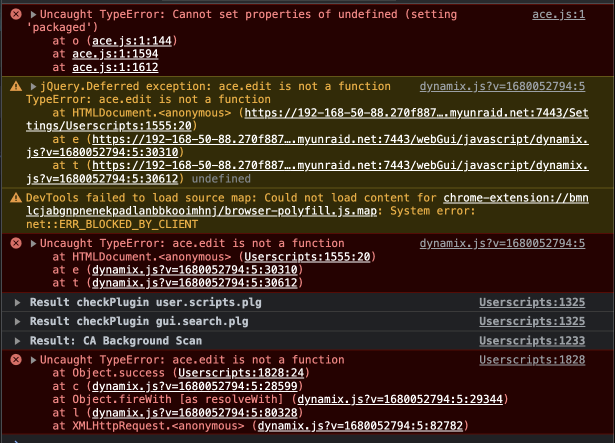
@SquidI'm experiencing the same as the others. I took a quick video of the issue. Here is a video https://monosnap.com/file/QjtqsB9WAGEMEfny0zmHUrK0hXNZLe And this is what is in the console:
-
@Richard Aarnink Yeah I had tried all those steps and none of them fixed it. I got the new processor today though, and the hardware acceleration crash that I was able to replicate no longer happens, so fingers crossed that my issue is fully solved.
-
@ScottAS2 @Richard Aarnink The disk.cfg ended up being another dead end but I did end up narrowing it down at last. For me it was in fact a hardware issue. Seemed to be mostly related to the iGPU on my intel chip. I was able to replicate a crash the second any Plex streams that used the transcoder happened. So I turned off hardware acceleration transcoding and the crashes mostly stopped but I was still getting the odd crash on occasion. I then opened my server to get the serial number from my chip and when I did so I unplugged the monitor from the server and forgot to plug it back in afterward, for some reason not having the monitor plugged in resolved all remaining crashes and for the first time I went 7 days with no crashes. My server is currently off as I RMAed the Intel chip and am waiting for a new one, but it seems at least for me that it was heavily tied to graphics usage. I'm curious to see when I get the new chip if hardware acceleration and such will work again, or if there is something else beside the processor itself that causes the crashes when this is in use. Though in my reading it looks like a lot of people have have crashes for various different types of reasons when working with Intel's iGPU. For what it's work my server uses the Intel i9-12900k
-
Love this plugin, I had few small visual requests that are all pretty related: 1. Currently when a folder is expanded any of the state altering commands (start, stop, restart, etc) cause the container preview to show the spinning loading icon, but not the container under the expanded folder. Could this be changed to either show on both, or just the one interacted with (i.e. if I restarted from the expanded container that should be the one showing the loading state if only one is going to show it)? 2. During the loading state from the above, the icons for WebUI and logs also spin too currently which looks odd, can we have them not be affected? 3. If a folder's state changes while a folder is expanded a little refresh happens and the folder is now closed, can we persist the open state of a folder? Thanks!
-
Ok so still finalizing testing but it looks like the culprit was the `disk.cfg` file. I'm almost at 24 hours without crashes since restoring that to defaults. I'm not trying to understand what the differences between the files are. If anyone can help me understand if any of these values seem odd: startArray: Default: "no", old config: "yes" poll_attributes: Default: "30", old config: "1800" nr_requests: Default: "auto", old config: "128" diskSpindownDelay.0: Default: "-1", old config: "0" diskExport.1 (this same one repeats for the other disks too): Default: "-", old config: "e" diskSecurity.1 (this same one repeats for some of the the other disks too but not all) : Default: "public", old config: "secure" diskWriteList.1 (this same one repeats for some of the the other disks too but not all) : Default: "", old config: "<my username>"
-
Interesting, I already am on a new USB stick. I'm going to use another USB just to get the untouched versions of files and replace them one by one to see if I can find the culprit. Would be nice if I can narrow that down for others.
-
@Richard Aarnink Any updates from you? Just came back from a weekend away myself. To answer your question I haven't made any changes to the bios. The flash drive is still plugged in but I'll have to check what USB type it is plugged in to. I'll have a look at the extensive test next as well. Thanks
-
@Richard Aarnink to add more data and rule more things out, I downgraded Unraid to 6.11.5 which did not fix the issue.
-
Let me know how that goes, I'm thinking I'm going to run an even longer memtest than I did last time cause I'm running out of things I know how to test.
-
I'm at a loss at this point of what to try. I replaced the Flash drive and still no luck. If it is related to some piece of my hardware I have no idea how to narrow down to which one.
-
For some reason I'm now crashing in safe mode, which I wasn't before. So back to the drawing board on testing. I'm currently doing an 24 hour run of memtest86 to reverify that there are no RAM issues, 14 hours in and all passing so far.
-
Honestly I'm confused. I removed ALL of my plugins and the crashes continued. I just this very moment turned safe mode back on, to confirm that it still helps. Documentation just says that safe mode is no plugins, I'm wondering if there are any other changes that safe mode makes that might be helping though.
-
Interestingly I just had a restart this morning with the first 50% of plugins turned on (which is the group of things that I thought were less likely to be culprits too). The ones in the remaining group that crashed are: appdata.backup.plg ca.update.applications.plg community.applications.plg customtab.plg disklocation-master.plg docker.folder.plg dynamix.file.manager.plg dynamix.unraid.net.plg fix.common.problems.plg unassigned.devices-plus.plg unassigned.devices.preclear.plg unlimited-width.plg user.scripts.plg Which leaves the ones we have in common as: appdata.backup.plg community.applications.plg dynamix.file.manager.plg dynamix.unraid.net.plg unassigned.devices-plus.plg unassigned.devices.preclear.plg Which is already a much more trimmed down list. Community Applications feels like it is probably unlikely to be the culprit, so I'm going to remove everything else in the cross sectioned group and see if the crashes still happen. If they don't then I can try readding them bit by bit.


